
DS18B20 Bluetooth Thermometer
Source: InternetPublisher:TJVFhCJ Keywords: DS18B20 Bluetooth Thermometer Updated: 2026/03/13
DS18B20 Bluetooth Thermometer
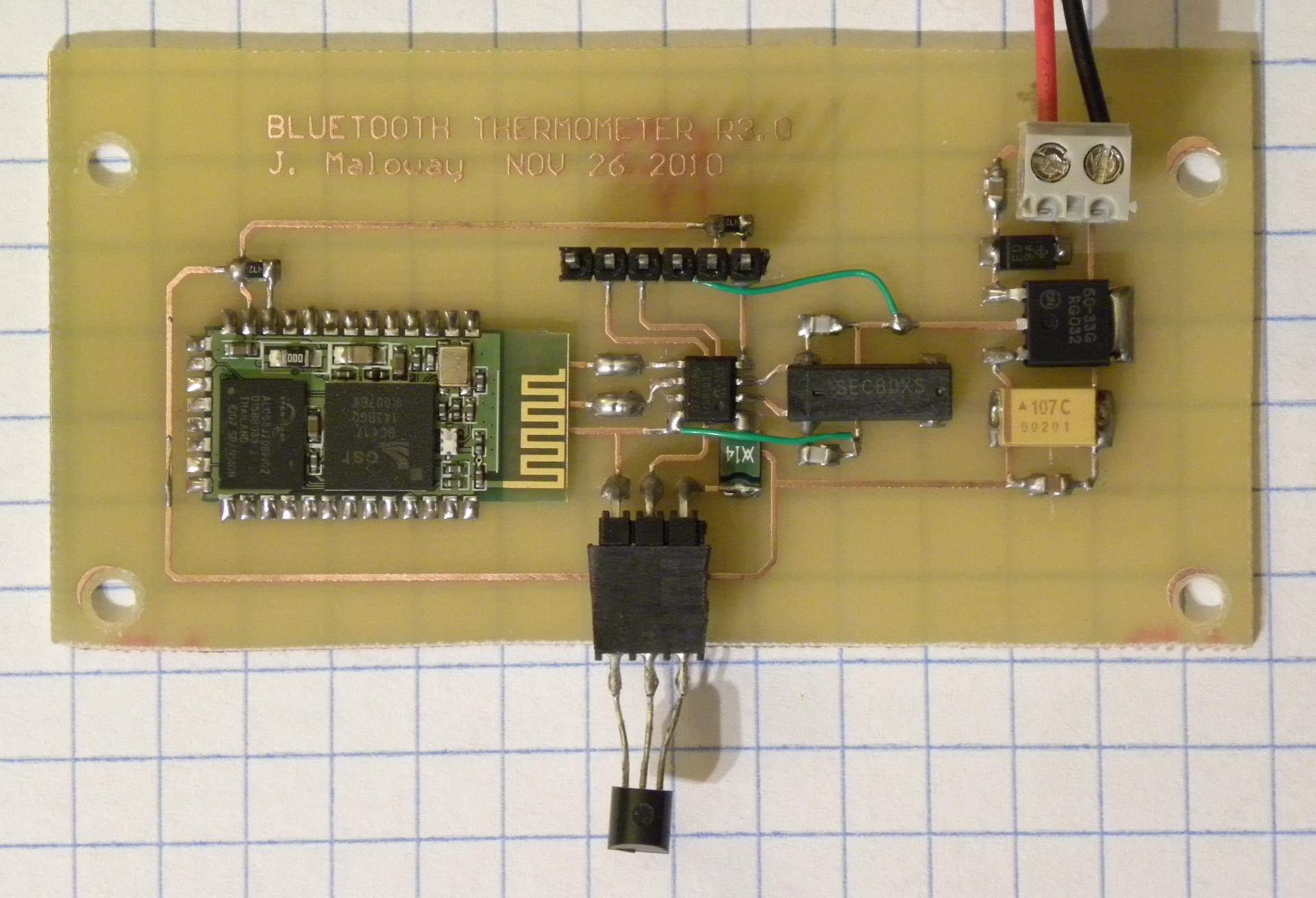
DS18B20 Bluetooth Thermometer
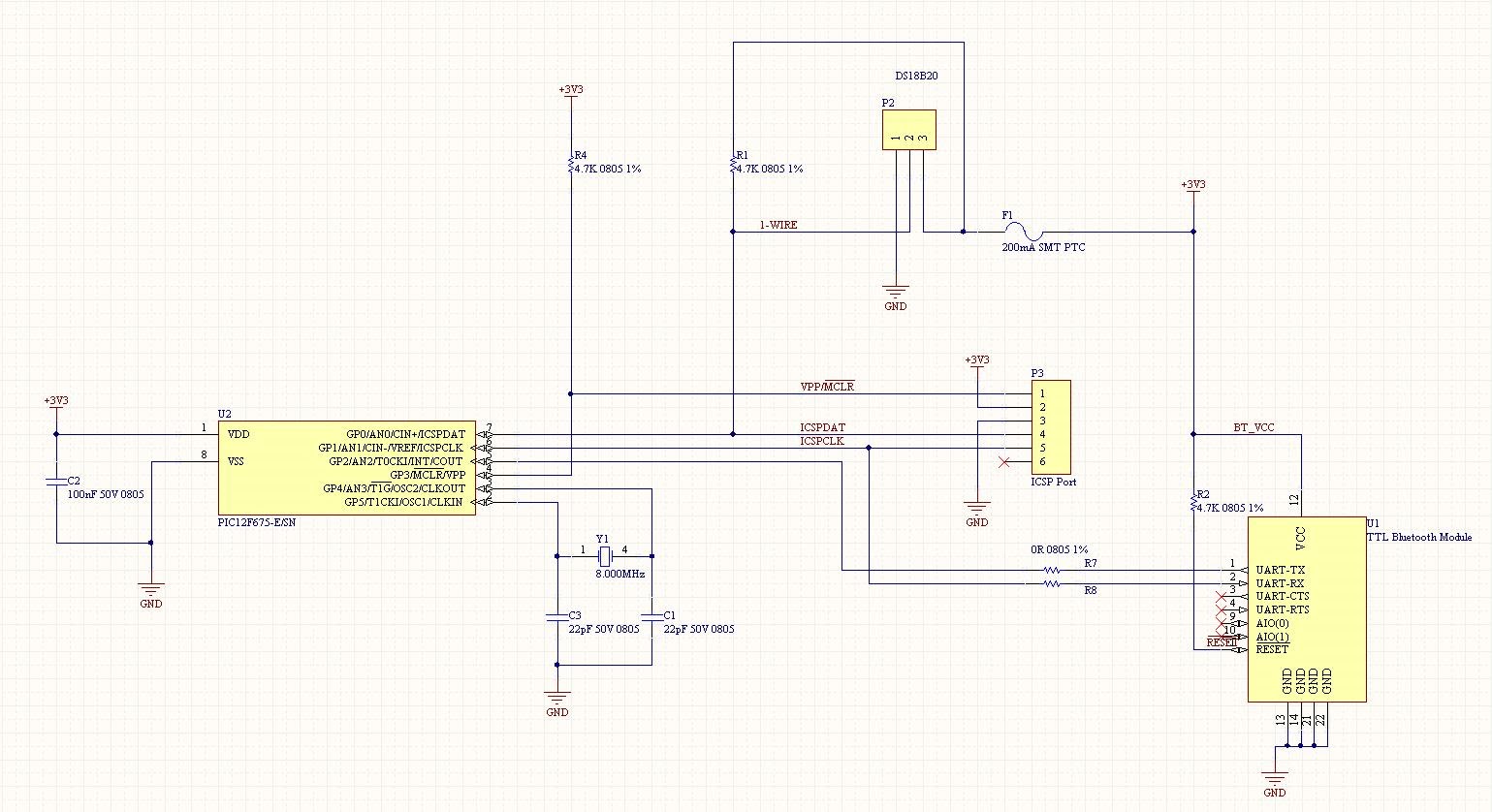
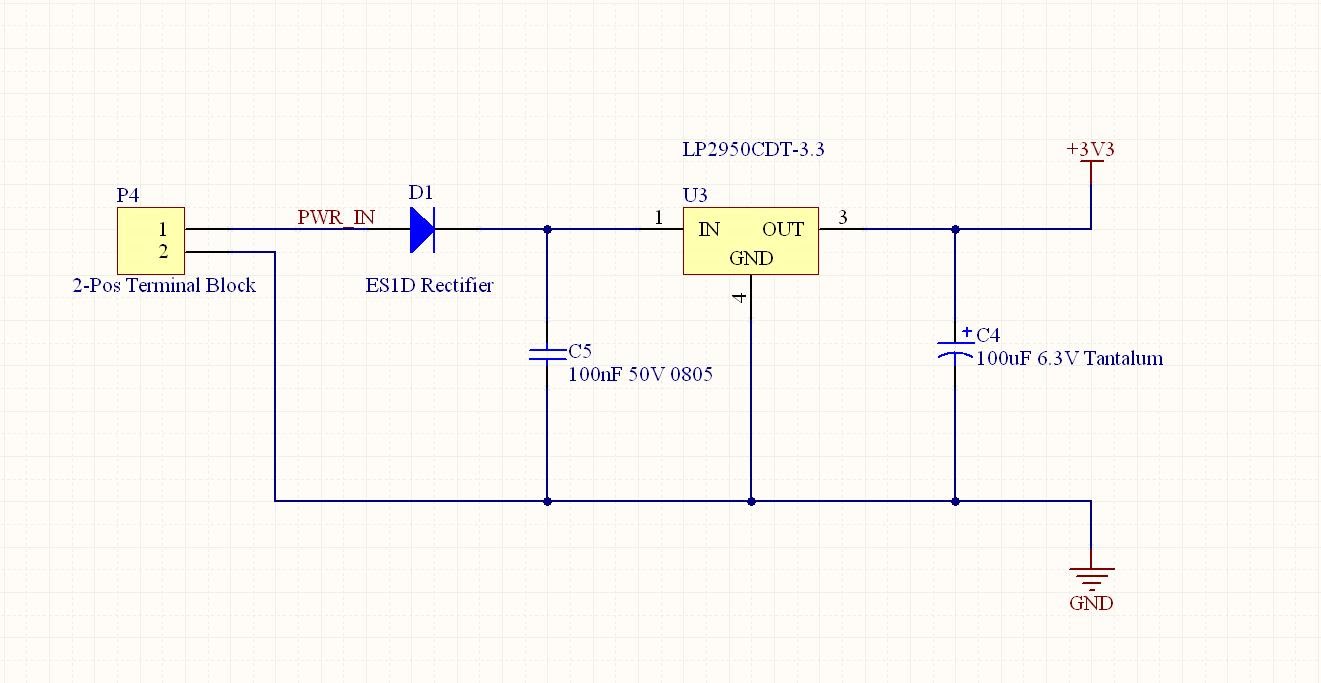
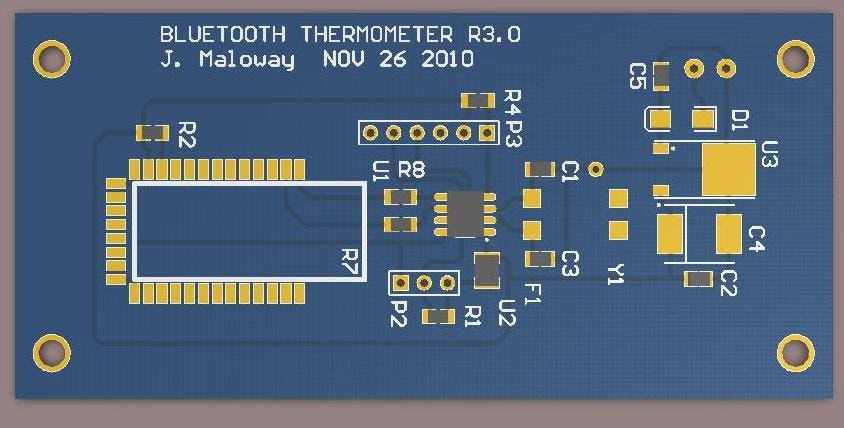
One morning I woke up wanting to know what the outside temperature was, and instead of running to Home Depot to buy a $2 glass thermometer, I decided to build my own wireless temperature sensor. At the heart of the board is an SO8-packaged PIC12F675 microcontroller. On the right side of the board is a linear power supply (LP2950), at the bottom center is a DS18B20 single-bus temperature sensor, and on the left you can see a Sure TTL Bluetooth module.
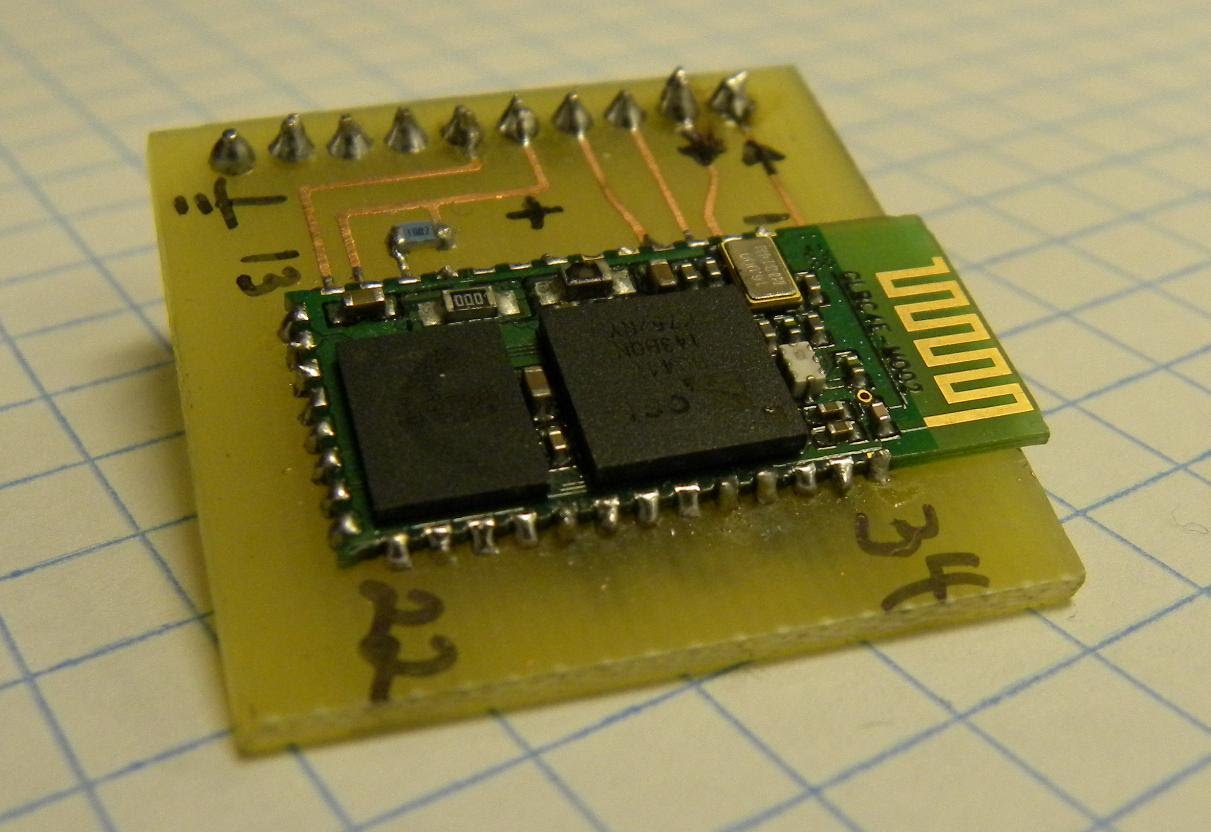
As a staunch supporter of standard protocols, I chose to transmit temperature data via a Bluetooth SPP (Serial Port Protocol) link rather than XBee or other similar wireless architectures. While Bluetooth radios consume more power than XBee modules, the advantage is that no custom hardware is required on the receiving end. Since almost all modern laptops integrate Bluetooth chipsets, this effectively means no hardware is needed on the PC side.
After rummaging through all my miscellaneous parts boxes, I found a Sure Bluetooth module I'd bought a few years ago for another project. For prototyping, this surface-mount module was attached to a homemade etched PCB with pin headers for inserting into a breadboard. Since I didn't have a hot air rework station, I ordered another GP-GC021 module for the final project. The module shown below is the one I initially used, while the photo above shows the module I recently acquired.
I decided to use the PIC12F675 as the main MCU for no other reason than that I had one in my parts box. I originally planned to utilize the PIC's internal 4MHz oscillator, but later discovered that since the serial module is fixed at 9600 baud, the main system clock had to be boosted to 8MHz to maintain synchronization and transmit data at the correct speed.
As with all my projects, the schematics and PCB layouts were done in Altium Designer. Over the years, I've tried several different EDA (Electronic Design Automation) suites, including Eagle, ExpressPCB, and EdwinXP, but I've found Altium far superior. If you're just a hobbyist, Altium might be over your budget, but their student licensing is fantastic; many colleges and universities have large licenses or even site licenses. At Okanagan College, we were very fortunate to have access to the college's floating license, which allowed students to use Altium on any computer we wanted, whether we were on campus or not. I should clarify that while I don't work for Altium, I've had many epic battles with CAD software over the years; while Altium and I have had our disagreements, overall, using it has been a pleasure.
footnote:
- Schematics, firmware, and all other related files are included in the accompanying ZIP archive.
Programming isn't my strong suit, so the firmware was written in PIC Basic. The ZIP archive contains a directly programmable HEX file, but if you want to modify the firmware, you'll need a copy of ProtonIDE to compile it.
- If you plan to make the PCB from the accompanying Gerber file, please note that the pad size for F1 (fuse on the sensor VCC bus) is actually too small (sorry).
All items here are provided "as is" and there is no warranty.
'****************************************************************
* Bluetooth Thermometer - R1 B23.BAS *
'****************************************************************
'MCU Selection'
Device = 12F675
8.000MHz crystal
XTAL = 8
Define symbol pin reference
Symbol DQ = GPIO.0 ' Single-bus network pin'
Symbol TX = GPIO.1 ' Bluetooth TX'
Symbol RX = GPIO.2 ' Bluetooth RX
Configure fuses: external oscillator (high speed), watchdog off, code protection off.
Config HS_OSC, WDT_OFF, CP_OFF
Define variables
Dim temperature As Word
Dim C As Byte
Dim CPerD As Byte
Dim sample_count As Word
Dim sample_delay As Word
Dim tx_pace As Word
Dim temp_dec As Byte
Dim sign As Byte
Insert a small delay between each character transmission to prevent data loss.
tx_pace = 80
'Sampling rate'
sample_delay = 10000
Set all pins to digital.
ALL_DIGITAL = true
'Set pin direction
Output TX
Input RX
'20-second startup delay'
DelayMS 20000
Displays "Power-on Self-Test" information.
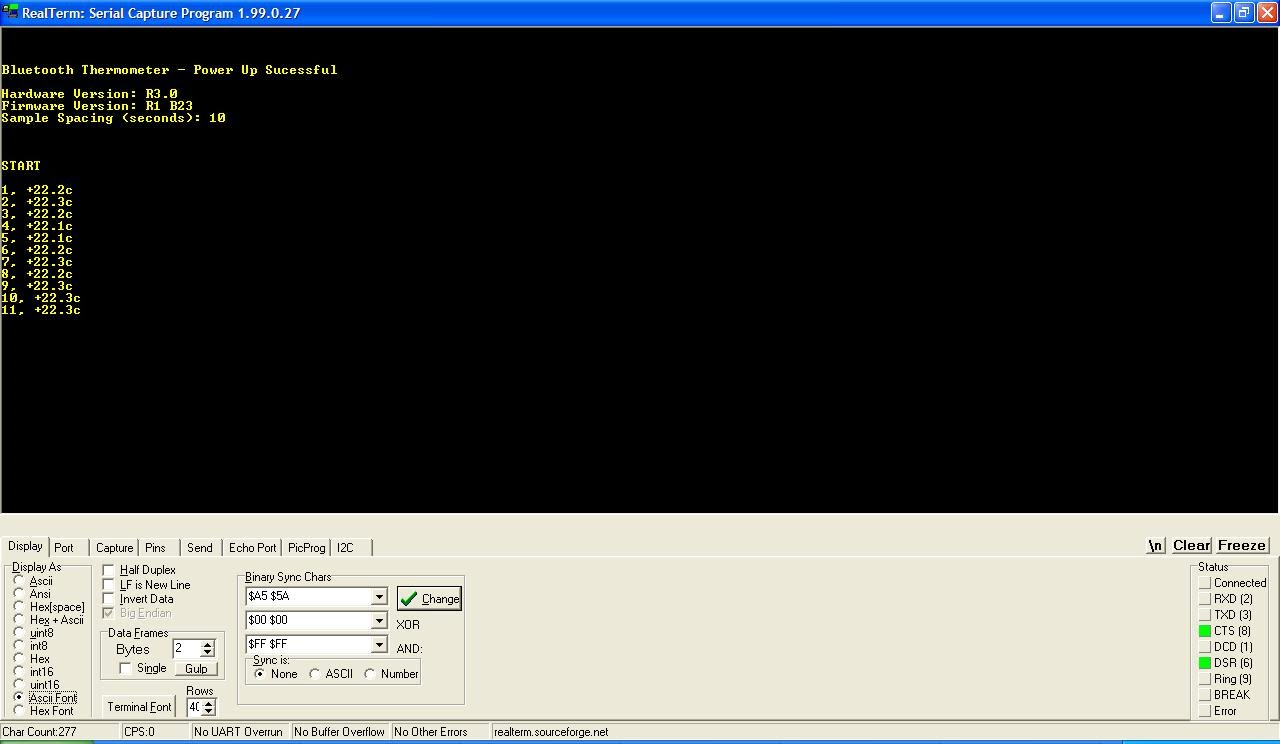
SerOut TX, 84, tx_pace, [13, 10, 10, 10, "Bluetooth Thermometer - Startup Successful", 13, 10]
SerOut TX, 84, tx_pace, [13, 10, "Hardware version: R3.0"]
SerOut TX, 84, tx_pace, [13, 10, "Firmware version: R1 B23"]
SerOut TX, 84, tx_pace, [13, 10, "Sampling interval (seconds): ", Dec sample_delay/1000, 13, 10]
SerOut data format: SerOut (pin)(Baud mode (9600 8N1 invert))(Temperature)[data]
' Blank line
SerOut TX, 84, tx_pace, [13,10,10,10]
Wait two seconds
DelayMS 2000
Initialize the sampling counter to zero.
sample_count = 0
Printing "Start" signals the host that data collection has begun.
SerOut TX, 84, tx_pace, ["Start", 13, 10,10]
'Main sampling/transfer loop'
acquisition:
OWrite DQ, 1, fault, [$CC, $44] ' Send command to calculate temperature
If no single-bus sensor is found, jump to the "Fault" function.
The OWrite and ORead functions are very comprehensive - see the PICBasic library for details.
Repeat
DelayMS 50' Waiting for conversion to complete
ORead DQ, 4, [C] ' Read counter value from DS18B20
Until C <> 0
OWrite DQ, 1, [$CC, $BE] ' Send "Read register" command
ORead DQ, 2, [temperature.LowByte,temperature.HighByte, C, C, C, C, C, CPerD]
Determines whether the value is positive or negative; toggles the sign.
In positions 8-15, a value of 1 indicates a negative temperature, and 0 indicates a positive temperature.
If temperature.8 = 1, then
If the value is negative, discard the first digit and invert the value.
temperature=(temperature.LowByte ^ $FF) >> 1
If Count = 0, then increment Temp.
If C = 0 Then temperature = temperature + 1
Change the sign to negative.
sign = "-"
Else
If positive, discard the first byte.
temperature = (temperature >> 1)
And change the sign value to positive.
sign = "+"
Reverse decimal value
temp_dec = 100 - temp_dec
EndIf
Each count is 1/16 degree, so 100/16 = 6.25, which is our decimal value (for temperature).
temp_dec = (6.25 * C)
Incrementing sampling counter
sample_count = (sample_count + 1)
Data is transmitted to the host via Bluetooth link.
'Transmission' seems to prevent data loss.
SerOut TX, 84, tx_pace, [""]
'Format: Sample count, comma, symbol, temperature integer, decimal point, temperature decimal, "c"
SerOut TX, 84, tx_pace, [Dec sample_count, ", ", sign, Dec temperature, ".", Dec Dig temp_dec, 1, 0, "c", 13, 10]
Wait a specified time before sending the next sample.
DelayMS sample_delay
Restart the sampling process
GoTo acquisition
If no single-bus sensor is found, the first OWRITE command will fail and jump here to indicate the fault.
fault:
SerOut TX, 84, tx_pace, [13, 10, "Error: Single-bus network fault detected - Check sensor wiring", 13, 10]
DelayMS 1000
Retry - If the problem is resolved, return to normal operation.
GoTo acquisition
- AC-AC solid-state relay (SSR)
- 8-channel RF remote control
- Speaker protection circuit
- room temperature controller
- Stepper motor controller
- Automotive dome light delay dimmer
- Automatic control circuit for "Starry Sky" festival lights accompanied by the sound of "Good Luck Always Comes"
- A practical automatic electronic welcome circuit
- What problems will be encountered when designing a constant temperature controller?
- What is a soft starter? Soft starter working principle diagram
- 13 examples of electric drag control circuit diagram
- Electric plow control circuit
- Mobile phone camera flash control circuit
- Traffic traffic light control circuit
- Assembly line outage monitoring circuit
- Chandelier control circuit
- Multi-pole leakage protector circuit b
- The structure of Hisense KFR-25GW-06BP inverter air conditioner outdoor unit microprocessor control circuit
- Typical operation display circuit
- Intelligent iron control circuit







 京公网安备 11010802033920号