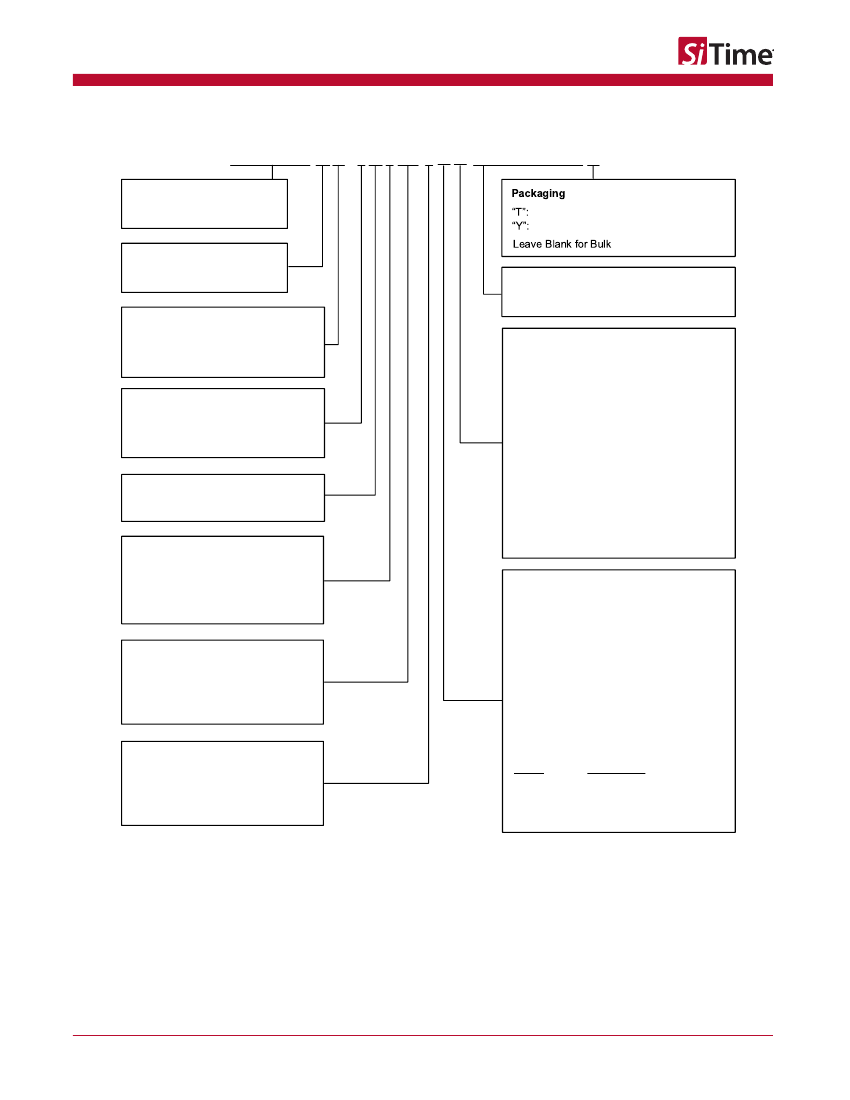
Ordering Information .................................................................................................................................................................... 2
User Programming Interface ..................................................................................................................................... 18
Start-up output frequency and signaling types ........................................................................................................... 18
Any-frequency function ............................................................................................................................................. 19
C/SPI Control Registers...................................................................................................................................................... 28
9 I
Register Address: 0x00. DCO Frequency Control Least Significant Word (LSW) .................................................... 28
Register Address: 0x01. OE Control, DCO Frequency Control Most Significant Word (MSW) ................................. 29
Register Address: 0x02. DCO PULL RANGE CONTROL ........................................................................................ 29
Register Address: 0x03. Frac-N PLL Feedback Divider Integer Value and Frac-N PLL Feedback Divider Fraction
Value MSW ............................................................................................................................................................... 30
Register Address: 0x05. Forward Divider, Driver Control ......................................................................................... 30
Register Address: 0x06. Driver Divider, Driver Control ............................................................................................. 31
2
C Operation ........................................................................................................................................................................ 32
10 I
I
2
C protocol ............................................................................................................................................................... 32
I
2
C Timing Specification ............................................................................................................................................ 35
I
2
C Device Address Modes ....................................................................................................................................... 36
Dimensions and Patterns ........................................................................................................................................................... 43
Additional Information ................................................................................................................................................................ 44
Revision History ......................................................................................................................................................................... 45
Rev 1.01
Page 3 of 45
www.sitime.com
SiT3521
1 to 340 MHz Elite Platform I2C/SPI Programmable Oscillator
1 Electrical Characteristics
All Min and Max limits in the Electrical Characteristics tables are specified over temperature and rated operating voltage with
standard output terminations shown in the termination diagrams. Typical values are at 25°C and nominal supply voltage.
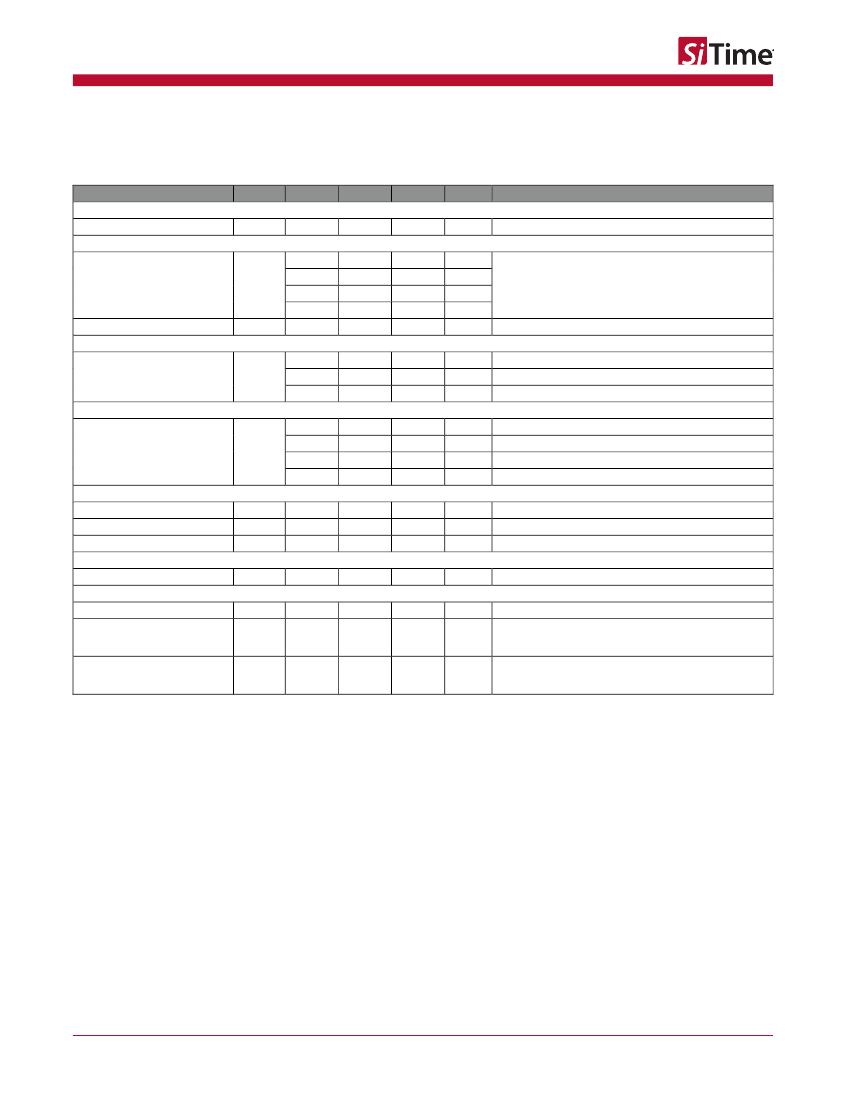
Table 1. Electrical Characteristics – Common to LVPECL, LVDS and HCSL
Parameter
Output Frequency Range
Symbol
f
Min.
1
Typ.
–
–
–
–
–
±1
–
–
–
Max.
340
Unit
MHz
Condition
Factory or user programmable, accurate to 6 decimal places
Frequency Range
Frequency Stability
Frequency Stability
F_stab
-10
-20
-25
-50
First Year Aging
F_1y
–
+10
+20
+25
+50
–
ppm
ppm
ppm
ppm
ppm
°C
°C
°C
1
st
-year aging at 25°C
Inclusive of initial tolerance, operating temperature, rated
power supply voltage and load variations.
Temperature Range
Operating Temperature Range
T_use
-20
-40
-40
+70
+85
+105
Supply Voltage
Supply Voltage
Vdd
2.97
2.7
2.52
2.25
3.3
3.0
2.8
2.5
–
–
100
–
–
–
3.63
3.3
3.08
2.75
–
30%
–
V
V
V
V
Extended Commercial
Industrial
Extended Industrial. Available only for I
2
C operation, not SPI.
Input Characteristics – OE Pin
Input Voltage High
Input Voltage Low
Input Pull-up Impedance
VIH
VIL
Z_in
70%
–
–
Vdd
Vdd
kΩ
OE pin
OE pin
OE pin, logic high or logic low
Output Characteristics
Duty Cycle
DC
45
–
–
55
%
Startup and Output Enable/Disable Timing
Start-up Time
Output Enable/Disable Time –
Hardware control via OE pin
Output Enable/Disable Time –
Software control via I
2
C/SPI
T_start
T_oe_hw
3.0
3.8
ms
µs
Measured from the time Vdd reaches its rated minimum value
Measured from the time OE pin reaches rated VIH and VIL to
the time clock pins reach 90% of swing and high-Z.
See
Figure 9
and
Figure 10
Measured from the time the last byte of command is
transmitted via I
2
C/SPI (reg1) to the time clock pins reach 90%
of swing and high-Z. See
Figure 30
and
Figure 31
T_oe_sw
–
–
6.5
µs
Rev 1.01
Page 4 of 45
www.sitime.com
SiT3521
1 to 340 MHz Elite Platform I2C/SPI Programmable Oscillator
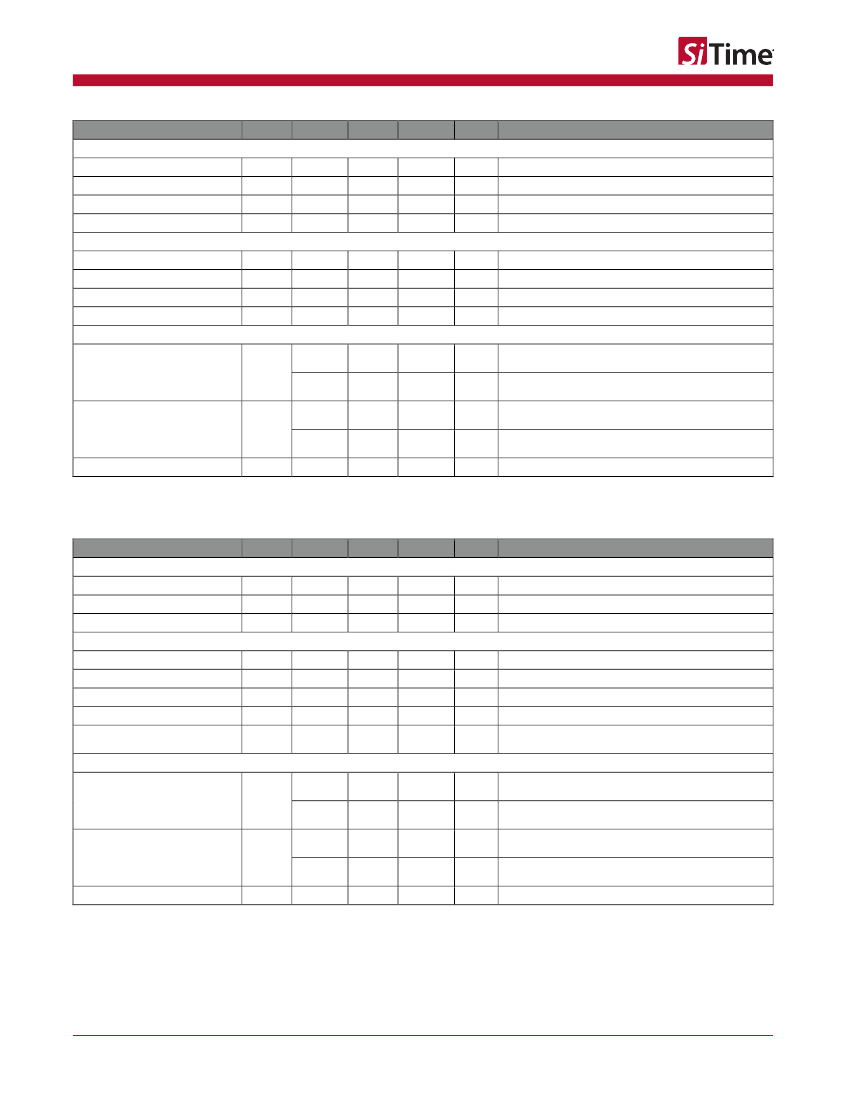
Table 2. Electrical Characteristics – LVPECL Specific
Parameter
Symbol
Min.
Typ.
Max.
Unit
Condition
Current Consumption
Current Consumption
OE Disable Supply Current
Output Disable Leakage Current
Maximum Output Current
Idd
I_OE
I_leak
I_driver
–
–
–
–
–
–
0.15
–
89
58
–
32
mA
mA
A
mA
Excluding Load Termination Current, Vdd = 3.3 V or 2.5 V
OE = Low
OE = Low
Maximum average current drawn from OUT+ or OUT-
Output Characteristics
Output High Voltage
Output Low Voltage
Output Differential Voltage Swing
Rise/Fall Time
VOH
VOL
V_Swing
Tr, Tf
Vdd - 1.1V
Vdd - 1.9V
1.2
–
–
–
1.6
225
Vdd - 0.7V
Vdd - 1.5V
2.0
290
Jitter
RMS Phase Jitter (random) –
DCO Mode Only
T_phj
–
–
RMS Phase Jitter (random) –
Any-frequency Mode Only
T_phj
–
–
RMS Period Jitter
[3]
Note:
3. Measured according to JESD65B.
T_jitt
–
0.225
0.1
0.225
0.11
1
0.340
0.14
0.340
0.15
1.6
ps
ps
ps
ps
ps
f = 156.25 MHz, Integration bandwidth = 12 kHz to 20 MHz,
all Vdd levels
f = 156.25, IEEE802.3-2005 10 GbE jitter mask integration
bandwidth = 1.875 MHz to 20 MHz, all Vdd levels
f = 156.25 MHz, Integration bandwidth = 12 kHz to 20 MHz,
all Vdd levels
f = 156.25, IEEE802.3-2005 10 GbE jitter mask integration
bandwidth = 1.875 MHz to 20 MHz, all Vdd levels
f = 100, 156.25 or 212.5 MHz, Vdd = 3.3 V or 2.5 V
V
V
V
ps
See
Figure 5
See
Figure 5
See
Figure 6
20% to 80%, see
Figure 6
Table 3. Electrical Characteristics – LVDS Specific
Parameter
Symbol
Min.
Typ.
Max.
Unit
Condition
Current Consumption
Current Consumption
OE Disable Supply Current
Output Disable Leakage Current
Idd
I_OE
I_leak
–
–
–
–
–
0.15
80
61
–
mA
mA
A
Excluding Load Termination Current, Vdd = 3.3 V or 2.5 V
OE = Low
OE = Low
Output Characteristics
Differential Output Voltage
Delta VOD
Offset Voltage
Delta VOS
Rise/Fall Time
VOD
ΔVOD
VOS
ΔVOS
Tr, Tf
250
–
1.125
–
–
–
–
–
–
400
455
50
1.375
50
470
Jitter
RMS Phase Jitter (random) –
DCO Mode Only
T_phj
–
–
RMS Phase Jitter (random) –
Any-frequency Mode Only
T_phj
–
–
RMS Period Jitter
[4]
Note:
4. Measured according to JESD65B.
T_jitt
–
0.21
0.1
0.21
0.1
1
0.275
0.12
0.367
0.12
1.6
ps
ps
ps
ps
ps
f = 156.25 MHz, Integration bandwidth = 12 kHz to 20 MHz,
all Vdd levels
f = 156.25, IEEE802.3-2005 10 GbE jitter mask integration
bandwidth = 1.875 MHz to 20 MHz, all Vdd levels
f = 156.25 MHz, Integration bandwidth = 12 kHz to 20 MHz,
all Vdd levels
f = 156.25, IEEE802.3-2005 10 GbE jitter mask integration
bandwidth = 1.875 MHz to 20 MHz, all Vdd levels
f = 100, 156.25 or 212.5 MHz, Vdd = 3.3 V or 2.5 V
mV
mV
V
mV
ps
f = 156.25MHz See
Figure 7
See
Figure 7
See
Figure 7
See
Figure 7
Measured with 2 pF capacitive loading to GND, 20% to 80%,
In wince 5.0, how to drive the buzzer when pressing the touch screen and make the buzzer sound! The buzzer driver has been implemented! Please give a solution!...
I am currently working on a graduation project, and I want to make a square wave that changes dynamically with the input, a bit like listening to the music....
With this thing, you can type remotely, and keyboards are no longer necessary~:https://training.eeworld.com.cn/course/3652
[font=微软雅黑][size=3]Recently, Tap Systems, a startup from the United States, l...
I am reading signals from sensors. When two sensors read black lines at the same time, I want to read the edge changes. Can an expert give me some advice?...
There are many different ways of human-computer interaction. The more common ones are listed below:
Mouse interaction: Using a mouse to operate a computer and interact was the most common human...[Details]
We are entering a new era where people are increasingly affordably equipped with more electronic gadgets. Electronics have become essential to our lives. For example, the average consumer now owns ...[Details]
On August 22nd, Lantu Motors unveiled a new technology called "Lanhai Intelligent Hybrid" during a live broadcast of CCTV News' "Top Laboratory." The name sounds like another new term, but a closer...[Details]
On August 20th, Tiantai Robotics Co., Ltd., along with strategic partners including Shandong Future Robotics Technology Co., Ltd., Shandong Future Data Technology Co., Ltd., and Gangzai Robotics Gr...[Details]
As the scale and business applications of national e-government networks continue to expand, the data and services transmitted over them are becoming increasingly sensitive and critical. To protect...[Details]
Laird Thermal Systems has introduced the HiTemp ET series Peltier cooler modules, which can operate at high temperatures and provide on-site cooling for sensitive electronic devices.
Dig...[Details]
Normally, we determine our location and where we want to go by comparing our surroundings with observation and simple GPS tools. However, this kind of reasoning is very difficult for self-driving c...[Details]
SMT placement machines are important equipment in surface mount technology (Surface Mount Technology). Their performance has a decisive impact on the quality and efficiency of electronic manufactur...[Details]
Reflow soldering, as an electronics assembly process, has become a vital component of the electronics manufacturing industry. Choosing reflow soldering equipment is crucial for improving production...[Details]
The MCX E series is the most reliability- and safety-focused series in NXP's extensive MCX product portfolio.
With the launch of this series, NXP has further enriched its 5V-compatible MCU pr...[Details]
In the period after the switching power supply achieved the "20 kHz" revolution in the 1970s, although improvements and enhancements were made in circuit technology, the development level of the se...[Details]
Shenzhen Baowei Power Supply high frequency pure sine wave power, communication inverter power supply has two communication interfaces, RS232 and R485 interfaces, their functions and characteristic...[Details]
Charging is an essential topic for electric vehicles. Batteries are a core component of new energy vehicles. So, what's the optimal charge level for electric vehicles? Based on current battery tech...[Details]
As a pioneer in the new smart home concept, robot vacuums have captured a significant market share. Robot vacuums, also known as automatic sweepers, smart vacuums, or robot vacuums, are smart home ...[Details]
introduction
A common voltage regulator is a three-terminal one. Its function is to step down the voltage and stabilize it at a fixed output value. Voltage regulators are commonly available in...[Details]

 Embedded System
 京公网安备 11010802033920号
 EEWORLD