Project physical image:
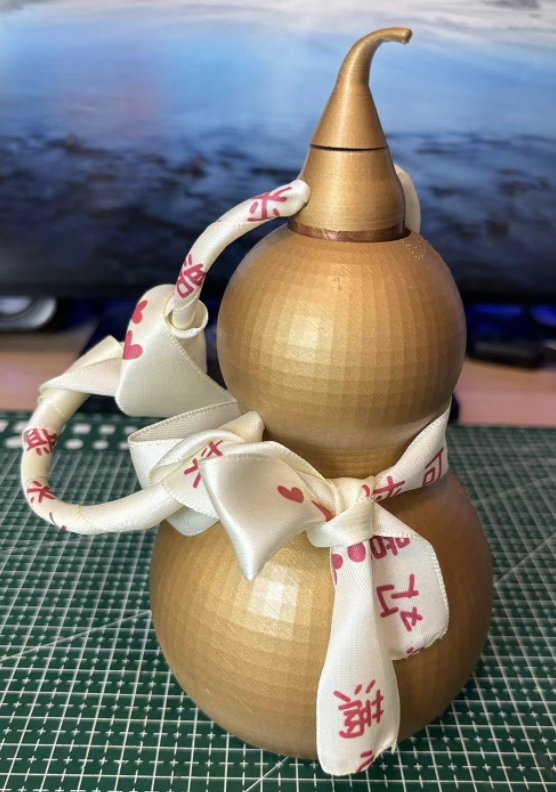
Project video display: https://www.bilibili.com/video/BV1jrgLe4Ef5/
Project origin:
After turning on the air conditioner in summer, the air is too dry, so a humidifier can be used. (Mainly to participate in the event to get free coupons)
Project core functions:
1. A gourd-shaped humidifier.
(1) Opening the lid turns it on, and closing the lid turns it off.
(2) There is a small tail on the gourd lid. Rotating the small tail can adjust the size of the mist. There is also an air outlet at the mist outlet, which can blow the water mist higher. The size of the air blow is adjusted synchronously with the size of the mist.
(3) To indicate how much water is left in the gourd, there is a breathing light on the belly of the gourd. When the water level is greater than 20%, the blue breathing light will flash. When the water level is less than 20%, the red light will start to flash to remind you that water needs to be added.
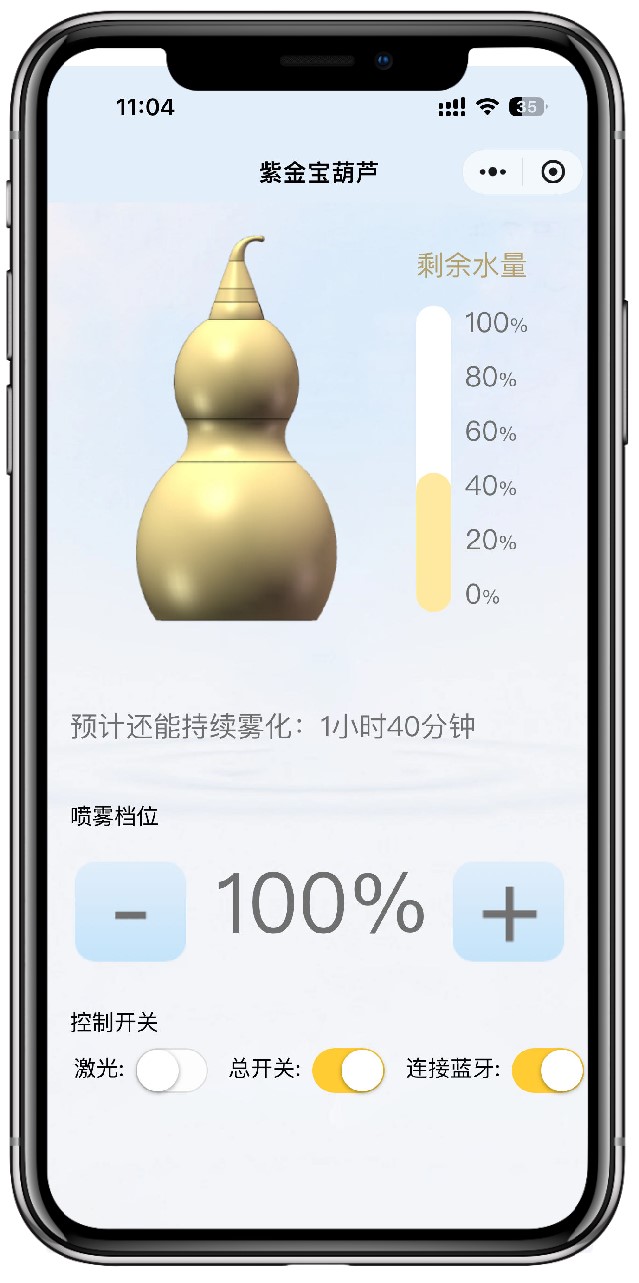
(4) A WeChat mini program was also developed, which uses Bluetooth connection. You can clearly see the remaining water in the gourd on your mobile phone. You can also remotely control the size of the atomization, the laser switch (for entertainment purposes), and the overall power on/off of the device.
2. Entertainment function (Imitate "If I call your name, will you answer?")
(1) You can turn on the gourd laser on the mini program. A laser beam will shoot out from the bottle mouth. Aim at someone you can joke with (note: do not shoot into their eyes) and shout "XXX, if I call your name, will you answer?"
Technical implementation:
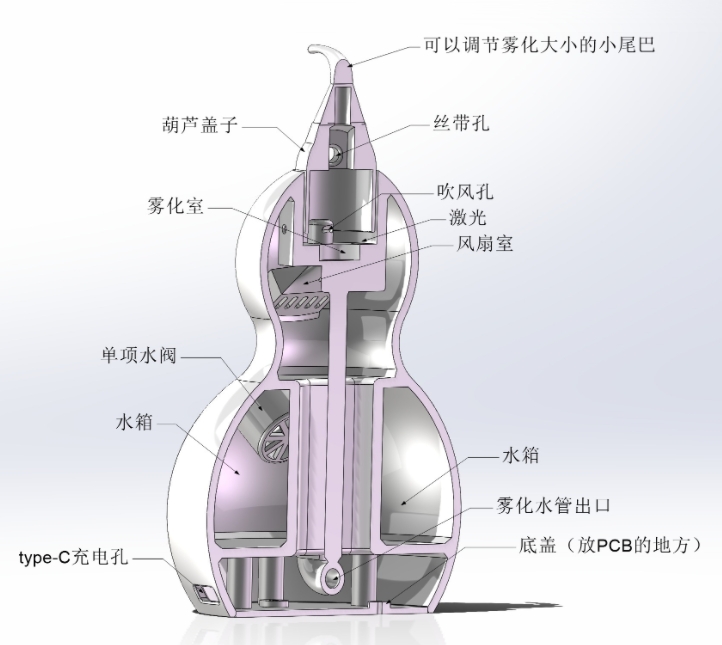
1. Structural part (as shown in the figure below)
(1) The gourd can be placed anywhere. Even if it falls over, there is no fear of water flowing out because a one-way water valve is used at the inlet.
(2) The atomization path is connected to the atomization chamber through the U-shaped pipe below. A sponge rod is also placed to make the atomization more uniform.
(3) The small tail can adjust the atomization size because a rotary potentiometer is added to the cap.
2. Hardware: See schematic diagram
(1). Two boards are used: one main board and one board for water level detection (which needs to be attached to the water tank).
(2) The main control chip uses ESP32-C3, which has built-in WIFI and BLE, thus facilitating Bluetooth communication.
(3) The power supply supports Type-C and lithium battery power supply. It has a built-in 1800mA lithium battery, and Type-C can charge the lithium battery.
(4) The laser and fan are driven by MOSFETs.
(5) Three 2812B LEDs are used for light indication.
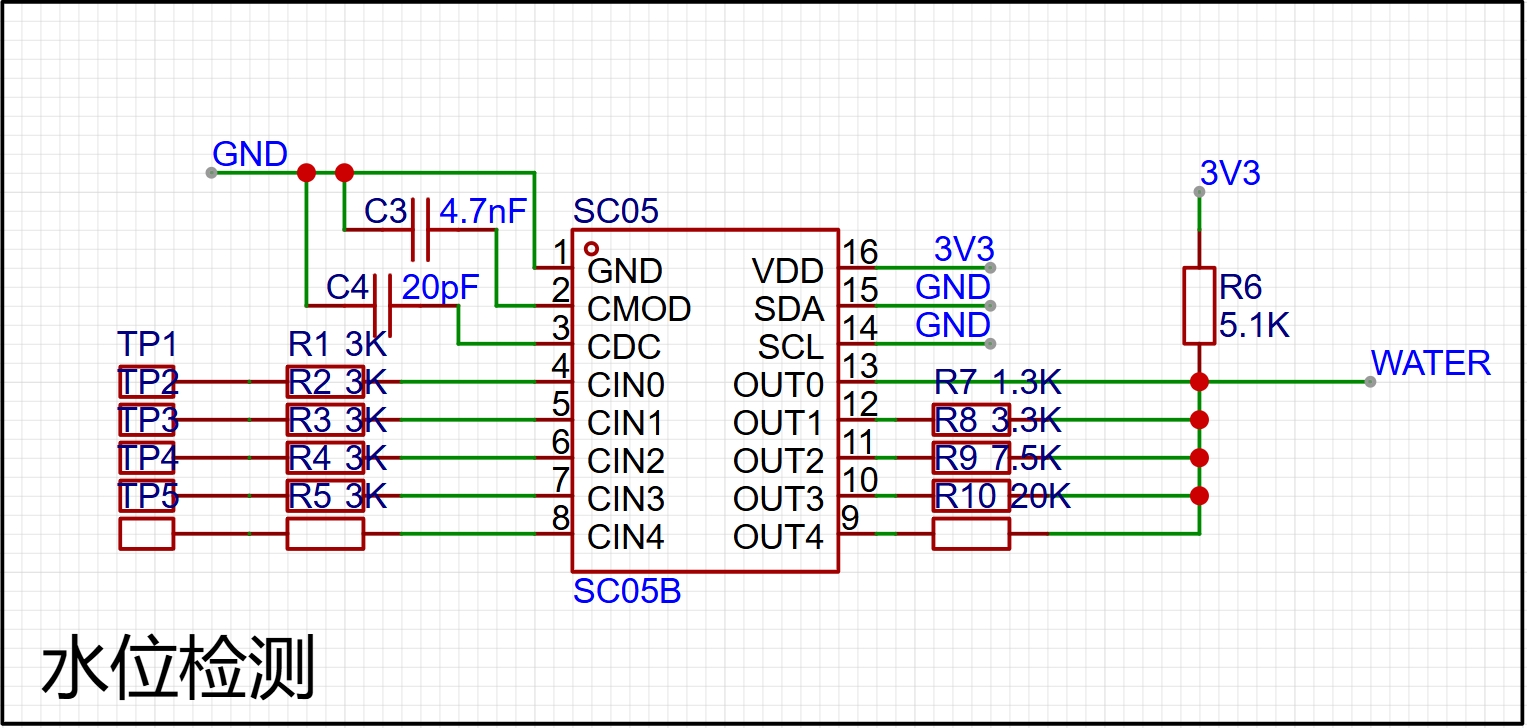
(6) A 5-channel SC05B touch chip is used for water level detection, which achieves the finest water level detection of 20%.
(7) Opening the cover turns on the machine, and closing the cover turns it off. A layer of copper foil is attached to the cover and a layer of copper foil is also attached to the inside of the contact port. Thus, when the cover is closed, the copper foil connects with the copper foil to realize the function of turning on and off the machine.
3. Software (Embedded software + WeChat mini-program) See open source materials for details.
(1) RTOS multitasking is used to control different modules.
(2) PWM wave is used to adjust the size of the atomization. Of course, a 25:800 surface mount inductor is used to excite the atomizing plate in the hardware.
(3) ADC is used to detect the analog signals of the rotating potentiometer and water level detection. The water level detection is achieved by different resistors to detect different water levels (as shown in the figure below).
(4) The WeChat mini-program is relatively simple because it is only one page. However, the UI is not very beautiful. My art skills can only do this much (the WeChat mini-program is shown in the figure below). Note: Because the WeChat mini-program needs to be registered, it cannot be opened for the time being. It can only be opened to the public after the registration is approved. (Wait a moment)
Software open source address (including structure and material list): https://github.com/Jgcoder2023/oscilloscope
Project video demonstration: https://www.bilibili.com/video/BV1jrgLe4Ef5/








 京公网安备 11010802033920号


 1N4461US



