This project
utilizes the STM32F722RET6 main chip to implement a high-performance, low-cost FOC dual-motor control system.
Through torque feedback between the two motors, a non-direct contact, real-time force feedback system is achieved, with one motor acting as the handheld end and the other as the actuator.
Bilibili video link: [FOC Dual-Motor Torque Feedback - Bilibili] https://b23.tv/6cs9857
Open-source license
: Hardware open source; Gerber data, schematics, PCB, BOM provided; program burned as a hex file; software code. Please like, favorite, and leave your email address below the post, and I will send it to your email.
Project-related functions:
This project primarily aims to create a hand-extended product, allowing the hand to feel the force feedback of the actuator in real time when it is inaccessible. For example, in the mechanical scalpel part of a surgical robot, the doctor operates the actuator through the handheld end, and the resistance encountered and the distance traveled by the actuator can be synchronously fed back to the operator's hand.
Project attributes:
This is the first public release of this project; it is my original work and has not been used in competitions or exhibitions elsewhere.
Project Schedule:
3.10 Circuit design completed
; 3.20 First PCB layout completed
; 4.10 First PCBA sample prototyping completed;
5.10 First software debugging completed;
6.1 Finalization completed. Project
Design Principles:
The main chip uses STM32F722 to drive two brushless motors using control algorithms.
The hardware driver uses a high-side driver chip DRV8300DR + 6NMOS, and current sampling uses a CC6903SO Hall current sensor for inline current sampling on the high side. The most important thing to pay attention
to in the software
is the SPI clock frequency of the magnetic encoder. It's best to use a frequency of 10Mbps or higher.
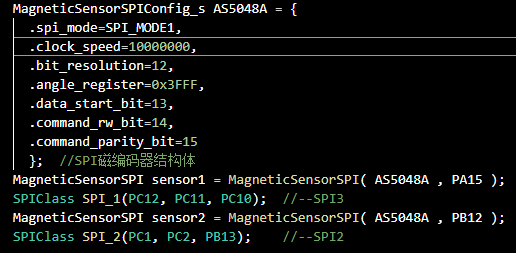
After confirming the hardware is OK, proceed with the following software writing and debugging steps:
1. Screen driver: for displaying debugging information.
2. Serial port driver: for printing debugging information, system input, etc.
3. Magnetic encoder chip driver: confirming the AS5048A magnetic encoder's SPI data output is normal.
4. Brushless driver program: through the voltage loop output, the three-phase output voltage can be obtained as the program's set value.
5. Current sensor calibration and reading program: confirming normal current sampling.
6. After completing the development and debugging of the above modules, you can start writing and debugging the open loop motor control program.
7. Finally, write the closed loop torque and angle control program to achieve torque feedback control of dual motors.
Physical demonstration
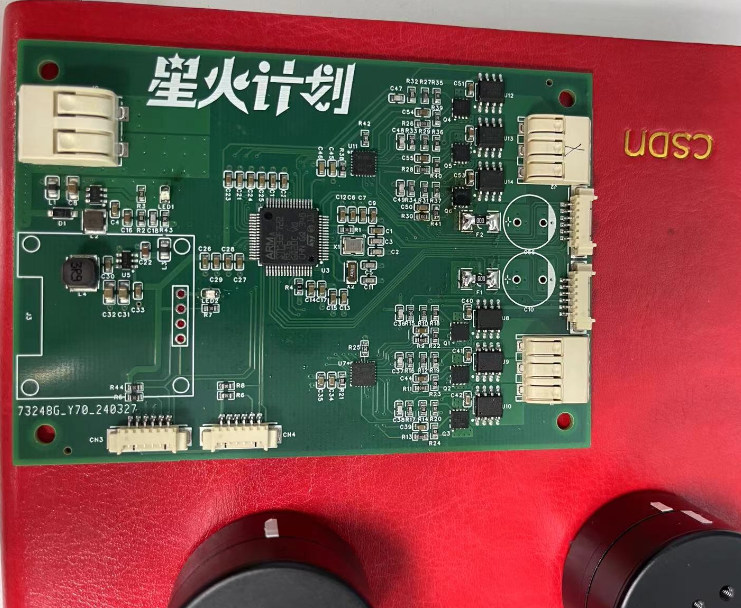
sample board processing: Because LCSC required ordering MOSFETs and couldn't use surface mount technology, I bought them myself. I used a hot air gun for a long time and it looked like it was soldered, but measurements showed the MOSFET was faulty. After several days of back and forth, I still couldn't get it working. After
exhausting my 15 MOSFETs, I ended up buying 20 more. This time I learned my lesson and manually soldered the MOSFETs face down, and it worked perfectly on the first try! Haha!
Design Notes
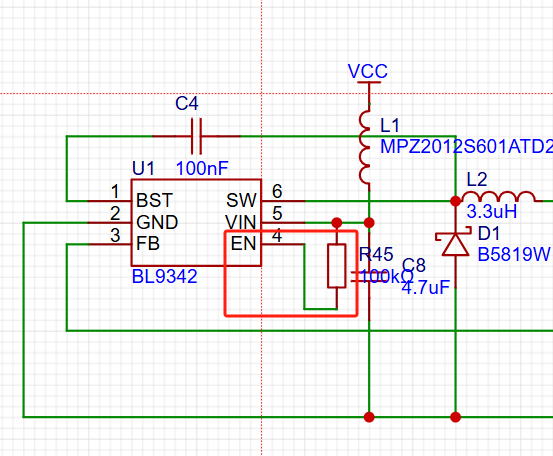
1: During hardware debugging after the PCB was installed, I discovered the power chip's enable pin was floating, resulting in no power. Project information updated.
2: The AS5048A magnetic encoder's SPI clock speed should ideally be above 10Mbps. Using 1M or 2M will cause jitter in a single motor .
3: MOSFETs on the board must be surface-mounted; never do it manually!
Other
demonstration videos: One is an open-loop motor drive video, showing smooth operation at both high and low speeds; the other demonstrates closed-loop control with torque feedback for dual motors.
Project attachments: Gerber, schematic, BOM, hex, LCSC project archive.








 京公网安备 11010802033920号


 UPC2907HF



