Prototype verification
and physical demonstration are available via a Bilibili video link.
Key parameters:
This design is based on the ESP32-C3, software compatible with the entire ESP32 series
, features intelligent network configuration, connects to routers without code modification
, supports Vivado debugging and FPGA downloading without additional plugins,
includes level conversion design, compatible with low-voltage I/O. FPGA
Getting Started:
Peripheral Connections :
The downloader uses Xilinx's standard 2.54mm 14P horn-shaped I/O layout, the same as typical downloader I/O layouts, and can be directly connected to most development boards.
Display: Compatible with SSD1306 main controller, OLED 0.91/0.96 inch IIC 4P interface screens, readily available online. Pay attention to the orientation when inserting.
Shorting the two pins marked Boot resets the device and enters download mode.
The interfaces marked Rx and Tx correspond to the ESP32's native serial port and can be used for debugging.
The interfaces marked GND, 3V, and 5V are for power supply.
The firmware download
includes the ESP32 software source code, maintained in the Gitee repository under the Xilinx Wireless FPGA Debugger ESP32-XVC. You can compile it yourself or directly download the ESP32-C3 binary firmware.
This hardware design can use either the ESP32-C3's USB CDC serial port for downloading programs or the UART peripheral for downloading programs.
Shorting the two pins marked "Boot" and pressing the Rst key to reset will enter download mode. The D+ and D- pins of the USB Type-C interface are already connected to the ESP32's USB peripheral I/O and can be used directly for downloading.
Specific download methods and accompanying software are not detailed here; many tutorials are available online.
Smart Network Configuration:
This project supports Espressif's SmartConfig function, eliminating the need to embed the Wi-Fi name and password in the program; network configuration can be done online via a mobile phone.
After powering on, the ESP32 will attempt to connect to the last Wi-Fi network by default, and the connection status will be displayed on the OLED screen. After multiple failed connection attempts, enter smart network configuration mode:
Take out your phone, go to the Espressif website - Support - Download - APP, download and install ESP TOUCH
. Keep WIFI on and connect to the WIFI you want the ESP32 to connect to.
Open ESP TOUCH, select the first option, enter the WIFI password, and click Confirm.
Wait a moment, and the OLED screen will display connection information after network configuration is complete.
Connecting to Vivado
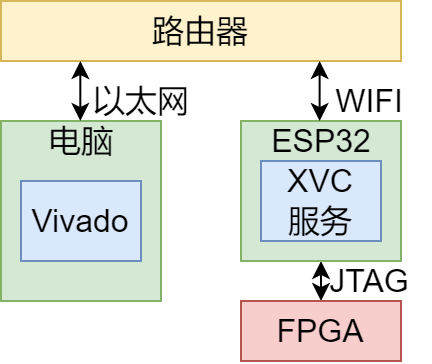
requires connecting the corresponding pin of the ESP32 to the JTAG interface of the FPGA, ensuring that the ESP32 and the computer are connected to the same router.
Open Vivado -> Open Hardware Manager,
click Open target -> Open new target -> Next -> Select Local server and click Next -> Click Add Xilinx Virtual Cable -> Enter the IP address and port number displayed on the screen.
If localhost() already exists in the Hardware window, then localhost() -> right-click -> Add Xilinx Virtual Cable (XVC).
If you see the debugger Hardware Target and the FPGA device Hardware Devices, the connection is successful, and you can start wireless programming!
Independent Power Supply:
Since it is a wireless downloader, using USB power feels strange. The bottom of the board has pre-drilled pin headers marked GND, 3V, and 5V for grounding, external 3.3V power supply, and external 5V power supply, respectively. After firmware flashing, the FPGA board can be powered directly without connecting to a computer.
The 3V connector is for connecting to an external 3.3V power supply, and the 5V connector is for connecting to an external 5V power supply; either one can be used, but only one power supply can be connected at a time. After the 5V power supply is connected, the 3V connector will output the 3.3V voltage obtained by the LDO step-down converter. At this time, the 3V connector must not be connected to an external power supply, otherwise, reverse current may occur, causing the device to burn out.
The hardware design concept
utilizes the ESP32, which is easy to use and inexpensive. A microcontroller costing only a few dollars can connect to Wi-Fi, and when combined with Arduino, it greatly reduces the difficulty of software development. The ESP32-C3, as a cost-effective product from Espressif Systems, is a very worthwhile choice.
The LDO no longer uses the classic 1117, because the superior CJ6206 is now available, requiring only two 1uF MLCCs externally, ensuring quality from a major manufacturer.
The programmer is powered by a global 3.3V supply, but the FPGA's I/O voltage is usually lower, such as 3.3V, 2.5V, or 1.8V. Directly connecting the ESP32's 3.3V I/O to the FPGA's 1.8V I/O will obviously cause problems. As a practical tool, the programmer must have I/O level conversion capabilities. This design uses a Runstone RS4T774 level converter chip to convert the levels of the four JTAG signal lines, supporting levels from 0.9V to 3.6V with low transmission latency. Other brands of 4T774 chips can also be used as substitutes.








 京公网安备 11010802033920号


 2176080-5



