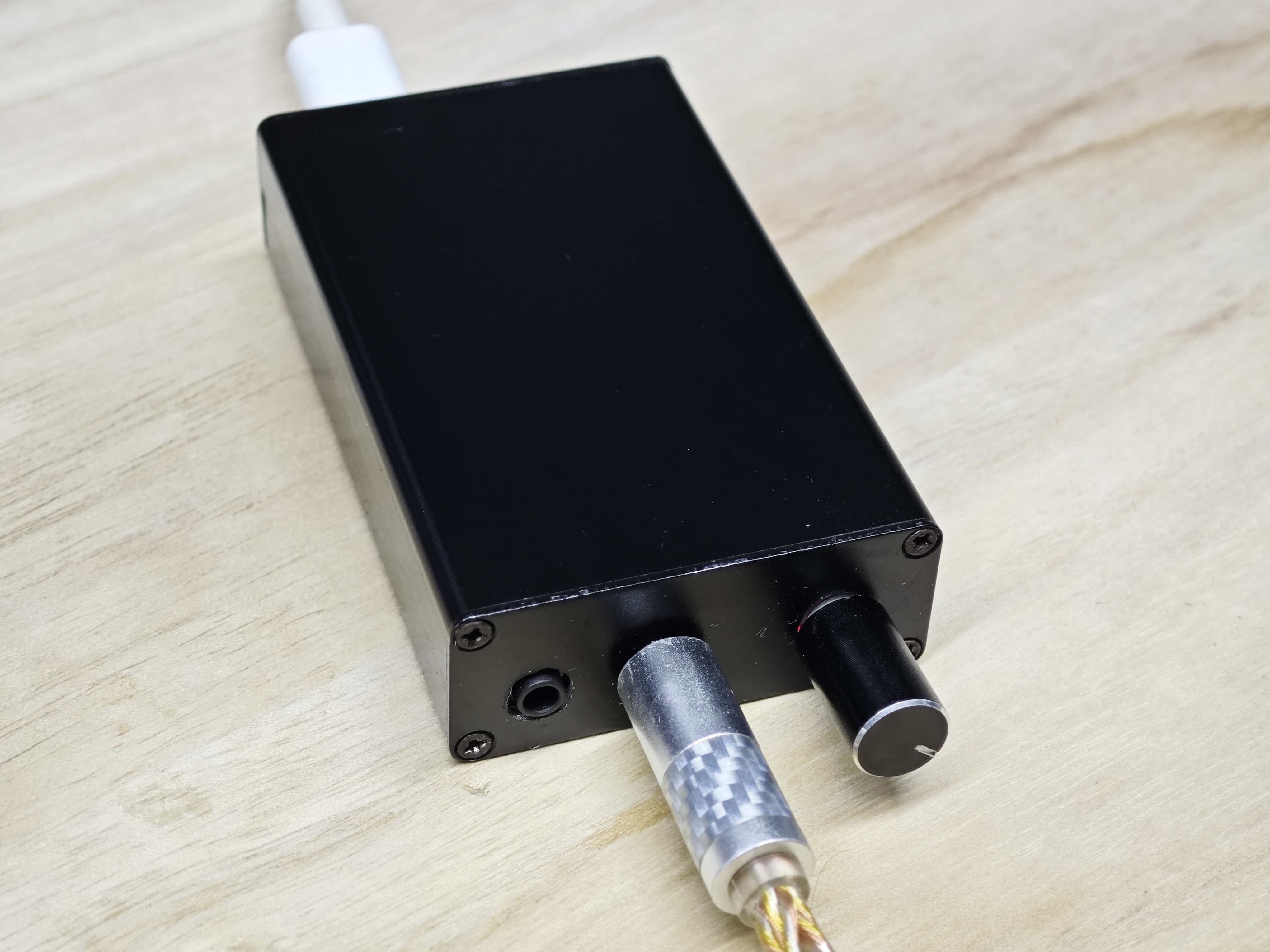
This USB-DAC
is a small USB headphone amplifier based on the CT7601 and STC8H8K64U. It features
a complete ±15V power supply in a small size, high output power (1000mW) and high swing (Vpp~30V) , analog volume control with perfect precision loss, 254 levels of ultra-fine granularity achieving near-stepless adjustment, excellent channel balance (<0.1dB) , integrated UAC2.0 and UAD protocols for use on all platforms, a complete Hi-Fi signal chain including a preamplifier circuit with a maximum preamplifier of +32dB, and uses a general-purpose SOP8 op-amp package for easy setup by audiophiles. It includes single-ended balanced dual outputs and an independent power supply interface that automatically shuts off the main power supply upon connection. The design block diagram and data block diagram are shown below. The diagram shows: U0[USB1] -->|DATA| BRIDGE (CT7601SR) U1[USB2] -->|DATA| MCU BRIDGE -->|I2S| ES9028 (ES9028Q2M). EC11[EC11] -->|GPIO| MCU MCU(STC8H8K64U) -->|I2C| ES9028(ES9028Q2M) MCU -->|SPI| PGA2310_L ES9028 -->|DACL| OPA_L(OPA) ES9028 -->|DACR| OPA_R(OPA) ES9028 -->|DACLB| OPA_L(OPA) ES9028 -->|DACRB| OPA_R(OPA) OPA_L -->|DC_BLOCK+LPF| PGA2310_L(PGA2310) OPA_R -->|DC_BLOCK+LPF| PGA2310_R(PGA2310) OPA_L -->|DC_BLOCK+LPF| PGA2310_L(PGA2310) OPA_R -->|DC_BLOCK+LPF| PGA2310_R(PGA2310) PGA2310_L -->|VOL_L| TPA6120_L(TPA6120) PGA2310_L -->|VOL_L| TPA6120_L(TPA6120) PGA2310_R -->|VOL_R| TPA6120_R(TPA6120) PGA2310_R -->|VOL_R| TPA6120_R(TPA6120) MCU -->|SPI| PGA2310_R TPA6120_L -->|OUT_HOT| 4.4mm(4.4mm) TPA6120_L -->|OUT_COLD| 4.4mm(4.4mm) TPA6120_R -->|OUT_HOT| 4.4mm(4.4mm) TPA6120_R -->|OUT_COLD| 4.4mm(4.4mm) TPA6120_L -->|OUT_HOT| 3.5mm(3.5mm) TPA6120_R -->|OUT_HOT| 3.5mm(3.5mm) Power supply block diagram graph LR U1[USB2] -->|5V| LDO1(3.3V LDO) U1[USB2] -->|5V| LDO2(1.2V LDO) U1[USB2] -->|5V| LDO3(3.3V LDO) U1[USB2] -->|5V| LDO5(3.3V LDO) U1[USB2] -->|5V| LDO4(1.5V LDO) LDO1 -->|3.3V VCC| BRIDGE(CT7601SR) LDO2 -->|1.2V VDD| BRIDGE(CT7601SR) LDO3 -->|3.3V VCC| ES9028 LDO5 -->|3.3V VCCA| ES9028 LDO4 -->|1.5V VDD| ES9028 U1 -->|5V| PGA2310_L(PGA2310_L) U1 -->|5V| PGA2310_R(PGA2310_R) U1 -->|5V| MCU(STC8H8K64U) U1 -->|5V| TPS65131(TPS65131) TPS65131 --> LDO_P(±LDO) LDO_P -->|±15V| PGA2310_L LDO_P -->|±15V| PGA2310_R LDO_P -->|±15V| P_OPA LDO_P -->|±15V| OPA_L LDO_P -->|±15V| OPA_R LDO_P -->|±15V| TPA6120_L(TPA6120_L) LDO_P -->|±15V| TPA6120_R(TPA6120_R) P_OPA(VCCAL/R OPA) -->|3.3V VCCAL/R| ES9028(ES9028Q2M) DIY Guide Most components in this project use small packages such as 0603/QFN, which presents a certain degree of soldering difficulty. Please prepare appropriate tools and materials : A suitable soldering iron (T12 recommended; don't use those cheap ones, you'll regret it), a heating table, You can buy one of those LED desoldering stations that cost around ten yuan on Taobao (not essential). Other materials include a multimeter, tweezers , a bench drill/hand drill , a file, lead-based medium-temperature solder paste (for soldering surface mount components, not essential) , solder wire, flux/soldering compound/rosin (to aid in soldering).
For the prototype analog + digital PCB, begin soldering
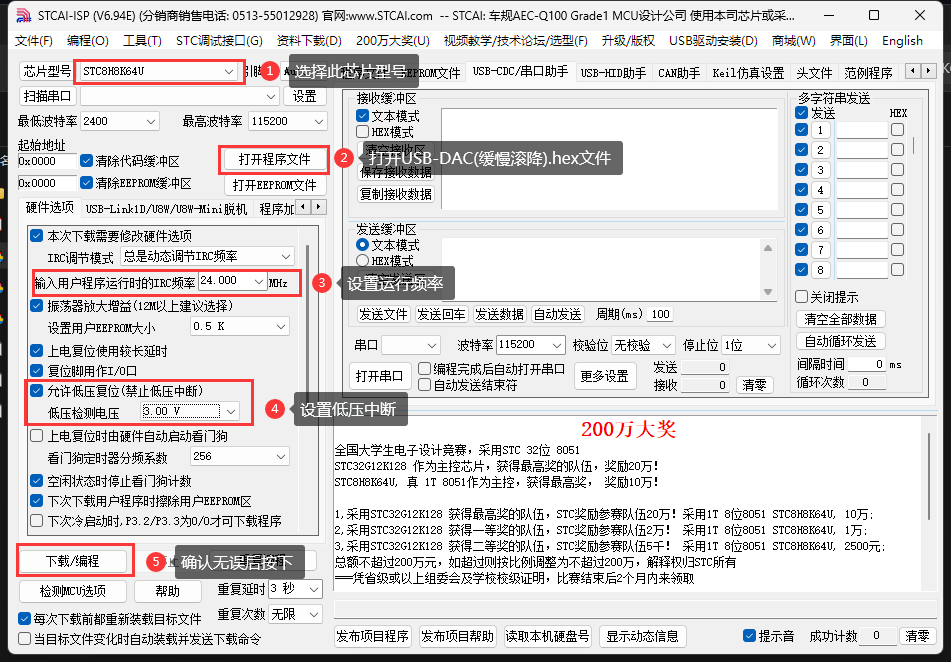
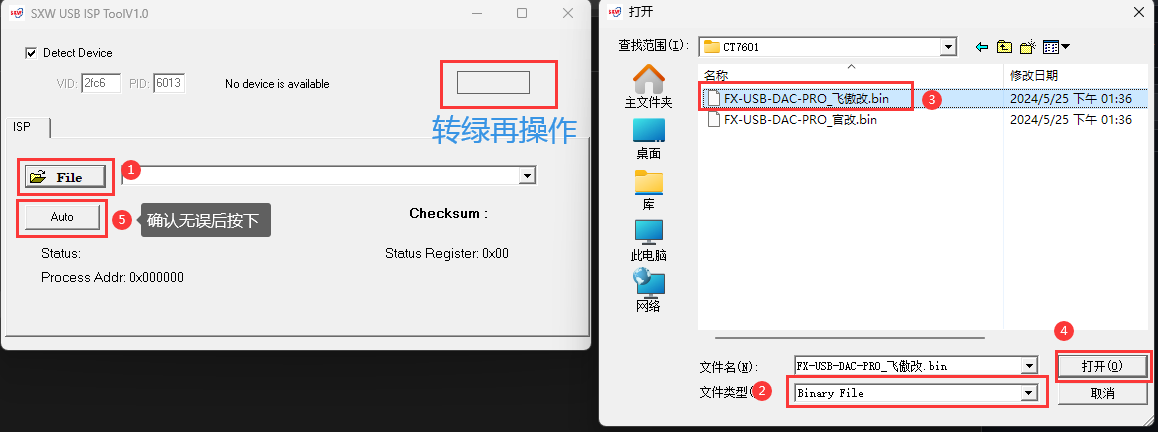
the components listed in this directory (heated platform method, recommended). Apply solder paste to all solder joints, being careful not to use too much. Using the LCSC Pro version's auxiliary soldering tools and referring to the 3D preview, carefully place all components onto Move the PCB to the heated platform and heat it. After the solder melts, use tweezers to align any misplaced components . Once finished, place the circuit board on the floor to accelerate cooling. Next, turn on the soldering iron and use the tip to clean the MCU pins to prevent solder bridging. Confirm that the soldering is correct. Finally, solder the remaining through-hole components. Soldering complete (using the soldering iron). (Iron Method) Apply solder to one side of the pads for all resistors, capacitors, LEDs, and diodes using a soldering iron. Using the LCSC Professional Edition's auxiliary soldering tools and referring to the 3D preview, carefully place the components onto the pads with tweezers. Heat the soldering iron on the side with solder until the component is flush against the PCB plane. Apply solder to the other side of the pads until all resistors, capacitors, LEDs, and diodes are soldered (note the diode orientation). Apply a generous amount of solder paste to the MCU pads , place the MCU on top, and add solder, using a soldering tool to guide it (note the component orientation). Confirm that all other soldering is correct. Finally, solder the through-hole components . Upload the program M. The CU program will download the latest pre-built file (USB-DAC (slow roll-off).hex) and the STC-ISP download tool. Open the STC-ISP and set it up as shown in the image. After confirming the settings are correct, click Download/Programming. While holding down the USB-ISP button on the motherboard, insert the USB cable near the DC-DC connector. If everything is correct, the program will automatically start downloading. If the download does not start, repeat the above steps and wait for the download to complete. The USB bridge program will download the latest pre-built file (FX-USB-DAC-PRO_Fiio modified.bin) and the SXW-ISP download tool. Open the SXW-ISP and set it up as shown in the image. Insert the USB cable near the USB bridge connector and confirm the settings are correct. Click AUTO. If the download does not start, repeat the above steps and wait for the download to complete. Assembly : Use calipers and other tools to mark the housing panel. Use a bench drill to drill the main holes. Use a file to refine the holes. Connect the 20-pin ribbon cable and slide the PCB into the housing slots. Tighten all screws. Secondary Development: Clone this project and open it with VSCode. Install Keil 5. After configuring the C51 and VSCode EIDE plugin and the builder, open the EIDE icon to expand the EIDE project. In the Build Options, click the pen icon next to the Builder Options to enter the Global Options tab. Change both RAM/ROM modes to LARGE and click the Save All button in the upper right corner. After the program is modified, click the Download icon in the upper right corner to complete the compilation. However , due to the high voltage and numerous analog components, the no-load power is approximately 4W, resulting in significant heat generation. It requires a well-ventilated environment for use.








 京公网安备 11010802033920号


 299025



