The requirements for
the laser target shooting system are: 1. The system should accurately identify targets generated by a randomly generated gimbal, with an accuracy rate exceeding 90%.
2. The system should accurately hit the target, with a maximum of three hits per target. 3. The main system should be able to handle communication data from
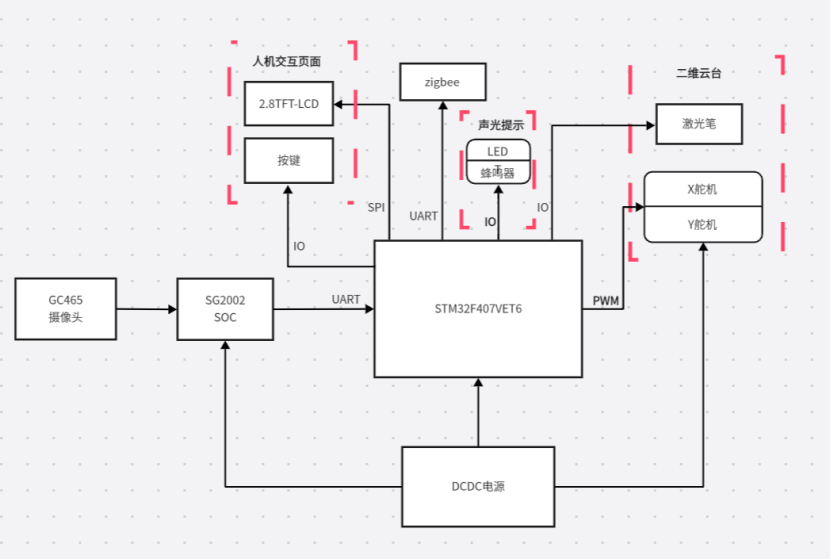
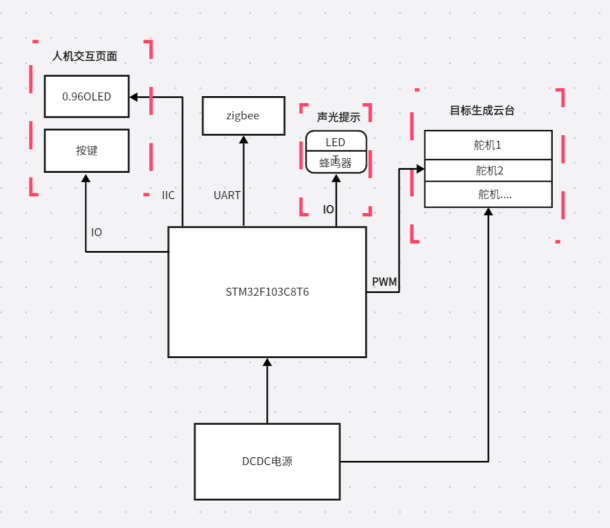
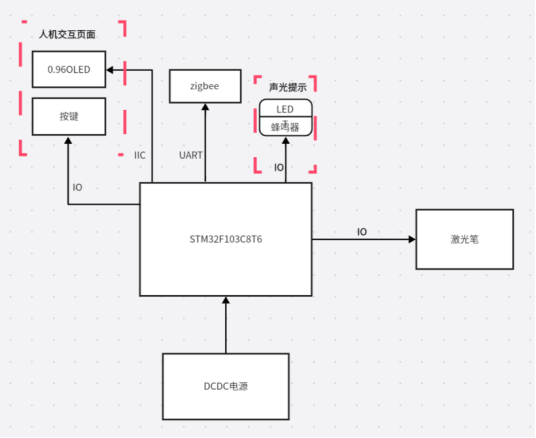
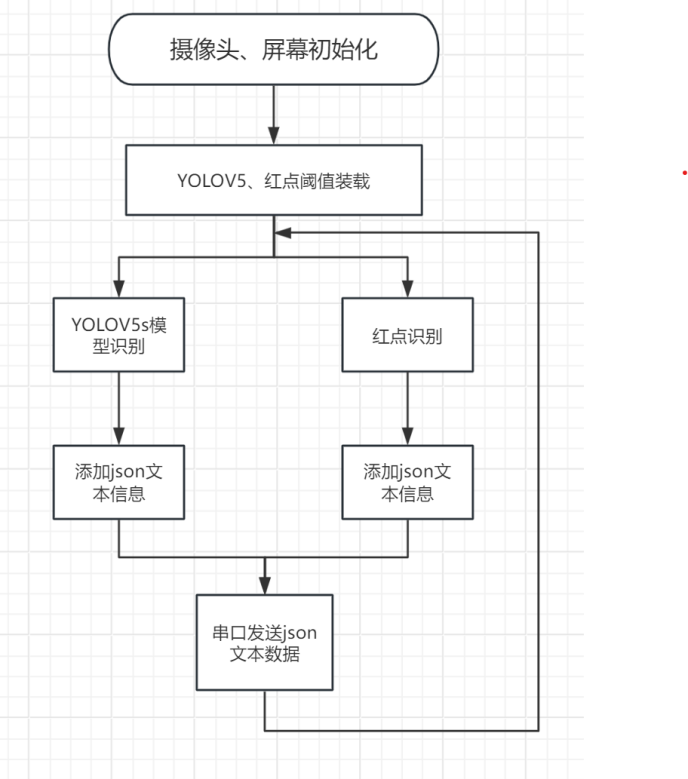
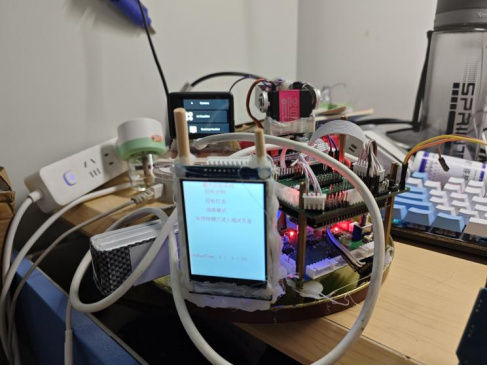
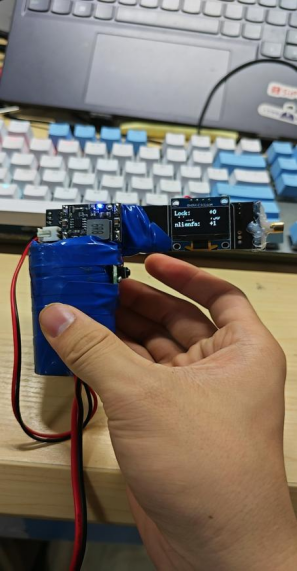
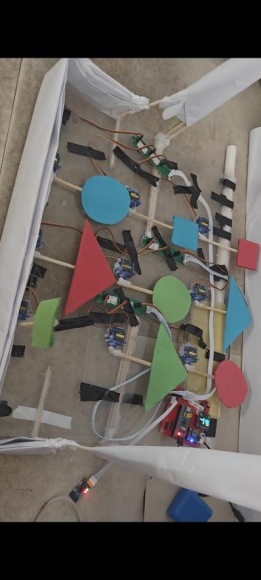
multiple subsystems . The system consists of a main system and multiple subsystems. The main system is a vision-based laser target shooting system, while the subsystems are a random target generation gimbal system and a manual target shooting laser gun system. These subsystems operate around the main system, with one-to-many communication. The main idea of this system is that the random target generation system generates the targets to be shot. The main system, acting as the terminal decision-maker, uses a human-computer interface to determine whether to automatically track and shoot the target or use it for laser gun scoring. The system construction involves a vision processing platform acquiring data, the main system's human-computer interface deciding whether to automatically shoot or manually score the target, and the random target generation system generating the targets to be shot. The schematic design describes the motion control system, which uses an SG2002 SOC running a Linux+RTOS system with Maixpy as the vision processing platform and an STM32F407VET6 microcontroller to control the servo gimbal's movement. Data is collected by a GC465 sensor and transmitted to the SG2002. Maixpy, running on the SG2002, uses the YOLOv5s algorithm and the Lab color space to capture color blocks for identification and returns data on targets and red dots. This data is then transmitted to the microcontroller via serial port. The STM32F407VET6 uses two one-dimensional closed-loop position PID controllers to form an angle loop, outputting two PWM signals to achieve the control effect. A TFT-LCD screen and buttons provide a human-machine interface for function selection. LEDs and a buzzer provide audible and visual alarms, and Zigbee enables wireless communication. The random target generation gimbal uses an STM32F103C8T6 microcontroller to control the servo and generate random targets. Nine different objects are generated by outputting nine PWM signals. An OLED screen and buttons are used for the human-machine interface to select functions, LEDs and a buzzer provide system operation indicators, and a Zigbee module enables wireless data transmission and reception. The laser gun uses an STM32F103C8T6 microcontroller to control a servo motor to generate random targets. An OLED screen and buttons are used for the human-machine interface to select functions, LEDs and a buzzer provide system operation indicators, and a Zigbee module enables wireless data transmission and reception. Software description from maix import camera, display, image, nn, app from maix import uart import json import numpy as np devices = uart.list_devices() serial = uart.UART(devices[0], 115200) detector = nn.YOLOv5(model="/root/models/model-150813.maixcam/model_150813.mud") thresholds_redyuan = [[20, 100, 127, 10, -128, 127]] # cam = camera.Camera(detector.input_width(), detector.input_height(), detector.input_format()) dis = display.Display() def find_blob_center(threshold): blobs = img.find_blobs(threshold, x_stride=1, y_stride=1,area_threshold=0,pixels_threshold=0) #Find color blocks if blobs: b = blobs[0] cx = b.cx() cy = b.cy() return cx, cy return None, None while not app.need_exit(): img = cam.read() data=[] data_one=[] data_two=[] data_three=[] tesu = 0 blobs_red = img.find_blobs(thresholds_redyuan, pixels_threshold=1) #Find red color blocks if blobs_red:#Red needs special handling for i in range(len(blobs_red)):#Find the length of the array arr = np.array([blobs_red[i].h()]) min_idex = np.argmin(arr) if blobs_red[min_idex].density() > 0.7: #Filtering #print('The duty cycle of this shape is',blobs_red[min_idex+1].density()) img.draw_rect(blobs_red[min_idex-1][0],blobs_red[min_idex-1][1],blobs_red[min_idex-1][2],blobs_red[min_idex-1][3], image.COLOR_GREEN) data.append((blobs_red[min_idex-1][5],blobs_red[min_idex-1][6])) #print("dorp:",data) objs = detector.detect(img, conf_th = 0.5, iou_th = 0.45) #Find the shape for obj in objs:
img.draw_rect(obj.x, obj.y, obj.w, obj.h, color = image.COLOR_YELLOW)#Frame out
obj_cx = (obj.x + obj.w + obj.x) // 2
obj_cy = (obj.y + obj.h + obj.y) // 2
data_one.append((obj_cx,obj_cy))
data_three.append((obj.w,obj.h))
msg = f'{detector.labels[obj.class_id]}: {obj.score:.2f}'
img.draw_string(obj.x, obj.y, msg, color = image.COLOR_YELLOW)
#print(detector.labels[obj.class_id])#Display the recognized objects
#print(type(detector.labels[obj.class_id]))
if detector.labels[obj.class_id] is not None:#non-empty
if detector.labels[obj.class_id] == "blue_yuan":#non-empty
data_two.append((1))
elif detector.labels[obj.class_id] == " blue_juxing":#non-empty
data_two.append((2))
elif detector.labels[obj.class_id] == " red_juxing":#non-empty
data_two.append((3))
elif detector.labels[obj.class_id] == " red_sanjiao":#non-empty
tesu = 1
data_two.append((4))
elif detector.labels[obj.class_id] == " green_yuan":#non-empty
data_two.append((5))
elif detector.labels[obj.class_id] == " bule_sanjiao":#non-empty
data_two.append((6))
elif detector.labels[obj.class_id] == " green_juxing": # Not empty
data_two.append((7))
elif detector.labels[obj.class_id] == " green_sanjiao": # Not empty
data_two.append((8))
elif detector.labels[obj.class_id] == " red_yuan": # Not empty
data_two.append((9))
data_out = json.dumps((data))
data_outone = json.dumps((data_one)) # Send the coordinates of the identified object
data_outtwo = json.dumps((data_two)) # Send the shape of the identified object
data_outthree = json.dumps((data_three))
print(data_out+data_outone+data_outtwo+data_outthree+'
')
if tesu != 1 :
serial.write_str(data_out+data_outone+data_outtwo+data_outthree+'
')
print("good")
elif tesu == 1:
serial.write_str(data_outone+data_outone+data_outtwo+data_outthree+'
')
print("bed")
dis.show(img)
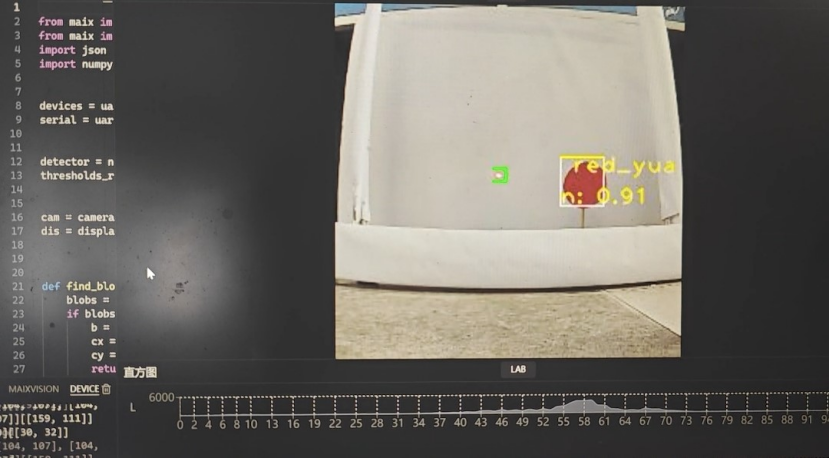
Physical display instructions








 京公网安备 11010802033920号


 FX-104-DFF-D4E8



