This project introduces a smart home experimental board based on the LCSC ESP32 development board
. It integrates switches (micro-buttons), lights (LEDs), alarms (buzzers), door and window indicators (Hall sensors), smoke alarms, digital tubes, screens, and expansion interfaces.
Regarding the screen,
various screen sizes are available, including 0.91, 0.96 (I²C, ISP), and 1.8-inch TFT.
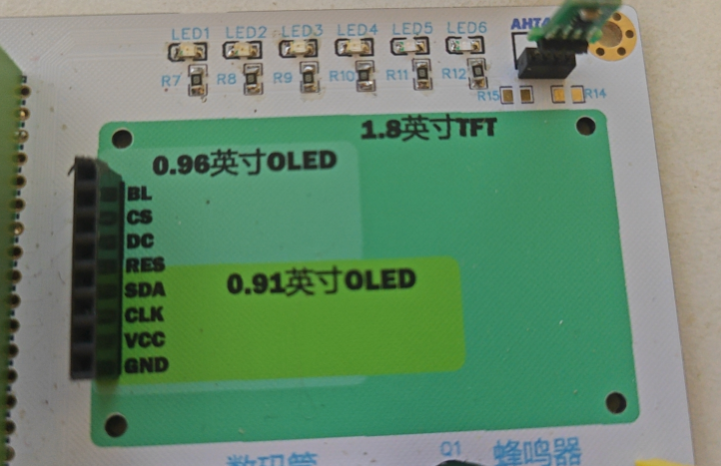
Regarding the expansion interface
, since different sensors have different voltages, the voltage can be selected via jumpers when using the sensor.
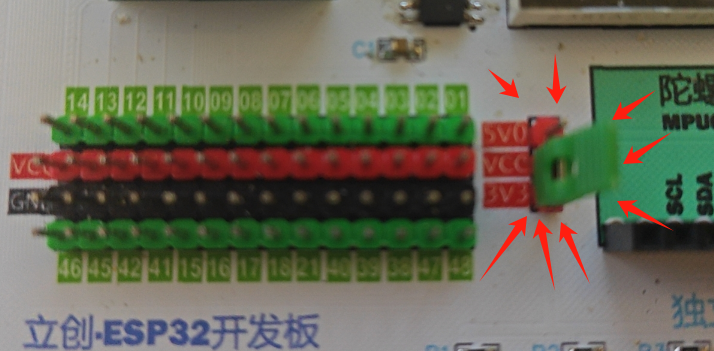
Below are two scenarios; see the video at the end for the effect.
Smoke Alarm Experiment
Hardware:
This experiment
uses a LCSC ESP32 development board ,
an MQ-2 sensor, and
a 1.8-inch TFT screen (ST7735).
Software:
Arduino IDE.
Installation includes SPI and Ucglib library
programs.
#include <
stdio.h> #include "Ucglib.h"
// Defines the TFT screen pins
#define UCG_WIDTH 160 #define UCG_HEIGHT
128 #define UCG_PIN_CS 7 #define UCG_PIN_RST 5 #define UCG_PIN_DC 6 #define UCG_PIN_CLK 3 #define UCG_PIN_MOSI 4 // Defines the UCGLIB configuration structure ucg_t ucg; ucg_config_t ucg_cfg = { .width = UCG_WIDTH, .height = UCG_HEIGHT, .pin_cs = UCG_PIN_CS, .pin_dc = UCG_PIN_DC, .pin_rst = UCG_PIN_RST, .pin_mosi = UCG_PIN_MOSI, .pin_clk = UCG_PIN_CLK, .pin_a0 = UCG_PIN_NONE, .pin_cd = UCG_PIN_NONE, .pin_wr = UCG_PIN_NONE, .pin_rd = UCG_PIN_NONE, .panel = UCG_PANEL_ST7735S_128X160, .color_mode = UCG_COLOR_MODE_BGR, .spi_mode = UCG_SPI_MODE_0, .spi_freq = 20000000, .i2c_addr = 0, .font = &ucg_font_6x13B, .contrast = 0x7F, .inverted = false, .scrolling = false, }; const int sensorPin = 38; // Analog input pin connected to the smoke sensor const int buzzerPin = 47; // Digital output pin connected to the buzzer const int threshold = 500; // Set the threshold, adjust according to the actual situation void setup() { Serial.begin(115200); // Initialize the TFT screen ucg_init(&ucg, &ucg_cfg); ucg_clear(&ucg); ucg_first_page(&ucg, true); do { ucg_draw_string(&ucg, 0, 14, "Initializing...", 1); } while (ucg_next_page(&ucg)); // Initialize the ADC analogReadResolution(12); // Set the ADC resolution // Initialize the buzzer pinMode(buzzerPin, OUTPUT); } void loop() { int sensorValue = analogRead(sensorPin); // Read sensor value ucg_clear(&ucg); ucg_first_page(&ucg, true); do { ucg_draw_string(&ucg, 0, 14, "Sensor Value:", 1); ucg_draw_string(&ucg, 0, 28, String(sensorValue).c_str(), 1); ucg_draw_string(&ucg, 0, 42, "Raw", 1); if (sensorValue > threshold) { ucg_set_color(&ucg, UCG_COLOR_RED); // Set red background ucg_fill_rect(&ucg, 0, 56, 128, 104); ucg_set_color(&ucg, UCG_COLOR_WHITE); // Set white text: ucg_draw_string(&ucg, 0, 70,"ALARM!", 1);
ucg_draw_string(&ucg, 0, 84, "Smoke detected.", 1);
// Trigger the buzzer
tone(buzzerPin, 1000, 500); // Emits a 1000Hz sound for 500 milliseconds
delay(500); // Waits 500 milliseconds
noTone(buzzerPin); // Stops the sound
} else {
ucg_set_color(&ucg, UCG_COLOR_GREEN); // Sets the background color to green
ucg_fill_rect(&ucg, 0, 56, 128, 104);
ucg_set_color(&ucg, UCG_COLOR_BLACK); // Sets the text color to black
ucg_draw_string(&ucg, 0, 70, "Safe", 1);
}
} while (ucg_next_page(&ucg));
delay(1000); // Updated every second
}
Remote switch light
hardware
This experimental board
LCSC ESP32 development board
program
const int buttonPins[6] = {46, 45, 42, 41, 15, 16} ; // Pins connected to the button
const int ledPins[6] = {9, 10, 11, 12, 13, 14}; // Pins connected to the LED
// Define button state variables
bool buttonStates[6] = {false};
bool lastButtonStates[6] = {false};
unsigned long lastDebounceTime[6] = {0};
const unsigned long debounceDelay = 50; // Debounce delay
// Define LED state variables
bool ledStates[6] = {false};
void setup() {
// Initialize LED pins as output
for (int i = 0; i < 6; i++) {
pinMode(ledPins[i], OUTPUT);
digitalWrite(ledPins[i], ledStates[i]); // LEDs are off in the initial state
}
// Initialize button pins as inputs and enable internal pull-up
for (int i = 0; i < 6; i++) {
pinMode(buttonPins[i], INPUT_PULLUP);
}
}
void loop() {
// Detect the state of each button and control the corresponding LED
for (int i = 0; i < 6; i++) {
int reading = digitalRead(buttonPins[i]);
// If the button state changes
if (reading != lastButtonStates[i]) {
// Record the time of the last change
lastDebounceTime[i] = millis();
}
// If the debounce delay time has passed
if ((millis() - lastDebounceTime[i]) > debounceDelay) {
// If the button is stable at a low level
if (reading == LOW && !buttonStates[i]) { // The button is pressed
// Switch the corresponding LED state
ledStates[i] = !ledStates[i];
digitalWrite(ledPins[i], ledStates[i]);
}
// Update button state
buttonStates[i] = reading == LOW;
}
// Update last button state
lastButtonStates[i] = reading;
}
}








 京公网安备 11010802033920号


 K182J15C0GF5UK2V



