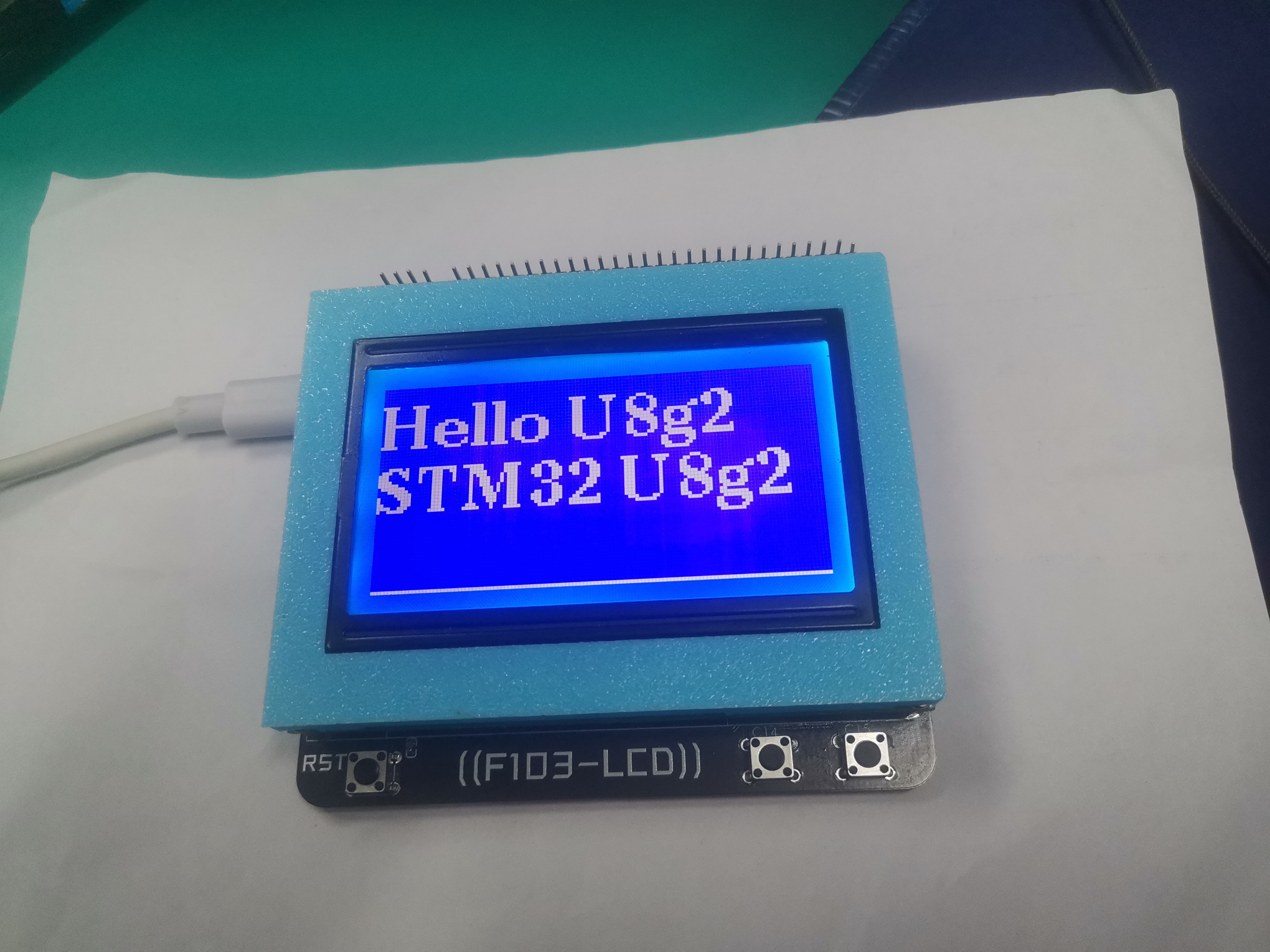
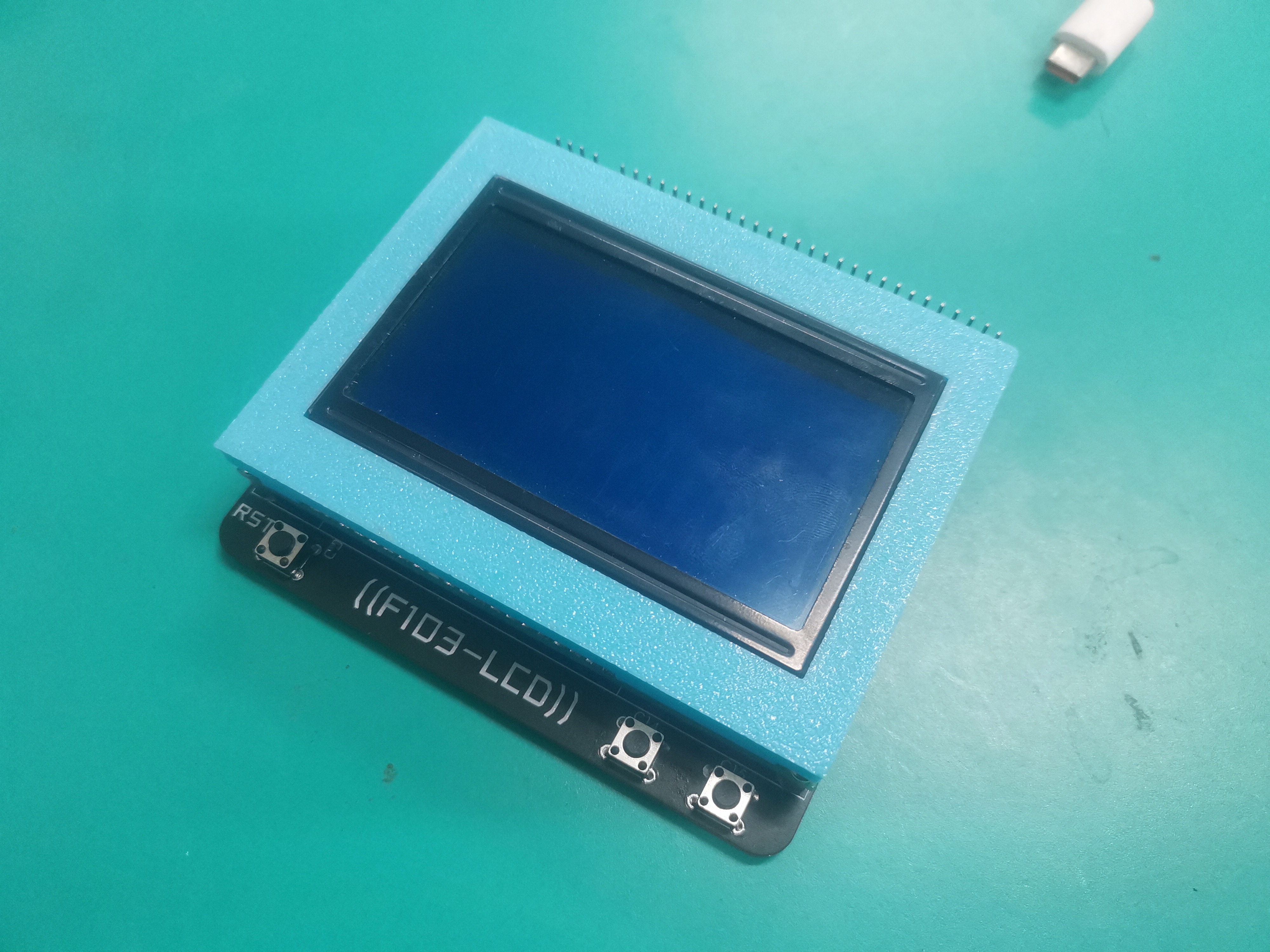
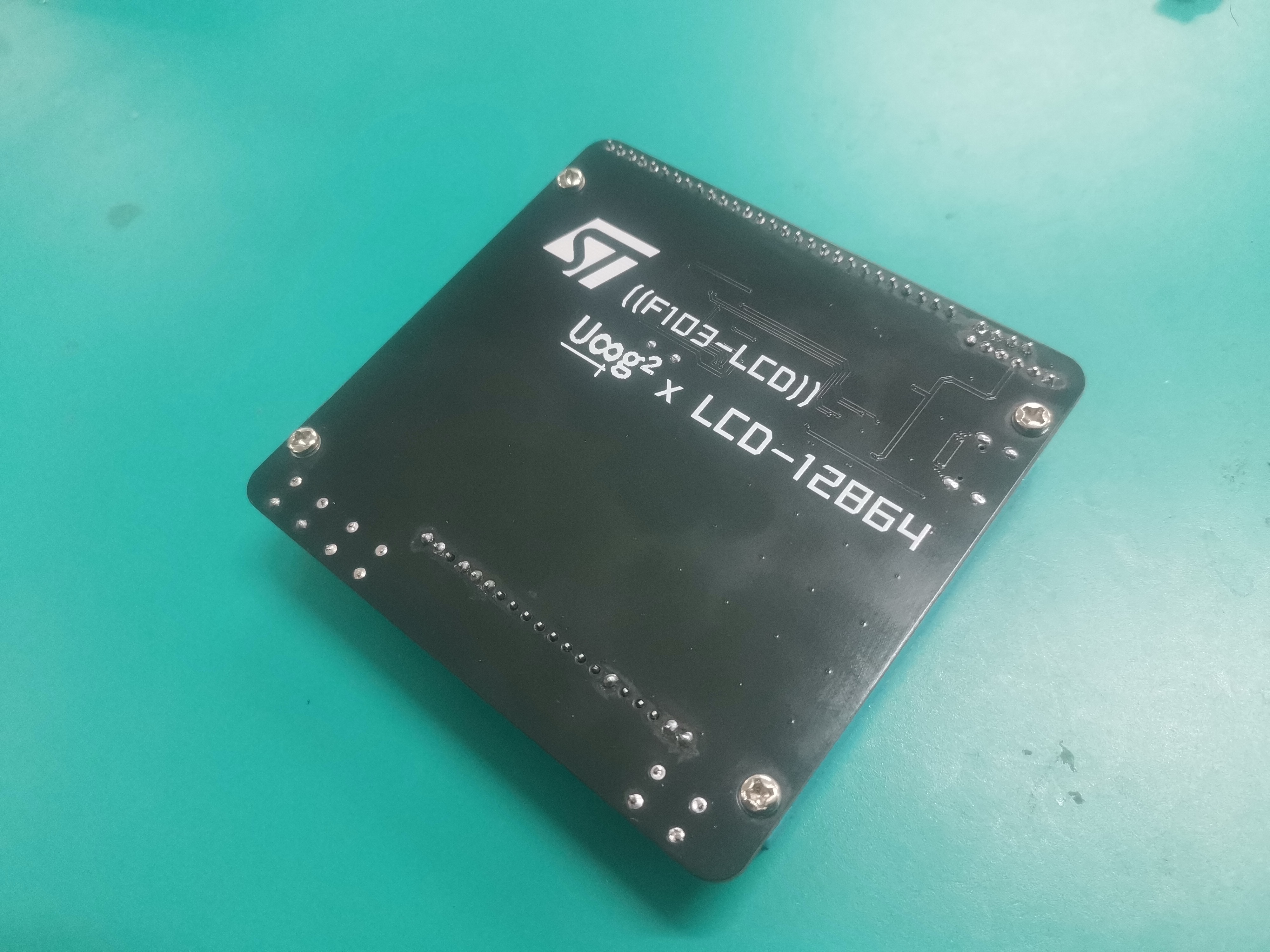
, and the screen is an LCD12864 (ST7920). With the 3D-printed casing, it looks quite good.
development with U8G2. For learning how to use
the CH552G as a link, see the LSPIClink tutorial: LCSC Liangshanpai development board with DAPlink using the CH552G as the downloader controller. LCSC development board official website: lckfb.com (gitee.com)
This was part of an event I participated in for the Liangshan School Smart Car project, which I put off for a long time, but it's finally finished now.
Project Introduction
and Functionality:
This project is a WiFi car built on the Liangshanpai development board. The car can be controlled by connecting to the WiFi network on the car (forward, backward, left turn, right turn). If there is an obstacle in front of the car while it is moving forward, it will automatically stop.
Hardware Circuit Introduction
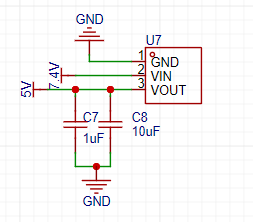
(1) Power Supply Section: HE6250MPR is used for voltage conversion to convert the 7V input from the battery to 5V for the development board. The specific circuit is as follows.
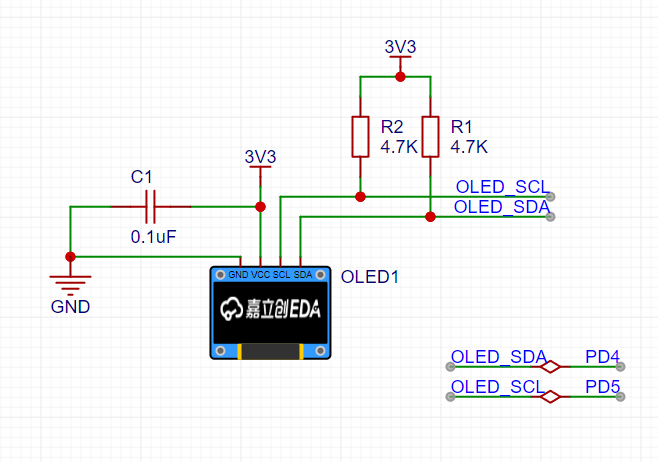
(2) OLED Display Section: A 0.96-inch 4-pin OLED is used, and IIC is used for communication. When drawing the schematic, remember to add 4.7k pull-up resistors to the SDL and SCK pins. The specific circuit is as follows.
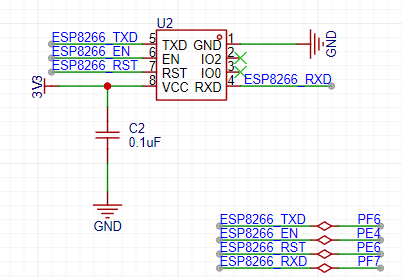
(3) ESP8266 Section: It can be directly connected to the UART of the development board. The specific circuit is as follows.
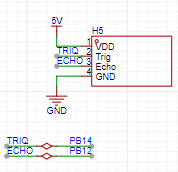
(4) Ultrasonic Section: It can be directly connected to the development board. The specific circuit is as follows.
(5) Servo Section: It can be directly connected to the development board. The specific circuit is as follows.
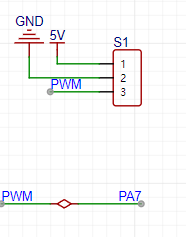
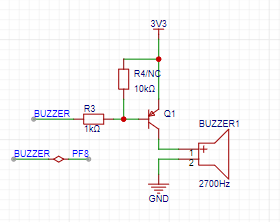
(6) Buzzer Section: It needs to be driven by a transistor. The specific circuit is as follows.
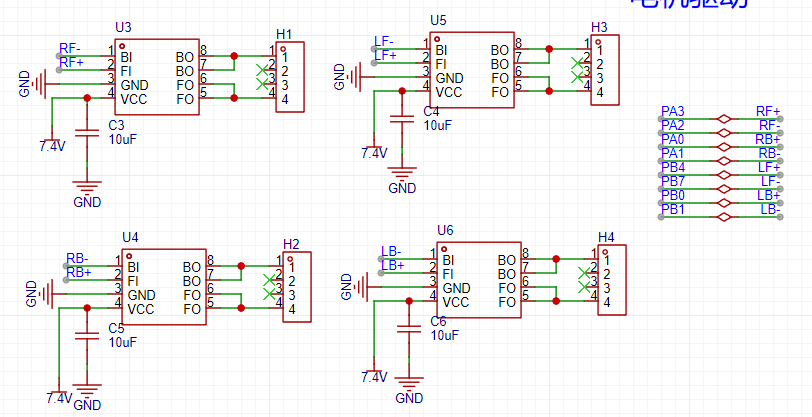
(7) Motor Drive Section: The LCSC Liangshanpai Open Source Car is referenced. The reference circuit is as follows.
Smart Car.zip
PDF_Smart Car.zip
Altium_SmartCar.zip
PADS_Smart Car.zip
BOM_Smart Car.xlsx
95773
Hardwood Classroom STM32H750 Oscilloscope & Signal Source Expansion Board
Oscilloscope + signal source analog front-end expansion board for use with Hardwood Classroom STM32H750 core board
Signal Input:
Two analog signal input channels.
Input signal range: -15V to +15V.
A 1MΩ input impedance is achieved through a series resistor voltage divider. The relay switch circuit selects direct connection/reduction by 20 times.
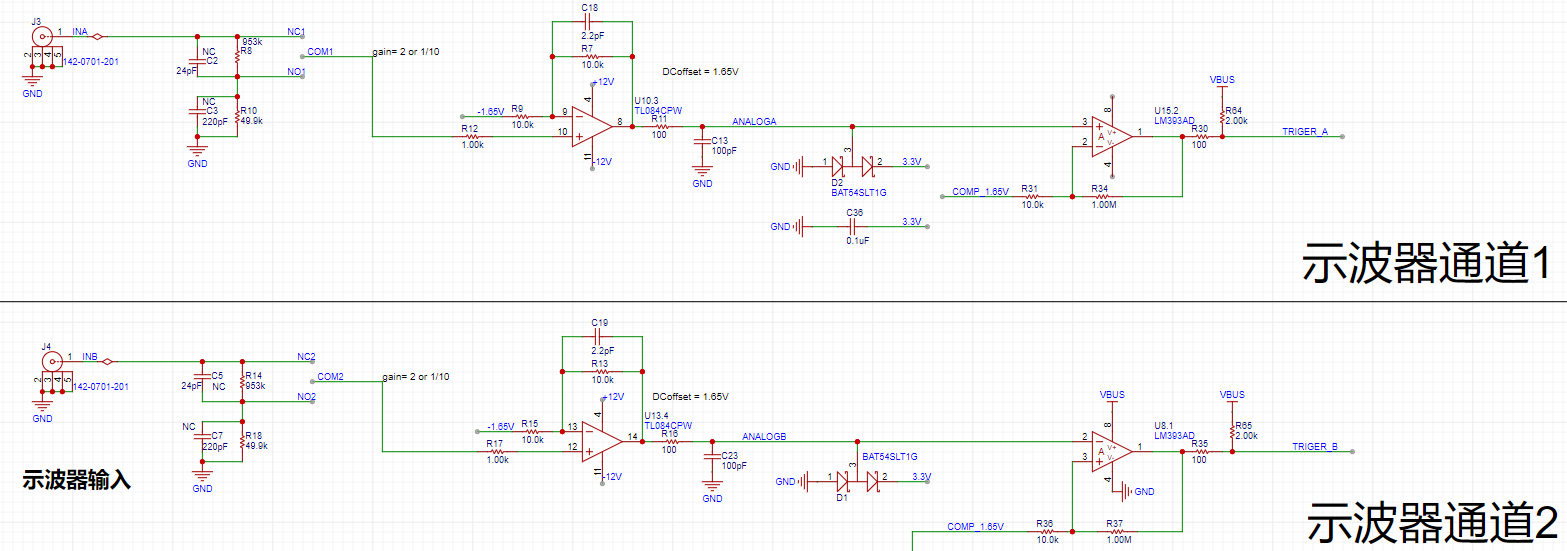
Because the STM32H750's internal VREF uses a 3.3V power supply, the ADC acquisition range is 0~3.3V, and the analog input voltage range is -15V~15V. Therefore, the signal needs to be reduced by at least 30/3.3 (approximately 9 times). Adding a positive offset of 3.3/2 = 1.65V, complete signal acquisition is achieved. Here, the signal is reduced by ten times (resistor parameters are easy to choose).
When the input signal is small, a relay is used to select the direct connection circuit to ensure that the signal entering the ADC is as large as possible. Combined with a 16-bit ADC, the sampling results are accurate and reliable.
The pre-amplifier is a non-inverting amplifier, which can amplify the signal by 2 times and offset it positively by 1.65V
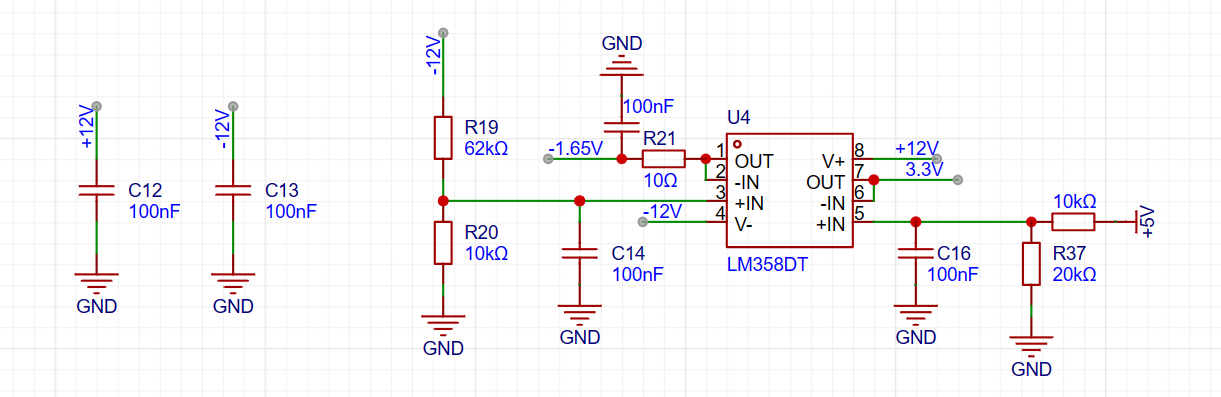
(the -1.65V above is obtained by voltage division of -12V through resistors and voltage follower).
The post-amplifier is a hysteresis comparator. The non-inverting input is a DC trigger signal generated by DAC1_OUT1 to achieve a square wave output, which is convenient for subsequent triggering of ADC signal acquisition, frequency measurement, etc. A suitable trigger signal can also make the waveform display stable.
The series Schottky diode potential clamping prevents damage to the
power supply section of the core board:
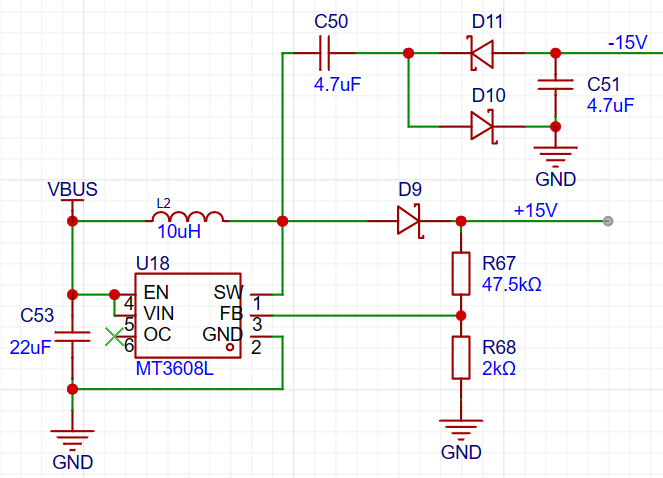
DC-DC boost and negative voltage generation circuit. I forgot the principle, but it is roughly that the chip can maintain the voltage between FB and GND at 0.6V, and the resistor ratio can output 15V. The voltage at SW oscillates between 0 and 15V. When SW outputs 15V, D10 conducts and C50 charges, resulting in a 15V voltage difference at C50 when fully charged. When SW outputs 0V, D11 conducts and C50 discharges, transferring the 15V voltage difference to C51, thus enabling the output of -15V.
(For the wiring of this part of the circuit, it is recommended to refer to the manual for precautions. Improper wiring can easily lead to boost failure.)
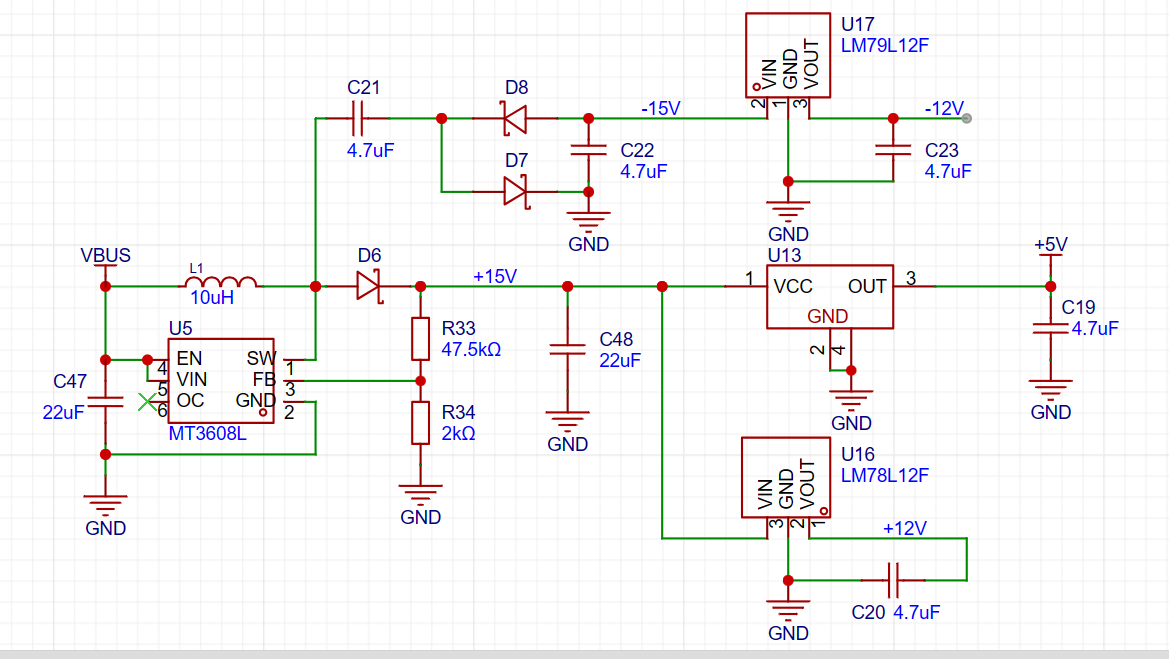
After obtaining ±15V, ±12V and +5V can be directly obtained through LDO (the 5V from the external power supply is not used directly here because a negative offset is needed to provide the analog output channel later. The external power supply fluctuates greatly, while the 5V obtained through LDO is very stable).
Analog output section:
a second-order RC filter to implement the low-pass filter function.
The STM32 ADC output range is 0~3.3V. In order to achieve the output requirement of -10V~+10V, the signal needs to be amplified by 20/3.3 (about 6 times) and then offset downward by 10V.
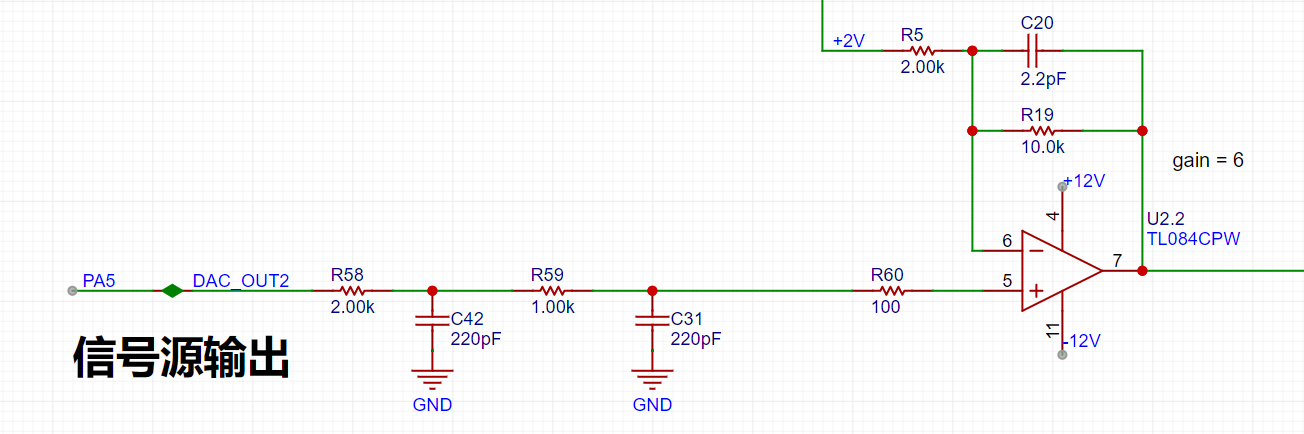
The 2V in the diagram is obtained from 5V through resistor voltage division and then through voltage follower.
Since Vn=Vp, Vout=(Vp-2)*5 + Vp = 6Vp -10V. The -10V offset is obtained in this way.
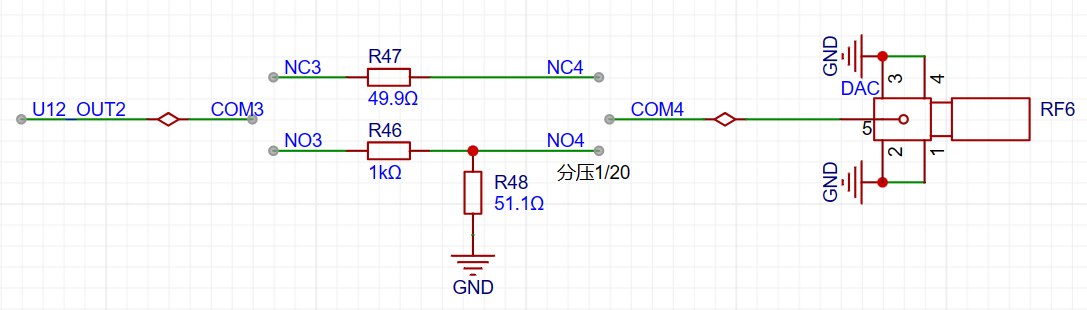
The ADC has a 12-bit output precision. When the DAC code value is reduced to output a small signal, to achieve a voltage resolution of 7 bits (i.e., a vertical resolution of 128 points), the waveform must be attenuated by 128/4096 = 1/32. This translates to an output voltage range of ±10V/32 = ±0.3215V. For signals smaller than ±0.3125V, further reducing the code value would result in insufficient DAC resolution, leading to noticeable waveform steps. Therefore, when outputting signals smaller than ±0.3125V, the output is switched from direct output to a resistor divider to attenuate the waveform by 1/20, ensuring sufficient voltage resolution for small signals.
The impedance to ground for both output speeds is 50Ω.
Button descriptions: KEY1: Backward selection KEY2: Forward selection KEY3: Channel 1/2 trigger selection KEY4: ADC on/off
Software section:
1. Timers used:
LPTIM1: 1. Triggers DMA every 20ms to refresh the screen 2. Detects button status every 100ms
LPTIM2: Timeout function. If a trigger signal is generated within 100ms, the frequency will be calculated in the TIM2 interrupt + ADC acquisition will be enabled + the timeout function will be disabled. If a timeout occurs, ADC acquisition will be enabled and the timeout function will be disabled.
TIM2: CH1, CH2 capture the trigger signal generated by the comparator
TIM3: Encoder mode count
TIM6: Triggers DAC1_OUT2 to adjust the frequency and peak-to-peak value
2. ADC:
16-bit ADC1 + ADC2 dual-channel acquisition to improve the sampling rate
3. DMA:
DMA of 3 peripherals is enabled: ADC acquisition (highest priority), DAC sends analog signals, SPI sends data to the screen (lowest priority)
4. X/Y axis switching:
X-axis switching: Adjusts the sampling range by changing the ADC sampling rate. A higher sampling rate results in a longer sampling time and a wider displayed signal. Six sampling times are available: 8µs, 16µs, 32µs, 64µs, 160µs, 320µs, and 640µs.
Vertical axis switching: Obtained by processing the ADC data. Six levels are available: 100, 200, 500, 1000, 2000, and 5000 mV/division.
5. Fast Fourier Transform (FFT ):
I don't understand
why the blue signal at the bottom of the screen is the FFT signal.
Here is the official tutorial: Chapter 1 Function Division and Preparation (yuque.com).
The official sample code will be attached at the end of the article
. Finally: I made some modifications to the code based on my own situation and preferences, including: 1. Because I used EC11, switching would jump two levels, which I changed back in the program. 2. Pressing EC11 resets the system. 3. Modifications to the waveform and the selected highlight color.
Video Demonstration: Hardwood Classroom STM32H750 Oscilloscope & Signal Source Expansion Board_Bilibili_bilibili
Official sample code.rar
Modified version.rar
PDF_Hardwood Classroom STM32H750 Oscilloscope & Signal Generator Expansion Board.zip
Altium_Hardwood Classroom STM32H750 Oscilloscope & Signal Source Expansion Board.zip
PADS_Hardwood Classroom STM32H750 Oscilloscope & Signal Source Expansion Board.zip
BOM_Hardwood Classroom STM32H750 Oscilloscope & Signal Generator Expansion Board.xlsx
95774
TTL to USB / SBUS to USB / SBUS to TTL converter
TTL to USB / SBUS to USB / SBUS to TTL converter
Introduction:
I noticed that the ones sold online were rather ugly, and since I was using fewer and fewer modules, I drew a simpler and nicer
functional diagram .
Figure 1 shows an inverter, which can also be used as the "Black Sheep Mod" in a racing game.
Figure 2 shows a USB to S-Bus converter; the S-Bus can be detached and used separately, resulting in a TTL to S-Bus converter and a TTL to USB converter.
Figure 3 shows a USB to TTL circuit.
The DIY
BOM cost is only a dollar or two.
PDF_TTL to USB - SBUS to USB - SBUS to TTL Converter.zip
Altium_TTL to USB_SBUS to USB_SBUS to TTL converter.zip
PADS_TTL to USB_SBUS to USB_SBUS to TTL converter.zip
BOM_TTL to USB_SBUS to USB_SBUS to TTL converter.xlsx
95775
LM1875 power amplifier board
LM1875 power amplifier board
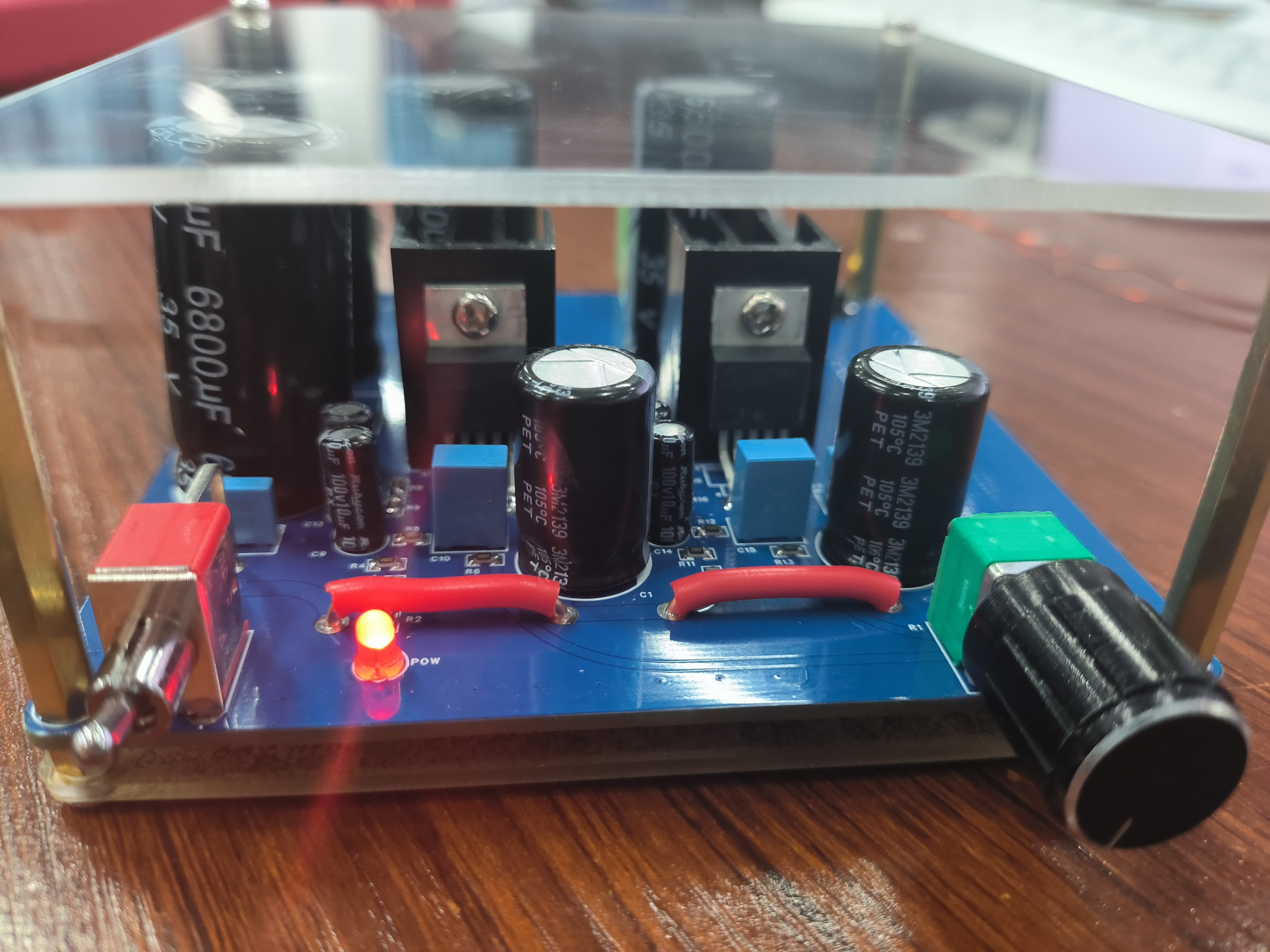
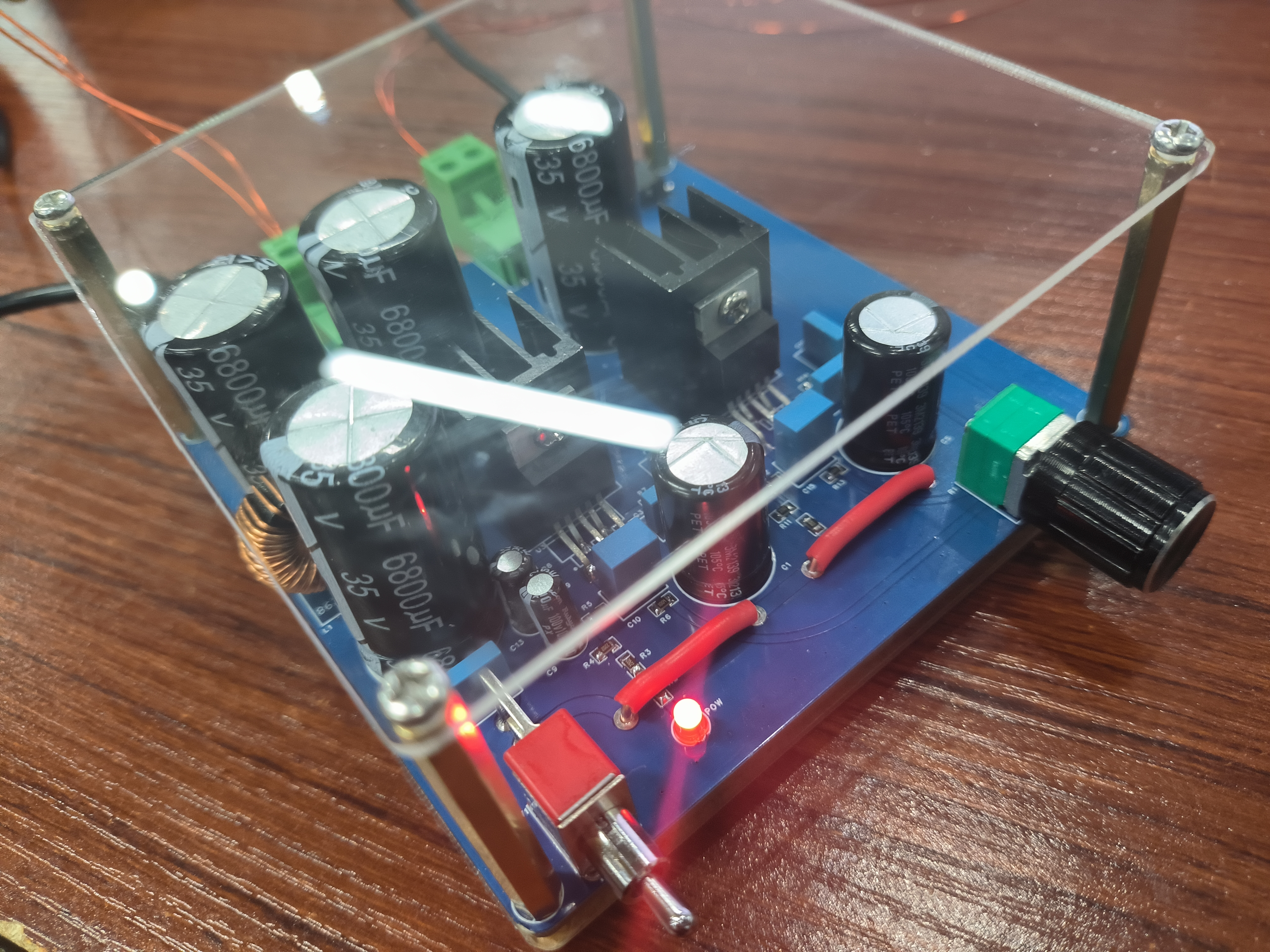
The LM1875 is a power amplifier integrated circuit developed by National Semiconductor. This device features a small package, simple peripheral circuitry, and excellent overload protection, making it suitable for use as an audio power amplifier in audio systems.
The LM1875 incorporates internal overload, overheat, and inductive load reverse potential protection, ensuring stable operation under various conditions.
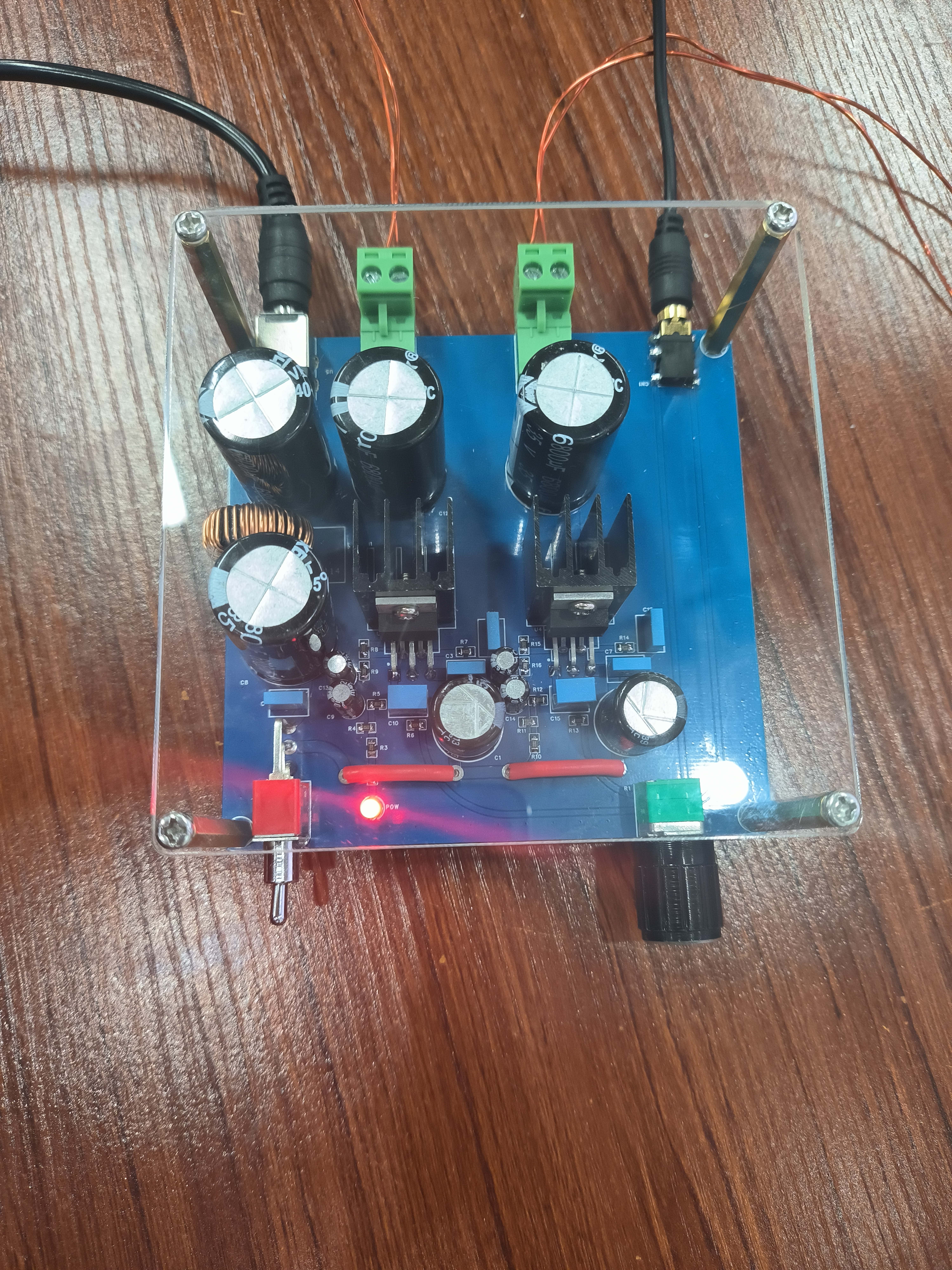
This circuit utilizes a dual-channel LM1875T 20W audio power amplifier.
A π-type filter circuit is used at the power input.
The power supply is a 12-24V DC-DC converter.
A 24V 3A or higher power supply is recommended.
[IMG0.jpg]
[IMG1.jpg]
[IMG2.jpg]
BOM.xlsx
IMG1.jpg
IMG2.jpg
PDF_LM1875 power amplifier board.zip
Altium_LM1875 power amplifier board.zip
PADS_LM1875 power amplifier board.zip
BOM_LM1875 power amplifier board.xlsx
95776
Touchscreen stand light
The touch-sensitive stand light has adjustable brightness and can be stood upright using a casing or inserted into some stand bases.
This is a touch-sensitive stand light using the RH6618A chip. It has adjustable brightness and can be stood upright in its casing or inserted into stand bases. However, two LEDs are not working, and I don't know why. The 3D-printed casing isn't very transparent, possibly due to the material chosen. Also, I forgot to include a hole for the switch in the casing design, and the battery hole wasn't deep enough (embarrassing).
2.jpg
3.jpg
4b2e7cea33ff50415f5b68596ded8d19.mp4
c9ef46579bbb02d1e8d18752a3caf4f3.mp4
PDF_Touchscreen Stand Light.zip
Altium Touchscreen Stand Light.zip
PADS_Touchscreen Stand Light.zip
BOM_Touchscreen Stand Light.xlsx
95777
electronic








 京公网安备 11010802033920号


 9201K1CWZQE22



