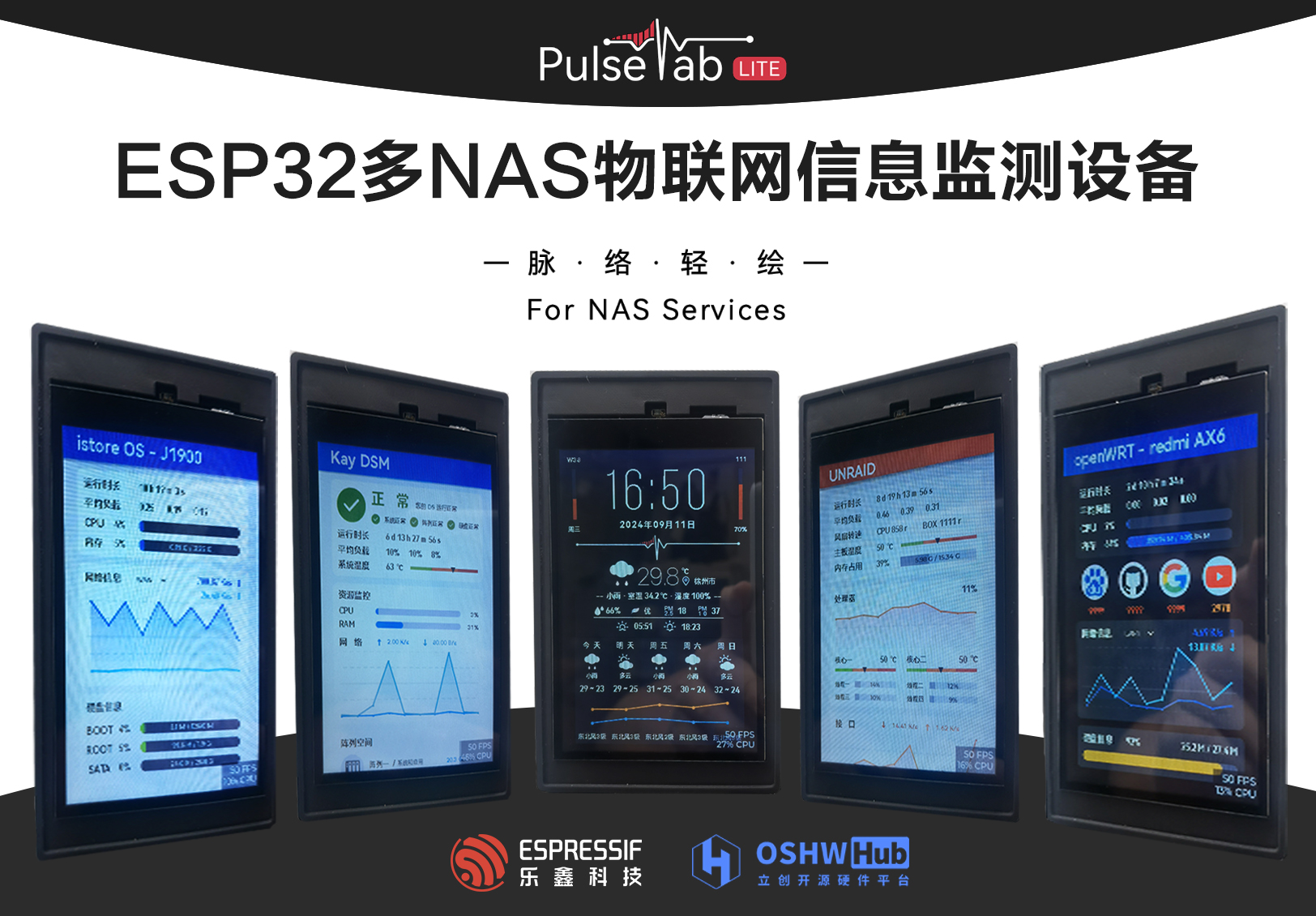
Project Introduction:
A NAS (Network Attached Storage) is a server specifically designed for data storage. It separates storage devices from the server via a network connection, centering on the data, thus enabling centralized data management. NAS devices require stable network connectivity and continuous hardware health monitoring to achieve backup and secure management of critical data. This project leverages the powerful networking capabilities of the ESP32 to develop an interactive IoT device that monitors the NAS network status, device hardware, and system health. It also includes necessary sensor peripherals to support environmental temperature and humidity adjustments, ensuring the NAS device operates continuously in a healthy environment and condition.
Product demo video: https://www.bilibili.com/video/BV1kb4ze6E7E/?spm_id_from=333.999.0.0&vd_source=c99f4cc51a936036bca99830e36262da
October 26, 2024 Update:
The LCSC ESP32 development board PulseTabLite computer monitor project has been completed and open-sourced. Interested users can access it after approval. Both hardware design and source code are open source.
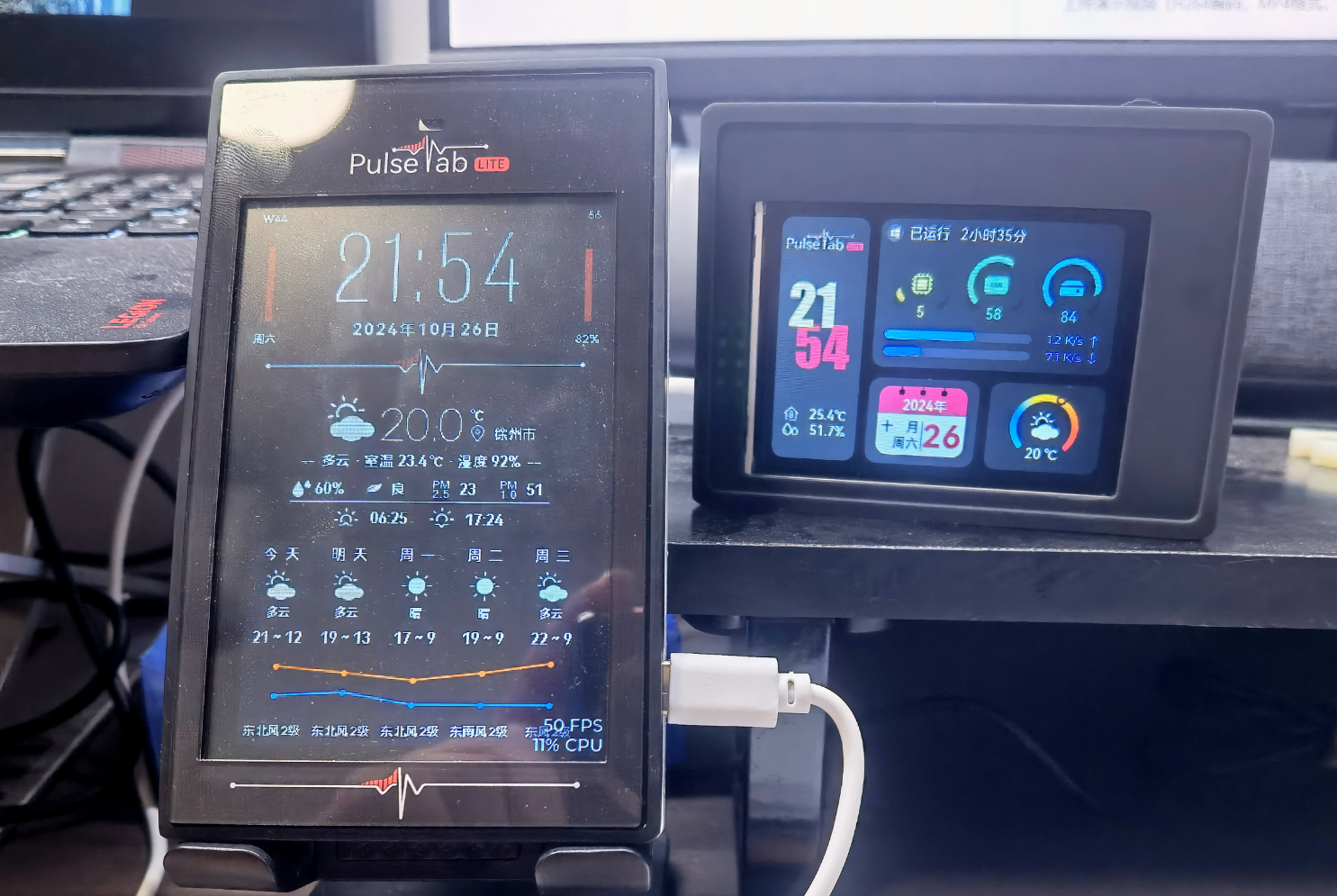
(Photo of the two brothers)
Preface :
By completing this project, you will gain:
Proficiency in using Espressif ESP32 for embedded development;
proficiency in developing ESP32 products in the Arduino environment;
proficiency in writing drivers for buttons, touch sensors, temperature and humidity sensors, and photosensors;
learning to use the GPIO/PWM/ADC pin functions of the ESP32;
understanding the GPIO pin limitations of the ESP32-S3 and learning to use it for circuit design.
Learn embedded system usage and GUI front-end development:
Learn to use TFT_espi and LVGL to drive LCD screens;
be proficient in using Figma with LVGL for GUI design;
learn to edit LVGL code to achieve functional interaction;
be able to get started with the basic usage of the FreeRTOS system.
Gain a preliminary understanding of network communication technology and implement its application:
Be able to use communication protocols such as HTTP/UDP to achieve various functions such as network access and API acquisition;
understand the basic principles of SNMP for device communication.
Learn the basic project development process:
Experience the entire process of a project from idea to product implementation;
develop brand awareness, understand the connotation of project naming and brand packaging;
understand the brand development process.
I. Project Introduction
1.1 Requirements Analysis
I am a deep DIY NAS enthusiast. Through several iterations of DIY products, I currently use an IstoreOS main router, an OpenWRT secondary router, and a dual-system NAS at home, including an underlying Unraid system and a DSM system installed on an Unraid virtual machine. The functions and concerns of each system are as follows:
IstoreOS Main Router:
Placed in the weak current box, attention needs to be paid to the temperature and heat dissipation of the box in summer;
the gateway network hub, DHCP service, and traffic monitoring.
OpenWRT Secondary Router:
Used as a secondary router in the study for internet access via VPN, requiring periodic testing of website connections;
using a Redmi AX6 (a high-end router) for upgrading, its hardware configuration is inferior to a software router, requiring monitoring of system resource usage.
Unraid NAS:
The underlying NAS system, running services using Docker and virtual machines, requiring monitoring of system and network resource usage;
the underlying system directly reads device resources, requiring monitoring of system temperature, hard drive usage, and fan operation.
DSM Synology NAS:
Used for storing and backing up important data, therefore requiring close monitoring of hard drive and storage space health, system operating status, and
system network monitoring.
Because NAS devices (including lightweight NAS systems) lack front-end system monitoring during daily operation, logging into a specific IP address webpage is required to understand the device's operating status, causing some inconvenience.
1.2 Functional Concept
Based on the above requirements analysis, the functions that this project needs to achieve are envisioned as follows:
a monitoring screen that can view the operating status of multiple NAS devices with one machine;
specific information monitoring for specific NAS system focus points;
a UI interface that fits the original system design, with intuitive and readable data;
simple operation, without cumbersome system and operation;
and the inclusion of functions such as clock and weather.
1.3 Brand Development
Brand development for a project refers to establishing and enhancing the brand image in the target market through a series of strategies and activities, thereby promoting the project's success and sustainable development. Although DIY enthusiasts primarily focus on learning and the fun of DIY, a successful project product will inevitably enhance its product image through brand development and promote it in the market by combining marketing strategies.
Since brand development involves more aspects of marketing, the discussion of brand development in this article will be brief. Additionally, this project has conducted a certain degree of brand development by leveraging Baidu's AI, Wenxin Yiyan; therefore, this section will use relevant discussions from Wenxin Yiyan.
1.3.1 Brand and Connotation (with Wenxin Yiyan)
The brand's name and connotation concisely reveal the project's core value. The core values of this project are: lightweight, accuracy, and intuitiveness.
Brand Name: NAS Pulse Tab Lite - NAS Pulse Lightweight
Brand Essence:
NAS (
Network Attached Storage) is the cornerstone of modern data centers, supporting the storage and sharing of critical enterprise and personal data. NAS PulseTabLite specifically addresses this core area, providing accurate and efficient performance monitoring and optimization services.
Pulse:
Like the pulse of the human body, NAS PulseTabLite can "sense" the "heartbeat" of the NAS system in real time—its operating status and performance fluctuations. This real-time monitoring and dynamic perception of performance ensures that users can understand the health status of the NAS system in a timely manner and quickly respond to potential problems.
Tab:
In the NAS PulseTabLite interface, users can easily browse different functional modules and monitoring indicators through simple "Tab" switching. Whether it's I/O performance, network bandwidth, or disk usage, everything is under control. This intuitive design allows users to quickly locate problems and improve operational efficiency. While pursuing comprehensive functionality, NAS PulseTabLite also emphasizes lightness and simplicity
.
Its simple interface design and convenient operation process allow users to easily get started and quickly master the product's usage without cumbersome settings or complicated steps. This lightweight design concept brings users a smoother and more efficient user experience.
The name "NAS Pulse Light Drawing
" embodies the product's core technological features (comprehensive monitoring and in-depth understanding of NAS system performance), conveys a simple, intuitive, and easy-to-use product experience, and also possesses a poetic aesthetic.
"Pulse" – In Chinese, "pulse" usually describes the internal connections and order of things, like the blood vessels in the human body, connecting various parts. Here, "pulse" is used metaphorically to describe the data flow, performance changes, and connections between various components within the NAS system. It implies that this product can deeply understand the "blood vessels" of the NAS system, providing users with clear and accurate performance monitoring and status display. "
Light Drawing" – This term expresses the product's interface design and user experience. "Light" represents simplicity and portability, while "drawing" suggests that users can easily perform various operations on this interface, as freely and smoothly as drawing. Therefore, "Light Drawing" conveys a simple, intuitive, and easy-to-use product experience, enabling users to easily control the performance and status of the NAS system.
1.3.2 The brand packaging
main logo design is as follows:

II. Hardware Implementation
The hardware implementation of this project is not complex, mainly including the screen and touch circuit, peripheral sensing circuit, and auxiliary power supply circuit, serial communication circuit, and ESP32 peripheral circuit.
In addition to supporting this project, this hardware can also leverage the powerful communication capabilities of the ESP32 chip to implement different IoT functions through different software development, including but not limited to smart home control, information broadcasting, and network communication support.
2.1 Schematic Diagram Description
2.1.1 The display screen and touch circuit
adopt an EYA 4-inch LCD capacitive touch screen with a built-in 40-pin FPC. The display interface supports SPI and parallel communication protocols; the 8-pin touch interface supports I2C communication protocol.
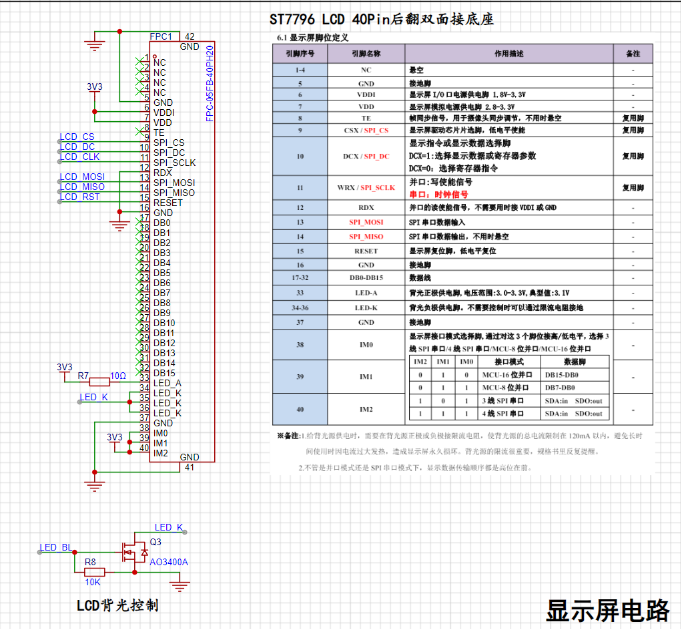

Key points of the display circuit:
According to the screen development manual, the board has 8 onboard LEDs, and the total backlight power supply current should not exceed 120mA. Therefore, a 10-ohm current-limiting resistor is connected in series at the LED_A interface;
the backlight control circuit should use a transistor, with the gate connected to the pin with PWM function;
the display interface selects the high and low voltage levels M0-M2 according to the communication protocol.
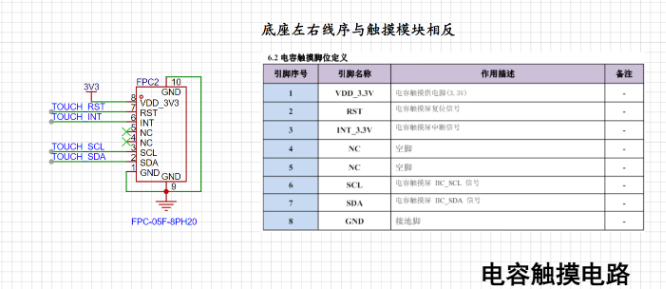
Key points of the capacitive touch circuit:
The 8-pin FPC socket interface with the serial number C2856797 selected here has the reverse pin sequence from the screen interface. Note that you need to check the correct connection before powering on;
RST can be connected to the RST pin of the LCD.
2.1.2 ESP32 Related Circuits
: For scalability considerations, this project uses ESP32-S3 WROOM N16 R8 Module. The following requirements should be noted in the design of the chip circuit (summarized from the chip design manual):
Note the minimum circuit requirements for the WROOM package in the design manual
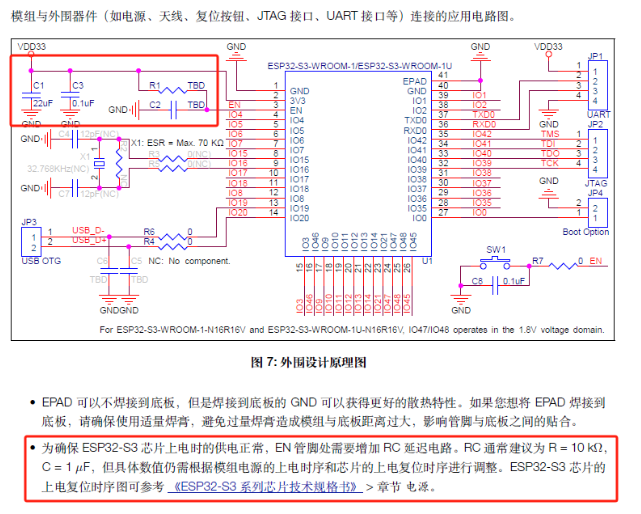
. IO35/IO36/IO37 cannot be used when there is SPI RAM;

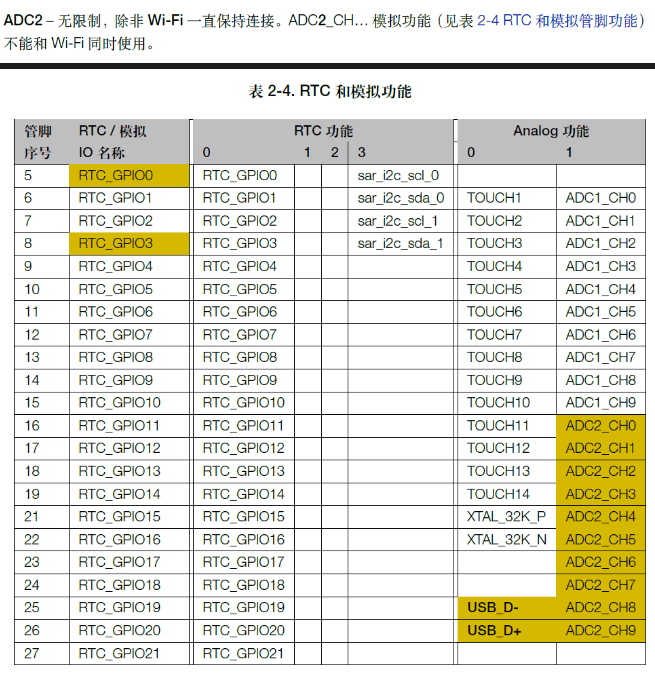
some GPIOs that support ADC functions cannot be used under continuous WIFI network conditions (yellow part in the figure below);
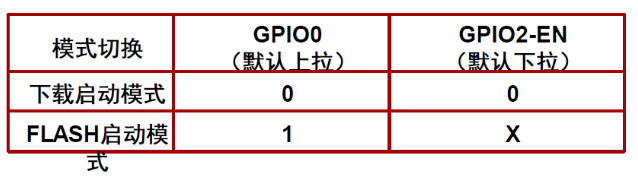
the serial port automatic programming circuit connects to the GPIO0-BOOT and GPIO2-EN pins, and uses two transistors to implement
SPI. The design should avoid SPI0/SPI1, and the default SPI pins should be used as much as possible
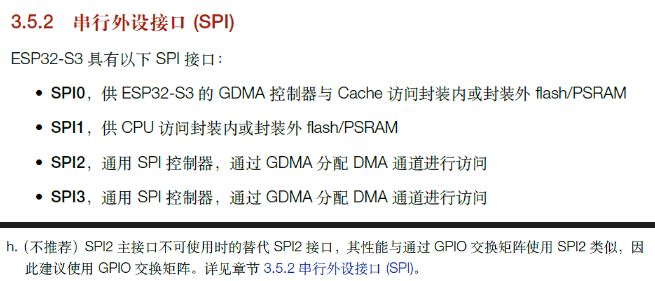
. Other circuits are not described in detail, and are all basic power supply, programming, button and sensor circuits.
2.2 Layout Instructions
2.2.1 Screen FPC Socket
Note the FPC cable direction in the LCD user manual. Check whether it is reversed before layout and power-on to prevent damage to the circuit.
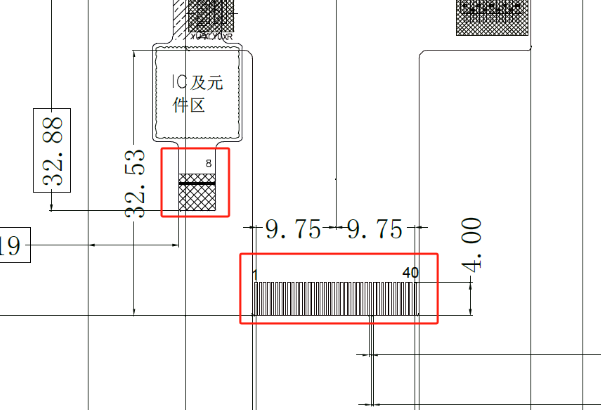
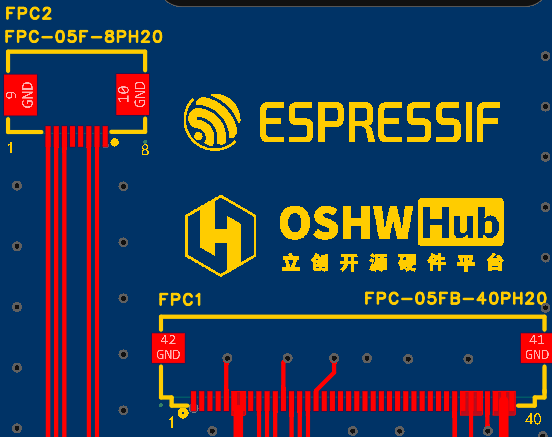
There should be no component layout in the FPC area; at the same time, open holes in the board for wiring as appropriate.
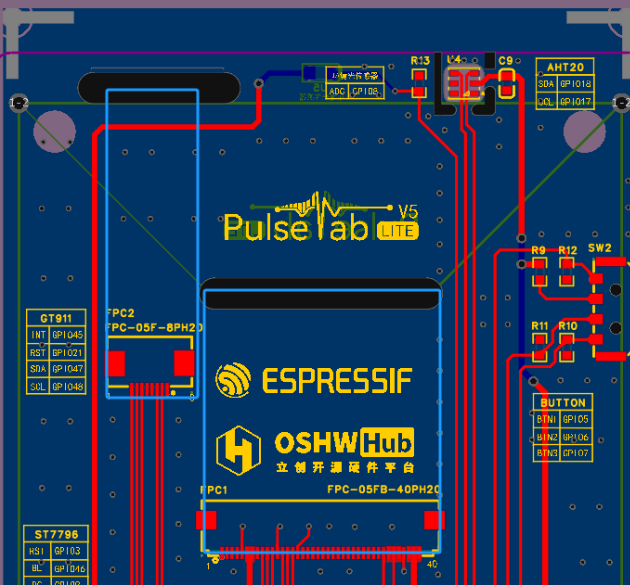
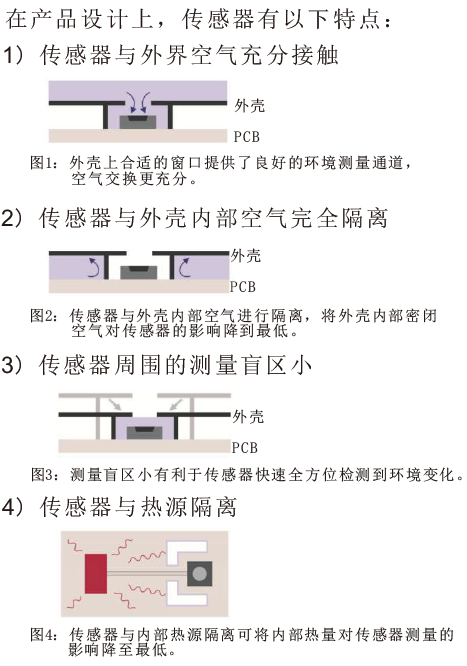
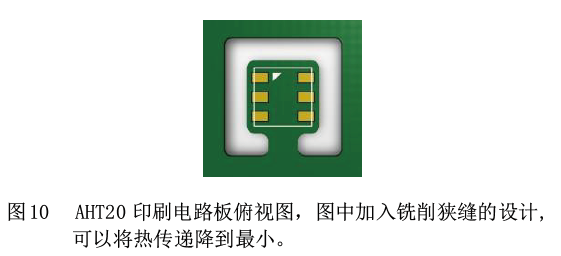
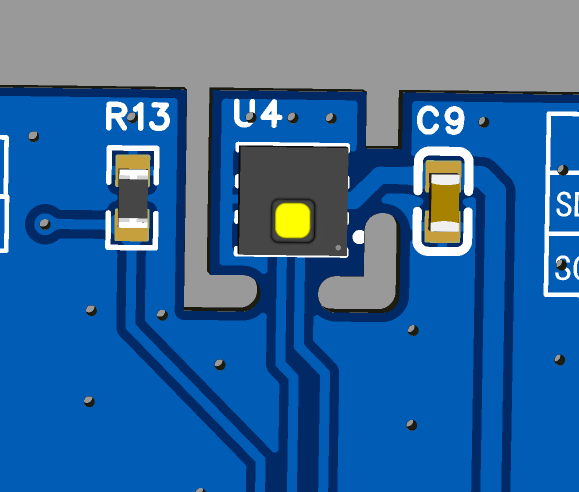
2.2.2 AHT20 Due to the large screen size in this project, the AHT20 temperature and humidity sensor's
heat generation from the screen and chip will cause it to exceed normal values. Therefore, the layout requirements in the instruction manual should be followed during the design process. Keep it as far away from heat-generating areas as possible to reduce heat conduction and increase ventilation.
2.2.3 Ambient Light Sensor:
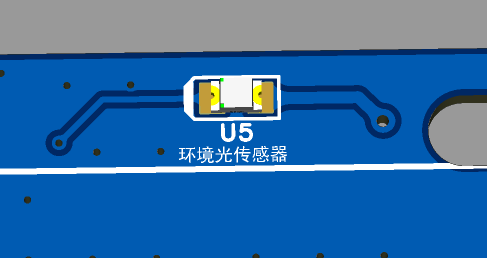
This sensor is located on the front of the machine and is the only component located on the back of the PCB. When soldering, ensure all other components are reflowed before manual soldering.
III. Software Implementation:
The hardware design of this project allows for expansion while ensuring functionality; however, software implementation is the focus of the project development. It utilizes ESP32 to implement various network communication services and achieves information acquisition and interaction functions through task scheduling design and front-end GUI development.
3.1 Functional Block Diagram:
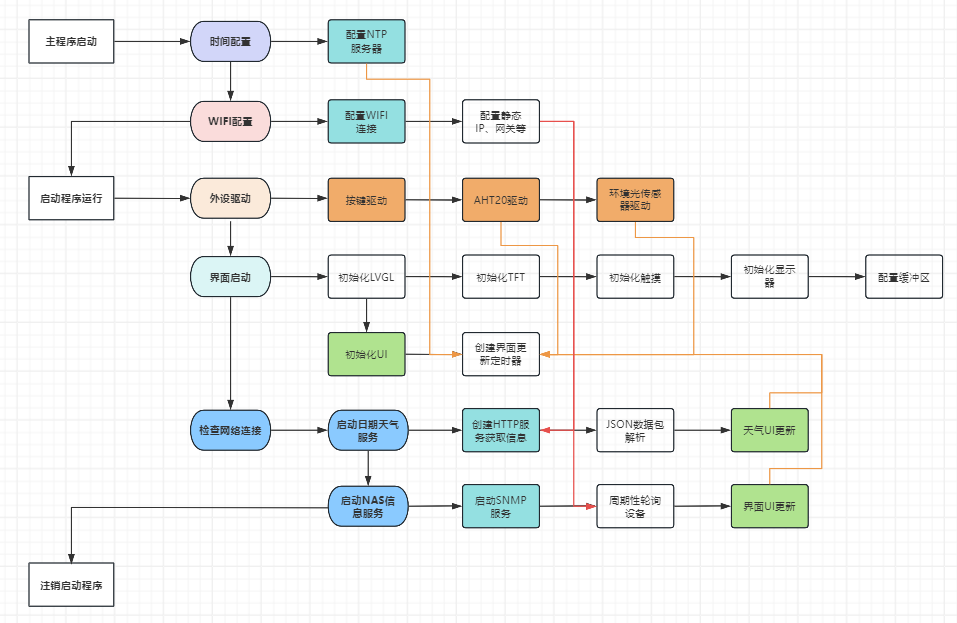
The software layer of this project uses the FreeRTOS system for backend task management and LVGL for frontend task processing. Functional implementation mainly includes network connection, sensor driver, and interface interaction.
Backend tasks include: startup program, device driver, capacitive touch startup and interface startup program, date and weather service program, and NAS information service program;
frontend tasks include: weather UI update, clock and date UI update, and NAS information panel UI update.
3.2 Capacitive touch and LVGL configuration:
The display driver is implemented using Ardiuno's TFT_espi and LVGL libraries, and the touch driver is implemented using the bb_captouch library.
TFT_espi configuration points:
Configure LCD pins and clock frequency;
implement the LCD screen ST7796 driver and configure the screen size.
LVGL configuration points (this part still needs further optimization)
: Configure the color mode as 16-bit RGB565;
use custom memory, configure the screen refresh rate, configure the clock frequency;
configure the screen buffer buffer_size = screenWidth * screenHeight / 30.
bb_captouch configuration points:
Configure the touch driver as GT911 and the communication method as I2C;
configure the touch driver pins;
configure the touch parameters. This driver can support up to 5-point touch.
3.3 Peripheral driver configuration:
Peripherals mainly consist of various sensors and buttons.
AHT20 temperature and humidity sensor configuration points:
This sensor uses the I2C communication protocol. Consult the device development manual. Since the capacitive touch has already used I2C configuration, the TwoWire Wire1 = TwoWire(1); parameter in the Wire library is used for configuration here. Wire1.begin(aht20_sda, aht20_scl); // Join I2C bus.
Key points for ambient light sensor configuration:
This sensor requires the use of the ESP32's analog-to-digital converter (ADC). Referring to the development manual, due to the need for continuous wireless connectivity in this project, there are some ADC pin limitations in the hardware design, which are emphasized here again.
Configure the pin mode as pinMode(LIGHTPIN, INPUT); and use analogRead(LIGHTPIN) to read data.
Button configuration is relatively simple and will not be elaborated here.
3.4 Time and Weather Function Implementation
Key points for the time function:
Time synchronization is achieved using Alibaba Cloud NTP servers, with three servers configured, such as ntp1.aliyun.com;
time zone offset: Beijing uses GMT+8, calculated in seconds as gmtOffset_sec = 8 * 3600; Daylight saving time is not used and is configured to 0;
Due to a delay of 5 to 10 seconds between clock configuration and time acquisition and update, investigation revealed a statement in the getLocalTime(&timeinfo) function that configured a time delay, causing a lag in time acquisition at boot time. This has not yet been optimized (experts are welcome to provide guidance).
Key points for the weather function :
After testing multiple service providers, the service provider "http://t.weather.sojson.com/api/weather/city/101190801" was ultimately selected. This website is stable, free, requires no registration, and has a short data acquisition cycle. See https://www.lanol.cn/post/33.html for details;
data parsing uses the ArduinoJson library.
3.5 NAS Information Communication
NAS communication is based on SNMP service. This communication protocol was chosen because iStorOS, OpenWRT, Unraid, and DSM systems are all based on Linux, making SNMP a universal communication protocol.
Key points of SNMP protocol communication:
Most OID and MIB trees based on Linux systems are universal, facilitating the acquisition of system, network, and hard drive usage information;
please note that when using SNMP, the server-side snmpd should be installed on the Linux-based NAS device;
the DSM system has performed secondary development of SNMP MIBs on its official website, and tutorials on using DSM's SNMP can be found online. The DSM SNMP user manual can be found at https://global.synologydownload.com/download/Document/Software/DeveloperGuide/Firmware/DSM/All/chs/Synology_DiskStation_MIB_Guide_chs.pdf.
Disadvantages of SNMP communication:
Because SNMP is based on the DUP protocol, communication here is asynchronous. When performing a large number of OIDs, especially when using WALK for device polling, the single communication cycle is long; at the same time, some data in the Linux snmpd protocol is updated every 5 seconds. Therefore, NAS information communication based on SNMP services cannot achieve second-by-second updates, which limits the monitoring of information requiring high synchronization.
3.6 GUI Front-end Development
The GUI front-end development uses Figma for UI design, and then imports the relevant material files into the SquareLine Studio environment for LVGL GUI development.
Figma is a vector graphics editing software with outstanding lightweight and ease of use features, allowing user interface (UI) and user experience (UX) design to be completed on the web page.
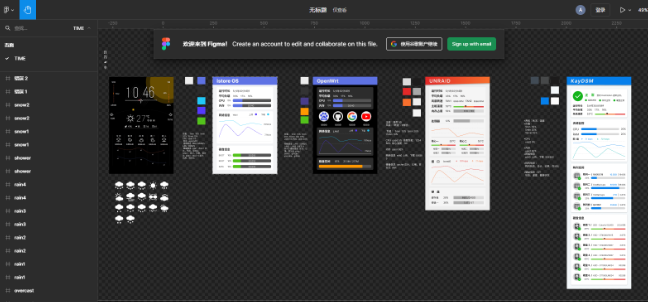
SquareLine Studio is an innovative visual drag-and-drop UI editor designed for embedded and desktop applications. Originally a platform for LVGL development, it has excellent compatibility with LVGL. This software greatly reduces the learning curve of LVGL development statements. Through graphical interface design, real-time interactive preview is possible, and program files can be exported after the design is completed.
The software trial lasted for 30 days, during which interface design could be completed (the trial period has now expired, and screenshot previews are no longer possible).
IV. Future
Functionality Improvements:
This project participated in the ESP32 IoT project, resulting in a tight development cycle. The LVGL design software is a paid service, and the project development, focused on learning and personal application, has certain limitations, such as the lack of a device configuration GUI design. The next step is to optimize the device configuration and NAS UI display interface.
Initially, device monitoring on Windows systems was also considered, therefore, relevant function interfaces for Windows system information monitoring are included, and these will be improved in the next step.
Regarding product optimization,
this project uses the SNMP protocol for communication. The project development allowed me to learn the principles and applications of this communication protocol. However, the SNMP protocol has drawbacks such as high latency. The next step is to use the mainstream AIDA software for optimization and development to improve real-time performance.
Due to the tight development cycle, memory debugging and optimization consumed approximately 50% of the time. Therefore, the 3D shell of the project was designed using JLCPCB EDA, and its personalization and operability need improvement.
This project connects NAS devices to the Internet of Things, realizing information access for personal electronic devices and showcasing the AI+ALL-in-one IoT concept. The next step is to build upon this foundation and further develop the system by leveraging Espressif Systems' ESP RainMaker solution and ESP HomeKit SDK framework to enable IoT device connectivity. This will allow for features such as mobile terminal monitoring, autonomous network optimization, and automatic temperature and lighting adjustment, helping NAS devices maintain optimal operating conditions in real time.








 京公网安备 11010802033920号


 C-157-1250AC-FDFB-SLC2-G5



