The TD3-TouchDisplay 3.0
is a small pendant based on an ESP32-S3R8 chip and a 1.89-inch QSPI screen. It offers a smooth user experience and supports both wireless charging and magnetic charging. It features an onboard clock chip, a six-axis gyroscope, a pressure sensor, a passive buzzer, and supports the SDMMC memory card file system. The
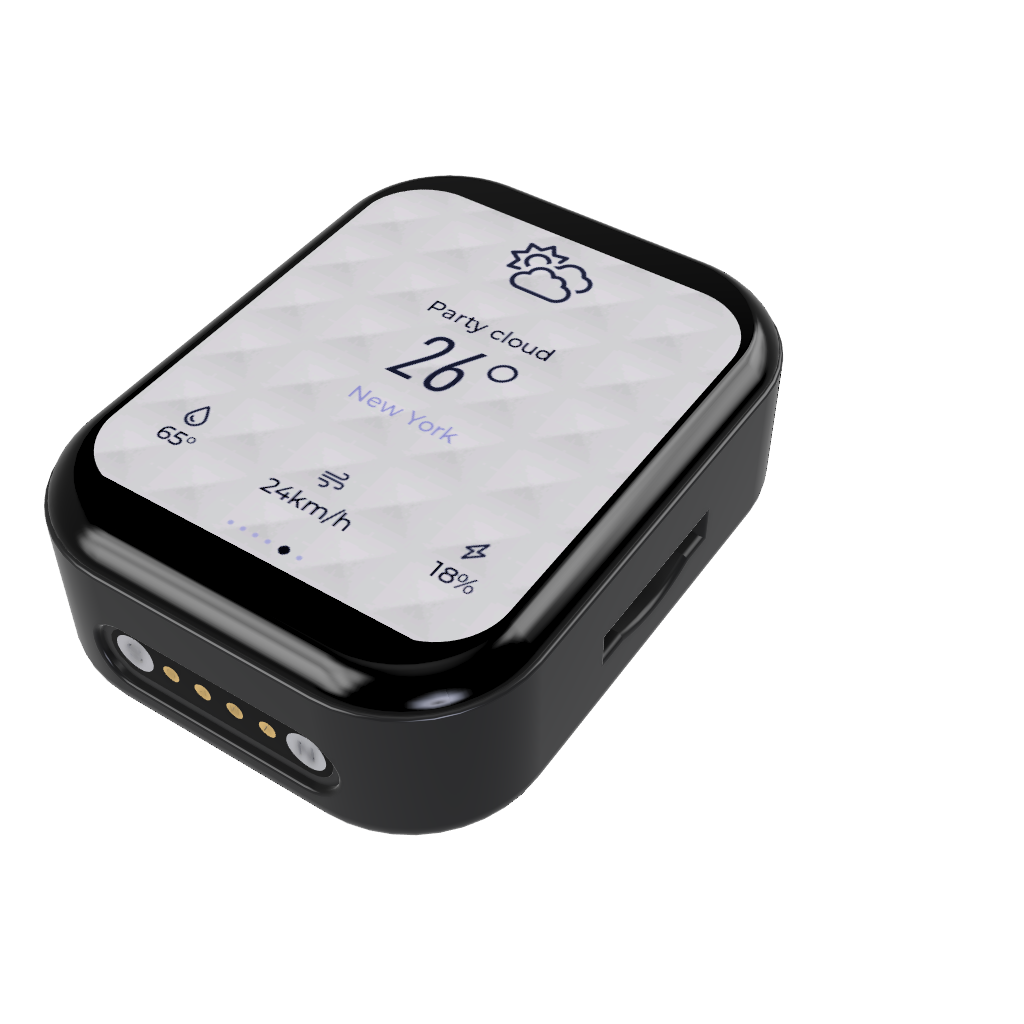
overall hardware thickness is less than 15mm, and it contains a 300mAh lithium battery powered by an AXP173 microcontroller. The magnetic charging interface and wireless power supply are switched via path selection. The
PCB thickness is 1.2mm.
Wireless power supply
uses the Volta NU1680 solution, supporting up to 5W wireless charging. The charging speed is limited by the AXP173, preventing the charging current from exceeding 1A. The NU1680's peripheral components have specific material requirements; it is recommended to refer to the datasheet to select appropriate resistors and capacitors.
The power management
uses the older AXP173 chip. Many people who are replicating this chip say that it has too many custom voltages and is difficult to buy. It can be modified to use my open-source single-cell lithium battery charging and discharging solution. You only need to write an additional ADC acquisition solution.
Lithium battery purchase link: [Taobao] Limited time offer: ¥2 off for orders over ¥20 https://m.tb.cn/h.gPwur8v7pjAurAq?tk=iaC63e7ytO5 MF6563 "3.7V polymer lithium battery, universal large-capacity built-in battery for walkie-talkies, story machines, car dashcams, and speakers" Click the link to open directly or search on Taobao to
buy 402530!!! Buy 402530!!! Buy 402530!!! The unsuitable
display that couldn't be installed
was a 1.89-inch QSPI screen from Huaxia Color, which is a bit pricey and currently has no alternative. This screen is the most expensive piece of hardware in the entire project. The screen's IC is GC9B71, and the driver is conveniently included in the IDF example code, making migration very easy. It's also a touch-enabled example code, and the chip is identical. If you don't want to use the code I provided, you can try migrating it yourself.
Magnetic power supply
was chosen because it makes base design very convenient, and the models for the two components of the magnetic power supply are already built; you can ask me for them if needed.
Development Configuration
: 1. Based on `esp-idf 5.1.2`, which may be replaced with a newer IDF version later.
2. `lvgl` version is `8.3.11`, which may be upgraded to `9` later.
Environment Configuration
: The pulled code does not include the `.vscode` folder. You need to open an IDF example project and copy the `.vscode` folder to the project root directory, or add the IDF plugin directly.
Target Board Configuration
: 1. Set the current target board:
2. Select the current workspace
. 3. Select `esp32s3`.
4. Select the `via ESP-PROG` item.
Project File Structure:
├─components
│ ├─axp173 // AXP173 power management driver
│ ├─backlight // AW9364 driver
│ ├─beep // buzzer driver
│ ├─bmp280 // BMP280 driver
│ ├─espressif__cmake_utilities
│ ├─espressif__esp_lcd_gc9b71
│ ├─espressif__esp_lcd_touch
│ ├─espressif__esp_lcd_touch_cst816s
│ ├─i2c // I2C driver
│ ├─lsm6ds3 // LSM6DS3 driver
│ ├─lvgl // LVGL
│ ├─pcf8563 // PCF8563 driver
│ └─qmc5883l // QMC5883L driver
│
├─docs
│
├─image
├─main
│ │ CMakeLists.txt
│ │ main.c
│ ├─HAL // Hardware Abstraction Layer provides hardware interfaces
│ ├─Model // The model layer mainly processes data, creates message queues, and creates acquisition tasks
│ └─View // In the MVVM architecture, the ViewModel layer mainly stores the generated UI
. │ .gitignore
│ CMakeLists.txt
│ partitions.csv
│ README.md
│ sdkconfig
│ sdkconfig.old
│ sdkconfig.temp
Flash Download Tools Burning (ignore if you don't need to burn the bin file)
1. Burning a separate bin file
| bin | address |
| -------------------- | ------- |
| bootloader.bin | 0x0 |
| partition-table | 0x8000 | |
ota_data_initial.bin | 0xd000 |
| TD3V2.0.bin | 0x10000 |
2. Burning a combined bin file
| bin | address |
| -------------------- | ------- |
| target.bin | 0x0 |
3. SPIFlashConfig
| Configuration Items | Options |
| --------- | ----- |
| SPI SPEED | 80MHz |
| SPI MODE | DOUT |
4. Manually power off and restart after flashing.
Introduction to the Page Management Framework
This page management framework is ported from the old TD3-App project. The original project was developed based on the Arduino platform, so it used C++, but the IDF was C. Although IDF supports C++ mixed programming, it is too cumbersome, so it was changed to C, losing classes and namespaces.
How to Add Pages
1. Create your page folder in the `mainViewPages` directory. The folder contains xxx.c files and xxx.h files, where xxx is your page name.
The .c file needs to follow the standard template as follows:
#include "Setting.h"
PageType *Setting;
static void Created()
{
}
static void Update(void)
{
}
static void Destroy(void)
{
if (lv_obj_is_valid(Setting->PageContent))
{
lv_async_call(lv_obj_clean, Setting->PageContent);
}
}
static void Method(void *btn, int event)
{
}
void Setting_Init()
{
Setting = lv_mem_alloc(sizeof(PageType));
strcpy(Setting->name, "Setting");
Setting->show_status_bar = 1;
Setting->BeforeEnter = NULL;
Setting->Created = Created;
Setting->Update = Update;
Setting->Destroy = Destroy;
Setting->Method = Method;
Setting->PageContent = create_new_screen();
Page_Register(*Setting); Simply replace all instances of `Setting` in the file with other names. The
.h file is simpler; just replace all instances of `Setting` with your own, and also change the capitalization of `Setting` in the conditional compilation section. #ifndef SETTING_H #define SETTING_H #ifdef __cplusplus extern "C" { #endif #include "Page.h" void Setting_Init (); #ifdef __cplusplus } /*extern "C"*/ #endif #endif ( The code snippet is incomplete and doesn't need a direct translation.) 2. Modify `mainCMakeLists.txt` to add `"View/Pages/xxx"` where xxx is your page directory name. As for why not write a unified CMake file to follow IDF project standards, the answer is no, that's right, "no".








 京公网安备 11010802033920号


 APA300-FCQPP



