I'm using a leftover ESP32-WROOM-32D from a previous project to make a simple Bluetooth keyboard.
Only a little hands-on skill is required :)
[Process]
Keyboard Layout: Create the keyboard layout at www.keyboard-layout-editor.com.
Positioning Board: Copy the keyboard layout to builder.swillkb.com to create the positioning board. This directly generates the entire keyboard's stacked file. Since it's a DIY project and includes a screen, I only used it to create a DXF file for the positioning board.
Schematic: I was lazy, so I didn't use an array for the keys; the number of I/O ports is sufficient for direct connection (ignore the knob presses, as I didn't plan to include a menu).
PCBA Layout: Import the positioning board's DXF into the layout.
Acrylic Stack-up: Convert the PCBA to a STEP file and import it into Solidworks. The keyboard has a sandwich structure, requiring five layers: top layer, bottom layer, frame, positioning board, base plate, and baffle. Make extra prototypes to make the overall thickness more stable for use as a clock/weather display on a desktop (the numeric keypad isn't used very often). Secured with four 2mm Allen screws. The actual DIY project used 28mm black screws.
Code: Arduino framework. No RTOS used, direct polling. Compilation & programming environment: VSCODE Platformio. Mainly used libraries:
Backlight control
Wi-Fi library,
screen display,
weather JSON text parsing
library,
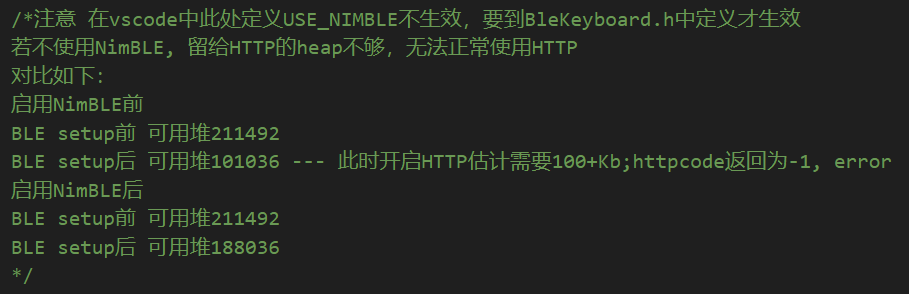
lightweight Bluetooth library. Important! Otherwise, the heap space for HTTP will be insufficient, and HTTP will not function properly. Note that
USE_NIMBLE must be defined in the Bluetooth library header file BleKeyboard.h. The following comments are provided in the code:
The left side of the screen displays the year, month, day, and time. The upper right corner displays Wi-Fi, Bluetooth, battery/charging indicator, below which are the weather, weather symbols, and temperature. The life tips are scrolling and can be swapped with the temperature symbols below.
The code is a bit rough, feel free to criticize ;-)
Prepare other materials while PCB design:
Switches: Kailh hot-swappable switches;
Switches: Kailh Zhixia switches (I like the sound and color) + Changrun satellite stabilizers;
Battery: Zhongshunxin 402764 portable instrument polymer lithium battery 3.7V 1000mAh + DF57 connector cable;
Keycaps: Five Star eSports PBT frosted translucent gray-black 21-key NumPad keycaps;
Rotary caps: Handoo aluminum alloy mechanical keyboard knob caps;
Display: Zhongjingyuan 2.08-inch OLED display 25664 sh1122 white; SPI interface module [pin headers are not soldered by default] 2.54 pin header length needs to be adjusted;
RGB LEDs: WS2812B LED chips (any one will do);
[Assembly and Network Configuration]
First, solder the PCBA (RGB chips, switches)
. Assemble the switches, positioning plate, and PCBA. Be especially careful not to break the satellite stabilizers, as acrylic is brittle. Small local breaks are okay.
Arrange the acrylic layers roughly in the following order: top layer, bottom layer, frame * n, positioning plate, frame * n, bottom plate; insert the baffle between the bottom plate and bottom layer. Trim the screen pin length and adjust the number of layers used. Plug in the screen, keeping it as close as possible to the top and bottom layers. Secure the end furthest from the screen socket with foam.
Tighten the four 2mm Allen screws.
Power on; the first time connecting to the network requires downloading the Esptouch app on your phone and connecting to the same Wi-Fi network for pairing. Subsequent power-ups will automatically connect.
[To be optimized]
Low power consumption is not implemented. A 1000mAh battery with Wi-Fi and Bluetooth fully enabled only lasts about five to six hours. It's mainly used as a clock via USB.
Changing the city string in the weather API settings to "ip" will automatically connect to the current city.
String url_weather = "https://api.seniverse.com/v3/weather/now.json"; String url_life = "https://api.seniverse.com/v3/life/suggestion.json";
String city = "Jiangsu Suzhou"; //This could be changed to "ip" to automatically obtain the current city . The
knob may cause errors when turned up and down quickly; this could be optimized.
Modify the buttons to an array, allowing for combination. Then, add a menu in the code, allowing adjustment of RGB colors, displayed content, etc.
The USB port is at the top, causing light to leak onto the screen. The PCBA and frame could be modified to allow the USB port and switch to come out from the side.








 京公网安备 11010802033920号


 FX-104-CFF-D1D9



