Project Description:
This device helps your keyboard produce various sound effects, from mahjong sounds to Chicago typewriter sounds.
Open Source License:
Public Domain.
Project Functionality
: This device connects between a USB keyboard and a host computer; pressing keys on the keyboard will produce sounds, thus creating various "typing sound effects."
Project Attributes:
This project is being publicly released for the first time and is my original work. This project has not won any awards in other competitions.
Project Progress:
Completed.
Design Principle:
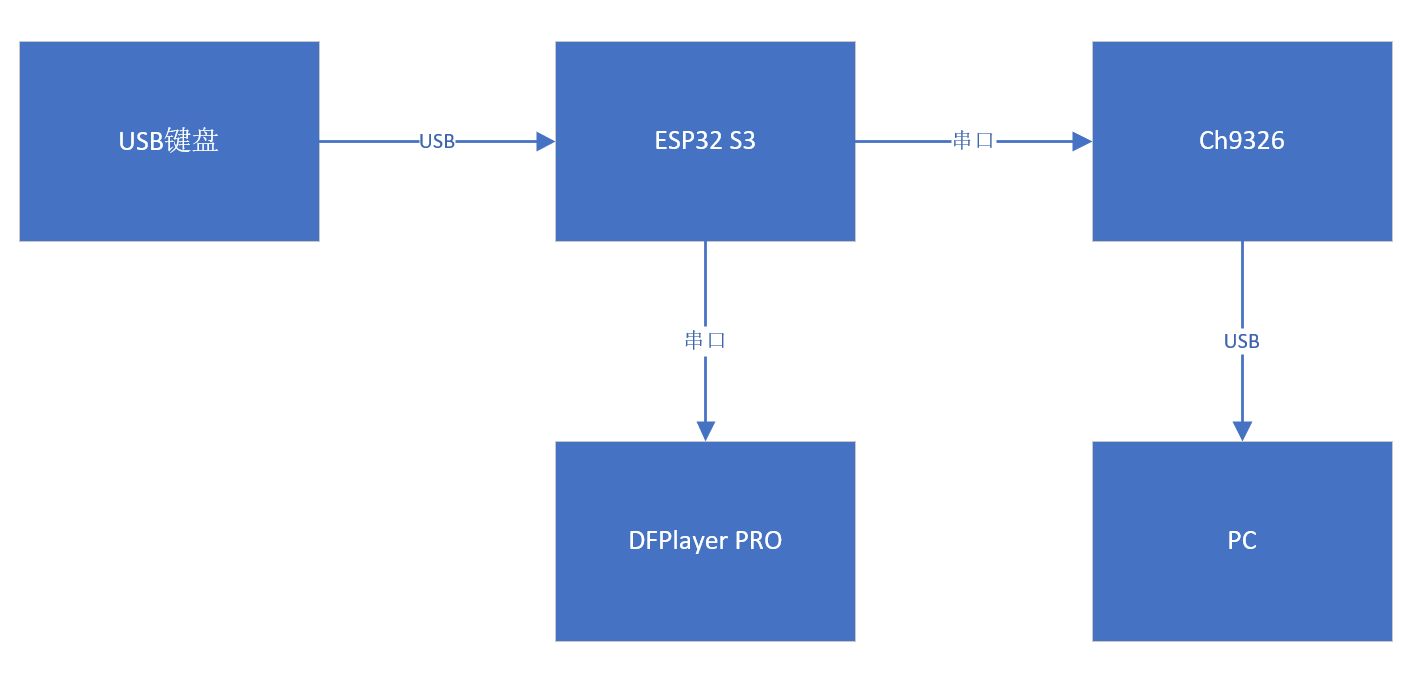
Uses an ESP32-S3 as the USB Host, sending parsed data to the CH9326 via serial port. The CH9326 is a driverless HID-to-serial converter chip. It supports bidirectional data transmission, receiving serial port data and, according to the HID class device specification, packaging the data and uploading it to the computer via USB, or receiving USB data packets compliant with HID class devices from the computer and sending them via serial port. Through the provided host computer software, users can also configure the chip's VID, PID, and various string descriptors. The chip is in an SOP16 package, making it easy to solder. Furthermore, the parsed data is sent to DFRobot's Fermion: DF1201S DFPlayer PRO MP3 player module [Reference 1]. This MP3 playback module supports four control methods: Arduino, AT commands, onboard buttons, and AD buttons. Music playback and switching can be performed even without a microcontroller using the onboard buttons. The module has 128MB of storage space, and music can be easily copied to the module via USB.
The software
code is developed based on the ESP32 Arduino environment. Important parts are explained below:
1. The `keyboard_transfer_cb()` function parses USB keyboard data. The parsed data is compared with the previously received data (keypressOld) to avoid repeatedly outputting pressed keys. If the new data does not appear in the previous data, it is added to the SoundBuffer:
void keyboard_transfer_cb(usb_transfer_t *transfer)
{
if (Device_Handle == transfer->device_handle) {
isKeyboardPolling = false;
if (transfer->status == 0) {
if (transfer->actual_num_bytes == 8) {
uint8_t *const p = transfer->data_buffer;
ESP_LOGI("", "HID report: %02x %02x %02x %02x %02x %02x %02x %02x",
p[0], p[1], p[2], p[3], p[4], p[5], p[6], p[7]);
// USB Host The parsed data is transmitted to Ch9326
memcpy(&keypress[5], p, transfer->actual_num_bytes);
SendData((byte*)keypress, sizeof(keypress));
// Check the data
for (int i = 2; i
if (p[i] != 0) {
// Search in the previous Buffer
boolean Found = false;
for (int j = 2; j
if (p[i] == keypressOld[j]) {
Found = true;
break;
}
}
// If not found, put the data into SoundBuffer
if (Found == false) {
Serial.print("Put");
Serial.print(p[i]);
Serial.println("into buffer");
SoundBuffer[IndexTail] = p[i];
IndexTail = (IndexTail + 1) % SOUNDBUFSIZE;
}
}
}
memcpy(keypressOld, p, 8);
}
else {
ESP_LOGI("", "Keyboard boot hid transfer too short or long");
}
}
else {
ESP_LOGI("", "transfer->status %d", transfer->status);
}
}
}
2. In the main function, there is an action to check the current queue. If the queue is not empty, then play the data in the queue. For example, 0x14 below is the "q" key defined by HID. The code means that if the q key is received, then send the command to the MP3 module to play /mj/1b.wav, so that the corresponding sound will be played in the speaker.
// First check if the queue is empty
if (IndexTail != IndexHeader) {
char NameBuffer[100];
switch (SoundBuffer[IndexHeader]) {
// Piece
case 0x14: // 'Q'
sprintf(NameBuffer, "%s1b.wav
", PlayFile);
Serial.print(NameBuffer);
Serial1.print(NameBuffer);
break;
case 0x1A: // 'W'
sprintf(NameBuffer, "%s2b.wav
", PlayFile);
Serial.print(NameBuffer);
Serial1.print(NameBuffer);
break;
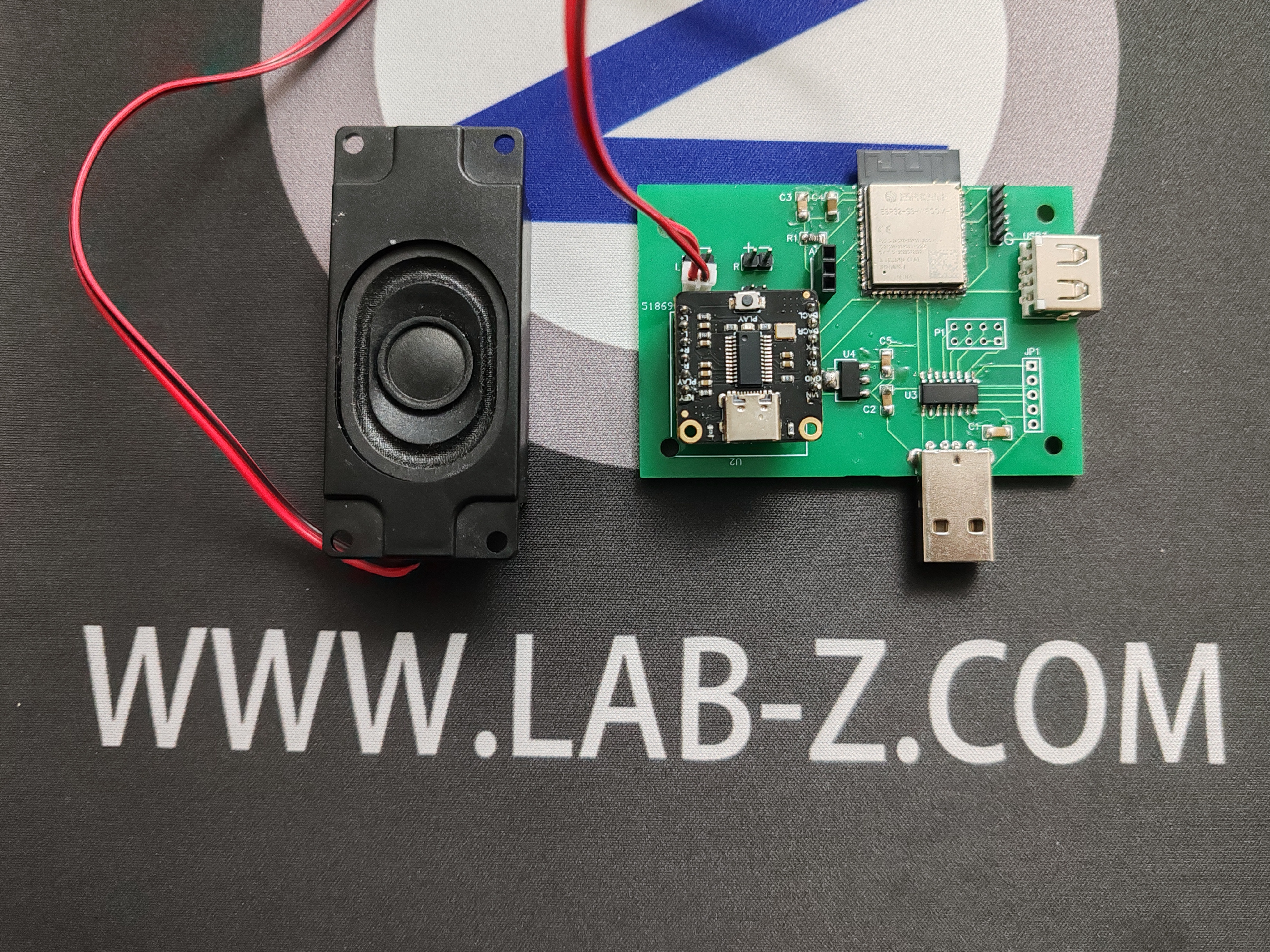
Physical demonstration
design considerations
Other
Bilibili:
【Real Mahjong Sound Keyboard】 https://www.bilibili.com/video/BV1eJ4m1h7jK/?share_source=copy_web&vd_source=5ca375392c3dd819bfc37d4672cb6d54
Reference:
1. https://www.dfrobot.com.cn/goods-3046.html
 The software







 京公网安备 11010802033920号


 1641S272K



