I. Project Name:
Design of a Novel Reader and E-book Reader Based on the Liangshan School of Electronic Design
II. Project Goals:
100% Open Source, Cost-Effective
Source code, PCB (this part is very basic and can be ignored), design philosophy, algorithm ideas, etc., are all open source. Of course, as I am only a sophomore and haven't learned much about analog and digital electronics, the PCB hardware part is definitely not as good as my software part, please forgive me!
Regarding the core code parts, such as: reading the dot matrix information of the font library from the TF card, the processing of GB2312 encoding and ASCII, the code for automatic line wrapping of Chinese characters on the LCD screen, the code for centering the LCD screen, the algorithm for handling file directories without quantity limit, etc., I have tried to improve its portability, that is, it can also be used in other projects in the future, thus avoiding the limitation that the code is only applicable to the Liangshan School of Electronic Design.
III. Project Objectives
Firstly, online resources for creating a novel reader using STM32 or GD32 are very limited, and even those available are mostly for ESP32. Furthermore, on Bilibili, the documentation for an STM32 novel reader project is being sold for 20 yuan. Therefore, I intend to create a 100% open-source novel reader project based on the Liangshanpai development board, hoping that the core code related to font operations, automatic line wrapping on the LCD, centering display, unlimited directory, and reading TXT files can provide some help to students!
Secondly, thank you to the LCSC development board for their project support!
Finally, "May all resources under heaven be open source!"
IV. Function Introduction
① Configure SDIO and FATFS file systems to read the dot matrix information of the font library and display the Chinese characters and other characters on the LCD screen.
② The used and unused capacity of the SD card is displayed in the UI (drawn by LCD interface functions), and the unit will automatically switch according to the SD card capacity
. ② When reading novels (TXT files), you can turn pages up and down using buttons without any garbled characters.
③ The previous code for the [LCSC Liangshan Pai Game Machine] only scanned a maximum of 100 NES directories; my version scans an unlimited number of directories and achieves unlimited novel directory reading without memory leaks—the LCSC Liangshan Pai Game Machine code can be optimized accordingly.
④ It supports inserting bookmarks and saves them as BIN files on the TF card, ensuring that bookmarks are not lost when power is off. If bookmarks exist, entering the novel will automatically jump to the bookmark page; otherwise, it will jump to the initial page.
⑤ The LCD screen brightness is adjusted via buttons; a long press of one button will adjust the brightness to the highest or lowest setting.
⑥ Font switching: The font can be switched in the settings interface. Common fonts such as [Fangsong], [Heiti], [Kaiti], [Huawen Xingkai], [Songti], [Xinsongti], and [Lishu] are provided. This is scalable and can be expanded as needed.
⑦ Regarding the image logo, I used the logo from the LCSC Liangshanpai game machine, but the usage is quite different. The Liangshanpai game machine logo is stored in the microcontroller's Flash memory by taking a mold, which takes a long time each time the code is burned, making it inconvenient. Therefore, I ran code on the microcontroller to create a BIN file from the image mold data and save it in the TF card via the file system, greatly saving burning time.
⑧ Serial port synchronous printing of operation information.
V. Skills Acquisition
① What I Learned:
First, through this novel reader project, I became more proficient in using the file system, further improved my ability to write multi-level menus, and became more skilled in handling GB2312 and ASCII encodings. In the future, if I encounter a part where I need to display Chinese characters on an LCD screen, I can easily solve it through the file system. Regarding the C language, I made unprecedented progress. For example, the code involved a lot of use of pointers, structure arrays, structures, and dynamic memory allocation and deallocation. I had rarely used these aspects of C language before, but I had a lot of application in this project, allowing me to appreciate the convenience of these data types.
Secondly, PWM adjusts the LCD screen brightness; the state machine detects buttons and recognizes long and short presses; the CubeMx configuration file system is used; combined with the file system and font library, the font dot matrix information is read from the TF card; TXT text is read from the file system and displayed on the LCD screen; infinite scanning of the file directory is supported.
② Shortcomings:
There are many regrets regarding the PCB design. My current situation is that my hardware design capabilities cannot support my software design capabilities, which means that some functions I originally wanted to add had to be cut due to insufficient hardware capabilities. Therefore, I hope to make up for the hardware limitations in the future.
VI. Problems Encountered and Solutions
① Regarding the problem of TF card initialization failure caused by the automatically generated code when configuring SDIO using STM32CubeMx
: SDIO initialization should be initialized with one data line, but the code generated by CubeMx initializes it with four data lines, which seems to be a CubeMx bug.
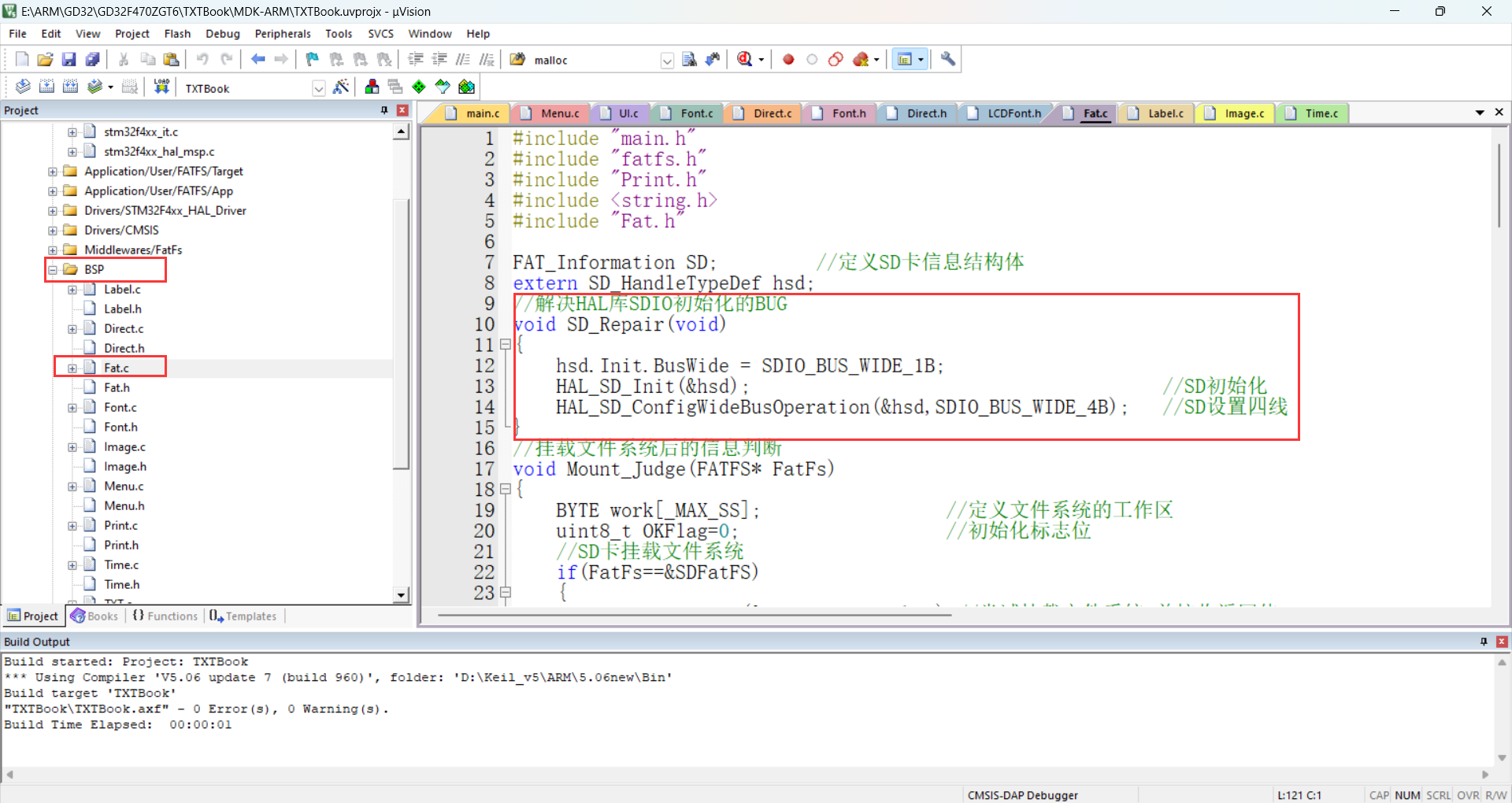
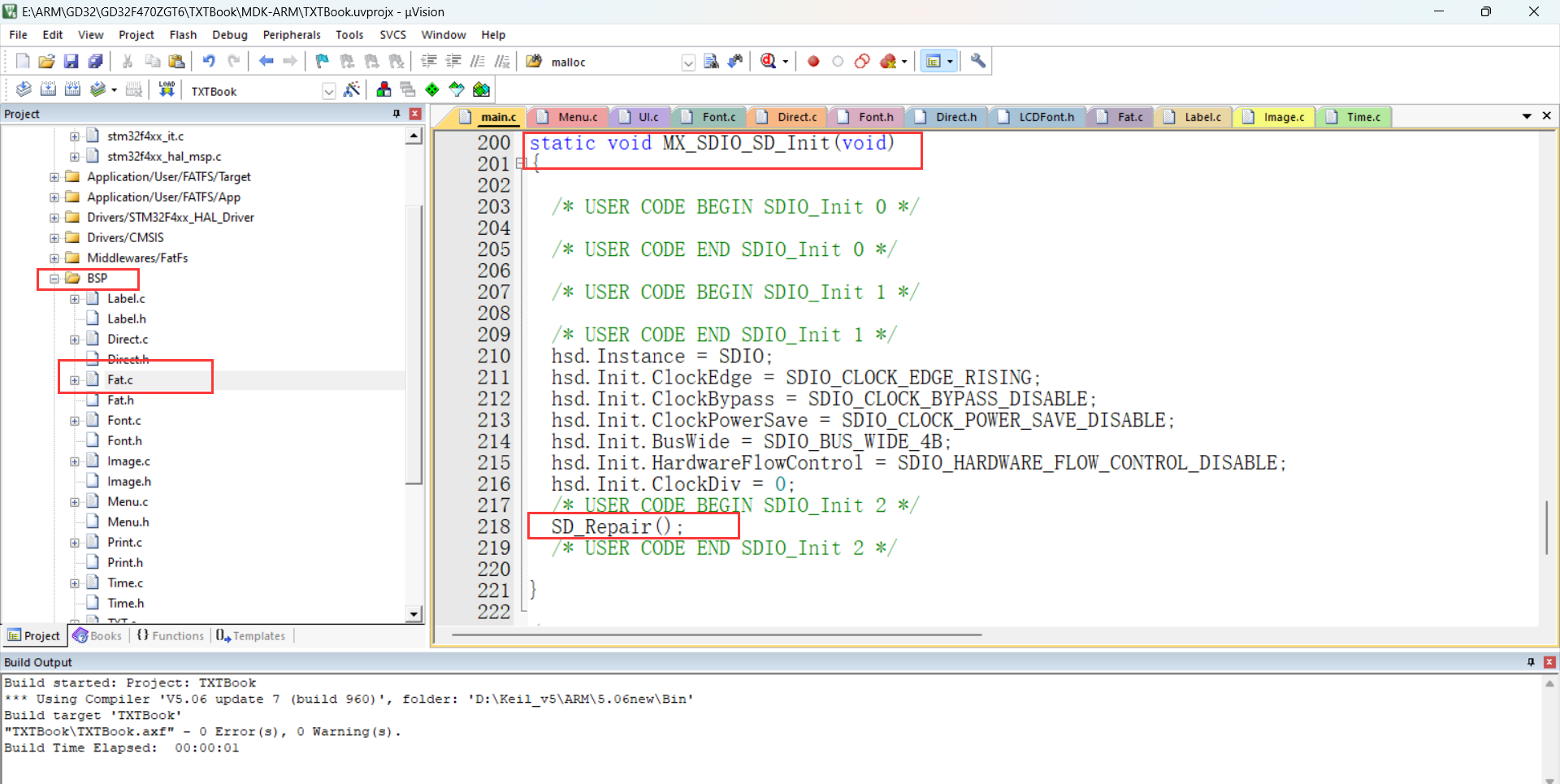
Here, I encapsulated an SDIO initialization repair function to initialize SDIO with one data line and then change the data line to four to solve this problem.
② Regarding the selection and processing of font encoding, how to display Chinese characters using the font library?
I created three font sizes: 16*16, 24*24, and 32*32.
One 16*16 Chinese character = 16*16/8 = 32 bytes;
one 24*124 Chinese character = 24*24/8 = 72 bytes;
one 32*32 Chinese character = 32*32/8 = 128
bytes. I also created seven fonts: 【仿宋】, 【黑体】, 【楷体】, 【华文行楷】, 【宋体】, 【新宋体】, and 【隶书】.
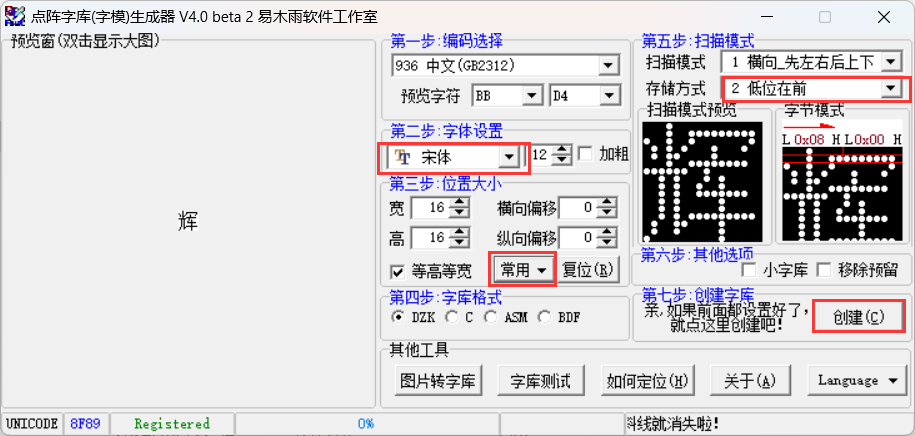
Website: GB2312 Encoding Table - Hammer Online Tools (toolhelper.cn)
Website: ASCII Code - Basic ASCII Code and Extended ASCII Code, the most complete Chinese ASCII code comparison table 0~255 (asciim.cn)
Here I've chosen the GB2312 encoding format. First, it's important to understand the GB2312 encoding format. GB2312 is a Chinese character encoding. In the GB2312 character set, both Chinese and English characters occupy two bytes. The first byte ranges from [0xA1, 0xF7], and the second byte ranges from [0xA0, 0xFF].
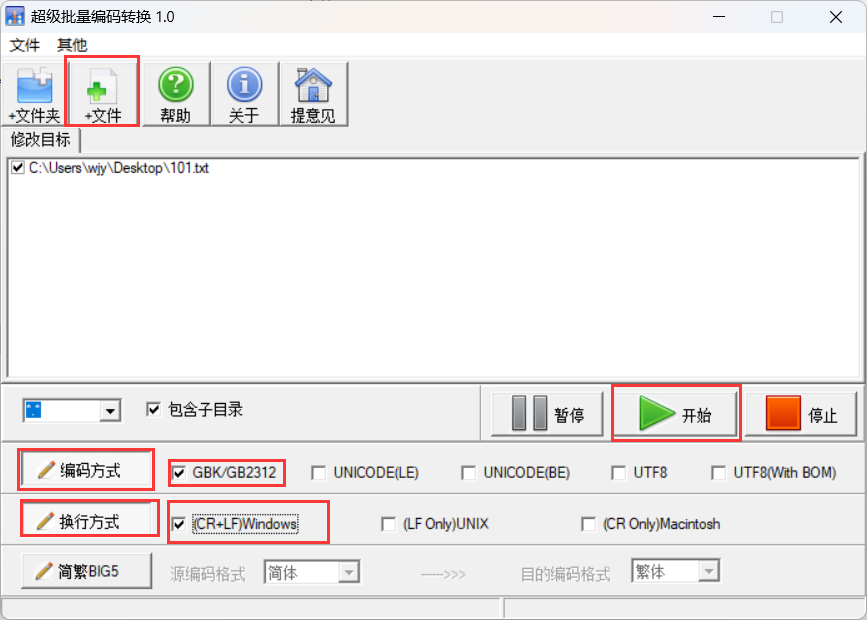
Novels or TXT files must be in GB2312 encoding format; otherwise, garbled characters will appear. This can be done using an encoding conversion tool
. ③ How to achieve mixed Chinese and English display?
Most screen driver code provided by screen manufacturers displays Chinese and English separately, and cannot display both simultaneously through a single function, making it very inconvenient to use. What I want to achieve is to display it on the LCD screen, similar to how `printf("你好世界Hello")` is printed on a computer. Before that, we need to analyze the string "你好世界Hello". This string contains four Chinese characters and six English characters. In the code, the Chinese characters are in GB2312 encoding format, while the English characters are in ASCII format. Chinese characters can be addressed based on their encoding, while English letters need to be converted to their corresponding English character encoding in GB2312. ASCII characters 32 to 126 correspond to GB2312 characters 0xA30xA0 to 0xA30xFE. Therefore, the offset calculation formula can be derived: addr = ((0xa3-0xa1)*94 + (uint8_t)*gbk + 128 - 0xa1)*Font.ByteSize; (Font.ByteSize is the size of a GB2312 encoded character in bytes; font size 16 occupies 32 bytes, font size 24 occupies 72 bytes, and font size 32 occupies 128 bytes; *gbk is the ASCII encoding corresponding to the English character). Finally, the dot matrix information is read into the cache through the file system and displayed on the screen using the LCD's underlying display functions.
④ Since the TXT file contains both GB2312 encoded Chinese characters and ASCII English characters, how should this be handled to avoid garbled characters?
Design philosophy: Since we cannot predict where the file system will read a complete character, if we read a fixed number of bytes each time, and happen to read the first byte of a Chinese character, which happens to meet the byte count requirement, the Chinese character encoding will be truncated, resulting in garbled characters in the subsequent parts. My idea is: the screen size is fixed, and there are curved parts around the screen, so I use partial display of characters, 13 * 15 = 195 characters, that is: display 195 characters at a time. Assuming that all 195 characters read are GB2312 encoded Chinese characters, then it will be at most 390 bytes. Inevitably, there will be some characters that occupy bytes but cannot be displayed, such as the newline character: CR+LF (occupying two bytes). We need to ignore these non-displayable characters, so to be on the safe side, we read 500 bytes after that. After each character is displayed, we increment by one. At the same time, we count the number of bytes according to whether it is GB2312 encoding or ASCII encoding, return the counted bytes and accumulate them, and use the accumulated result as the starting byte for the next reading. The above describes the backward reading method. The forward reading method is similar: read 500 bytes backward from the current position and count them. When exactly 195 characters have been read, return the number of bytes. Then, offset the current position forward by the returned byte count. Next, from the offset position, read the returned byte count backward and display it on the LCD screen. However, it's crucial to note that if the current byte count is less than 500 bytes from the beginning of the file, the position must be offset from the beginning of the file.
⑤ How to implement the novel bookmark insertion function?
Initially, I planned to use AT24C or W25Q, but these storage chips have relatively small capacities, and separating the ebook and bookmarks would be very inconvenient for management. Therefore, I continued to use the file system to create BIN files to store bookmarks; each bookmark is eight bytes, four for storing the page number and four for storing the byte offset position. Regarding the bookmark design, when entering and reading a novel, the system first checks for bookmarks. If a bookmark exists, it jumps to the bookmark page, and the page number turns red. If no bookmark exists, it jumps to the beginning of the novel. To insert a bookmark, long-press the confirmation button. After successful insertion, the page number turns red.
⑥ How to implement font switching?
A font library is defined using a structure. The structure stores important information such as font size, font library location, and the number of bytes occupied by a character. Modifying the font means re-initializing the font library information, which is equivalent to modifying the font library's location information.
VI. Project Declaration:
This project is primarily open-source in terms of software!
You can port the code of this project to your own projects. However, I am not responsible for any consequences arising from its use in your own projects!








 京公网安备 11010802033920号


 DC-113-015-270-ESTB



