LCSC Training Camp · Skystar GD32F407VET6 Development Board - Youth Edition Electronic Keyboard Desktop Ornament.
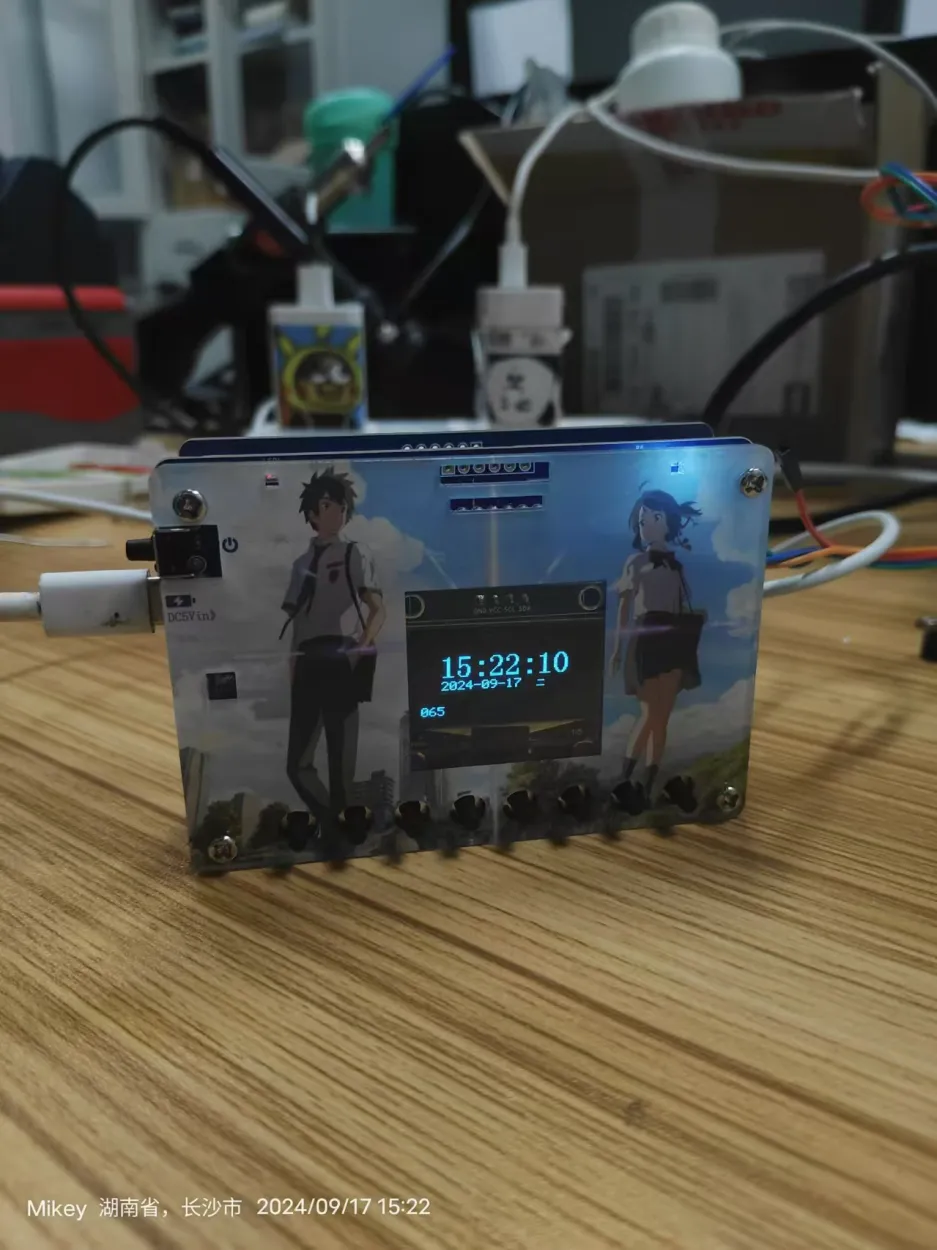
The soldering skills are so-so, haha~~~
LCSC's color silkscreen printing is really beautiful, and the panel is amazing too~~~
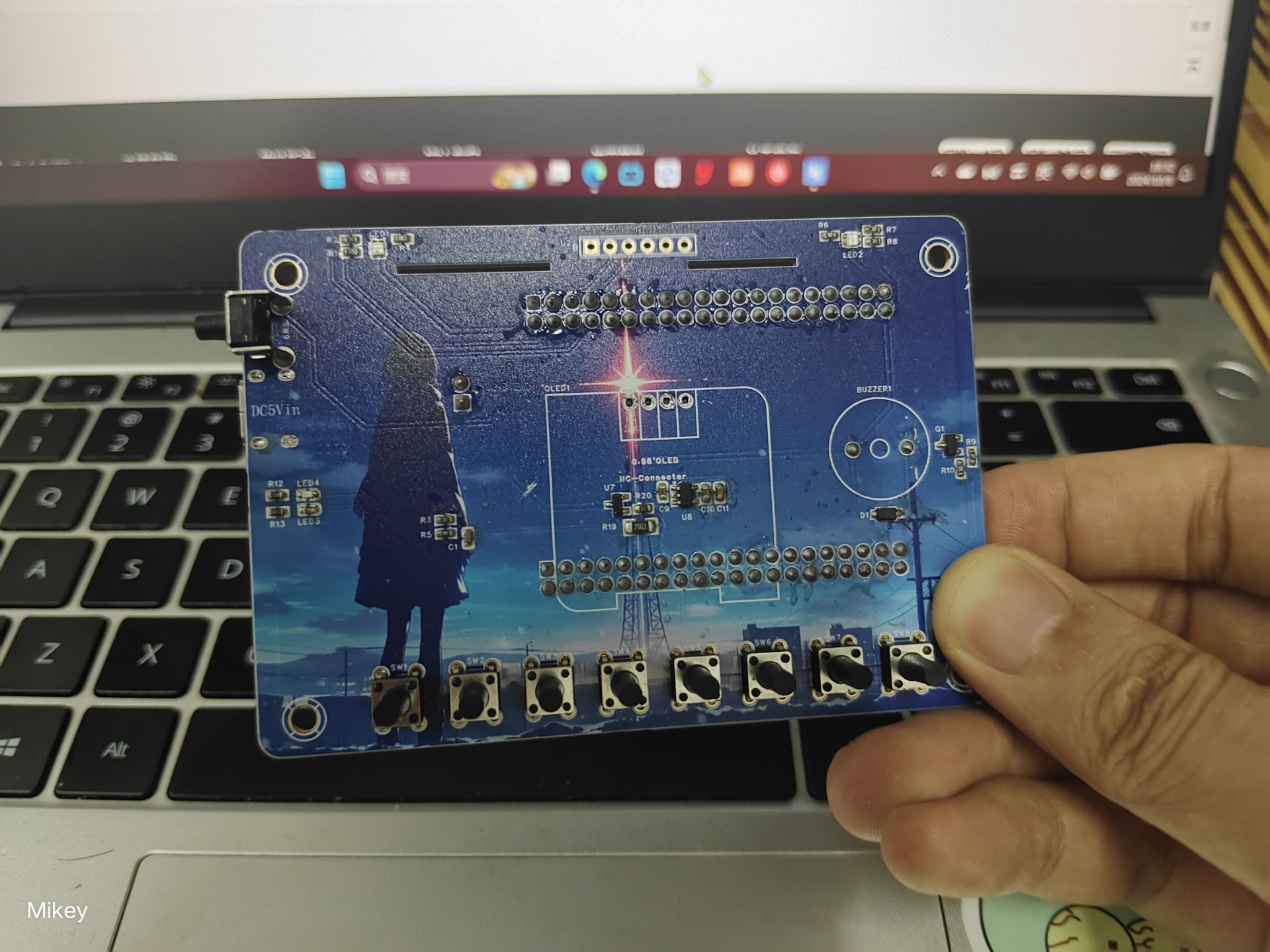
1. Project Introduction
This project is a portable desktop electronic ornament based on the LCSC Skystar GD32F407VET6. It displays the time and date and can also be used as a simple handheld game console, suitable for playing simple, stress-relieving games when bored. Because the initial design included electronic keyboard functionality, many buttons were added, allowing it to be used as an electronic keyboard as well. It supports charging management, so it doesn't need to be constantly plugged in for power; you can take it anywhere. It can also be used to learn GD32 development, which was my original intention in designing this little gadget. Referring to LCSC's practical approach, I named it Blueberry Pi 1.0. This is also my first time making this, and there are many imperfections. Please help me correct them, thank you!
2. Peripheral Usage
2.1. 1-Channel ADC: Acquires Lithium Battery Voltage and Displays Battery Level The
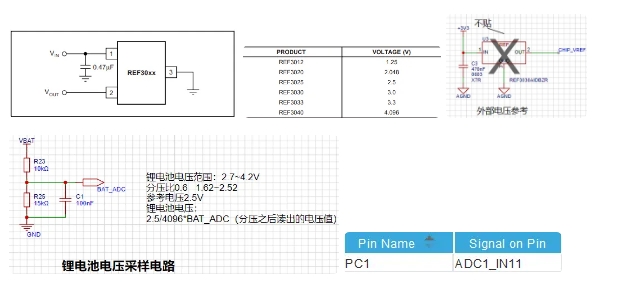
GD32F407VET6 has a total of 16 external ADC channels. We connect the AO pin of the photoresistor module to the PC1 pin. According to the pin definitions in the datasheet, the additional functions of PC1 are channel 11 of ADC0, channel 11 of ADC1, and channel 11 of ADC2.
2.2. Two serial ports
2.2.1. Onboard serial port 1 for debugging
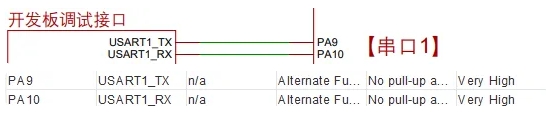
2.2.2. Expansion board serial port 2 (Bluetooth)
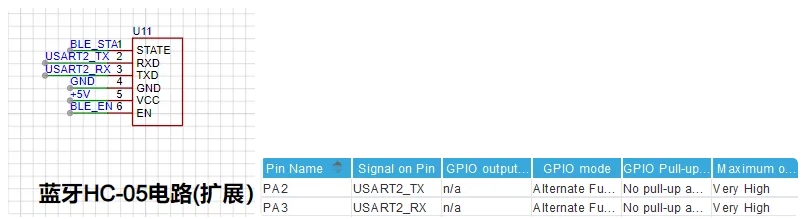
2.3. Seven I/O outputs
2.3.1. One passive buzzer
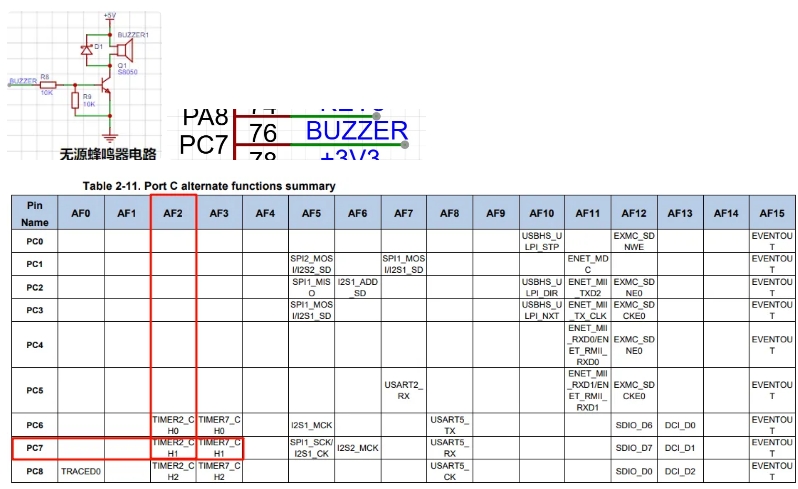
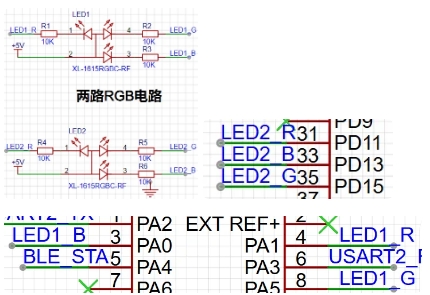
2.3.2. Two RGB LEDs Six I/O pins
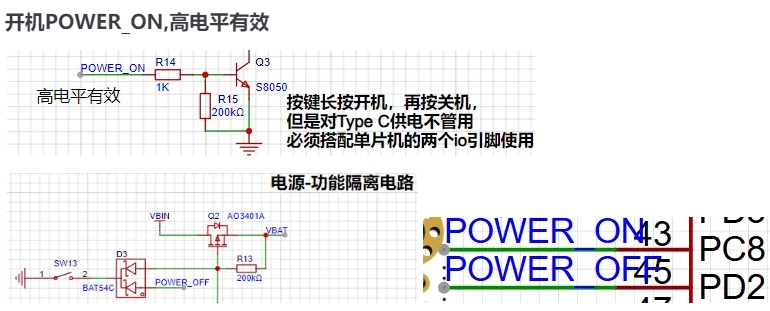
2.3.3. One I/O output for power on/off
(POWER_ON, active high)
2.4. One SPI: W25Q64 for storing Chinese character library

2.5. Ten I/O inputs:
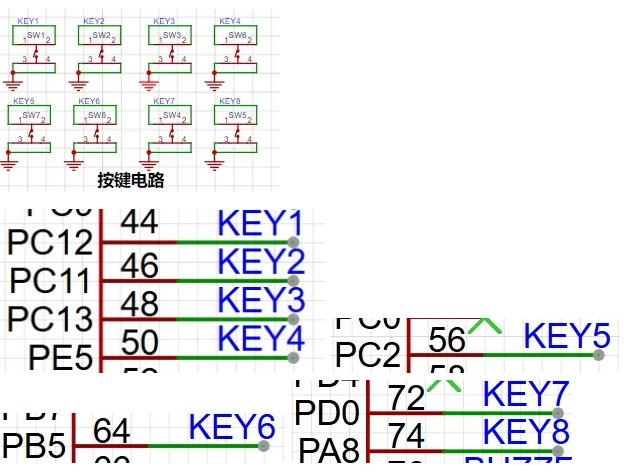
2.5.1. Eight button input detections
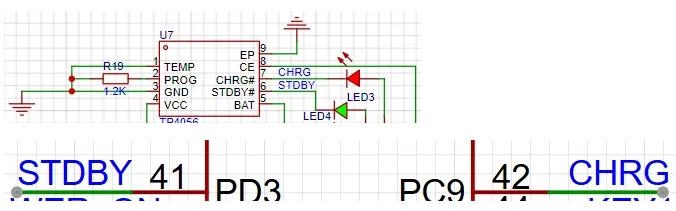
2.5.2. Lithium battery charging (CHRG), charging complete (STDBY)
2.6. RTC: Alarm, calendar, time.
(GD32F4 RTC alarm and auto-wake interrupt configuration in-depth analysis - IoTWORD - IoT
GD32 practical 14__RTC_gd32 rtc circuit - CSDN blog
32.768KHz
CR2012)
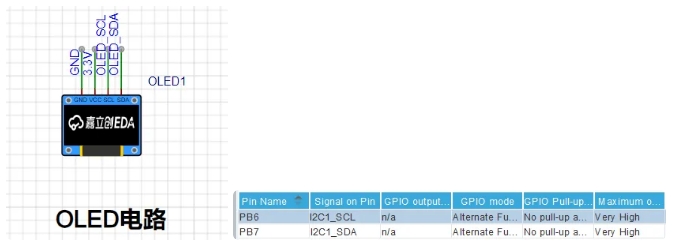
2.7. 1 IIC:OLED multi-level menu
3. Basic principle of buzzer music playback
3.1. Pitch
Frequency determines pitch, duty cycle determines volume. Here we only use frequency, changing the duty cycle has no effect, just keep it at 50%.
The PWM period is 1ms, the high level time is 0.5ms, the low level time is 0.5ms, so the frequency is 1kHz, and the duty cycle is 50%.
The adjustment of PWM comes from the control of the width of the "duty cycle". The wider the "duty cycle", the higher the output energy will be, and the average voltage value obtained through the RC converter circuit will also increase. The narrower the "duty cycle", the lower the average voltage value of the output voltage signal will be, and the average voltage value obtained through the RC converter circuit will
also decrease. That is, at a certain frequency, different output analog voltages can be obtained by different duty cycles. Therefore, we can control the buzzer to emit different pitches by controlling the PWM output frequency.
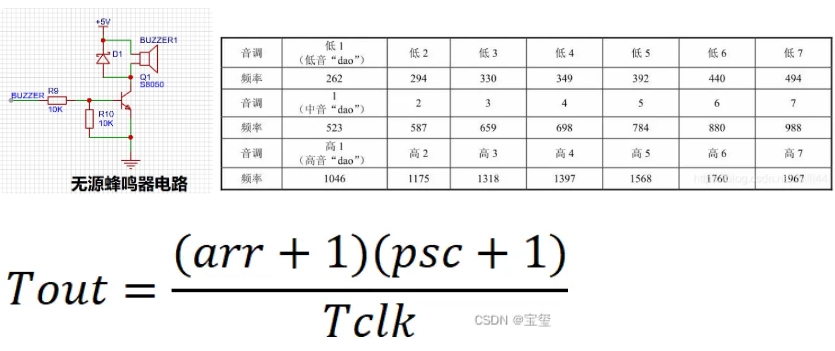
Tout is the calculated interrupt generation period, where arr is the auto-reload value, psc is the prescaler, and Tclk is the corresponding clock frequency.
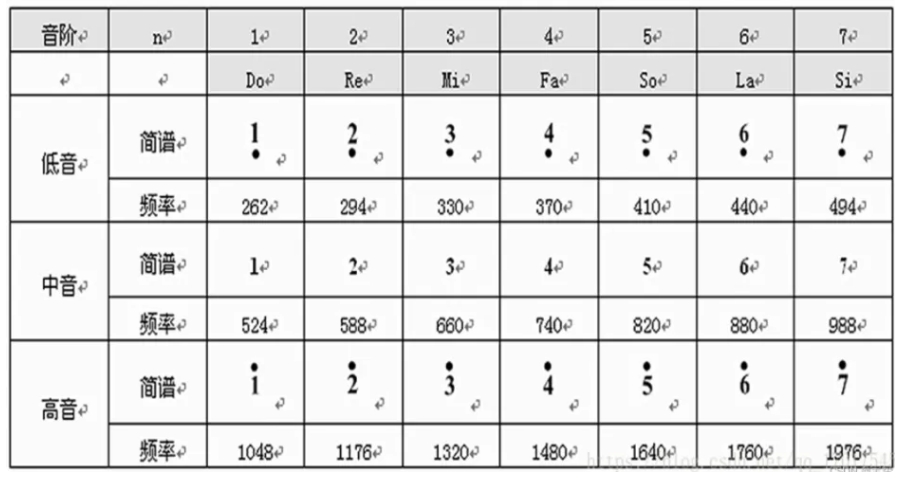
To make the tone correspond to the timer frequency, taking the low-pitched DO as an example, substitute f=262 and arr=1000-1 into the above formula to calculate the psc value. Different values correspond to different tones.
From the timer period calculation formula, we know that Tclk is the timer's connected clock bus frequency, arr is the set timer auto-reload value, and f is the known frequency of different tones. In the diagram, the frequency of "dao" is 262. By calculating and assigning psc to the timer, different tones can be obtained.
#define proport 168000 //Tclk/(arr+1)=168000000/(1000)
//Based on Tout= ((arr+1)*(psc+1))/Tclk, the psc value is the value defined in this line. Tout is the reciprocal of the pitch frequency 131Hz, Tclk=168MHz
define L1 ((proport/262)-1)//low-key do frequency
define L2 ((proport/296)-1)//low-key re frequency
define L3 ((proport/330)-1)//low-key mi frequency
define L4 ((proport/349)-1)//low-key fa frequency
define L5 ((proport/392)-1)//low-key sol frequency
define L6 ((proport/440)-1)//low-key la frequency
define L7 ((proport/494)-1)// Low-key Si frequency
define M1 ((proport/523)-1)// Mid-key Do frequency
define M2 ((proport/587)-1)// Mid-key Re frequency
define M3 ((proport/659)-1)// Mid-key Mi frequency
define M4 ((proport/699)-1)// Mid-key Fa frequency
define M5 ((proport/784)-1)// Mid-key Sol frequency
define M6 ((proport/880)-1)// Mid-key La frequency
define M7 ((proport/988)-1)// Mid-key Si frequency
define H1 ((proport/1048)-1)// High-key Do frequency
define H2 ((proport/1176)-1)// High-key Re frequency
define H3 ((proport/1320)-1)// Frequency of high-key mi
define H4 ((proport/1480)-1)// Frequency of high-key fa
define H5 ((proport/1640)-1)//frequency of high key sol
define H6 ((proport/1760)-1)//frequency of high key la
define H7 ((proport/1976)-1)//frequency of high key si
define Z0 0//
3.2.
A dot on the scale indicates a high note, no dot indicates a middle note, and a dot below indicates a low note
. 3.3. The length of a note
in the simplified musical notation corresponds to a beat when there is no horizontal line below the scale, half a beat when there is a single horizontal line, and 1/4 beat when there are two horizontal lines. A dot after the scale number adds half a beat, and a horizontal line adds one beat.
const uint16_t music4[]={ //My heart is always uneasy. L6,25,L6,25,M3,25,M4,25,M3,25,M4,25,M3,50,L6,50, //Oh, I am now terminally ill. Z0,50,L6,50,L5,25,L6,25,L6,25,L5,25,L6,50,L6,50,M1,100, //Oh dear! Could it be that I've really gone mad because of you? M4,100,M3,100,L6,50,L6,50,Z0,50,L6,50,L6,100,M3,25,M4,25,M3,25,M4,25,M3,50,L6,50, //Hmm, I wasn't this kind of person before, but you've made me a strange person. Z0,50,L6,50,L5,25,L6,25,L6,25,L5,25,L6,50,L6,50,L6,100,Z0,50,L6,50,L5,25,L6,25,L6,25,L5,25,L6,50,L6,50,M1,100, //This is the first time I've become like this. H1,100,M7,50,M5,50,M5,50,M3,50,M3,50,M3,50,H1,100,M7,50,M5,50,M5,50,M3,50,M3,50,M5,150, //No matter how much I deny it Z0,50,M3,50,M3,50,M3,50,M5,50,M5,50,M5,50,M6,50,M7,50, //Just because you are so beautiful, baby L6,25,L6,25,M3,50,M3,50,L6,100,Z0,100,Z0,50,L6,25,L6,25,L6,50,Z0,50,Z0,150, //Just because you are so beautiful, baby Z0,50,L6,25,L6,25,M3,50,M3,50,L6,100,Z0,100,Z0,50,L6,25,L6,25, //Just because you are so beautiful, baby L6,50,Z0,50,Z0,50,L6,25,L6,25,L6,50,L6,25,L6,25,M3,50,M3,50,L6,100,Z0,100,Z0,50,L6,25,L6,25,L6,50,Z0,50,};uint16_t length4 = sizeof(music4)/sizeof(music4[0]);
void music_play(const uint16_t* music_buf,uint16_t length){ clear_buzzer_buf(); OLED_DrawRectangle(122,8,3,56,2);//clear progress bar buzzer_record_mode =1;//note recording mode /* If the music note data music_buf is not passed through buzzer_beep_tone here, If the notes are stored in the `buzzer_beep_data[]` array, then a `while` loop is needed to wait for each note to finish playing before the next note can be played. This will temporarily freeze the program within the `while` loop, preventing it from responding to other operations, such as refreshing the OLED display time. However, if a `for` loop is used to transfer all the notes to be played into the `buzzer_beep_data_write_pos++;//Recording mode, recording each pressed note if (buzzer_beep_data_write_pos >= MAX_BUZZER_DATA_SIZE) buzzer_beep_data_write_pos = 0; buzzer_beep_tone(music_buf[i*2],100,(music_buf[i*2+1]),0);//Assignment } buzzer_record_play = 1; // Play after recording buzzer_record_mode = 2; // Recording playback enters music playback mode}
4. Key scanning debouncing implements long and short presses, double clicks, and rapid clicks
4.1. Header file macro definitions
#define CONFIRM_TIME 10 // Key debouncing time window 10ms
#define LONGPRESS_TIME 1000 // Long press time window 1000ms
#define FAST_PRESS_TIME 10 // Long press trigger execution 10ms
#define DOUBLE_PRESS_TIME 130 // Rapid click interval 130ms
define KEY1_SHORT_PRESS 0X01
define KEY1_DOUBLE_PRESS 0x11
define KEY1_FAST_PRESS 0X71
define KEY1_LONG_PRESS 0X81
define KEY2_SHORT_PRESS 0X02
define KEY2_DOUBLE_PRESS 0x12
define KEY2_FAST_PRESS 0X72
define KEY2_LONG_PRESS 0X82
define KEY3_SHORT_PRESS 0X03
define KEY3_DOUBLE_PRESS 0x13
define KEY3_FAST_PRESS 0X73
define KEY3_LONG_PRESS 0X83
define KEY4_SHORT_PRESS 0X04
define KEY4_FAST_PRESS 0X74
define KEY4_LONG_PRESS 0X84
define KEY5_SHORT_PRESS 0X05
define KEY5_FAST_PRESS 0X75
define KEY5_LONG_PRESS 0X85
define KEY_NUM_MAX (sizeof(g_gpioList) / sizeof(g_gpioList[0]))
4.2. Initialization
typedef struct
{
rcu_periph_enum rcu;
uint32_t port;
uint32_t pin;
} Key_GPIO_t;
/Array of structures used for key initialization and scanning/
static Key_GPIO_t g_gpioList[]=
{
{RCU_GPIOC,GPIOC,GPIO_PIN_12},//key1
{RCU_GPIOC,GPIOC,GPIO_PIN_11},//key2
{RCU_GPIOC,GPIOC,GPIO_PIN_13},//key3
{RCU_GPIOE,GPIOE,GPIO_PIN_5},//key4
{RCU_GPIOC,GPIOC,GPIO_PIN_2}//key5
};
/** @function
KeyDrvInit @brief Key
initialization
@param none @return
none *
/
void KeyDrvInit(void) {
for
(uint8_t i=0; i = 255)g_key_cout=0;
break ; case KEY4_FAST_PRESS : if(++g_key_cout>=255)g_key_cout=0; break; case KEY5_SHORT_PRESS: if(--g_key_cout<=0)g_key_cout=255; break; case KEY5_FAST_PRESS: if(--g_key_cout<=0)g_key_cout=255; break; case KEY1_DOUBLE_PRESS: bsp_led_off(LED2_R); break; case KEY2_DOUBLE_PRESS: bsp_led_off(LED2_B); break; case KEY3_DOUBLE_PRESS: bsp_led_off(LED2_G); break; default: break; } } 4.4. Short press (non-blocking) typedef struct { uint16_t key_count1; uint8_t key_short_flag; } Key_Info_t; static Key_Info_t g_keyInfo[KEY_NUM_MAX]; /** @function KeyScan @brief dynamic key scanning @param keyIndex Key index value @return Returns the key key value */ static uint8_t KeyScan(uint8_t keyIndex) { uint8_t keyPress; keyPress = gpio_input_bit_get(g_gpioList[keyIndex].port,g_gpioList[keyIndex].pin); if (keyPress) { g_keyInfo[keyIndex].key_count1=0; g_keyInfo[keyIndex].key_short_flag=0; } else if(!g_keyInfo[keyIndex].key_short_flag) { g_keyInfo[keyIndex].key_count1++; if(g_keyInfo[keyIndex].key_count1 > CONFIRM_TIME) { g_keyInfo[keyIndex].key_short_flag=1; g_keyInfo[keyIndex].key_count1=0; return (keyIndex+1); } } return 0;
4.5. Long and Short Press
Typef struct
{
uint32_t key_count;
uint8_t key_lock_flag;
uint8_t key_short_flag;
uint8_t key_long_flag;
} Key_Info_t;
static Key_Info_t g_keyInfo[KEY_NUM_MAX];
/**
@function KeyScan
@brief Dynamic key scanning
@param keyIndex Key index value
@return Return key value
*/
static uint8_t KeyScan(uint8_t keyIndex)
{
uint8_t keyPress;
keyPress = gpio_input_bit_get(g_gpioList[keyIndex].port,g_gpioList[keyIndex].pin);
if (keyPress)
{
g_keyInfo[keyIndex].key_count=0;
g_keyInfo[keyIndex].key_lock_flag=0;
g_keyInfo[keyIndex].key_long_flag=0;
if(g_keyInfo[keyIndex].key_short_flag)
{
g_keyInfo[keyIndex].key_short_flag=0;
return (keyIndex+1);
}
}
else if((!g_keyInfo[keyIndex].key_lock_flag)&&(g_keyInfo[keyIndex].key_long_flag==0))
{
g_keyInfo[keyIndex].key_count++;
if(g_keyInfo[keyIndex].key_count > CONFIRM_TIME)
{
g_keyInfo[keyIndex].key_short_flag=1;
}
if(g_keyInfo[keyIndex].key_count > LONGPRESS_TIME)
{
g_keyInfo[keyIndex].key_count=0;
g_keyInfo[keyIndex].key_short_flag=0;
g_keyInfo[keyIndex].key_long_flag=1;
return (keyIndex+0x81);
}
}
return 0;
}4.6. Continuous firing
typedef struct
{
uint16_t key_count1;
uint16_t key_count2;
uint8_t key_short_flag;
uint8_t key_long_flag;
} Key_Info_t;
static Key_Info_t g_keyInfo[KEY_NUM_MAX];
/**
@function KeyScan
@brief Dynamic key scanning
@param keyIndex Key index value
@return Return key value
*/
static uint8_t KeyScan(uint8_t keyIndex)
{
uint8_t keyPress;
keyPress = gpio_input_bit_get(g_gpioList[keyIndex].port,g_gpioList[keyIndex].pin);
if (keyPress)
{
g_keyInfo[keyIndex].key_count1=0;
g_keyInfo[keyIndex].key_short_flag=0;
g_keyInfo[keyIndex].key_long_flag=0;
}
else if(!g_keyInfo[keyIndex].key_short_flag)
{
g_keyInfo[keyIndex].key_count1++;
if(g_keyInfo[keyIndex].key_count1 > CONFIRM_TIME)
{
g_keyInfo[keyIndex].key_short_flag=1;
g_keyInfo[keyIndex].key_count1=0;
return (keyIndex+1);
}
}
else if(g_keyInfo[keyIndex].key_count1 < LONGPRESS_TIME)
{
g_keyInfo[keyIndex].key_count1++;
}
else if(!g_keyInfo[keyIndex].key_long_flag)
{
g_keyInfo[keyIndex].key_long_flag=1;
return (keyIndex+0x81);
}
else
{
g_keyInfo[keyIndex].key_count2++;
if(g_keyInfo[keyIndex].key_count2 > FAST_PRESS_TIME)
{
g_keyInfo[keyIndex].key_count2 =0;
return (keyIndex+0x71);
}
}
return 0;
}4.7. Long and short presses + multi-clicks + rapid fire
/**
@function KeyScan
@brief Dynamic key scanning
@param keyIndex Key index value
@return Return key value
*/
static uint8_t KeyScan(uint8_t keyIndex)
{
uint8_t keyPress;
keyPress = gpio_input_bit_get(g_gpioList[keyIndex].port,g_gpioList[keyIndex].pin);
if (keyPress)
{
g_keyInfo[keyIndex].key_count1=0;
g_keyInfo[keyIndex].key_short_flag=0;
g_keyInfo[keyIndex].key_long_flag=0;
if(g_keyInfo[keyIndex].key_times > 0)
{
g_keyInfo[keyIndex].key_count3++;
if(g_keyInfo[keyIndex].key_count3 > DOUBLE_PRESS_TIME)
{
if(g_keyInfo[keyIndex].key_times == 1)
{
g_keyInfo[keyIndex].key_times = 0;
return (keyIndex+1);
}
else if(g_keyInfo[keyIndex].key_times == 2)
{
g_keyInfo[keyIndex].key_times = 0;
return (keyIndex+0x11);
}
g_keyInfo[keyIndex].key_times = 0;
}
}
}
else if(!g_keyInfo[keyIndex].key_short_flag)
{
g_keyInfo[keyIndex].key_count1++;
if(g_keyInfo[keyIndex].key_count1 > CONFIRM_TIME)
{
g_keyInfo[keyIndex].key_short_flag=1;
g_keyInfo[keyIndex].key_count1=0;
g_keyInfo[keyIndex].key_times++;
g_keyInfo[keyIndex].key_count3 = 0;
}
}
else if(g_keyInfo[keyIndex].key_count1 < LONGPRESS_TIME)
{
g_keyInfo[keyIndex].key_count1++;
}
else if(!g_keyInfo[keyIndex].key_long_flag)
{
g_keyInfo[keyIndex].key_long_flag=1;
g_keyInfo[keyIndex].key_times = 0;
return (keyIndex+0x81);
}
else
{
g_keyInfo[keyIndex].key_count2++;
if(g_keyInfo[keyIndex].key_count2 > FAST_PRESS_TIME)
{
g_keyInfo[keyIndex].key_count2 =0;
return (keyIndex+0x71);
}
}
return 0;
}5. Project Summary:
This project took about two months to complete. Because I was interning and working on it simultaneously, I had to squeeze in time to work on it. We encountered some hardware issues, but the software code took the most time. This project looks simple, but it's actually quite challenging. It's precisely because it seems simple that I strived for perfection. It supports double-tap, long/short press, continuous clicks, recording note duration, pause/play, accelerated/decelerated playback, animation and time display, buzzer music playback, and button scanning debounce without interference. It almost completely avoids delay, relying entirely on dynamic scanning. It doesn't have an operating system port, but future upgrades might include one, as an operating system would be simpler. The OLED uses a hardware I/O chip, and it also utilizes C++ object-oriented programming principles in many places. This was my first time using this programming approach, and everyone who used it praised it.
This project is one I've worked on seriously for a long time. Whenever I had free time, I'd bury myself in front of the computer working on it. There were times I felt completely overwhelmed; a single bug could baffle me for days. I was thinking about it even while eating and sleeping. Because we didn't use an operating system, the logic became a bit messy with so many things, leading to a constant stream of bugs. But after solving them, I realized it wasn't so bad, haha.
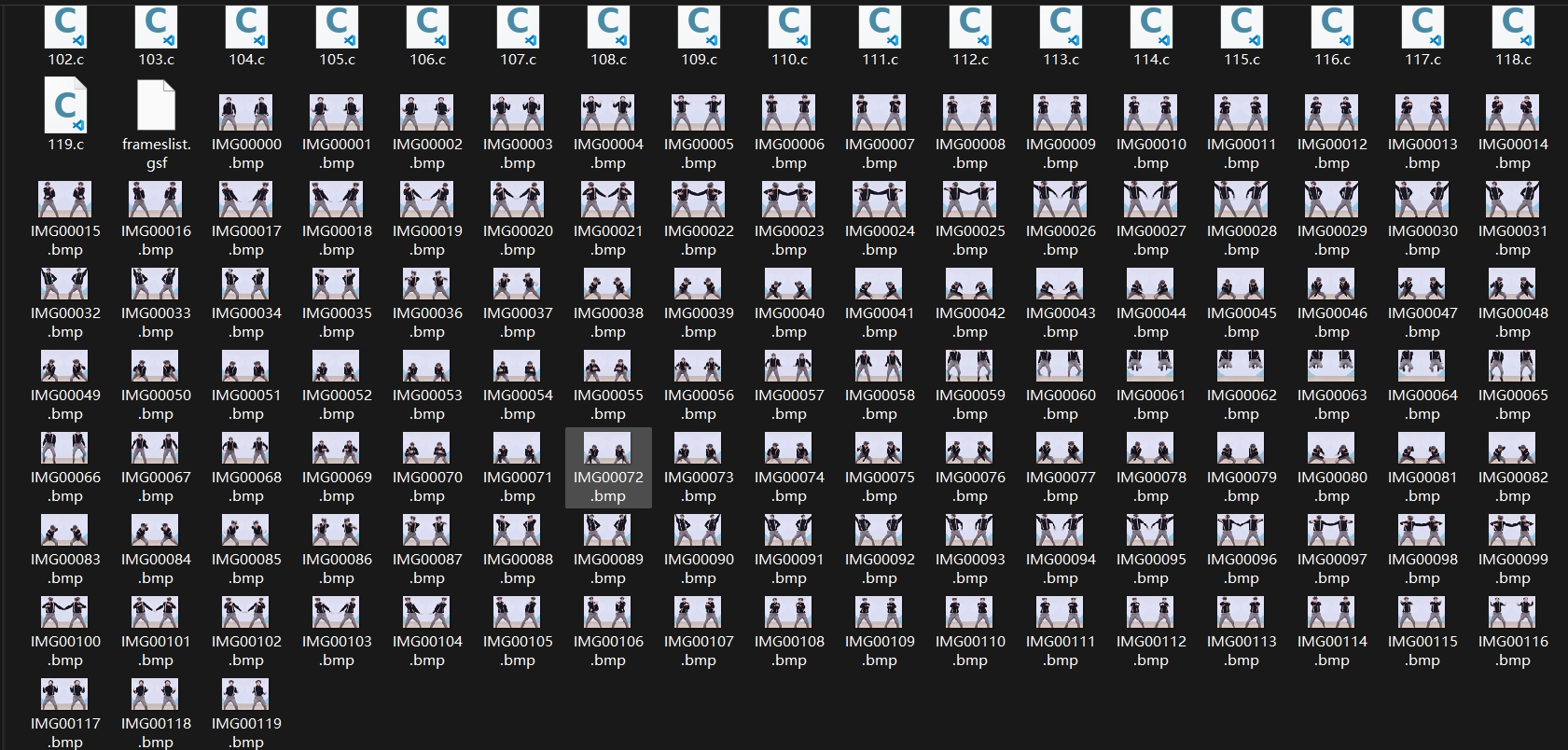
The part about writing the sheet music to make the buzzer sing and displaying animations on the OLED screen was exhausting. A Kunkun dancing at 119 frames per second almost drove me crazy during the modeling process, haha. Thankfully, it finally played reasonably well in the end.
6. Function Demonstration
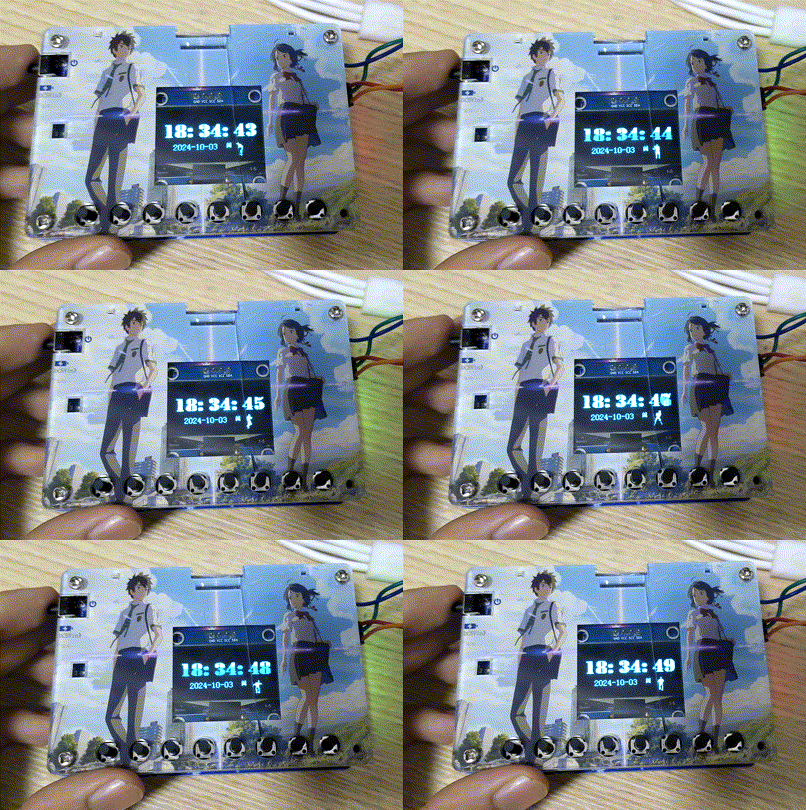
See the Bilibili video for a detailed demonstration:
Keep Playing, Keep Dancing ♫₍•◡•₎♫_Bilibili_bilibili








 京公网安备 11010802033920号


 TNPW1206221KBT9RT1



