1. Project Function Introduction:
0.96-inch TFT color screen desktop thermometer and hygrometer + network time synchronization clock + stopwatch + multi-color breathing light.
Micropython programming, [even beginners can complete it in a day].
Simplified circuit, reduced time-consuming soldering, reusable ESP32 development board, whether you use [LCSC ESP32-S3] or [ESP32-C3 classic version]. The difference is a shorting position on the circuit board (explained in the schematic diagram).
*2. Project Attributes:
Original.
3. Open Source License:
GPL 3.0 (Unauthorized reproduction prohibited).
4. Hardware:
Minimum of only 2 surface mount resistors and 0 LEDs (using monochrome LEDs, no need for selector switches; for simple button functions, consider using the boot button on the development board).
Everything else is through-hole, even beginners can handle the soldering.
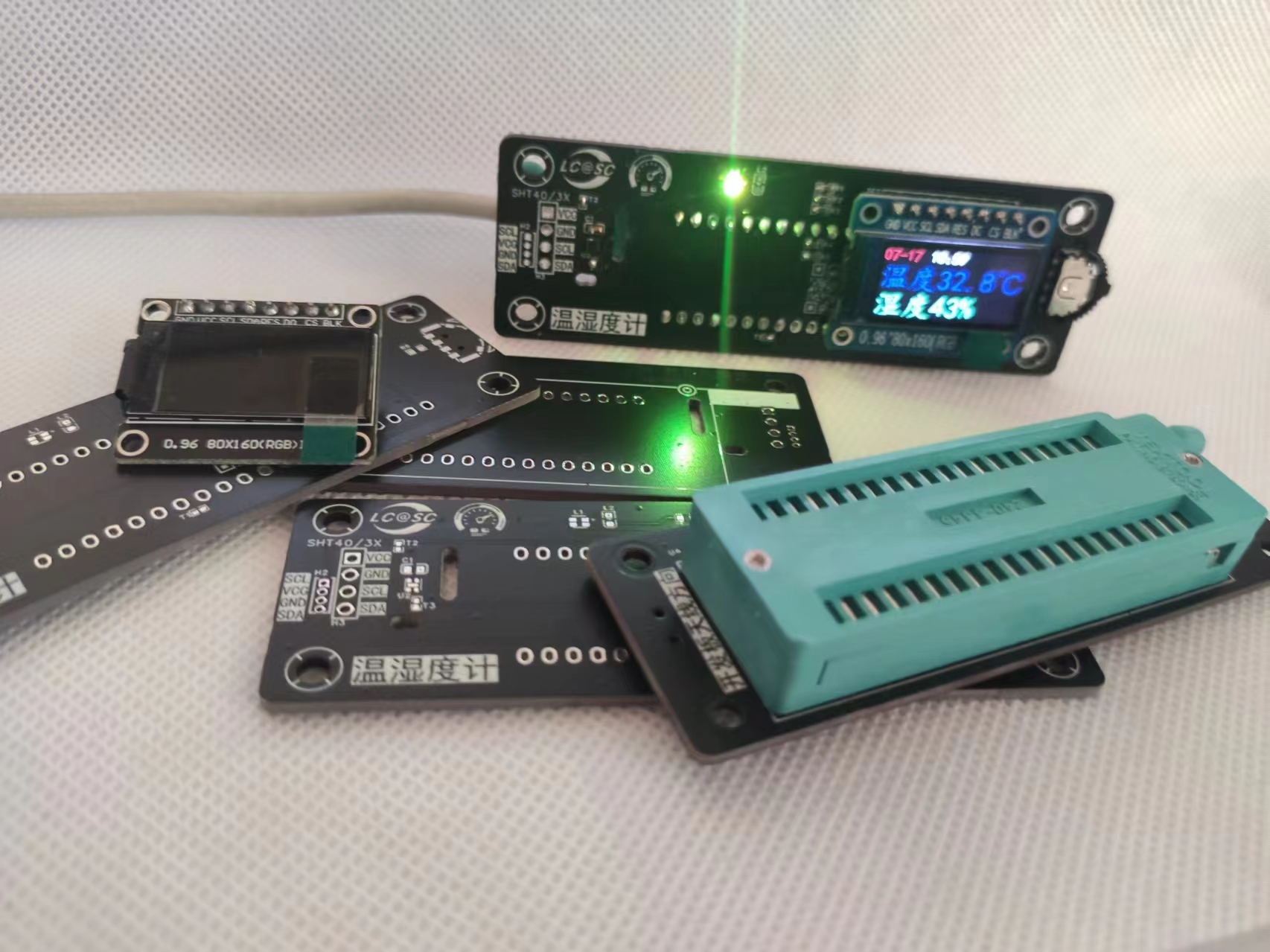
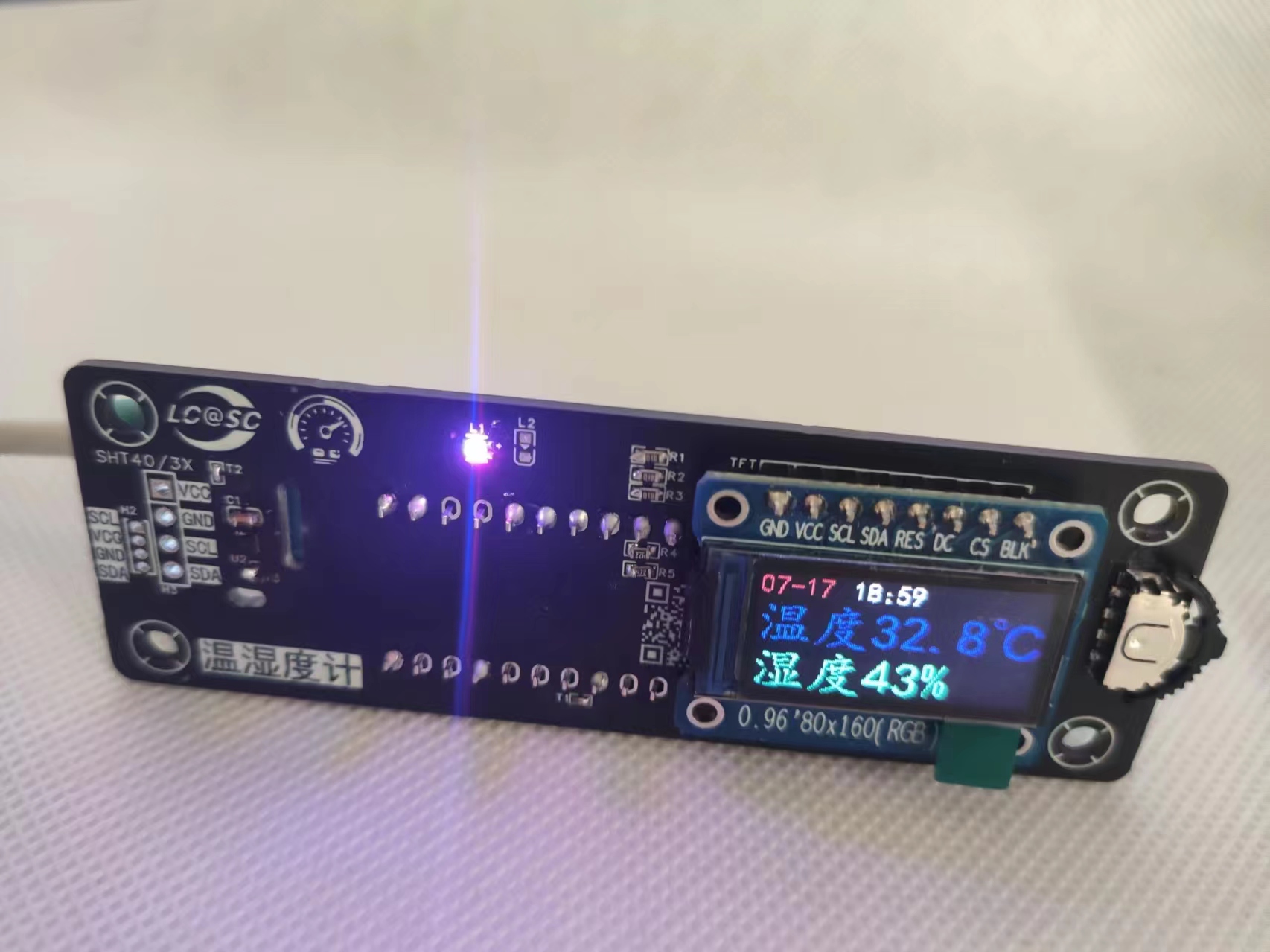
Uses a 0.96-inch TFT screen to drive the ST7735s, can connect to SHT40/3x temperature and humidity sensors. If you are confident in your hand strength, you can also try soldering the sensor directly.
The tri-color LED allows for various color breathing lights; the four-pin, two-position selector switch makes selection/switching easy.
It supports the ESP32-C3 classic version and LCSC ESP32-S3 development board, so you'll never have to worry about what to do with the development board again.
Already mastered the temperature and humidity meter? Want to use the development board for other things? Sure! The locking socket design allows for one-click disassembly and assembly of the development board, ensuring reuse and preventing waste.
The panel is also in the open-source project, using a PCB for the panel – hopefully LCSC won't be angry with me!

*5. The software
uses MicroPython programming, making it quick to learn; even beginners can master the most basic functions (temperature and humidity measurement and display) in a day.
The MicroPython firmware is specially modified and compiled for ESP32-C3, expanding two pins (18, 19) from USB to GPIO.
An additional pin (11) is added for fuse settings (requires Python installation on Ubuntu, which may be difficult for beginners, but not necessary if you don't need a selector switch).
Don't know how to use fuses or want to flash the modified firmware, and only want to achieve the most basic functions? Only mount resistors R4 and R5; ignore the other surface-mount components. The selector switch is also optional.
With the ESP32, you can have not only a desktop thermometer and hygrometer, but also a desktop clock, a desktop weather app, and a RGB breathing light.
The effects in the video use coroutines. Considering the difficulty for beginners to understand, this version is not yet open source.
It can also automatically adjust the screen brightness according to the time (evening/morning) (simple, but not implemented; too lazy to implement it. Connect blk to pin0 on the ESP32C3 and set PWM to achieve this. In fact, the function is already built into the library; just pass a value of 0-255 to the tft.back_light() function).
[Code and Attachment Explanation]
The .bin file is my modified Mpy firmware, which needs to be downloaded using espdownloadtool. If you don't know how, you can search on Baidu; there are many simple tutorials.
The modified firmware adds some libraries. I've put the documentation for these libraries on my WeChat official account, 【Programming Playground】. Since the official account is newly registered, I can only post one thing a day, so I can only add the materials little by little. Please be patient.
Instruction manual link: https://mp.weixin.qq.com/s/i4zHbHtT85C3H_K2b04Uhg
t16.bmf and t32.bmf are font files, which I have simplified. Accelerate character lookup. The characters included are:
Temperature/Humidity (°C/%), Start, Medium/Low/High, LED, White, Always On, Off, Multi-color meter, Colors: Blue, Green, Red, Yellow, Purple, White, Black, Font Color, Background Color, Screen Brightness, Homepage, Set as Main Time, Network Time Synchronization, Now Updating, Updated Every 8 Hours Daily, Weather: Sunny/Cloudy, Rainy, Medium/Partly Cloudy, Snowy, Windy, Thunder, Lightning, Stormy, Dust Storm, Haze, Floating Dust, Half Back to Homepage >:-.1234567890. Items
exceeding these cannot be displayed.
Regarding the firmware, it is a custom-modified version for this project. NTPtime (modified), SHT4X, ST7735S, and UFont are integrated into the firmware. Pins 18 and 19 have been changed to normal I/O.
NTPtime is a network time synchronization subfunction, used in the same way as the official library example, but I have changed it to use a domestic server + Beijing time (UTC+8). It's very easy to use. The
`led` function is the driver for tri-color LEDs; single-color LEDs won't work. This function is external and not integrated into the firmware because I've always wanted to modify it for fun.
`sht4x` is the driver for `sht40`, which is quite integrated. The usage is simply `measurement`, as shown in the code in `main`. The return value is the final temperature and humidity data in tuple format. `
st7735s` is a special version adapted for 0.96-inch screens, but different buyers may have different screens, and abnormal display is common. However, I tested two different sellers and they are currently consistent. I'll address any issues later.
`ufont` is the font loading submodule; you can see the loading method in `main`, it's very simple.
[Driver code can save you development time]: (Because there's not much information on Baidu, and much of it is incorrect {maybe because many tutorials use the older Python 2 version, while MPP has been upgraded to version 3}).
1. Network time synchronization submodule: The server used in the official MPB firmware has been changed from overseas to a domestic server, and the time zone has been adjusted to East 8. Time synchronization can be achieved with just one function.
2. SHT4X driver submodule: Parsing, CRC verification, and calculation are all pre-written. A single function can obtain temperature and humidity values.
3. ST7735S driver submodule: 65535 colors, RGB565, adapted to 0.96-inch TFT screens (my adaptation may differ from your screen, and you may need to modify it yourself, but it is unlikely you will need to).
4. Chinese display submodule: Font allows you to load Chinese characters as you wish, but only those I have listed are supported
. 5. A simplified font library specifically developed for thermometers and hygrometers. KaiTi font, better looking! Fewer characters, faster display! (See above for font library content)
【Summary】
A. To achieve full functionality, you must:
1. Use my modified firmware
2. Use my modified firmware
3. Use my modified firmware
B. Potential problems:
1. There is an open-source driver for the ST7735 display. It took me two days to debug this. The display bit width of the screen and this driver are not completely compatible. You need to adjust and modify it yourself. Your 0.96 TFT screen may be different from mine, so you need to modify it yourself. I have encountered problems such as screen flickering, italic text, incomplete display, and incorrect colors. Don't panic if you encounter problems; I have basically solved them for you.
2. When the font is shrunk, some strokes are not fully displayed. Therefore, I used two font libraries, T16 and T32. The two fonts are completely identical, only the default font size is different. When shrunk, the strokes may not be fully displayed. When enlarged, the font granularity is large. So use the large font library for larger displays, and the small one... I'm too lazy to repeat myself.
3. The code and firmware are based on the classic ESP32C3 development board. Theoretically, it can also be used with the LCSC ESP32S3 development board, but this has not been verified. There may be some perplexing issues that you'll have to resolve yourself. Firmware development is also not underway – time is limited and we can't afford to waste any more time.
4. The H2 interface is the sensor module interface sponsored by LCSC for this event, H3 is the Taobao universal module interface, and U2 is the SHT40 sensor. Using just one is sufficient. However, a minor bug (not a bug in the traditional sense) occurred during the design: the wiring sequence was inconsistent between the components and modules (as shown on the silkscreen). The components need to be reversed in the code, but this shouldn't affect the overall design. When using components, it's recommended to remove the copper plating around the components and the heat sink. However, components are difficult to solder, so modules are recommended.
The main.py code is an example to illustrate how to call these libraries. Writing a code with a settings menu, as shown in the video, requires more logic and code, making it 2-3 times more difficult than a simple display. You can explore it yourself.
*6.
See the open-source project for the BOM list.
*7. Contest logo verification.
*8. Demo your project and record a video to upload
to https://b23.tv/1MZ8C5w








 京公网安备 11010802033920号


 DS1746-70



