This project is based on the original project, improved and optimized. For the original project, please see -> Original Project Link .
Creating this was not easy, please like, comment, and share! For the latest information, click here -> Little O Creations
. I. Update Log 2024.06.12: Based on the original project, hardware PCB was optimized. Software and hardware optimizations are as follows: 1. Fixed the issue of battery drain during shutdown; 2. Optimized BOM, reducing some components and lowering the difficulty of replication; 3. Fixed the issue of screen flickering upon startup and the issue of excessively low screen brightness; 4. Single-color temperature power increased from 3W to a maximum of 7W. The power was not fully utilized due to software limitations, considering battery and temperature; 5. Optimized button logic, fixing the issue of double-click triggering single-click; 6. Added a triple-click overclocking function;
II. Function Introduction
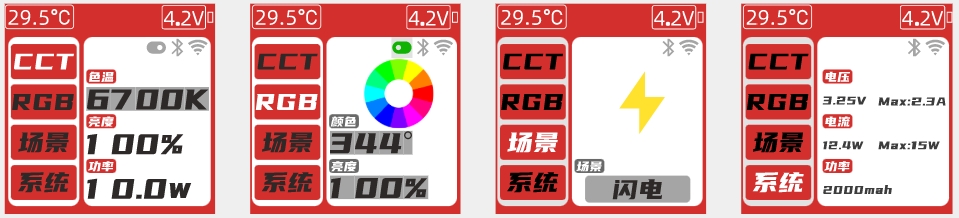
1. UI Design
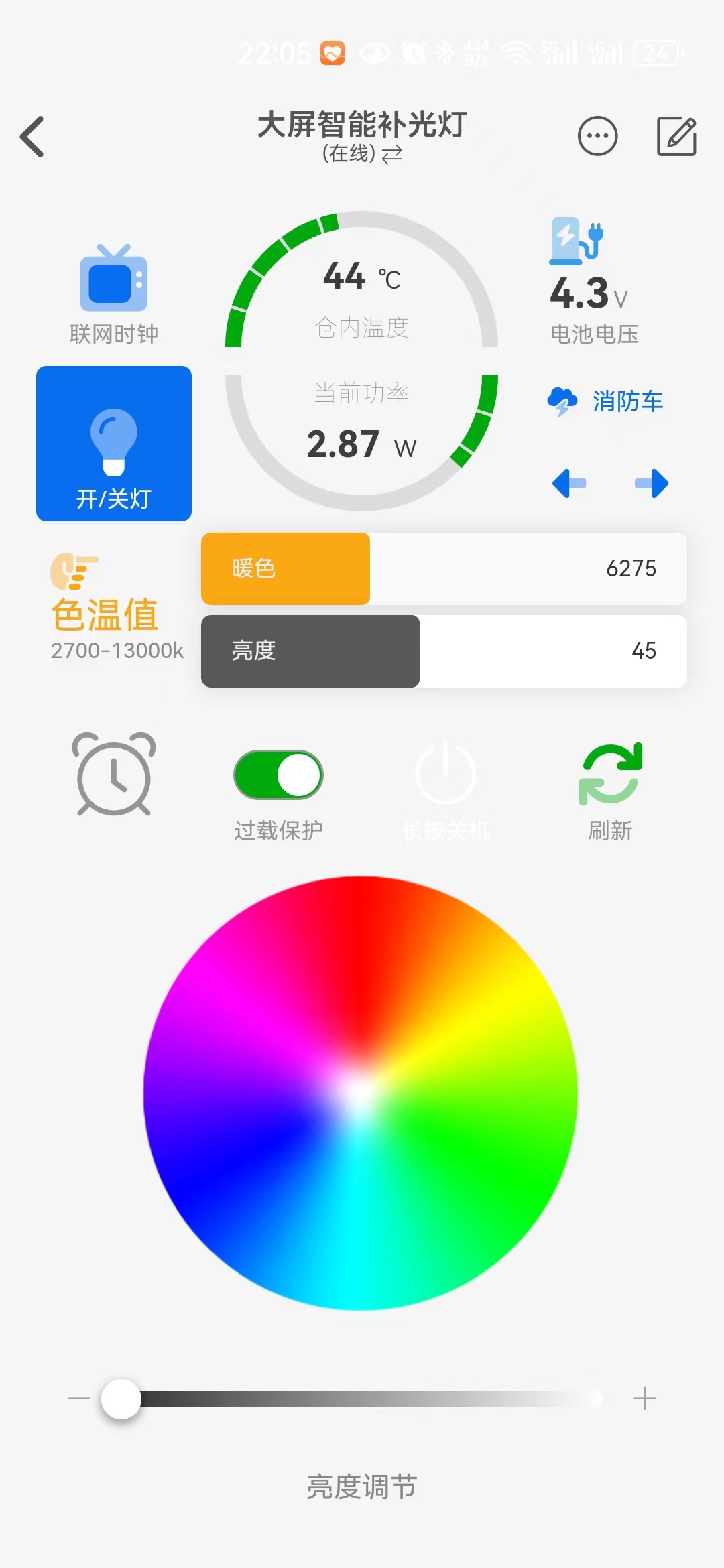
2. APP Interface Design:
3. Function Description
1). CCT Mode: Color temperature supports adjustment from 2700-13000K, brightness: 0-100%. Single-color temperature 3.25W, dual-color temperature 6.5W.
2) RGB Mode: Supports full-color RGB, HSL: 360°, brightness: 0-100%.
3) Simulated Scenes: 11 scenes: lightning, gradient color, candle, flame, police car, ambulance, high power, TV, club, flash, TV.
4) System: Viewable: maximum voltage, current, power, hardware and software version, serial number; adjustable: LED color temperature, screen off time, discharge voltage, maximum power, maximum current, overload protection.
5) Desktop network clock, automatically switches themes.
Actual product image below:

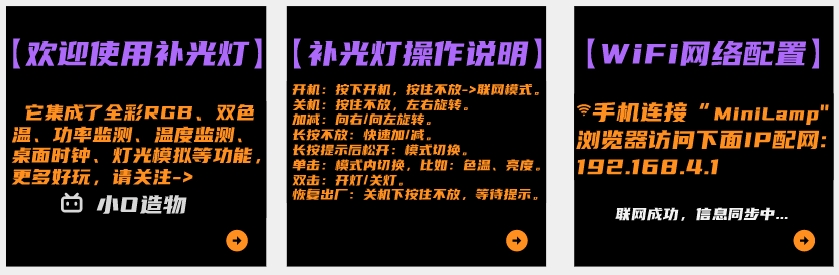
3. Boot-up guidance and network configuration
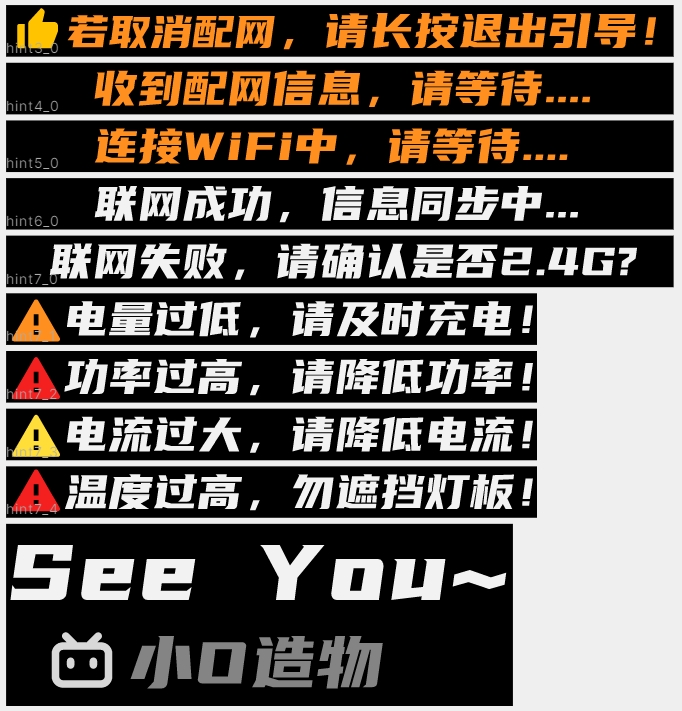
4. UI prompts
III. Soldering Precautions
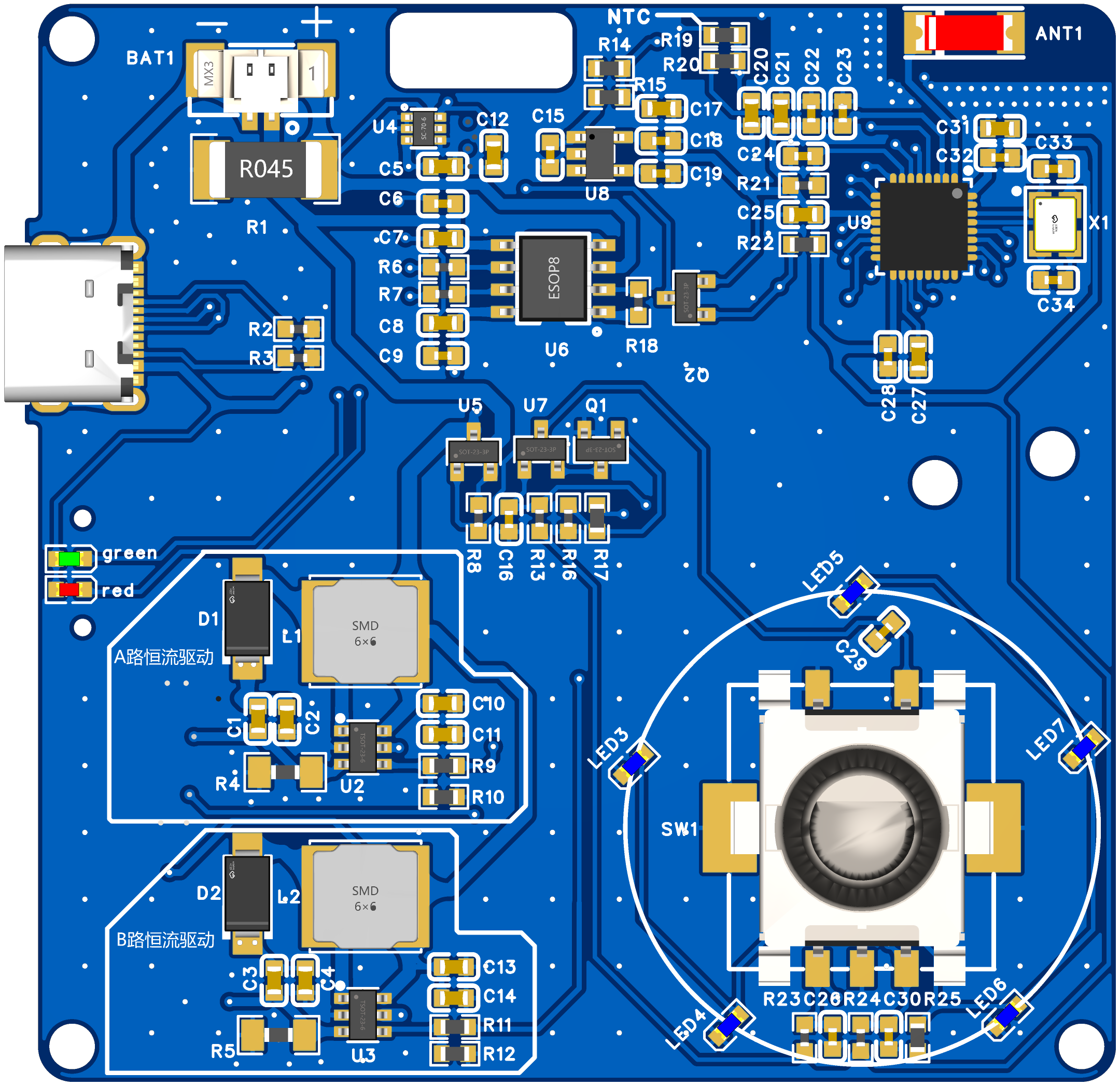
1. Main Control Board
1. The EC11 knob needs to be centered, otherwise it can easily cause interference during later installation. The keycaps need to be pressed down properly, otherwise the knob may tilt unevenly.
2. Before powering on, measure whether the battery terminals BAT1 and L1 are short-circuited, then power on.
3. Components marked NC do not need to be soldered; it will not affect functionality!
2. Lamp Board
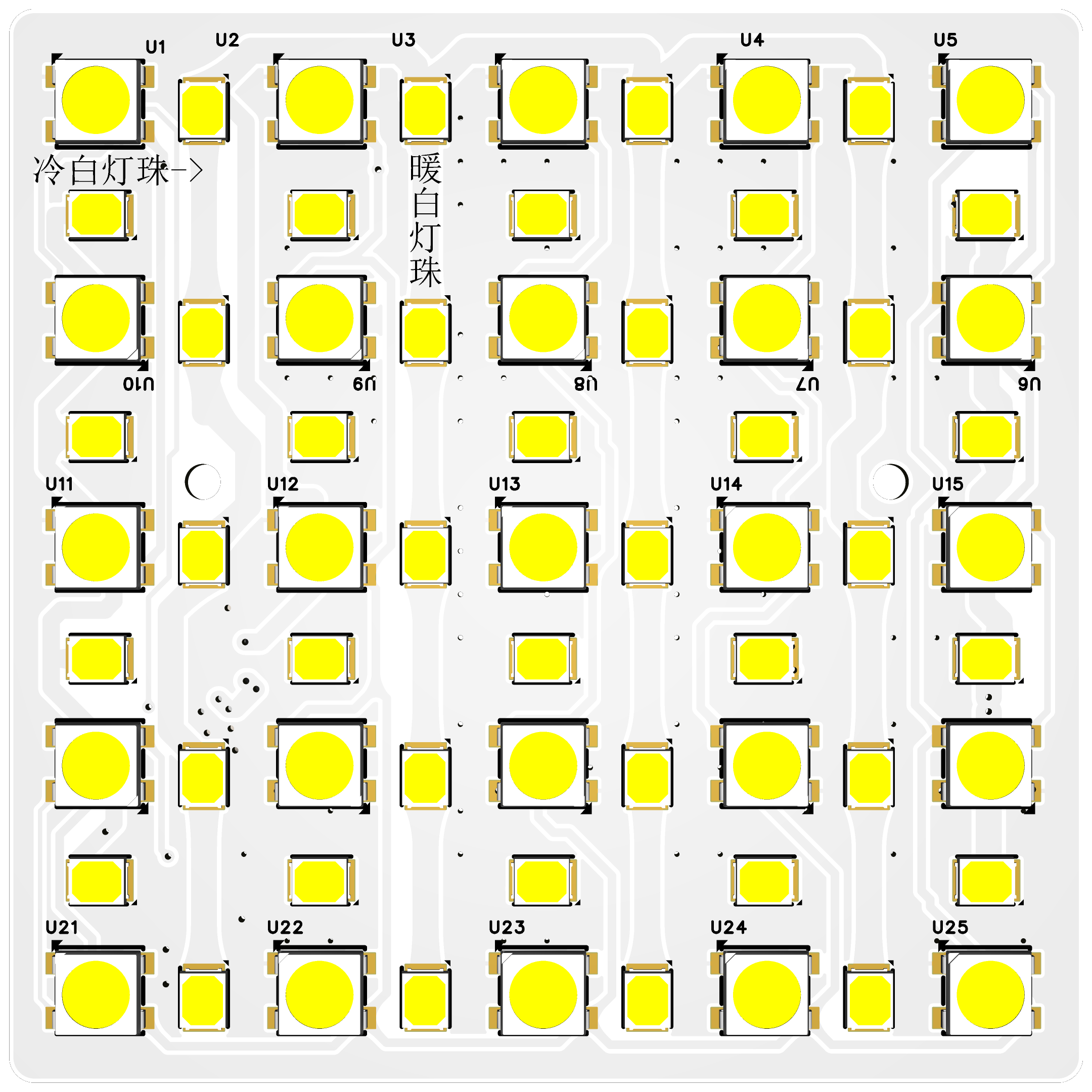
1. Note the soldering direction of the 2835 LED beads: horizontal for cool light and vertical for warm light.
2. Note the pin direction of the 2812; the direction alternates horizontally.
IV. Hardware Introduction and Installation Please refer to the original open-source documentation .
V. User Manual and Software Burning
1. Interface Operation
1) Power On: Press and hold to release -> Offline Mode Press and hold until the prompt appears -> Network Mode.
2) Power Off: Press and hold, rotate left or right.
3) + key: Rotate right.
4) - key: Rotate left.
5) Press and hold: Quickly + or quickly -.
6) Press and hold for 1 second to release: Mode switching.
7) Single click: Switch functions within the mode, such as color temperature, brightness, and scene. 8) Double click
: Turn the light on or off; triple click for overclocking (battery voltage greater than 3.7V is required to trigger).
9) Factory Reset: Press and hold in the settings interface and wait for restart.
2. Settings Interface
1) Color Temperature Setting: Purchase different LED beads and modify the corresponding color temperature (default 2700k-13000k). - Without color temperature calibration, there may be temperature deviation.
2) Screen Off Time: Set the screen off time from 30-300 seconds.
3) Discharge Voltage: Set the minimum battery discharge voltage; the device will automatically shut down if it falls below the set value.
4) Maximum Power: Automatically shut down if the set value is exceeded.
5) Maximum Current: Automatically shut down if the set value is exceeded. (It is best to follow the battery discharge rate, for example, 2000mAh, 1C -> 2000*1/1000=2A) 6
) Overload Protection: YES: Automatically shut down if the set value is exceeded (recommended to enable); NO: Not limited by the set value.
7) Over-Temperature Protection: Automatically shut down if the temperature exceeds the set value.
3. Software Burning
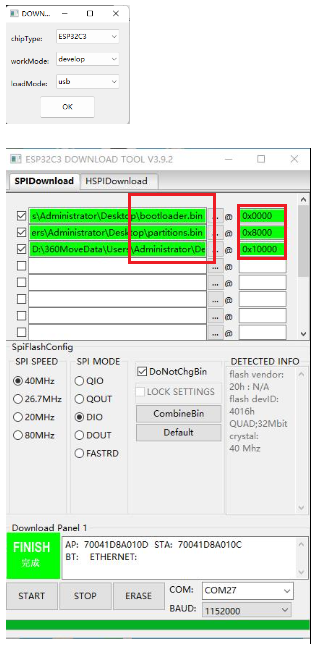
1) Software: flash_download_tool_3.9.2.exe -> Select ESP32C3 -> USB.
2) Steps: Set up as shown in the picture [you need to press and hold the knob during the burning process].
VI. APP Download and WIFI Configuration
1. Device Key (Blinker ID) Acquisition Method:
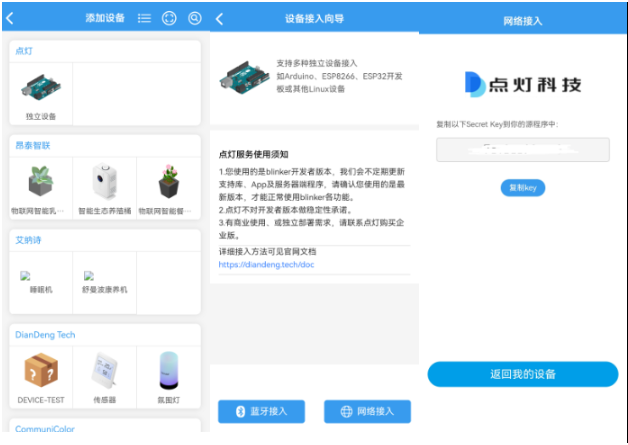
(I). Go to the official website of Lamp Technology to download the APP -> Open the APP on the official website and add the device -> Specific Method
1) Obtain Blinker ID: Open the APP -> Add Device -> Independent Device -> Network Access -> Copy the key (Blinker ID), which is needed for network configuration (you can leave it blank if you are not using the app)
2) Interface Configuration: Open the new device -> Interface Configuration -> Enter the configuration information (copy the text below) -> Update Configuration
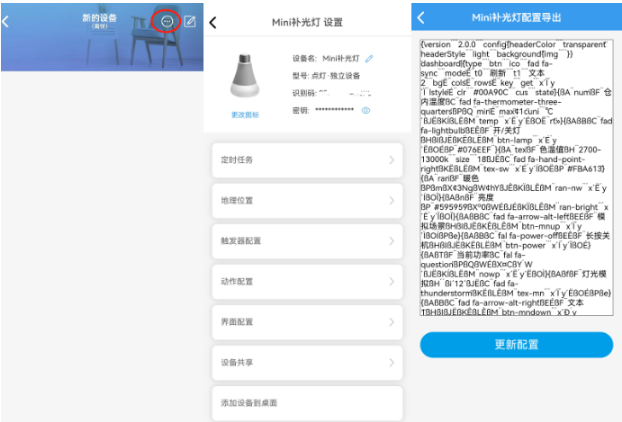
{¨version¨¨2.0.0¨¨config¨{¨headerColor¨¨transparent¨¨headerStyle¨¨light¨¨background¨{¨img¨´´}}¨dashboard¨|{¨type¨¨btn¨¨ico¨¨fad fa-sync¨¨mode¨Ë¨t0¨¨refresh¨¨t1¨¨text2¨¨bg¨Ë¨cols¨Ë¨rows¨Ë¨key¨¨get¨´x´Ï´y´Ï¨lstyle¨É¨clr¨¨#00A90C¨¨cus¨¨state¨}{ßA¨num¨ßF¨innerTemperature¨ßC¨fad fa-thermometer-three-quarters¨ßPßQ¨min¨É¨max¨¢1c¨uni¨´℃´ßJËßKÍßLËßM¨temp¨´x´Ë´y´ÉßO˨rt¨»}{ßAßBßC¨fad fa-lightbulb¨ßEÊßF¨On/OffLight¨ßHßIßJËßKËßLËßM¨btn-lamp¨´x´É´y´ËßOÉßP¨#076EEF¨}{ßA¨tex¨ßF¨ColorTemperature¨ßH¨2700-13000k¨¨size¨¨18¨ßJËßC¨fad fa-hand-point-right¨ßKËßLËßM¨tex-sw¨´x´É´y´ÍßOËßP¨#FBA613¨}{ßA¨ran¨ßF¨warm color¨ßPßmßX¢3NgßW¢hYßJÊßKÏßLÊßM¨ran-nw¨´x´Ë´y´ÍßOÎ}{ßAßnßF¨brightness¨ßP¨#595959¨ßXº0ßWÉßJÉßKÏßLÊßM¨ran-bright¨´x´Ë´y´ÎßOÎ}{ßAßBßC¨fad fa-arrow-alt-left¨ßEÉßF¨Simulate Scene¨ßHßIßJËßKÊßLÊßM¨btn-mnup¨´x´Ï´y´ÌßOÍßPße}{ßAßBßC¨fal fa-power-off¨ßEÊßF¨Long Press to Power Off¨ßHßIßJËßKËßLËßM¨btn-power¨´x´Í´y´ÏßOÉ}{ßAßTßF¨Current Power¨ßC¨fal fa-question¨ßPßQßWÉßX¤CßY´W´ßJËßKÍßLËßM¨nowp¨´x´Ë´y´ËßOÌ}{ßAßfßF¨Light Simulation¨ßH´´ßi´12´ßJËßC¨fad fa-thunderstorm¨ßKËßLÊßM¨tex-mn¨´x´Ï´y´ËßOÉßPße}{ßAßBßC¨fad fa-arrow-alt-right¨ßEÉßF¨text1¨ßHßIßJËßKÊßLÊßM¨btn-mndown¨´x´Ð´y´ÌßOÍßPße}{ßAßTßF¨battery voltage¨ßC¨fad fa-charging-station¨ßP¨#389BEE¨ßWÉßXº0ßY´V´ßJËßKËßLËßM¨num-bat¨´x´Ï´y´ÉßOÉßa»}{ßAßBßC¨fad fa-tv-retro¨ßEÉßF¨Network Clock¨ßHßIßJËßKËßLËßM¨btn-clock¨´x´É´y´ÉßPßeßOÉ}{ßA¨tim¨ßJËßKËßLËßM¨timing¨´x´É´y´Ï}{ßA¨col¨ßF¨Brightness Adjustment¨ßPß1AßJËßKÑßLÑßM¨RGBKey¨´x´É´y´ÑßOÊ}{ßAßBßCßwßEÊßF¨Overload Protection¨ ßHßIßJËßKËßLËßM¨btn-protect¨´x´Ë´y´ÏßOÊßPßQ}÷¨actions¨|¦¨cmd¨¦´b1´‡¨text¨‡´on´¨Open relay 1¨¨off¨¨Close relay 1¨—{ß1N{´b2´´on´}ß1O¨Open relay 2¨}{ß1N{´b2´ß1Q}ß1O¨Close relay 2¨}÷¨triggers¨|÷ßa|ßZß1B÷}
(二).WIFI network configuration:
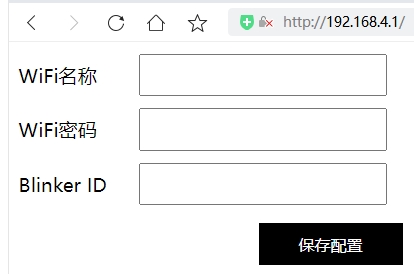
Press and hold, release after the prompt, and enter the WIFI network configuration.
For the first network configuration, use a mobile phone or computer to connect to "MiniLamp", access the browser: 192.168.4.1, and enter the WiFi account, password, and Blinker ID (see above for how to obtain them).
VII. Replica Instructions
1. Commercial use is prohibited. Reproduction is difficult; the source code is not currently open source, only the BIN file is provided.
2. The main controller is in a QFN package. Beginners should proceed with caution as soldering errors are highly likely. Resistors and capacitors use 0603 packages.
3. The BOM list should be updated to match the actual component list. The BOM is in the attachment.
4. Attachments: Burning BIN file, 3D printing files, PCB and schematic diagram, soldering diagram.
VIII. Function Demonstration
Click here to watch the Bilibili demo video.
Remember to like, comment, and subscribe! Your support is my motivation!








 京公网安备 11010802033920号


 10121750-1029237LF



