This is an
APDS-9960 digital proximity, gesture, and ambient light sensor FPC expansion board.
I'm looking for a JLC supplier, thanks.
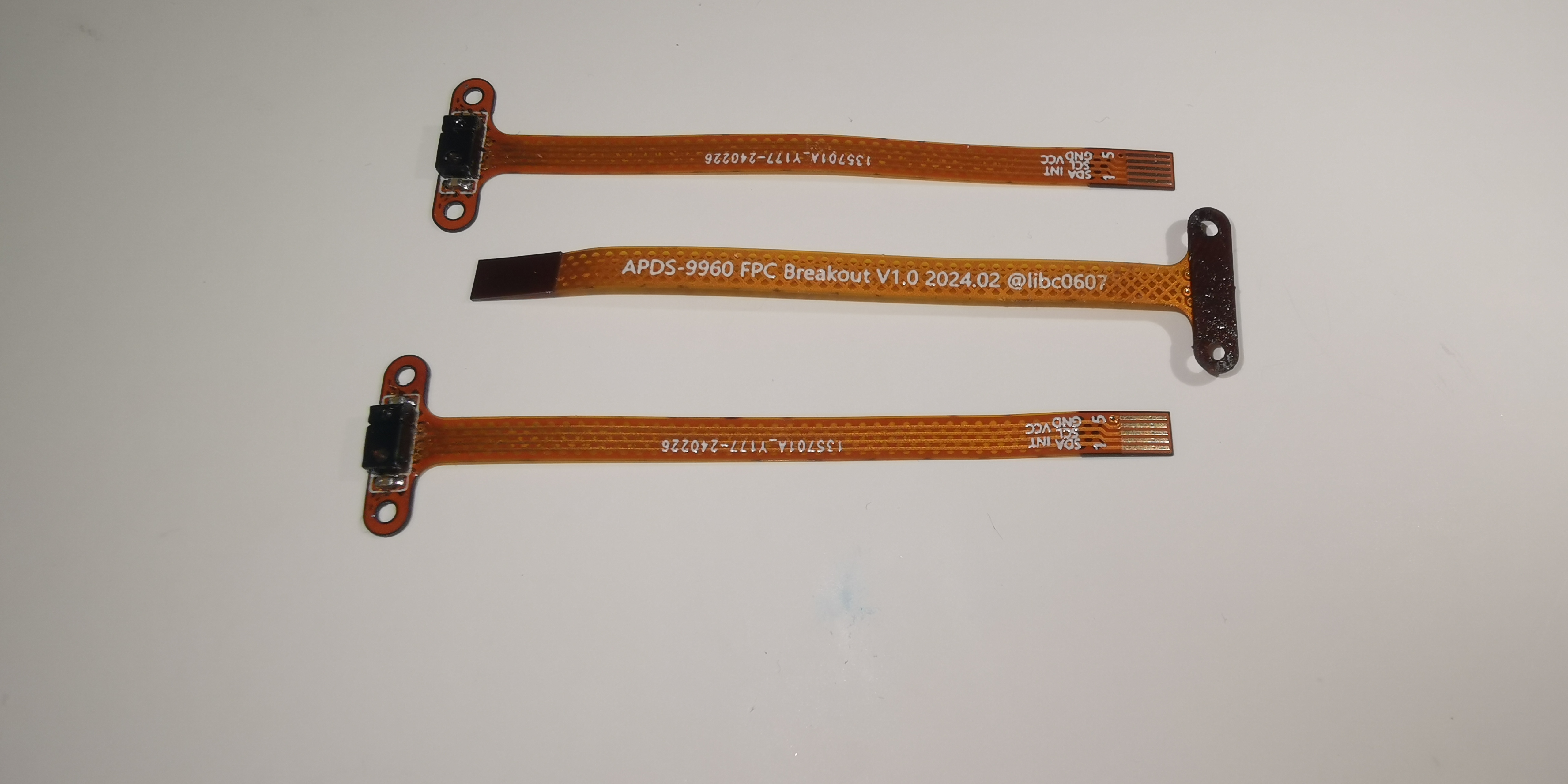
Why JLC makes
this? I don't know. Why can't I buy this on Taobao? They're all huge PCBs! How do you fit such a large frame into a casing?
Because: 1. As a gesture sensor, it obviously needs to face the user directly; 2. As a proximity/ambient light sensor working with the screen (screen off/touch off/brightness adjustment), it needs to be aligned with the screen.
If your device has a casing and screen, the sensor's placement is usually inconvenient on the main PCB. This board can be used to bring it out.
For example, my "God's Eye" (*not the low-end version, it removed the sensor) supports automatic screen dimming. You can see the effect here. The red box shows the ambient light sensor.
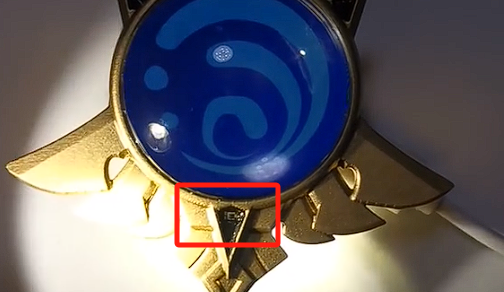
Because there were no available FPCs for the casing design in December 2021, only a TEMT-6000 sensor was used and soldered onto a general-purpose FPC cable.
If this sensor were used, gesture interaction could even be added. The overall
length
is 50mm. You can adjust the length according to the overall structure of the device by lengthening the middle section; a longer length is recommended, at least enough to accommodate
two M1.2 holes with an 8.8mm hole spacing. For other specific dimensional details, refer to the PCB diagram.
The FPC gold finger side is 0.5mm 5P, and it supports common 0.5mm pitch/0.3mm thickness FPC sockets by default.
When ordering, you need to calculate the PI reinforcement layer thickness of the FPC based on your actual situation, as the thickness that the FPC socket can fit into is generally considered fixed. Too thin and it won't clamp properly, too thick and it won't close.
You can use the FPC reinforcement calculator provided by JLCPCB to calculate it, and it is recommended to use this as the standard. Currently, the thickness in the open-source version has been calculated based on the most common 0.3mm thickness socket; you can order directly with this thickness
. It's almost impossible to solder with a soldering iron; a hot plate soldering iron is recommended.
The electrical characteristic
schematic is based on Adafruit's module, but it only supports 2.4~3.6V power supply & IO voltage, and does not include level conversion
SDA/SCL/INT. None of them contain pull-up resistors, facilitating integration into existing designs.
Quick testing
can be performed using the test code I provided (see attachment). Good test
code functionality
: color_sensor: Color sensing example, cyclically printing color values in the USB CDC serial port;
gesture_sensor: Gesture example, outputting a gesture in the USB CDC serial port when motion is detected above/below/left/right in front;
proximity_sensor: Proximity sensing + interrupt example, generating an interrupt on INT when sufficiently close, outputting the relative distance in the USB CDC serial port.
Hardware connection:
RPi Pico.
My APDS-9960 FPC board
is connected as follows, allowing direct execution of this code:
APDS-9960.SDA <---> Pico.GP0 <---> Pull-up resistor <---> 3V3;
APDS-9960.SCL <---> Pico.GP1 <---> Pull-up resistor <---> 3V3;
APDS-9960.INT <---> Pico.GP2 (Low speed, using internal pull-up resistors,
requires additional 3.3V power supply and GND connection.
Software environment:
Arduino-Pico, https://arduino-pico.readthedocs.io/en/latest/, board settings can be left at default.
Adafruit_APDS9960 library, https://github.com/adafruit/Adafruit_APDS9960.
Reference documentation
: https://github.com/adafruit/Adafruit_APDS9960
, https://www.adafruit.com/product/3595
, https://cdn.sparkfun.com/assets/learn_tutorials/3/2/1/Avago-APDS-9960-datasheet.pdf. Datasheet.
Open source license:
MIT License.
*This roughly means that if you use this board in your project, you only need to indicate the source, author, and license; there are no other restrictions. However, this is a simplified explanation; please refer to the original license for the most accurate information.)








 京公网安备 11010802033920号


 H8/3437



