
Serial voltmeter using PIC16C71
Source: InternetPublisher:vuJcM6oU1 Keywords: PIC16C71 Voltmeter Updated: 2026/02/11
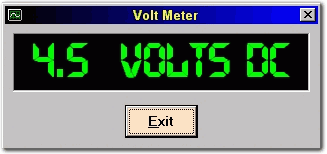
Serial Voltmeter using PIC16C71
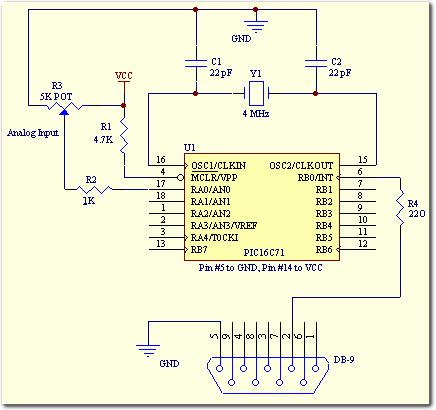
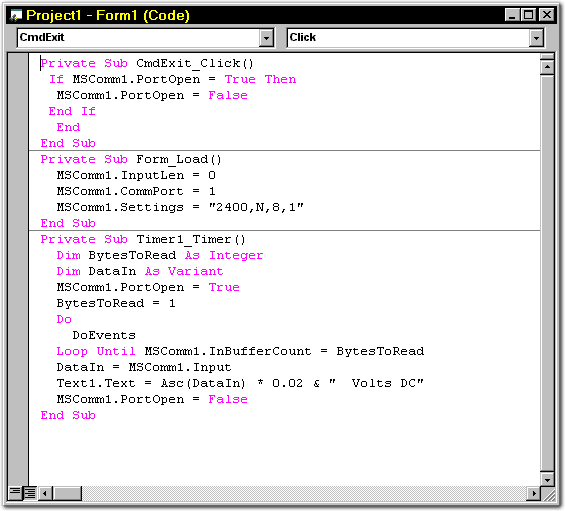
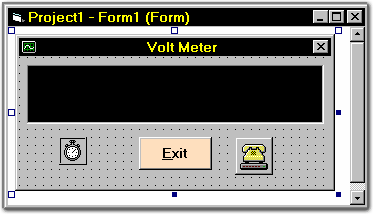
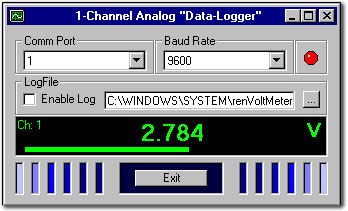
Building a serial voltmeter to measure 0 to 5 volts DC is actually quite easy. This can be done using MeLabs PicBasic and Microsoft Visual Basic 5.0 Professional Edition. You need Visual Basic Professional Edition because you must use the MSComm control for Basic. This control is not available in the Visual Basic 5 "Learning" edition. The PIC16C71 further simplifies the task with its built-in analog-to-digital converter. Pins 17, 18, 1, and 2 are the analog inputs AIN0, AIN1, AIN2, and AIN3, respectively.
Latest Microcontroller Circuits
- Arduino DCC Decoder
- RS232 serial interface to USB converter
- DAC0832 pin diagram and interface circuit
- Design of Simple Digital Voltmeter
- PIC microcontroller experimental board circuit
- Interface circuit between PDIUSBD12 chip and 51 single-chip microcomputer
- Simple RS232C/TTL level conversion and serial port power supply
- An article explains the undervoltage reset of the microcontroller
- What is the mechanism of microcontroller latch-up?
- How to interface a 16×2 LCD display to a PIC18F4550 microcontroller?
Popular Circuits
- Electrical schematic diagram of DC voltmeter input at non-inverting terminal
- The voltmeter is connected to circuit a through a voltage transformer or commutation switch
- Grain moisture detection circuit
- Simple DC voltmeter circuit
- Electronic voltmeter circuit that automatically converts two ranges using relays
- Automatic voltmeter circuit with impedance converter
- Multi-range voltmeter circuit using 0 to 1mA meter
- Simple differential voltmeter
- Negative feedback voltmeter
- Four and a half digit LCD digital display voltmeter circuit







 京公网安备 11010802033920号