Modified from https://oshwhub.com/madoka/opensk-nrf52840-mini
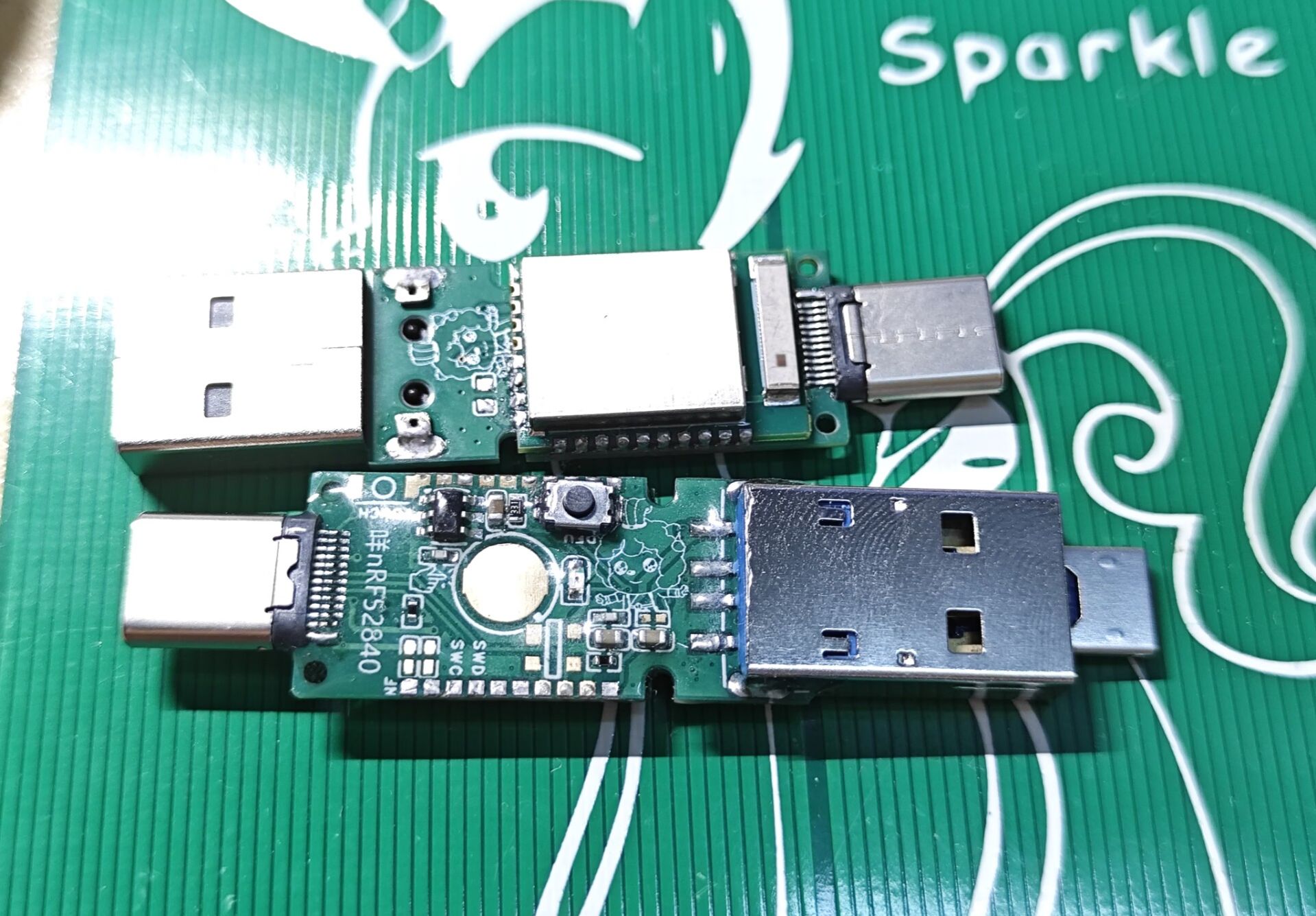
usb. A micro USB can also be pulled out from side A. So, the actual
thickness is 0.8mm for the 3-head board. If you choose the wrong port (C-port), it won't install. Download the firmware
from the expert's link; the attached
video tutorial for E73 soldering, firmware flashing, and UV glue sealing is here
: https://www.bilibili.com/video/BV1rJ4m1H7gN.
You'll need an RP2040; any Raspberry Pi Pi (Pico) will work. Download the DAP downloader firmware here:
https://github.com/raspberrypi/debugprobe/releases. Download the one ending in pico.uf2. Hold down the boot button, plug it into your computer, and drag a USB drive to it. If you don't know where to click, download this: https://github.com/raspberrypi/debugprobe/releases/download/debugprobe-v2.0/debugprobe_on_pico.uf2. Then connect GP2 to the SWC point near the tail and GP3 to the SWD point near the USB (A-port). Plug both boards into the same USB port. Download the program from the official website https://gnutoolchains.com/arm-eabi/openocd/ on the hub (or elsewhere). After downloading, extract the file to get the openocd-xxxx folder. Right-click on Computer, select Properties, then Windows Advanced System Settings > Advanced > Environment Variables > System Variables > Path (double-click) > New > select the bin folder under openocd-xxxx. Then go to the OpenOCD-xxxxshareopenocdscripts folder and drag the hex firmware into this folder. In the address bar, type cmd and press Enter. Then type the following and press Enter: openocd -f "interface/cmsis-dap.cfg" -f "target/nrf52.cfg" -c "program filename" -c reset -c shutdown. For example, openocd -f "interface/cmsis-dap.cfg" -f "target/nrf52.cfg" -c "program E73_bootloader-0.8.3-2-ge745002-dirty_s140_6.1.1.hex" -c reset -c shutdown outputOpen On-Chip Debugger 0.12.0 (2023-10-02) [https://github.com/sysprogs/openocd]Licensed under GNU GPL v2libusb1 09e75e98b4d9ea7909e8837b7a3f00dda4589dc3For bug reports, read http://openocd.org/doc/doxygen/bugs.htmlInfo : auto-selecting first available session transport "swd". To override use 'transport select '.Info : Using CMSIS-DAPv2 interface with VID:PID=0x2e8a:0x000c, serial=E6611032E3302F2EInfo : CMSIS-DAP: SWD supportedInfo : CMSIS-DAP: Atomic commands supportedInfo : CMSIS-DAP: Test domain timer supportedInfo : CMSIS-DAP: FW Version = 2.0.0Info : CMSIS-DAP: Interface Initialised (SWD)Info : SWCLK/TCK = 0 SWDIO/TMS = 0 TDI = 0 TDO = 0 nTRST = 0 nRESET = 0Info : CMSIS-DAP: Interface readyInfo : clock speed 1000 kHzInfo : SWD DPIDR 0x2ba01477Info : [nrf52.cpu] Cortex-M4 r0p1 processor detectedInfo : [nrf52.cpu] target has 6 breakpoints, 4 watchpointsInfo : starting gdb server for nrf52.cpu on 3333Info : Listening on port 3333 for gdb connections[nrf52.cpu] halted due to debug-request, current mode: ThreadxPSR: 0x01000000 pc: 0x00000a80 msp: 0x20000400** Programming Started **Info : nRF52840-xxAA(build code: D0) 1024kB Flash, 256kB RAMInfo : Padding image section 0 at 0x00000b00 with 1280 bytesInfo : Flash write discontinued at 0x00025de8, next section at 0x000f4000Warn : Adding extra erase range, 0x00025de8 .. 0x00025fffInfo : Padding image section 2 at 0x000fc0cc with 5940 bytesWarn : Adding extra erase range, 0x000fd858 .. 0x000fdfffWarn: Adding extra erase range, 0x10001000 .. 0x10001013Warn : Adding extra erase range, 0x1000101c ..0x10001fff** Programming Finished **shutdown command invoked ** Seeing "Programming Finished" indicates success . A new USB drive letter will appear . Drag the uf2 file starting with "update-E73" onto the USB drive. The microcontroller will automatically restart. Then drag another uf2 file into it. This completes the flashing process. CanoKey Firmware Compilation Tutorial: https://zyyme.com/canokey-nrf52840.html
The compatible firmware has been uploaded in the attachment below. Press and hold the button to insert the USB drive, drag it to the USB flash drive, flash canokey_flash.uf2, and then run Canokey-config-init.exe to complete the initialization. It supports more functions than OpenSK, adding OpenPGP and PIV support on top of OpenSK's Fido2 and U2F support. Certificates can only be generated and then imported. Also, the web console is unusable (this feature wasn't implemented at all).
On 2024/04/26, the attachment was re-uploaded, adding led-off firmware. The light will flash once when powered on and then turn off, not stay on continuously. It will still flash when touched. Updating the firmware will retain the previous certificate and Fido2.







 京公网安备 11010802033920号


 1027UA-45TE13



