3-inch MIPI Touchscreen Porting:
1. Screen Parameters
:
Connect
the screen
(3 Inch, 40 Pin), MIPI
screen .
Touch
Chip: FT5316
(same as above)
. 2. Modify the Device Tree
: Modify the file [SDK_DIR]/kernel/arch/arm64/boot/dts/rockchip/tspi-rk3566-user-v10.dts, disable HDMI and EDP screens, and enable DSI screen.
// #include "tspi-rk3566-edp-v10.dtsi"
// #include "tspi-rk3566-hdmi-v10.dtsi"
#include "tspi-rk3566-dsi-v10.dtsi" // Enable DSI screen
by modifying the file [SDK_DIR]/kernel/arch/arm64/boot/dts/rockchip/tspi-rk3566-dsi-v10.dts, adding FT5316 touch, and modifying screen parameters
// Add FT5316 touch screen
&i2c1 {
status = "okay";
ft5316@38 {
pinctrl-0 = <&touch_gpio>;
compatible = "focaltech,fts";
reg = 8;
focaltech,max-touch-number = <2>;
// focaltech,display-coords =<0 0 854 480>;
focaltech,irq-gpio = <&gpio1 RK_PA0 IRQ_TYPE_LEVEL_LOW>;
focaltech,reset-gpio = <&gpio1 RK_PA1 GPIO_ACTIVE_HIGH>;
};
};
// dsi screen related changes
&dsi1 {
status = "okay";
};
&dsi1_in_vp0 {
status = "okay";
};
&dsi1_in_vp1 {
status = "disabled";
};
&video_phy1 {
status = "okay";
};
&route_dsi1 {
status = "okay";//wucaicheng mipi okay
connect = <&vp0_out_dsi1>;
};
&dsi1 {
status = "okay";
rockchip,lane-rate = <480>;
dsi1_panel: panel@0 {
status = "okay";
compatible = "simple-panel-dsi";
reset-gpios = <&gpio3 RK_PC1 GPIO_ACTIVE_LOW>;
pinctrl-names = "default";
pinctrl-0 = <&dsi1_rst_gpio>;
reg = <0>;
backlight = <&backlight>;
reset-delay-ms = <200>;
enable-delay-ms = <100>;
prepare-delay-ms = <20>;
unprepare-delay-ms = <20>;
disable-delay-ms = <20>;
init-delay-ms = <120>;
dsi,flags = <(MIPI_DSI_MODE_VIDEO | MIPI_DSI_MODE_VIDEO_BURST |
MIPI_DSI_MODE_LPM | MIPI_DSI_MODE_EOT_PACKET)>;
dsi,format = ;
dsi,lanes = <2>;
panel-init-sequence = [
05 78 01 01
05 78 01 11
39 0A 06 FF 77 01 00 00 13
15 0A 02 EF 08
39 0A 06 FF 77 01 00 00 10
39 0A 03 C0 E9 03
39 0A 03 C1 10 0C
39 0A 03 C2 20 0A
15 0A 02 CC 10
39 0A 11 B0 00 23 2A 0A 0E 03 12 06 06 2A 00 10 0F 2D 34
1F 39 0A 11 B1 00 24 2B 0F 12 07 15 0A 0A 2B 08 13 10 2D 33 1F
39 0A 06 FF 77 01 00 00 11
15 0A 02 B0 4D
15 0A 02 B1 48
15 0A 02 B2 84
15 0A 02 B3 80
15 0A 02 B5 45
15 0A 02 B7 85
15 0A 02 B8 33
15 0A 02 C1 78
15 0A 02 C2 78
15 0A 02 D0 88
39 0A 04 E0 00 00 02
39 0A 0C E1 06 A0 08 A0 05 A0 07 A0 00 44 44
39 0A 0D E2 30 30 44 44 6E A0 00 00 6E A0 00 00
39 0A 05 E3 00 00 33 33
39 0A 03 E4 44 44
39 0A 11 E5 0D 69 0A A0 0F 6B 0A A0 09 65 0A A0 0B 67 0A A0
39 0A 05 E6 00 00 33 33
39 0A 03 E7 44 44
39 0A 11 E8 0C 68 0A A0 0E 6A 0A A0 08 64 0A A0 0A 66 0A A0
39 0A 03 E9 36 00
39 0A 08 EB 00 01 E4 E4 44 88 40
39 0A 11 ED FF 45 67 FA 01 2B CF FF FF FC B2 10 AF 76 54 FF
39 0A 07 EF 10 0D 04 08 3F 1F
05 78 01 11
15 0A 02 3A 55
05 14 01 29
];
panel-exit-sequence = [
05 00 01 28
05 00 01 10
];
disp_timings1: display-timings {
native-mode = <&dsi1_timing0>;
dsi1_timing0: timing0 {
clock-frequency = <33500000>;
hactive = <480>;
vactive = <854>;
hfront-porch = <8>;
hsync-len = <2>;
hback-porch = <43>;
vfront-porch = <4>;
vsync-len = <10>;
vback-porch = <42>;
hsync-active = <0>;
vsync-active = <0>;
de-active = <0>;
pixelclk-active = <1>;
swap-rb = <0>;
swap-rg = <0>;
swap-gb = <0>;
};
};
ports {
#address-cells = <1>;
#size-cells = <0>;
port@0 {
reg = <0>;
panel_in_dsi1:endpoint {
remote-endpoint = <&dsi1_out_panel>;
};
};
};
};
ports {
#address-cells = <1>;
#size-cells = <0>;
port@1 {
reg = <1>;
dsi1_out_panel: endpoint {
remote-endpoint = <&panel_in_dsi1>;
};
};
};
};
3. Modify the kernel.
Focaltech touchscreen support is enabled by default in the kernel. You can check if it's enabled in menuconfig. After confirming it's enabled, modify the following code.
Unlike other touchscreens that specify screen size in the device tree, this needs to be changed in the header file. It's a bit tricky.
After completing all steps, compile and flash the program.
// Modify /kernel/drivers/input/touchscreen/focaltech_touch/focaltech_core.h
// Modify this to the screen size
#define FTS_X_MAX_DISPLAY_DEFAULT 480
#define FTS_Y_MAX_DISPLAY_DEFAULT 854
// Modify the /kernel/drivers/input/touchscreen/focaltech_touch/focaltech_core.c file
// If you don't modify the following code, the x-axis touch is reversed. Around lines 658 and 735, change it to 480-events[i].x, as follows:
// Around line 658
#if 1
input_report_abs(data->input_dev, ABS_MT_POSITION_X, 480-events[i].x);
input_report_abs(data->input_dev, ABS_MT_POSITION_Y, events[i].y);
// near line 735
input_report_abs(data->input_dev, ABS_MT_POSITION_X, 480-events[i].x);
input_report_abs(data->input_dev, ABS_MT_POSITION_Y, events[i].y);
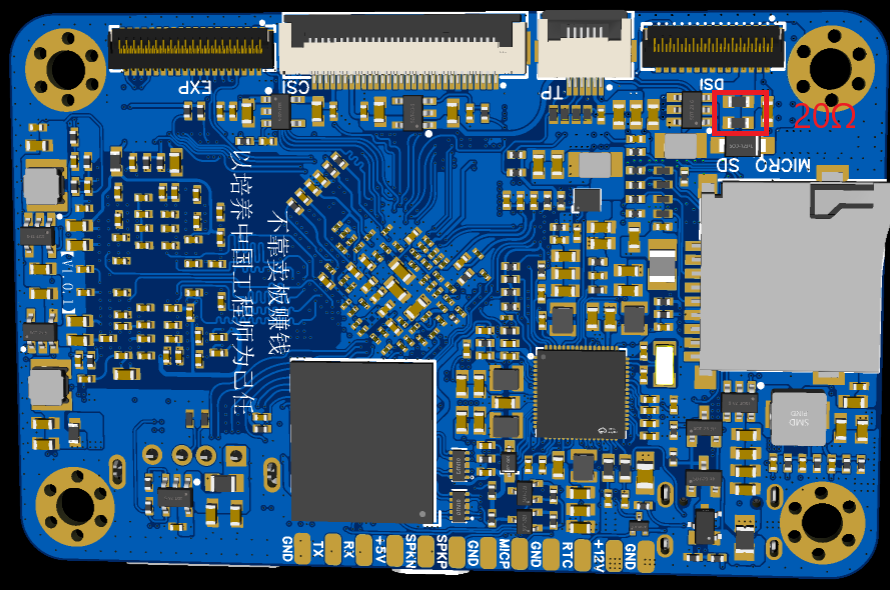
4. Modify the backlight resistor
The screen backlight requires a current of 20mA, so I=0.2V/R, which is acceptable for R=10Ω. Two resistors with R=20Ω can be connected in parallel. Modify the two resistors in the red area of the figure below. There is a lot of room for modification, and it is not difficult to solder with a soldering iron.








 京公网安备 11010802033920号


 1N4002GPE/73



