otQoq

Hand-built 8-bit computer: Z80-V2

 
Overview
The design and debugging of the entire system's hardware and software took about a year and a half, during which many difficulties were encountered, but fortunately, they were all resolved one by one.
This project will be one of the best practical projects in computer organization principles: it adopts a modular design, with each module having a clear division of labor and a simple structure, allowing modules to be added or removed as needed.
The minimum system requires at least three modules: a motherboard, memory, and an LED array. With these three boards, it is possible to run self-made programs and observe their output, which is also the part that must be done in the early stages of the project.
Video:
CP/M Demo: https://www.bilibili.com/video/BV1BxGkeuEWK
I will be uploading hardware and software tutorials for this project to bilibili gradually. Follow me for the latest updates: https://space.bilibili.com/252130017
Software:
To download the code, please copy the following command to your terminal and execute it: git clone https://gitee.com/tomorrow_land/z80v2.git
Hardware:
Z80-VDP Graphics Card
Z80-MEMORY Memory
Z80-JOYPAD-PSG Game Controller + Sound Card
Z80-DIGITAL I/O LED Array
Z80-KEYBOARD PS/2 Keyboard
Z80-SIO RS232 Serial Port
Z80-CF Compact Flash Memory Card
 
For this replica project, please strictly adhere to the open-source license terms. Note: Information related to the project and author in the PCB board and source code must not be modified, including text and logos.
Open Source License: GPLv3
 
PDF_Manually Hand-crafted 8-bit Computer: Z80-V2.zip
Altium - Hand-crafted 8-bit computer: Z80-V2.zip
PADS 8-bit Hand-crafted Computer: Z80-V2.zip
BOM_Manually Built 8-bit Computer: Z80-V2.xlsx
94025
[Mini Project] STM32 Electronic Keyboard and Bluetooth Music Player
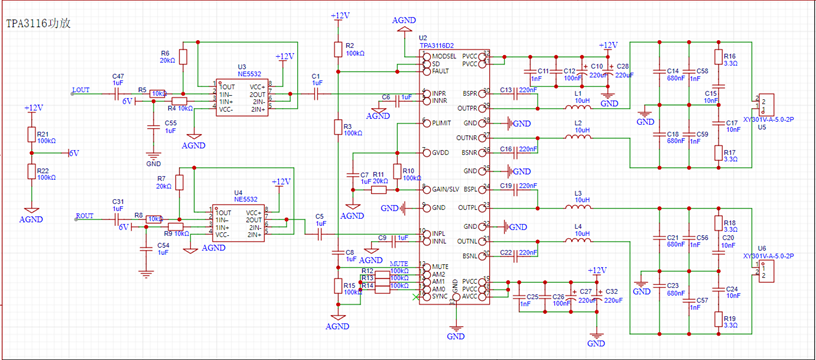
This project is a Bluetooth music spectrum lamp and electronic keyboard based on the STM32F103RCT6 chip. The Bluetooth speaker itself can be solved by pure hardware, but in order to show the workload, a microcontroller, TFT screen, ADC module and other functions were added.

This work is a modified version of an open-source project by a master programmer, and some issues remain, as mentioned in the attached "Introduction." However, it is sufficient for a microcontroller course project or learning project. The original
open-source project link
begins with the TPA3116 power amplifier circuit, the core component, which connects to the speakers for sound output.
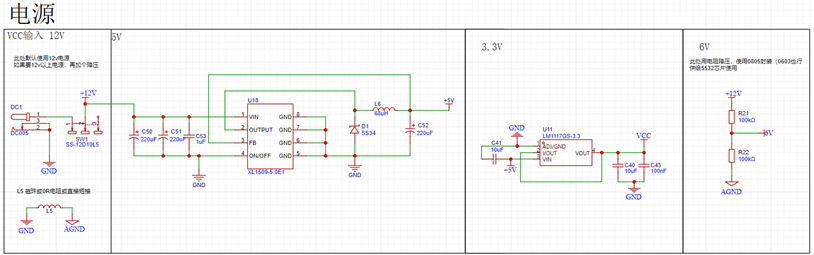
The power supply section
contains some miscellaneous components; these are mainly for connecting to the 32-bit chip.
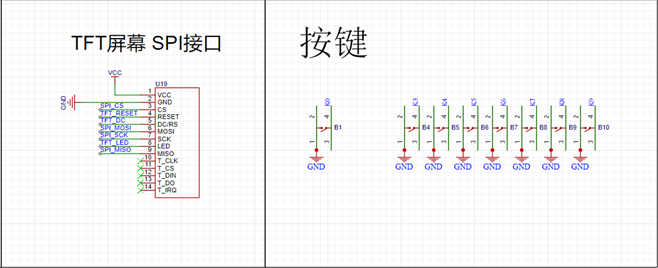
The Bluetooth module, audio acquisition module, and TFT screen can be purchased from Taobao. The Bluetooth module has a built-in song switching function; simply connect it according to the resistor values. The audio module outputs analog signals, which need to be converted using the ADC pin of the 32-bit chip. The TFT uses hardware SPI, so find the correct SPI pin on the 32-bit chip (configure directly using CubeMX).
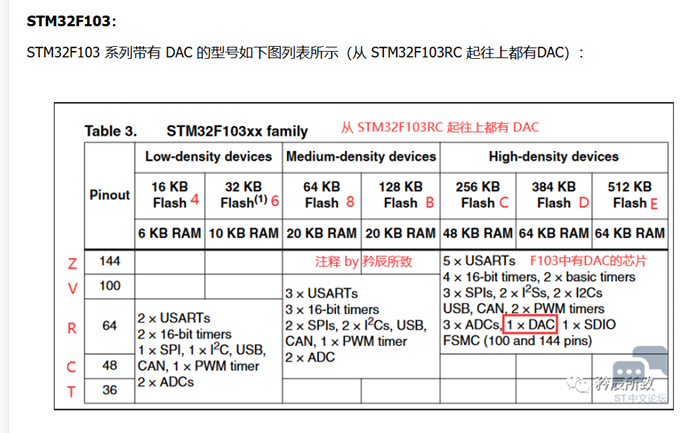
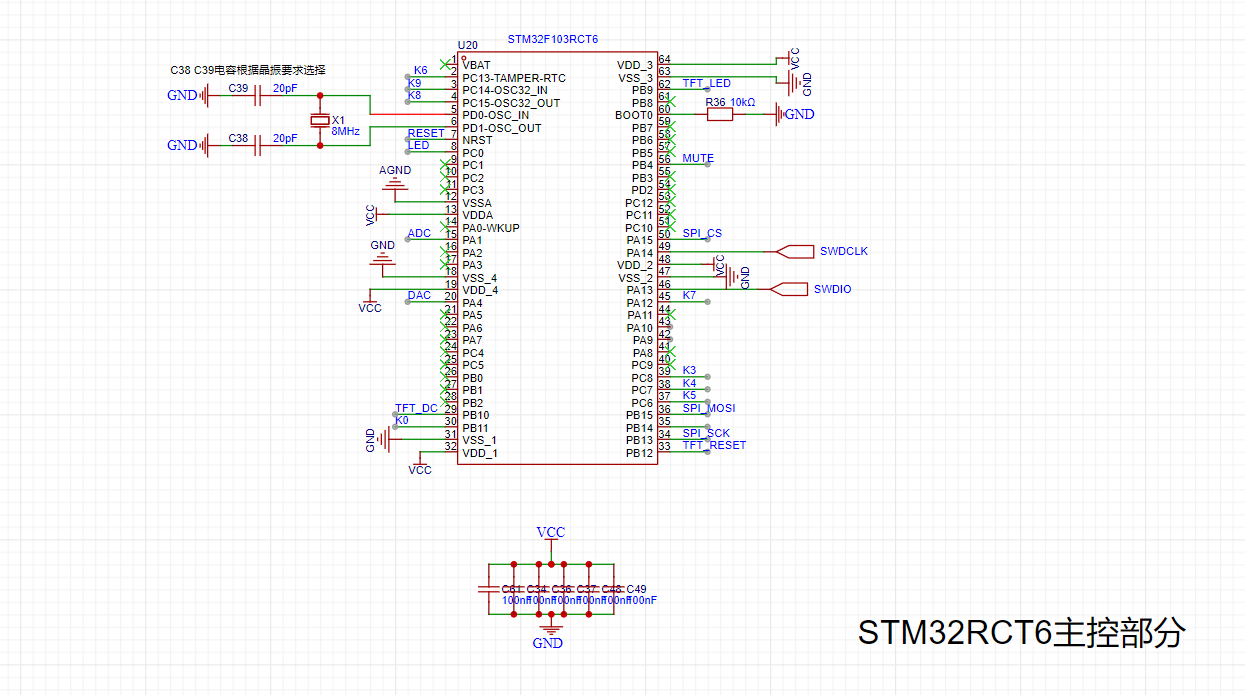
Next is the 32RCT6. The reason for choosing this chip is its fewer pins for easier soldering, and because a DAC function is required. The RCT6 chip was selected based on the table below.
Remember the components you learned before? Connect them to the pins (the pin positions are your choice; details will be explained in the CubeMX configuration
section later). I won't go into detail about the software; interested readers can download the attached "Introduction" and code package and refer to them.
Component purchase instructions:
Surface mount components are mostly 0603 packages. Use two resistors to divide the voltage to obtain 6V. I chose 0805 packages; you can choose to solder either 0805 or 0603.
For the RCT6 chip, TFT screen, MH-M18 Bluetooth module, and MAX9814 audio acquisition module, just find stores with high sales volume on Taobao.
The C1 and C5 capacitors are CBB packages; if you don't want to buy them separately, you can use ordinary capacitors.
I bought a six-pin 50k rotary potentiometer.
Finally, thanks to everyone who shared their learning experience in open source. I learned a lot during the process. Although the result isn't perfect, it's sufficient for a microcontroller course project.
It's less of a project and more of a review of my learning experience, haha ​​(a little self-deprecation).
There are two versions! The second version is based on the problems in the first version, so just treat the first version as a joke.
9d7a3c6d9562858699c4f703d5089332.mp4
Introduction.docx
Bluetooth speaker.zip
Bluetooth speaker.7z
PDF_【Mini Course Project】STM32 Electronic Keyboard and Bluetooth Music Player.zip
Altium_【Mini Course Project】STM32 Electronic Keyboard and Bluetooth Music Player.zip
PADS_【Mini Course Project】STM32 Electronic Keyboard and Bluetooth Music Player.zip
BOM_【Mini Course Project】STM32 Electronic Keyboard and Bluetooth Music Player.xlsx
94026
Wireless Dual-Core Download Debugger ARM+RISC-V WCH-LinkW
A DAP downloader based on the CH32V208G supports both ARM and RISC-V wireless download methods.
Current version 1.1V
1. Fixed silkscreen error at the interface (TDX-->>TXD)
Current version 1.0V
1. Updated the test history in the data package
2. Online firmware upgrades may fail and firmware may be lost; in this case, the firmware needs to be reflashed.
The data has been uploaded as an attachment. If you have any questions, please leave a message at the bottom.
Video address: [Open Source] Hands-on Guide to Making a Mini Dual-Core Wireless Download Debugger ARM+RISC-V WCH-LinkW
Project Introduction
WCH-LinkW is a wired/wireless 2.4G dual-analog debugger that can be used for online debugging and
downloading , and also for online debugging and downloading of ARM chips with SWD/JTAG interfaces.


Mode
Status Indicator
Supported IDEs
Supported Chips


RISC-V
Blue light is off when idle
Mount River Studio
This company supports RISC-V core chips for single/dual-wire debugging


ARM
Blue light is on when idle
Keil/Moun River Studio
Supports ARM core chips with SWD/JTAG interfaces


For other models, please refer to the WCH-Link manual in the attachment.


The design has been reduced in size, making it more compact. A power pad is provided on the bottom for connecting an external power supply cable.


It adopts a 4-layer board design and uses a more professional CA-C03 antenna.


An acrylic protective shell is included to protect the downloader.


To save costs, I opted for hand soldering with a heating table. The chip was the most difficult part to solder; the rest was relatively easy to solder by hand. (Try challenging your soldering skills!) The wired
mode


requires only one WCH-LinkW. Connect the header pins to the MCU and the USB port to the computer for downloading and debugging.


The wireless mode requires two WCH-LinkWs: a WCH-LinkW master (connected to the computer) and a WCH-LinkW slave (connected to the MCU).


The wireless access address can be set using the WCH-LinkUtility tool.
Detailed parameter settings are provided in the attached WCH-Link user manual.


Instructions for Use
: Follow these steps using the attached data package:

Install the WCH-LINK driver package in administrator mode.
Press and hold BOOT and then power on. To burn the WCH-LINK firmware,
press and hold the Mode button and then power on. This will switch between ARM and RISC-V modes. In ARM mode, the blue light will remain constant.
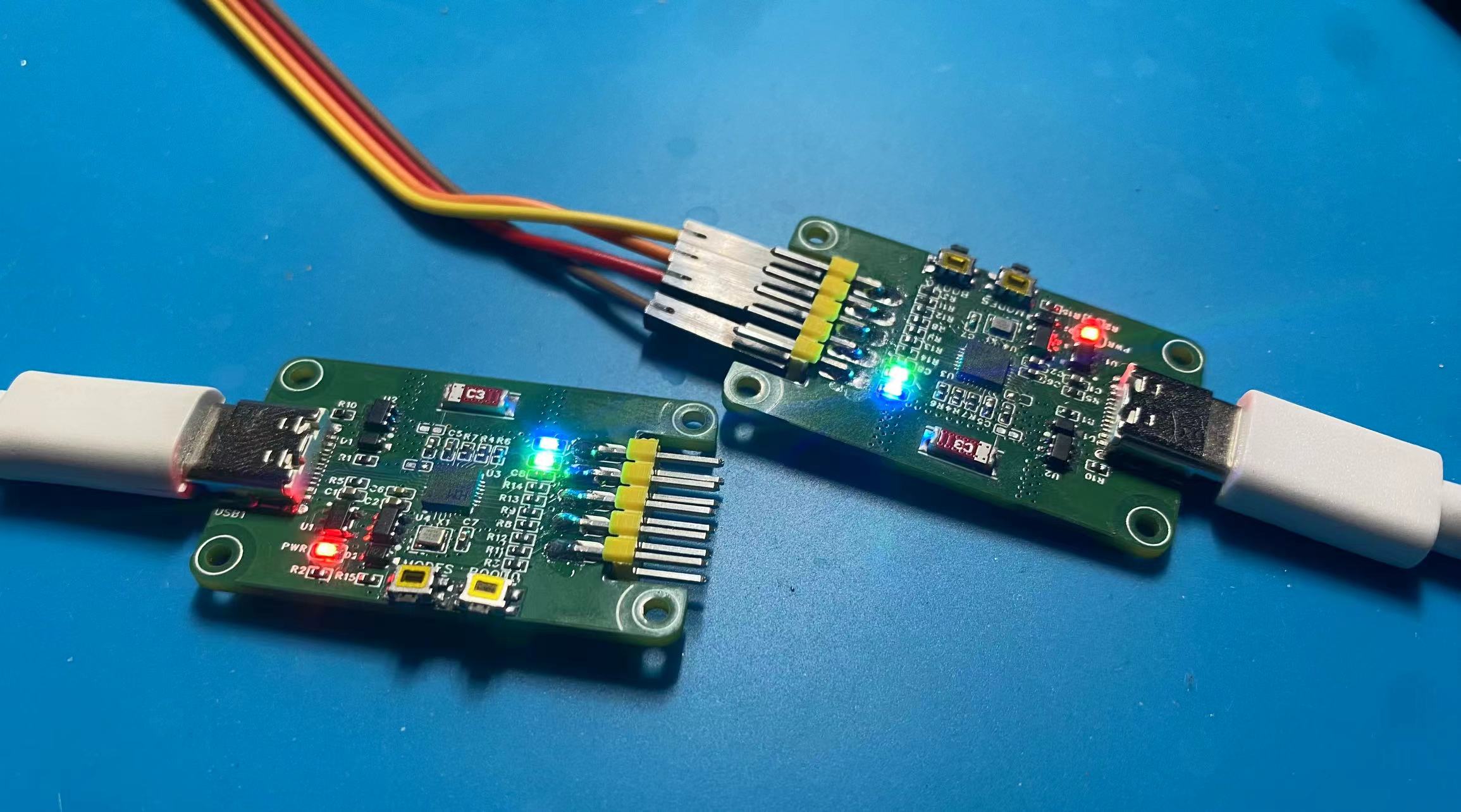
In wireless mode, pre-set the current burning mode. Then, power on the slave (connected to the target chip) burner first, and then power on the host (connected to the PC) burner. When you see the green lights on both burners constantly lit, it indicates that you are in wireless download mode.


Test Progress:

[x] Wired Download Test
[x] Wireless Download Test

Physical Demonstration
Precautions
: 1. When soldering, please pay attention to the soldering order to ensure the power supply is correct and to avoid burning out subsequent circuits! The soldering order should follow the principle of from shortest to smallest, and from inside to outside.
2. The circuit has been verified. Solder according to the component parameters in the schematic diagram. It is recommended to solder the main controller first, as it is more difficult to solder. It is recommended to use a heated soldering station.
3. When using the board cleaning solution, be careful not to touch the buttons, as corrosion will make it difficult to use.
4. It is recommended to use the schematic diagram parameters; the BOM table may contain errors.
WCH-LinkW.zip
PDF_Wireless Dual-Core Download Debugger ARM+RISC-V WCH-LinkW.zip
Altium Wireless Dual-Core Downloader and Debugger ARM+RISC-V WCH-LinkW.zip
PADS Wireless Dual-Core Downloader and Debugger ARM+RISC-V WCH-LinkW.zip
BOM_Wireless Dual-Core Downloader and Debugger ARM+RISC-V WCH-LinkW.xlsx
94027
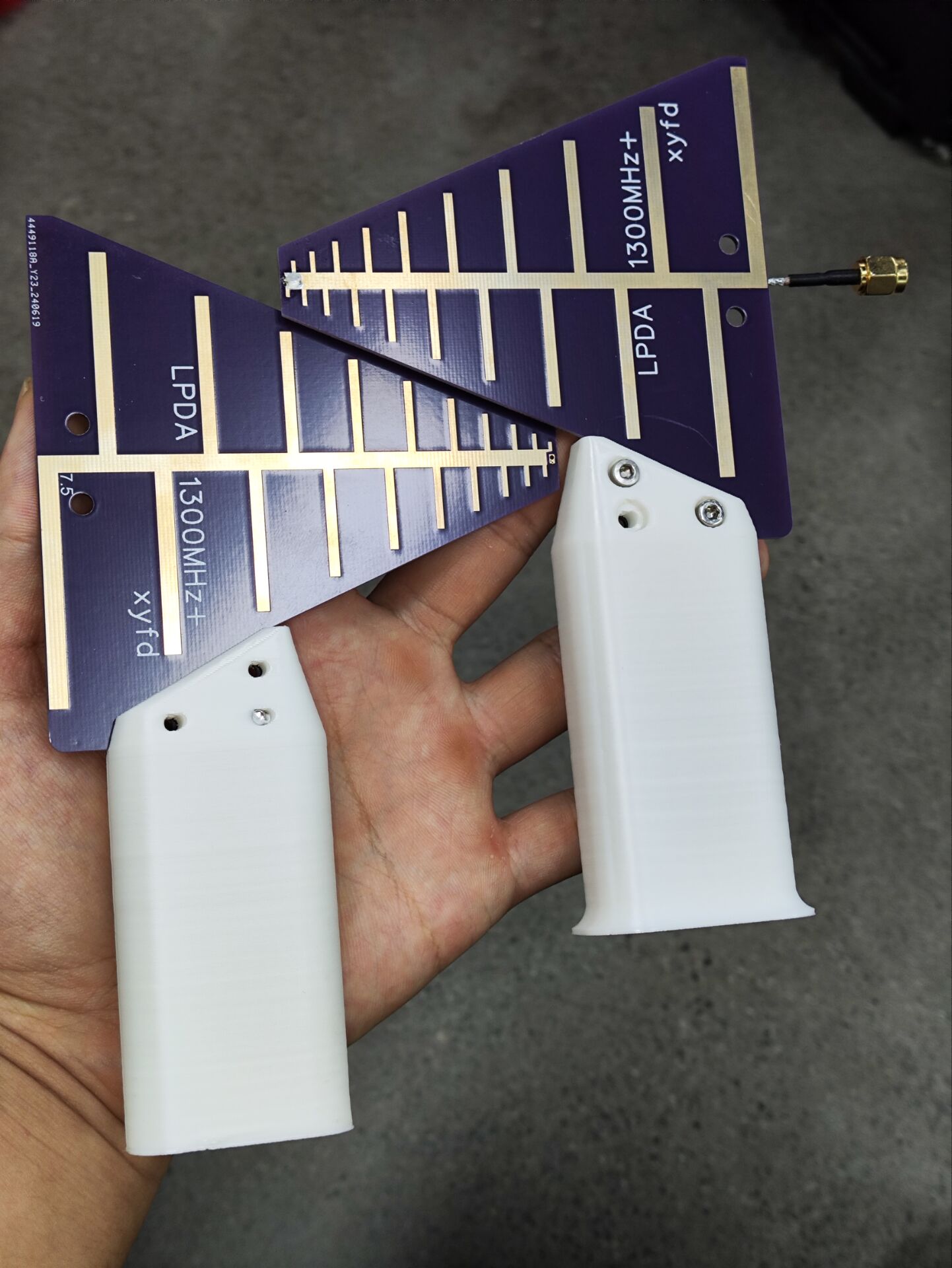
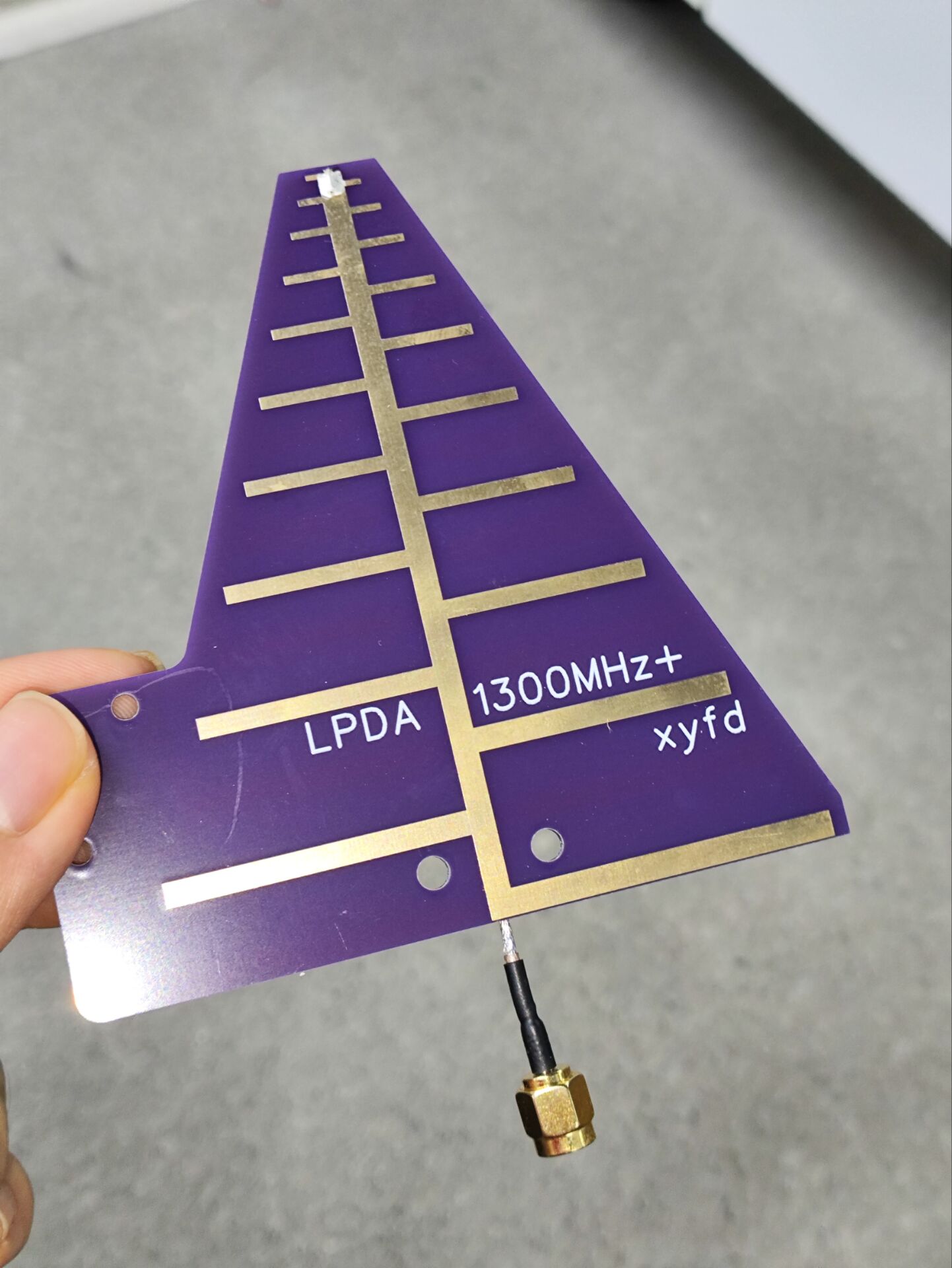
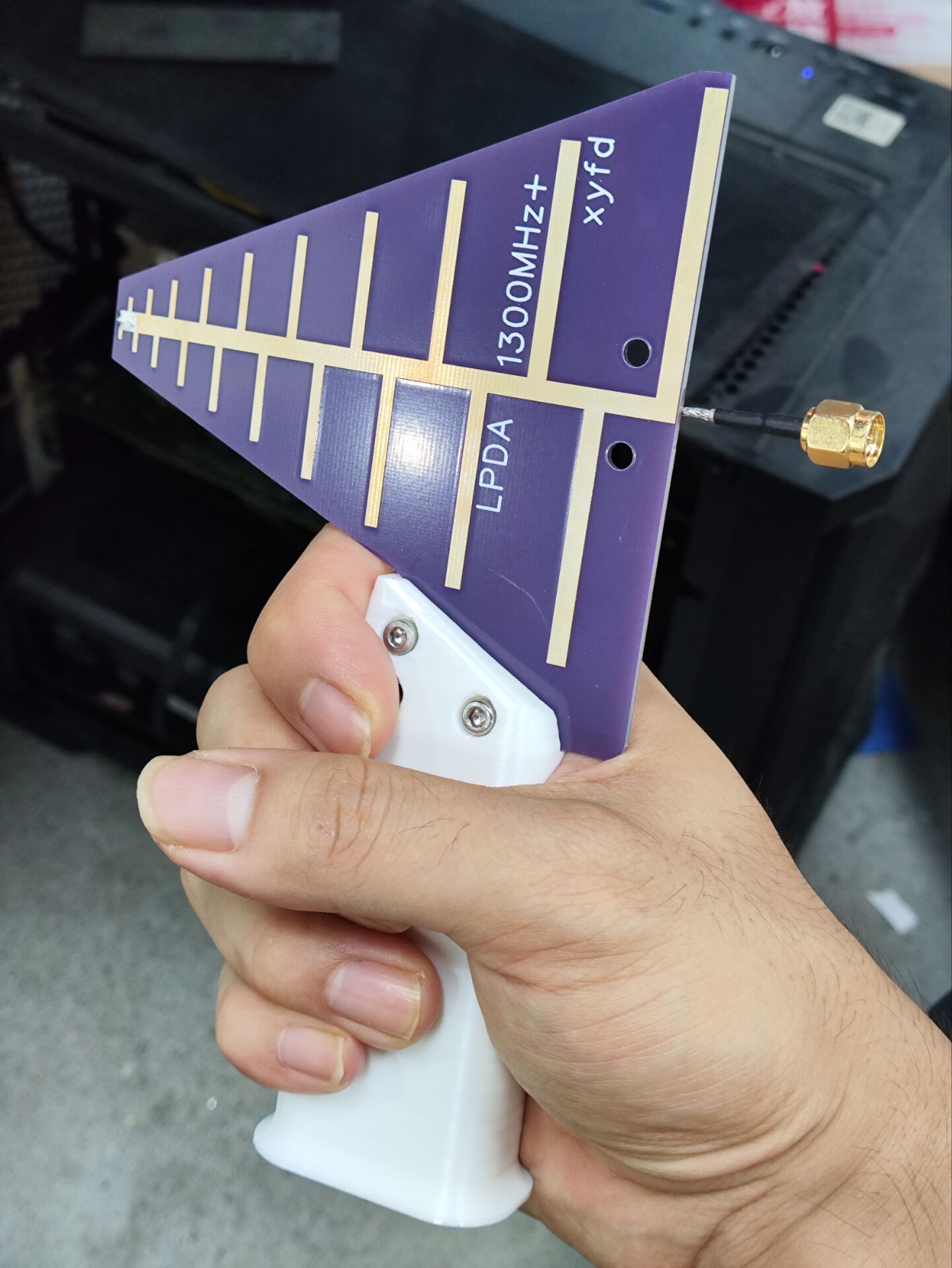
Log-periodic antenna, operating frequency above 1300MHz, comes with handle model file.
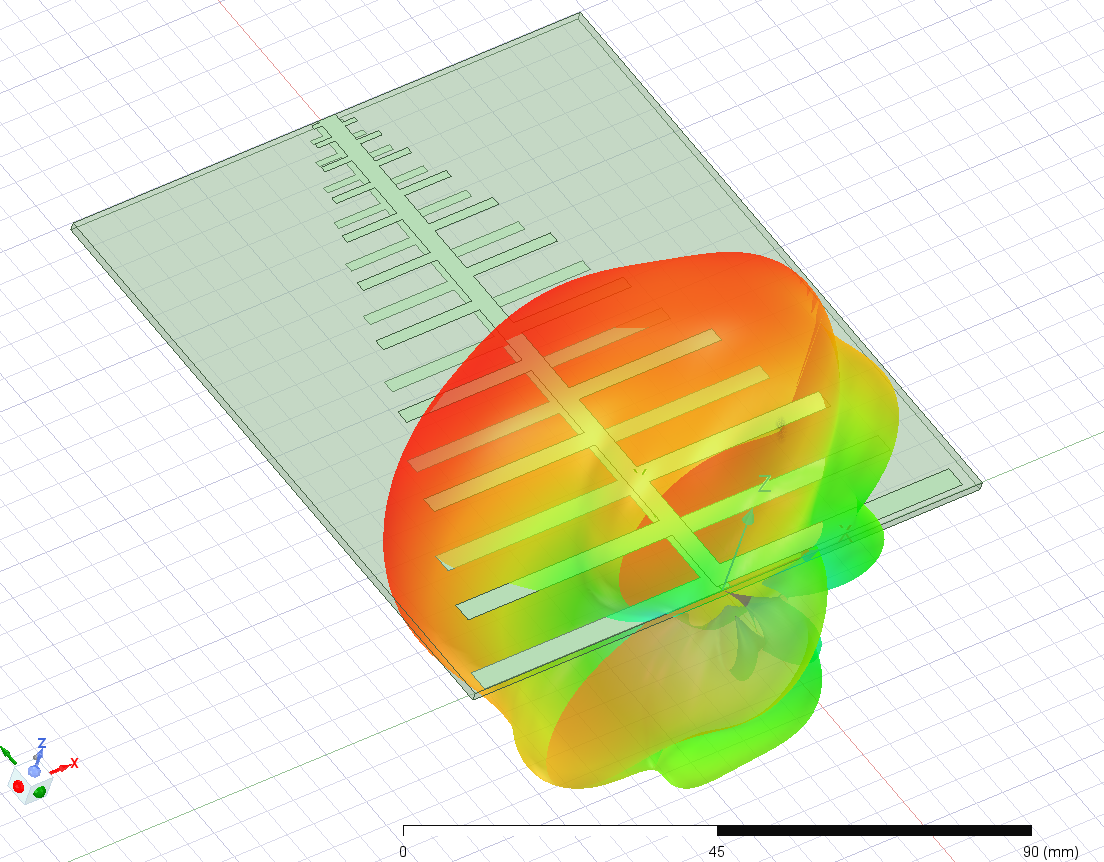
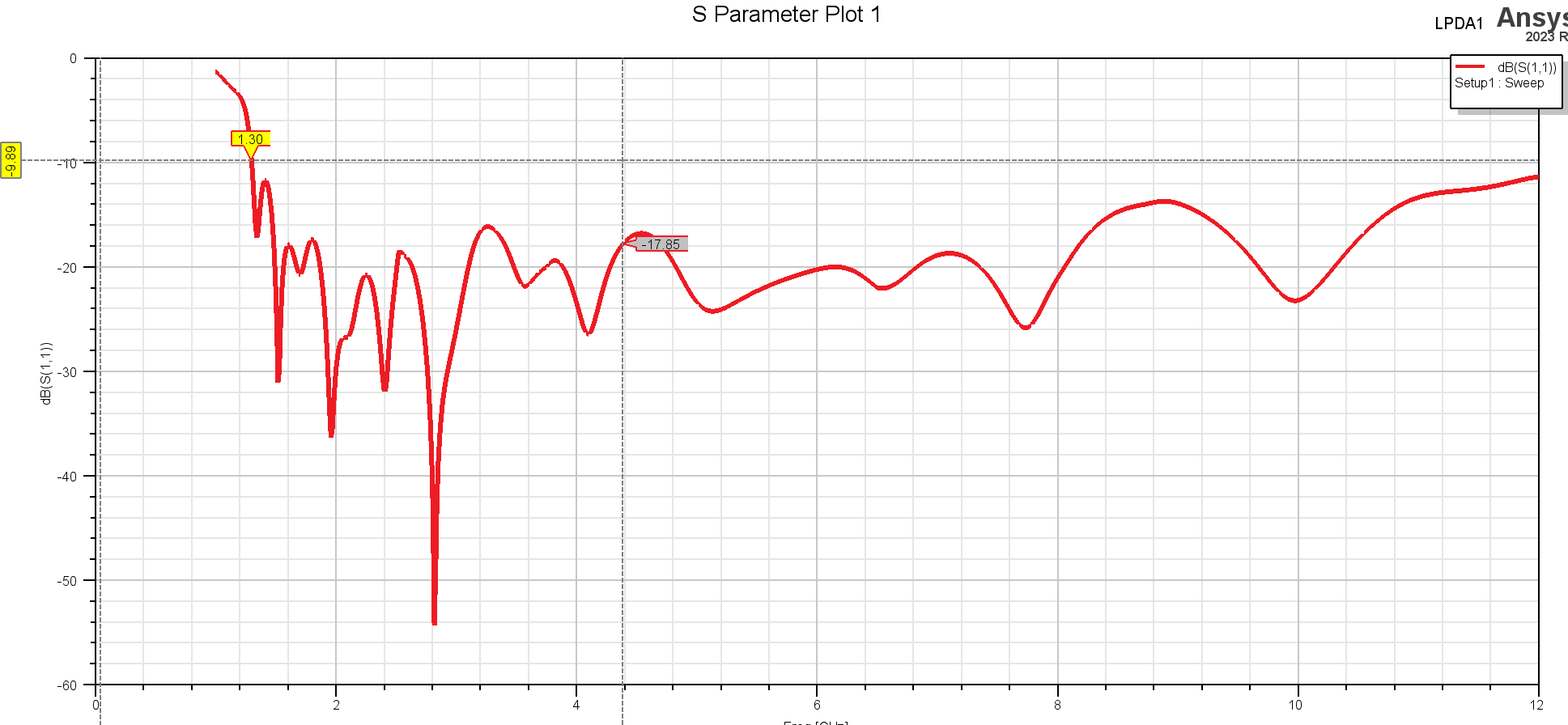
This is a log-periodic antenna operating at frequencies between approximately 1.3 GHz and 12 GHz, with a gain of around 5 dB. It has been tested with a VNA and performs well (high-frequency performance is affected by the feed line; performance above 8 GHz is not guaranteed). The board thickness is 1.6 mm; other thicknesses will affect performance, requiring the feed line to be soldered onto the front tip manually.
 
LPDA-handle.x_t
LPDA-handle.STL
PDF_Log-periodic antenna, operating frequency above 1300MHz, with included handle model file.zip
Altium log-periodic antenna, operating frequency above 1300MHz, includes handle model file.zip
PADS Log-Periodic Antenna, operating frequency above 1300MHz, includes handle model file.zip
94028
star night light
A starry night light made using the open-source Starry Sky PCB.
1. This is based on the Starry Sky PCB design by the Bilibili user "I'm Not Surnamed Cui," whose open-source link is: https://oshwhub.com/sytnocui/star-pcb-drawing
2. This project mainly uses a radar detection module and a WS2812B LED strip. The radar module is optional.
3. Since a 3D model was drawn beforehand, the top switch part was manually cut out. If there are many requirements, I might consider drawing a model with openings. Of course, the user can directly create their own. The back cover has no extra design; it's just glued with 502 glue. The SolidWorks source files are provided.
4. JLCPCB was used for both the PCB file and 3D printing. The PCB was free, and the 3D printing cost a total of 21.22 yuan.
6. Bilibili video link: https://www.bilibili.com/video/BV1pZ421B7Lt/?share_source=copy_web&vd_source=800b0cce2dee97823e91fad6181bdec5
7. 3D shell file link (with openings): Link: https://pan.baidu.com/s/1zqFVajP6gzTa473AMMs5oQ?pwd=eiaf Extraction code: eiaf
5. Finally, please feel free to contact me with any questions or unclear points. This is my first time open-sourcing, so please forgive any shortcomings.
 
Starry Sky Desktop Lamp.zip
PDF_Starry Night Light.zip
Altium_Starry Night Light.zip
PADS_Starry Night Light.zip
BOM_Starry Night Light.xlsx
94029
T12 soldering station (STC15W408AS)
The T12 soldering station
is almost entirely for through-hole components, except for the crystal oscillator's matching capacitor, which is surface-mount (because I didn't think 20pF through-hole capacitors looked good).
It was originally a Kicad project, imported into LCSC EDA Professional Edition.
It works, but there are problems
!!! I'm not responsible for any issues with this open-source project!!! I also copied the circuit diagram and code from someone else
. Furthermore, this project will not be updated. (Because I made a small one with a 32-bit microcontroller, I won't be working on this larger one.)
Open-source license:
CC BY-NC-SA 3.0.
References (copied from the following places):
(Copied circuit diagram, slightly modified) https://oshwhub.com/myseil/stc15w408as-t12
(Copied heating end driver) https://oshwhub.com/createskyblue/opent12-jing-jian-ban
(Copied from code, slightly modified) https://www.mydigit.cn/forum.php?mod=viewthread&tid=132209&extra=page%3D1
Known Problem:
Temperature measurement has a bug. For example, if I set it to 300 degrees, the digital tube reading changes from 10 to 290 to 230 to 300. The 290 to 230 segment is instantaneous, dropping sharply. I don't know where the problem lies.
It's usable, I guess.
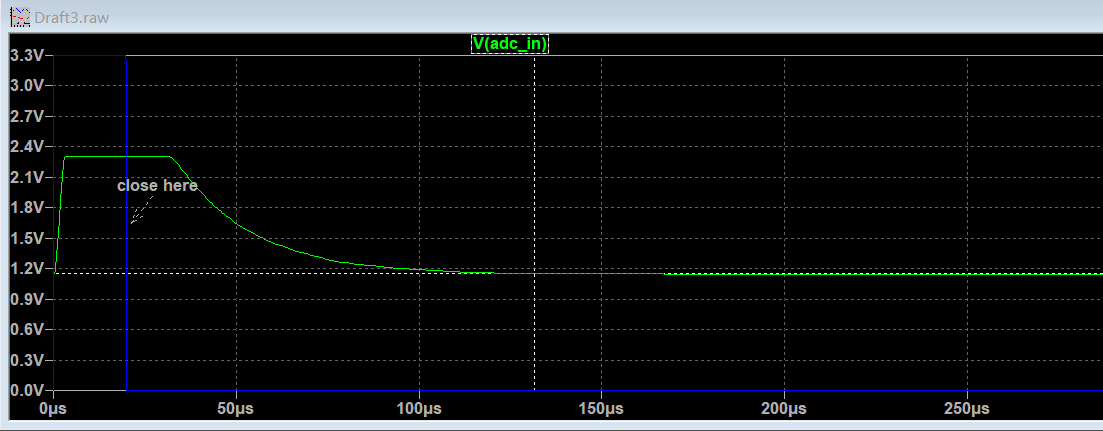
Solution: Case solved!!! Simulations showed that it takes over 100µs for the MOSFET to stabilize and the ADC value to become stable, as shown in the image. However, the code only waits for tens ofµs, so the code needs adjustment.
Increasing the delay time in the interrupt directly won't work, as it will affect the main function's refresh of the digital tube.
A feasible solution is to first shut down the MOSFET in the first interrupt after the heating time, record this in a variable, return to the main function, and then check the variable in the second interrupt to see if the MOSFET was shut down and 500µs (interrupt time) has elapsed before measuring and calculating the temperature.
Important note:
Do not connect the soldering iron during the first run. Without the soldering iron, a temperature of 500+ degrees Celsius is normal for the digital tube. Power off, connect the soldering iron, and confirm the resistance is around 8 ohms. After startup, be careful with the soldering iron and be prepared to unplug the power at any time.
1. The program download interface only has RX, TX, and GND; power is required for downloading, or connect a wire to the VCC of the STC15W408AS or add an additional VCC.
2. The external crystal oscillator is optional. If not connected, select 11.0952MHz for the internal IRC during download.
3. Zero-point drift of LM358 (there is a DT in the code to correct it) (PS: it would be better to replace it with a precision op-amp)
4. DS18B20 code not implemented
5. Vibration switch code in T12 handle not implemented
6. The pin order of the digital tube and TM1650 connection has been adjusted for wiring convenience
7. The buzzer only sounds once when the power is on, I'm too lazy to write the code... as long as it works.
8. When making the PCB, remember to specify the customer's code location. Place the JLCJLCJLCJLC in the digital tube area.
Press
once to change the set temperature to 315 degrees
. Press and hold once and release to change the set temperature to 10 degrees.
You need to
confirm whether the purchased parts match the PCB, including the size. (To be honest, I don't remember the original parts I used. I confirmed it by searching the order records on Taobao.)
1. DC-005 socket
2. KF126 3P (used to connect external power input, with the same function as the DC socket in the first item)
3. KF126 2P (used to connect the switch)
4. KCD11 switch two-pin (the opening on the PCB is 9mm*14mm), you can replace it with other switches yourself
5. DC-DC module, pay attention to the pin order and input (24V+) and output (5V) voltages
6. IRF4905 PMOS TO-220 package
7. GX12-5 aviation connector
8. LM358
9. 9042 passive buzzer (4mm lead pitch) in DIP8 package ; confirm the size yourself.
10. EC11 rotary encoder; buy a cap for a small fee.
11. STC15W408AS SKDIP28 package; note it's SKDIP, narrower than a regular DIP.
12. TM1650 DIP16. 13.
0.28-inch 4-digit common cathode LED display.
14. TL431 TO92.
15. S8050 TO92.
16. DS18B20 TO92 (I didn't write a program to drive this; you don't need to buy it).
17. Resistors, capacitors, and diodes; buy them according to the schematic (104 and 103 capacitors are CBB capacitors, lead pitch should be 5mm; 10uf electrolytic capacitors have a 2mm lead pitch and a diameter of approximately 5.0-5.5mm).
18. M3 screws, 20mm M3 copper pillars (depending on the switch height, see the picture below), 6mm building blocks (I bought 1000 blocks for 12.8 yuan, not enough, there's a hole missing on the bottom, prioritize building the sides, fill in the extra blocks at the bottom), a sheet of transparent plastic film (to block dust, just found one).
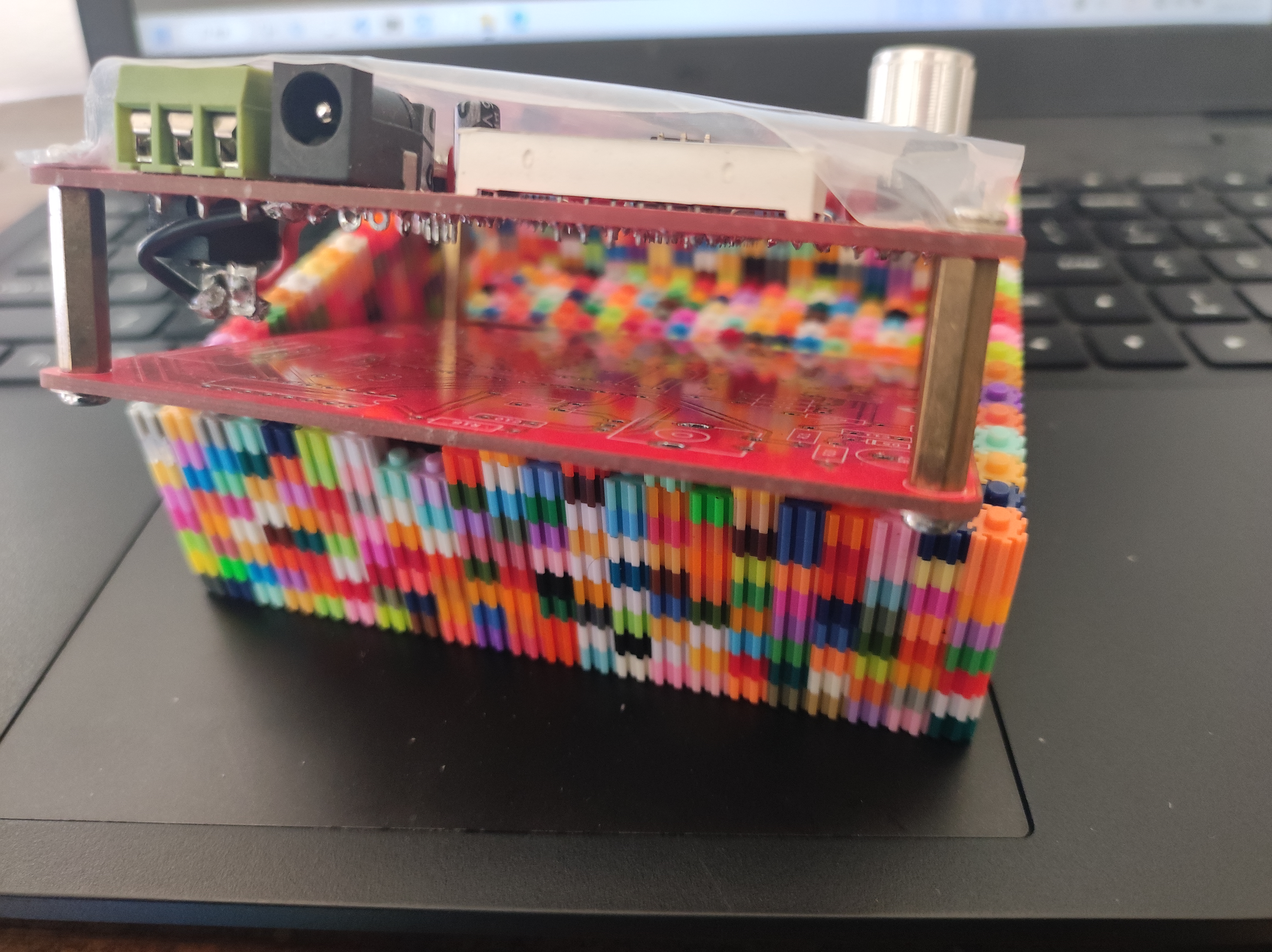
(The KF126 2P should theoretically be placed at the bottom to connect to the switch, but it looks better on top).
19. 24V 3A power supply.
20. T12 handle kit
code.
I modified the code to use SDCC. The code is messy and not organized (I just looked at it again. The program logic has clearly been changed, but there are still comments from the original code).
The code package comes with an SDCC compiler. Click build.bat to compile
the generated firmware in the bin directory. If
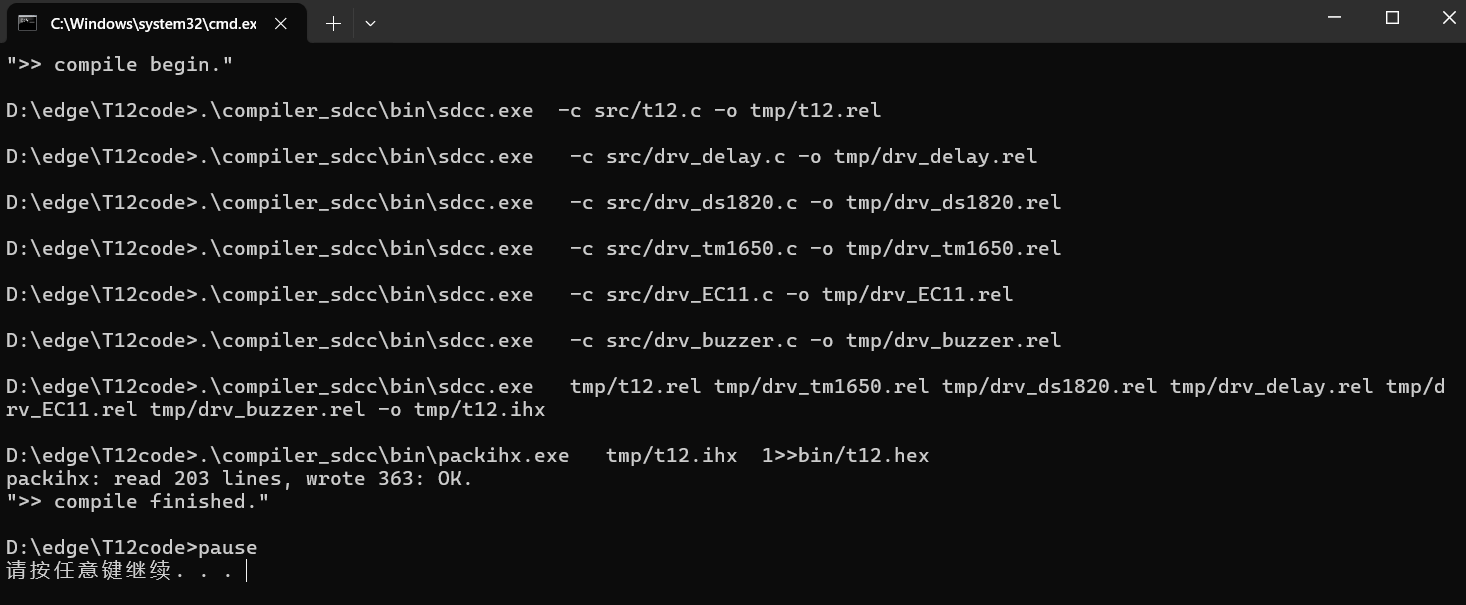
using the internal IRC, select 11.0952MHz frequency.
Modification suggestion:
the board is a bit exaggerated, reduce it yourself.
The original code measures the temperature every certain period of time and then uses the PID to calculate a new heating time, which is not very good. It's suggested to set the temperature measurement to: turn off the output at 50ms, measure the temperature at 51ms, calculate the PID, and output a new PWM value.
Also...
this was done a long time ago, and I don't remember it very clearly. I used it as practice when I was just starting out (so I made a large 10cm x 10cm board with all through-hole components, haha. If you understand it, you can modify it to be smaller).
Firmware download instructions can be found on Baidu.
(Maybe in two years I'll make a smaller board and reorganize the code.)
If you can't see the schematic and PCB, you can open them by clicking clone. This is a bug in LCSC's code, and they haven't fixed it for so many years.

T12code.zip
PDF_T12 Soldering Station (STC15W408AS).zip
Altium_T12 soldering station (STC15W408AS).zip
PADS_T12 soldering station (STC15W408AS).zip
BOM_T12 Soldering Station (STC15W408AS).xlsx
94032
electronic
参考设计图片
×
 
 
Search Datasheet?

Supported by EEWorld Datasheet

Forum More
Update:2026-03-26 02:12:50
  • Please advise: Design case of the latest image sensor S8380.
  • Please ask ozi, ozf2, etc. for high scores
  • Show off our competition results~~~
  • Please help regarding AMS1117 AD output voltage
  • Huawei HG8347R optical modem message trigger dialing
  • bigbat's orcad study notes

EEWorld
subscription
account

EEWorld
service
account

Automotive
development
community

Robot
development
community

About Us Customer Service Contact Information Datasheet Sitemap LatestNews


Room 1530, 15th Floor, Building B, No.18 Zhongguancun Street, Haidian District, Beijing, Postal Code: 100190 China Telephone: 008610 8235 0740

Copyright © 2005-2024 EEWORLD.com.cn, Inc. All rights reserved 京ICP证060456号 京ICP备10001474号-1 电信业务审批[2006]字第258号函 京公网安备 11010802033920号