Project Introduction:
This project is a doodle-style desktop weather clock that can be network-configured via the tuya APP or Smart Life APP. Network configuration is quick and convenient, supporting both Bluetooth and AP network configuration. Weather and time services are also obtained through Tuya Cloud, ensuring the stability and accuracy of related services. Hardware circuitry and casing are based on the following projects:
Control Mini Program ESP8266 Weather Clock WiFi Mini TV Album Perfect Support
SmallDesktopDisplay
Project Functionality
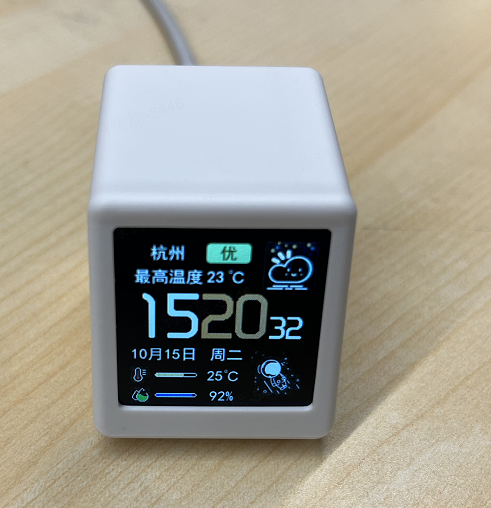
. This design is a desktop weather clock based on the tuya t2 module. During network configuration, the app will obtain the device's location based on the phone's location, eliminating the need for the user to specify the city for weather in the code. Currently, the desktop clock can display the following data information, which will automatically update every 15 minutes (update interval is adjustable):
Current Time,
Device City
, Air Quality ,
Current Weather Icon
, Highest and Lowest Temperatures,
Today's Date and Day of the Week,
Feeling Temperature,
Humidity.
Software
Code: tuyaDesktopDisplay. Note:
Please refer to README.md!
Version Change Notes Known Issues
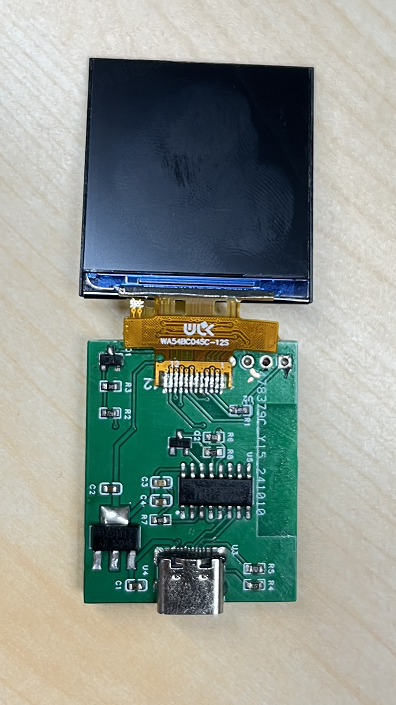
v1.0.0 Initial version: The location of resistors R4 and R5 prevented direct mounting on the PCB; the casing needed to be trimmed with a knife. The distance between the module antenna and other metal parts was not more than 15mm. v2.0.0 Updated component locations; the distance between the module antenna and other metal parts is now more than 15mm. Silkscreen error in PCB testing . v2.0.1 Fixed silkscreen error in PCB testing. v2.0.2 Optimized the location of some components for easier mounting. Unverified Component List This design uses T2 as the main control chip. The screen uses a 1.54-inch IPS full-view SPI serial port ST7789 TFTLCD 240*240 LCD screen CH340C AMS1117-3.3 PZ254V-11-04P TYPE-C16PIN female connector. Four-pin triple-modulation SS8050 * 2 4.7k resistors * 1 200R resistor * 1 22R resistor. Resistor * 1 5.1kΩ, Resistor * 2 10kΩ, Resistor * 1 1kΩ, Resistor * 1 5R, Resistor * 1 0.1uΩ, Capacitor * 2 10uΩ, Capacitor * 2. [ Image of the assembled device] Figure 1: Soldered but not encased (v1.0.0) Figure 2: Encased diagram. Notes: The software development uses Arduino IDE2, developed using tuyaopen. Tuyaopen is based on tuya-open-sdk-for-device, so the tuyaos license code cannot be used on it; a dedicated tuyaopen sdk license code is required. Tuya is currently running a promotion where you can get a free tuyaopen sdk license code. Join QQ group: 796221529 and follow the group's activity instructions to get a free tuyaopen sdk license code from the group owner.










