First, this is a rhythmic light; second, it can shock people!!!
The light board uses a WS2812B.
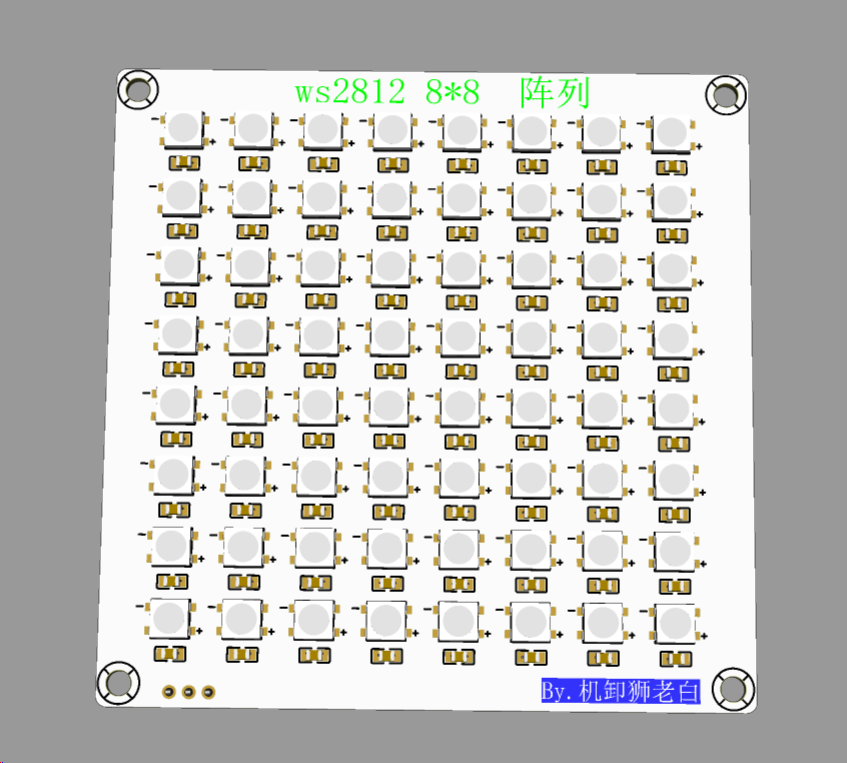
Regarding the capacitor issue, not every LED needs a capacitor. I didn't add any, and there were no problems. Hand soldering surface-mount components is quite tiring, especially with 64 LEDs, right? If there are no problems, it saves time. If problems arise, we can add capacitors later.
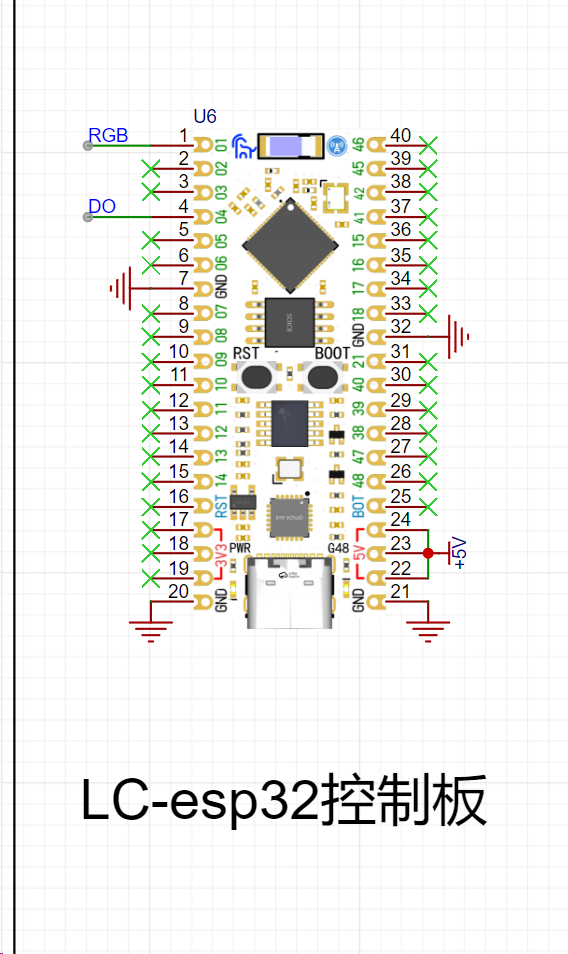
The control board uses the LCSC ESP32R8N8
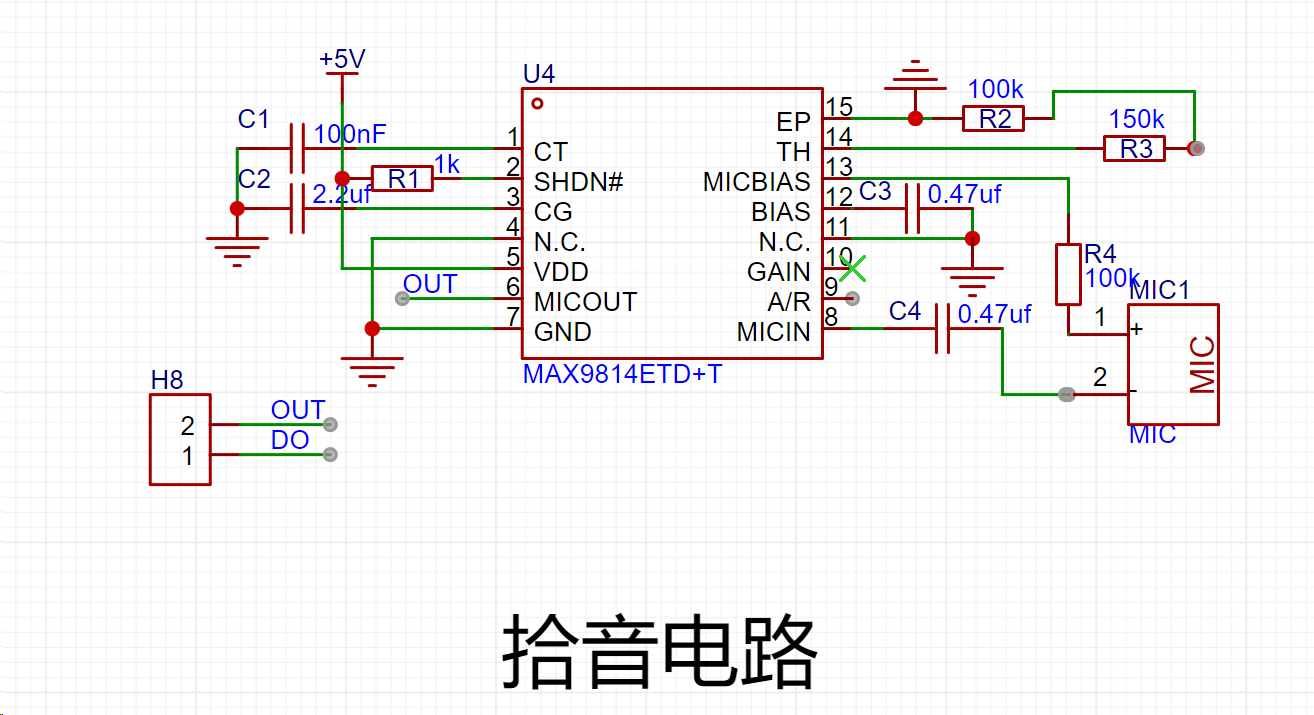
pickup circuit, and the microphone circuit uses the MAX9814 solution.
Of course, for those who have difficulty soldering, a module interface can be used.
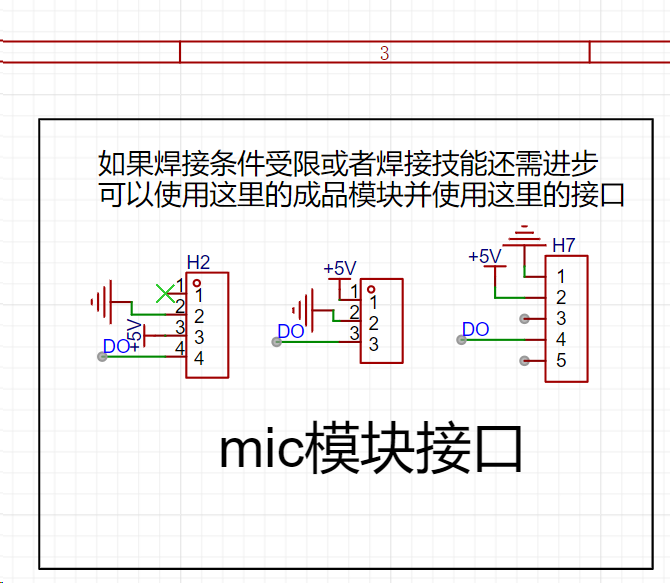
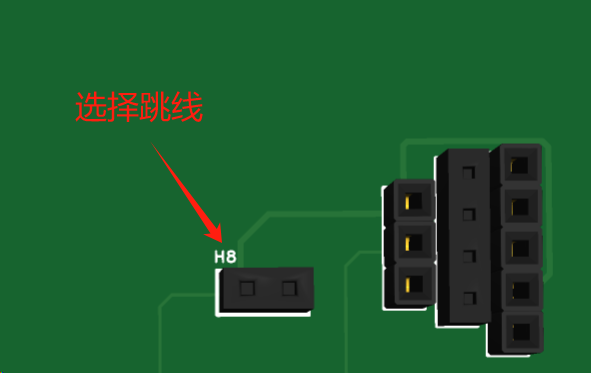
By selecting jumpers, you can decide whether to use a module or onboard soldering. The choice is yours. You can use the MX9814 (slightly expensive), the MAX4464 (mid-range price), or a microphone module based on the LM393 from Taobao (the cheapest). Looking at the wallet-shaped giant cauldron module, anyway, all the interfaces are reserved. When using the module
, pay attention to
the power supply and do not reverse it. Pay attention
to the power supply and do not reverse it. Pay attention to the power supply and do not reverse it .
I will say it three times because it is important
. Since this is a joke theme, pranks are indispensable .
The electric shock module
uses the universal chip NE555 to generate pulses, drive the transistor, and then drive the three-pin inductor (autotransformer). A high voltage is generated between the toggle switch and the back panel (don't worry, it's not fatal. You've all played with electric chewing gum when you were a kid, right? The principle is the same). Because this generates high voltage, I am worried about damaging other modules (mainly the development board. As a fan of women, I am very careful with the development board). Therefore, it is powered independently (6V or higher, below 12V is recommended).
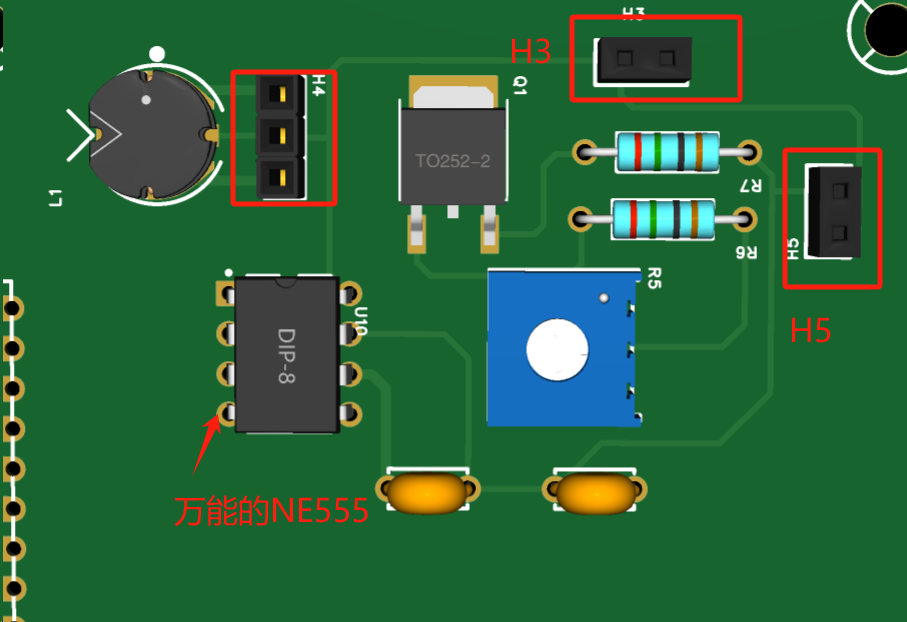
H5 forms a circuit with the toggle switch and the battery.
H3 connects the toggle switch metal and the back panel.
H4 can be a through-hole three-pin inductor (because there is no through-hole three-pin inductor package in EDA).
The electric shock waveform measured by the oscilloscope after 10 times attenuation
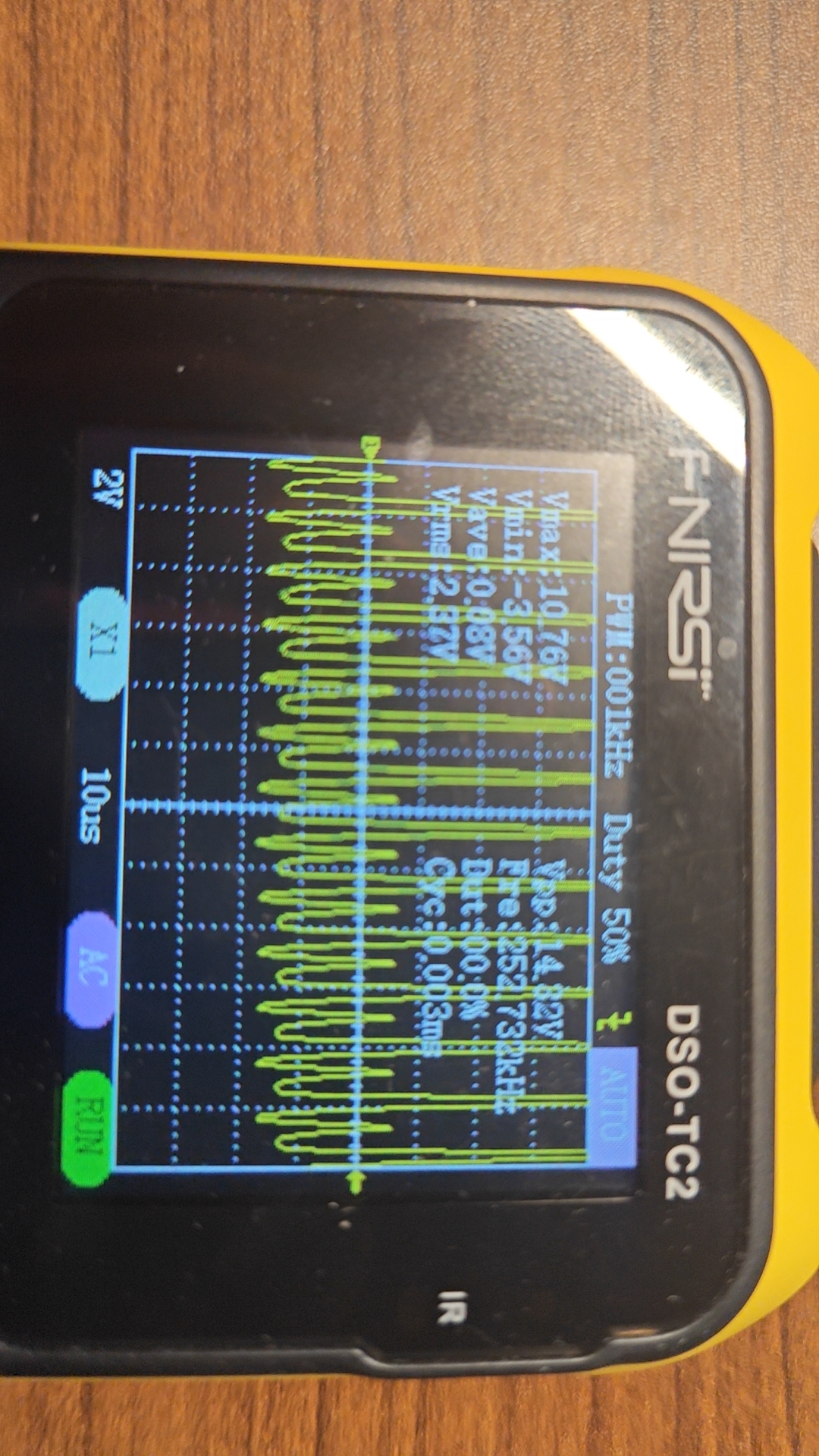
. Don't worry, the current is very small. This is a safe
code.
/*
This project is applied to the LC-ESP32R8N8 development board. */
Modifying the I/O ports can be applied to other ESP32 development boards
and Arduino development boards.
Learned from GitHub: https://github.com/Fudan-EGA/LEDSpectrum/tree/master
*/
#include // Install 1.6.1 for providing timing functionality in the program
#include // Install 3.5.0 for third-party Arduino libraries to control WS2812, LPD8806, and other LEDs
#include "arduinoFFT.h" // Install 1.6.2 for the open-source library of Fourier transform
arduinoFFT FFT = arduinoFFT(); // Create an FFT object
const uint16_t samples = 64; // Number of sampling points
const double samplingFrequency = 8000; // Sound sampling frequency
unsigned int sampling_period_us;
unsigned long microseconds;
double vReal[samples]; // FFT sampling input sample array
double vImag[samples]; // FFT operation output array
// FFT default parameter
#define SCL_INDEX 0x00
#define SCL_TIME 0x01
#define SCL_FREQUENCY 0x02
#define SCL_PLOT 0x03
// Interface and LED board
#define CHANNEL 4 // Audio input IO port number is 4
#define LED_PIN 1 // LED board input IO port selection
#define LED_NUM 64 // Number of LEDs
#define BRIGHTNESS 10 // Default backlight brightness
#define LED_TYPE WS2812 // LED type
#define COLOR_ORDER GRB // Color order
CRGB leds[LED_NUM]; // Define LED object
void setup() {
sampling_period_us = round(1000000 * (1.0 / samplingFrequency)); // Calculate sampling frequency
pinMode(CHANNEL, INPUT); // Initialize microphone interface to input mode, indicating reading microphone data
FastLED.addLeds(leds, LED_NUM); // Initialize LED strip
FastLED.setBrightness(BRIGHTNESS); // LED brightness setting, value range is 0-255
}
void loop() {
static uint32_t t = 0, dt = 5;
static uint8_t flag = 0;
/* Sampling */
microseconds = micros();
for (int i = 0; i < samples; i++) {
vReal[i] = analogRead(CHANNEL); // Read analog value, signal sampling
vImag[i] = 0;
while (micros() - microseconds < sampling_period_us) {
// empty loop
}
microseconds += sampling_period_us;
}
//Fourier Transform
FFT.Windowing(vReal, samples, FFT_WIN_TYP_HAMMING, FFT_FORWARD); /* Weigh data */
FFT.Compute(vReal, vImag, samples, FFT_FORWARD); /* Compute FFT */
FFT.ComplexToMagnitude(vReal, vImag, samples); /* Compute magnitudes */
fill_rainbow((leds), 64 /* Quantity */, 0 /* Starting color value */, 4 /* Incrementing value */); //Set rainbow gradient, first fill the entire area, then fill with black according to the value, indicating the light is off
for (int i = 0; i < 8; i++) { //Loop through the eight columns of LED
drawBar(i, (vImag[i * 3 + 2] + vImag[i * 3 + 3] + vImag[i * 3 + 4]) / 3 / 200, &flag); // Select 8 values after averaging the spectrum and pass the time flag to the drawing function
}
FastLED.show(); // Display the light bar
if ((millis() - t) > dt) { // Read the time and determine if the falling time has been reached
flag = 1; // If reached, mark it as 1
t = millis(); // Update the time
}
}
// Drawing function, draw the length according to the frequency
void drawBar(int idx, int16_t value, uint8_t *flag)
{
static int16_t volume[8]; // Save the falling data
consttrain(value, 0, 8); // Amplitude is limited to the range of 0-8
if (volume[idx] < value) // If the collected data is larger than before, update to achieve the upward effect
volume[idx] = value;
if (idx % 2) { // Remainder 2 operation to determine if the sequence number is odd
for (int i = 0; i < 8 - volume[idx]; i++) leds[idx * 8 + i] = CRGB::Black;
} else {
for (int i = volume[idx]; i < 8; i++) leds[idx * 8 + i] = CRGB::Black;
}
if (*flag) {
volume[idx] -= 1; // Decrease by 1 when the time is reached, indicating a fall
if (idx == 7) *flag = 0; // Clear the flag after all columns 0-7 have been updated
}
}
Be careful when playing pranks, including but not limited to getting beaten up.
Be careful when playing pranks, including but not limited to getting beaten up.
Be careful when playing pranks, including but not limited to getting beaten up.








 京公网安备 11010802033920号


 MB3833APFV



