Foreword:
First of all, I'd like to thank the developers for their open-source project: the CH552G
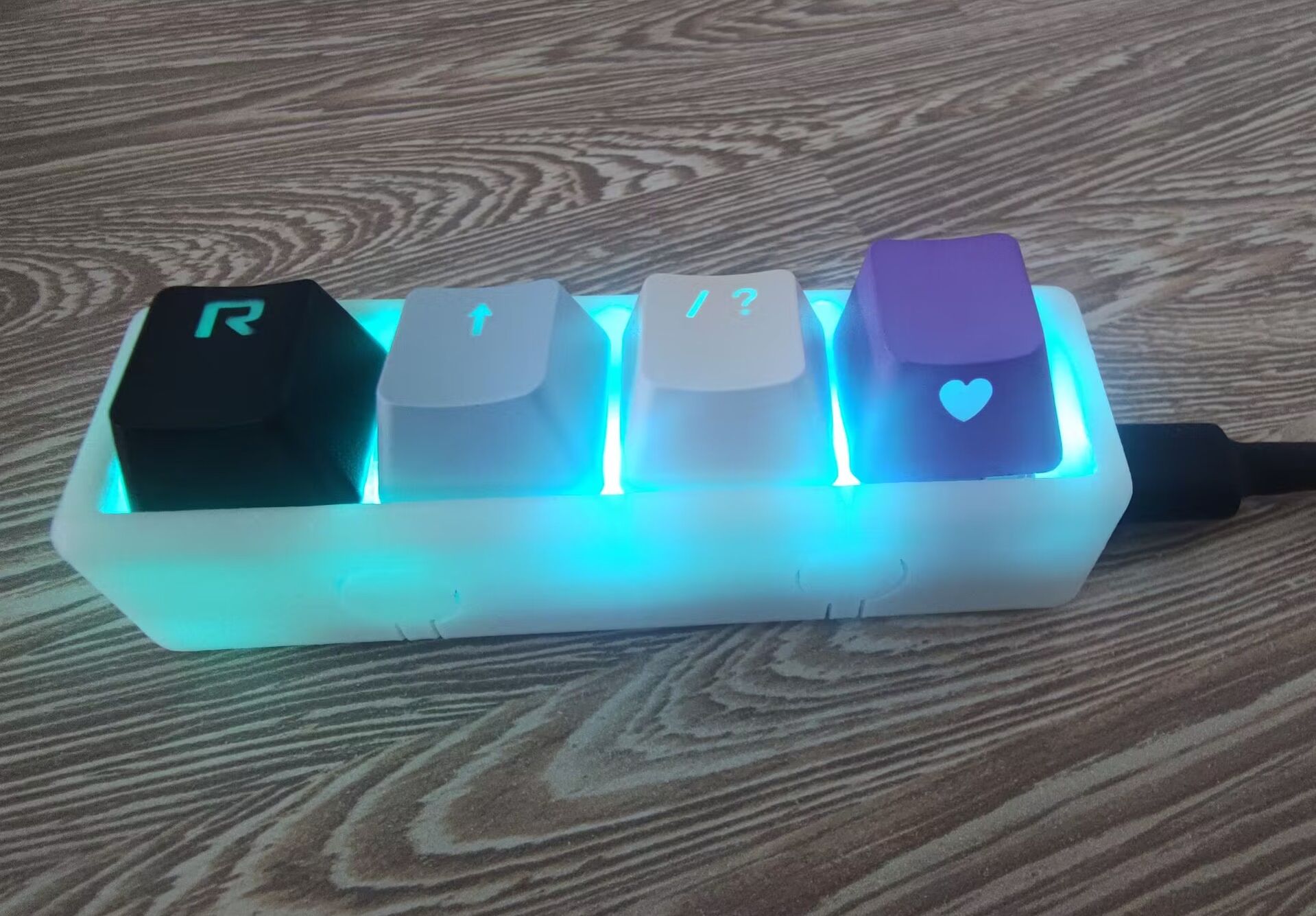
CV keyboard (three-button
, four-button, nine-button, wired, small keyboard with side backlight). They did a fantastic job, and the process is very detailed. I followed their instructions and made some minor modifications. I'm sharing this open-source project for two reasons: first, to share a variety of key switch trigger feedback effects; and second, to practice my Markdown documentation skills. So, this post will focus on my improvements; I'll refine the rest later. For detailed environment configuration instructions, please refer to the developers' posts, which are excellent.
I saw someone on WeChat Moments buy a two-button CV keyboard on PDD, but it was a bit pricey at over 20 RMB. I wanted to make one myself, so I browsed the LCSC open-source hardware platform and ultimately decided to replicate the four-button project from the CV keyboard (three-button, four-button, nine-button, wired, small keyboard). The 3D shell in the attachment was also drawn by 00.01%, as I only know CV and not 3D modeling for shells. The project is impressive; I originally planned to replicate it by directly creating the PCB, soldering, and programming. However, it seems the developer's focus is entirely on the nine-key keyboard. I'm unsure if the four-key version was shelved or if I simply couldn't find the program. I could try programming the nine-key firmware; while the latest version supports software key remapping, each key is independent. Furthermore, my key remapping software only successfully recognized the key once via serial port, and as an amateur, I didn't dare ask, so I abandoned the idea of programming the nine-key firmware and decided to modify the source code myself.
The "Three-Button Program Source File Based on Mouse Example.zip" in the open-source project attachment is likely a rudimentary program written by the author when they first modified someone else's code; it has logic for handling simultaneous button presses. Based on this, I improved upon the source file, supporting single-click, double-click, long-press, and multiple button combinations. In
the software section
(20240504)
, I implemented several lighting effects: gradient flowing lights, symmetrical flowing lights, global flowing lights, and constant-on/constant-off lights. I also added a button-off feature.
On May 2, 2024
, while trying to add new features, I discovered that the Shishan program I wrote was too large to fit into the development board's memory. An ASlink-Error-Insufficient ROM/EPROM/FLASH memory error occurred.
So I modified the button scanning part, using a structure instead, which saved a significant amount of space.
bool button1Press = !digitalRead(BUTTON1_PIN);
bool button2Press = !digitalRead(BUTTON2_PIN);
bool button3Press = !digitalRead(BUTTON3_PIN);
bool button4Press = !digitalRead(BUTTON4_PIN);
KeyAction key1Result = analyzeKeyPress(button1Press, &key1State);
KeyAction key2Result = analyzeKeyPress(button2Press, &key2State);
KeyAction key3Result = analyzeKeyPress(button3Press, &key3State);
KeyAction key4Result = analyzeKeyPress(button4Press, &key4State);
20240425
Based on my personal habits, my button settings are as follows:
Key1: Single click: Copy (Ctrl+C) Double click: Copy (Ctrl+Insert) Long press: Undo (Ctrl+Z) Key2: Single click: Paste (Ctrl+V) Double click: Paste (Shift+Insert) Long press: Redo (Ctrl+Y) Key3: Single click: Delete Double click: Clipboard (Win+V) Long press: Save (Ctrl+S) Key4: Single click: Enter Double click: Screenshot (Win+Shift+S
) Long press: Comment /**/ Key combinations: key1+key2 Left arrow key2+key3 Up arrow key3+key4 Right arrow key1+key4 Down arrow (Single click sends once, long press sends continuously)**
/***********Modifiable/callable parameters****************/
#define Naive_Debouncing_TIME 50 //WHILE
#define SCAN_PERIOD 1 //Scan cycle
#define KEY_COUNT_DESHAKING ( 1/SCAN_PERIOD) //Key debouncing time
#define KEY_COUNT_LONGTIME (15/SCAN_PERIOD) // Long press button timer
#define KEY_COUNT_DUALCLICKTIME (15/SCAN_PERIOD) // Double press button timer
#define KEY_LONG_REPEAT_TIME (20/SCAN_PERIOD) // Reciprocal of the long press button's return rate, i.e., the response time interval when the button is continuously pressed
#define NO_Click 0 // No button pressed
#define Click_Shot 1 // Short press
#define Click_Double 2 // Double press
#define Click_Long 3 // End long press
#define Hold_Long 4 // Continuous long press
bool Press_multiple_buttons = false; // Flags for multiple buttons/combination keys
char ResultKEY1 = 0;
char ResultKEY2 = 0;
char ResultKEY3 = 0;
char ResultKEY4 = 0;
/***************************/
This key state analysis program from Line 200 to Line 667 is something I copied from someone else a long time ago. The key detection was originally intended to be done in a timer interrupt, but I couldn't find how to configure a timer interrupt for the CH552G, so the entire key detection is now placed in a while loop. Because this CV keyboard is for productivity, not gaming, I sacrificed fast feedback, trading a slight delay for richer functionality.
ResultKEY represents the key state, including not pressed, single click, double click, during a long press, and after a long press. Next, I wrote the functionality based on ResultKEY. There's no order restriction between the single-click, single-double click, and single-press/long-press handlers, but the handling of two keys being pressed simultaneously must be placed before the single-key handler, and the handling of two keys being pressed simultaneously and then ending (removing the Press_multiple_buttons flag) must be placed after the single-key/long-press handler.
//-------Short press twice--------//
if ((ResultKEY1==Click_Shot )&&(ResultKEY2==Click_Shot ))
{
ResultKEY1=NO_Click;
ResultKEY2=NO_Click;
Keyboard_press(KEY_LEFT_ARROW);
delay(20);
Keyboard_releaseAll();
}
//------Long press twice--------//
if ((ResultKEY1==Hold_Long )&&(ResultKEY2==Hold_Long ))
{
Press_multiple_buttons=true;
Keyboard_press(KEY_LEFT_ARROW);
delay(20);
Keyboard_releaseAll();
}
//-------Short press once--------//
if(Press_multiple_buttons==false)
{
/**Button 1**/
if (ResultKEY1==Click_Shot ) {
ResultKEY1=NO_Click;
Keyboard_press(KEY_LEFT_CTRL);
Keyboard_press('c');
delay(20);
Keyboard_releaseAll();
}else if (ResultKEY1==Click_Double) {
ResultKEY1=NO_Click;
Keyboard_press(KEY_LEFT_CTRL);
Keyboard_press(KEY_INSERT);
delay(20);
Keyboard_releaseAll();
}else if (ResultKEY1==Click_Long) {
ResultKEY1=NO_Click;
Keyboard_press(KEY_LEFT_CTRL);
Keyboard_press('z');
delay(20);
Keyboard_releaseAll();
}else if (ResultKEY1==Hold_Long) {
}
//------Long press the two states to end--------//
if ((ResultKEY1==Click_Long )&&(ResultKEY2==Click_Long )&&(Press_multiple_buttons==true )){ResultKEY1=NO_Click;ResultKEY2=NO_Click;Press_multiple_buttons=false;}







 京公网安备 11010802033920号


 SN74AHCT367PWG4



