Project Description:
This project uses Espressif's ESP8266 as the main controller to drive a 1.54-inch TFT LCD screen. It utilizes capacitive touch buttons, WS2812 LED lights, and a buzzer to create a popular WiFi weather clock desktop decoration. In addition to the standard weather clock functionality, this project adds a photo album function, allowing users to upload and delete photos with a single click via a mini-program or webpage, further enhancing its practicality. Capacitive touch buttons are also added for switching interfaces, increasing ease of use and interactivity. The addition of WS2812 LED lights adds a cool effect to the small TV, offering various ambient lighting effects: fixed color; fixed color breathing light; and fixed brightness gradient color. A buzzer is added to function as an alarm clock, a long-awaited and practical feature. It supports setting up to three alarms, each with options for: single alarm, weekday, and daily alarms, sufficient for daily use.
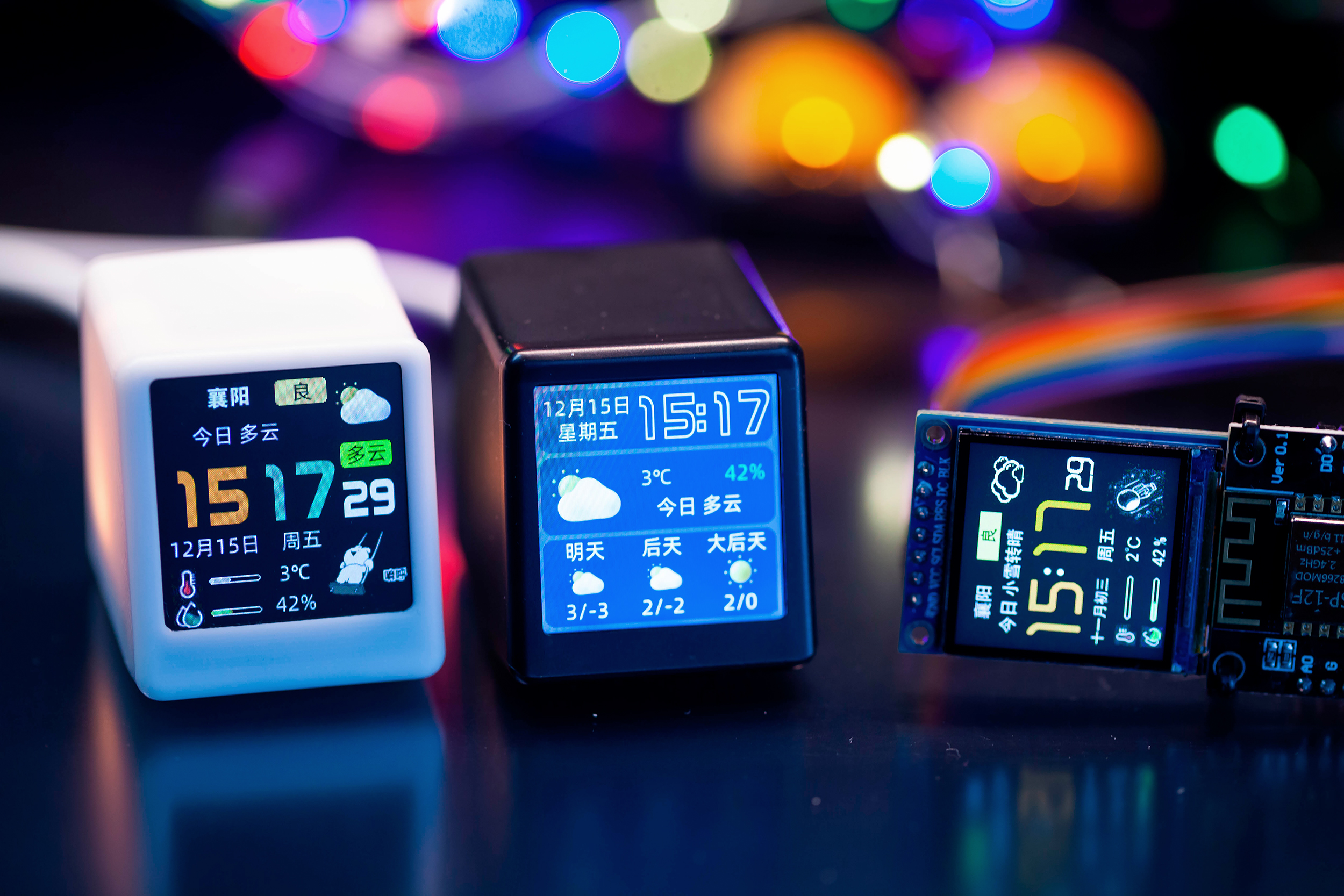
The project features
automatic WiFi connection, allowing users to set and modify WiFi usernames and passwords via a mini-program or webpage, eliminating the hassle of changing locations – one of the reasons I dedicated myself to this project.
It displays the time using automatic WiFi synchronization, ensuring accuracy, and allows setting the time zone within the mini-program or webpage, making it usable even abroad. It
displays weather information by retrieving real-time weather data from a weather website, with the mini-program or webpage supporting city/location modification.
Multiple clock and weather interface themes are available, switchable via buttons, the mini-program, or the webpage – there's one to suit your taste.
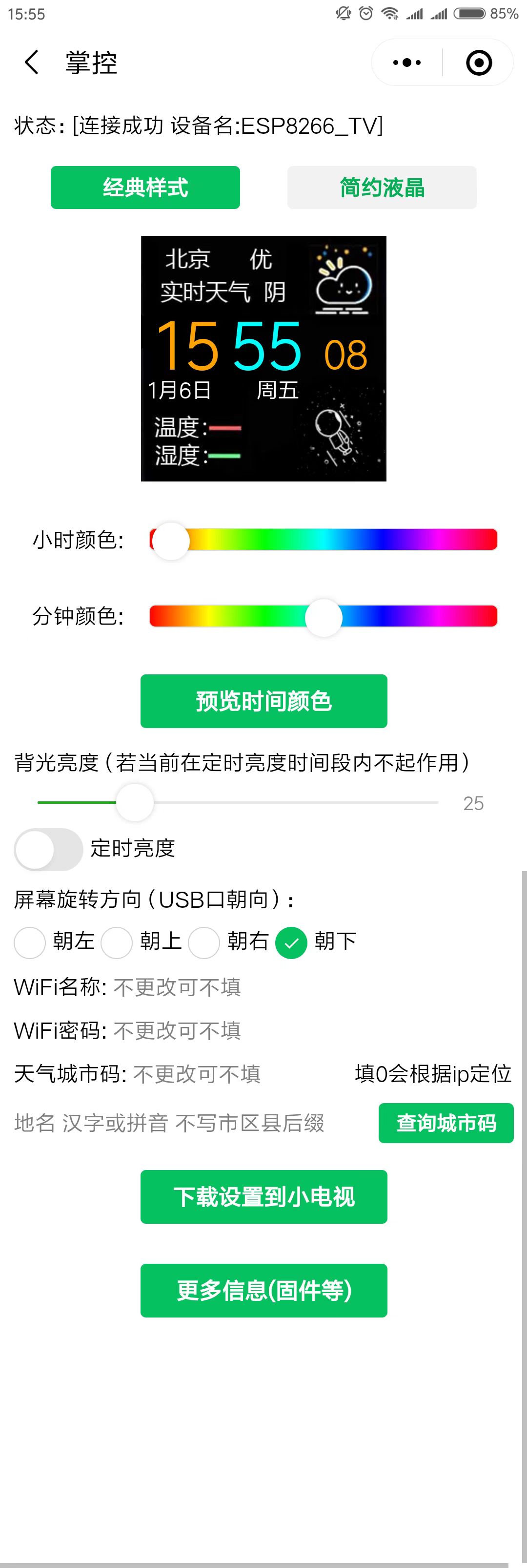
Text color is adjustable, allowing you to change the text color freely within the mini-program or webpage, changing your mood with a different color.
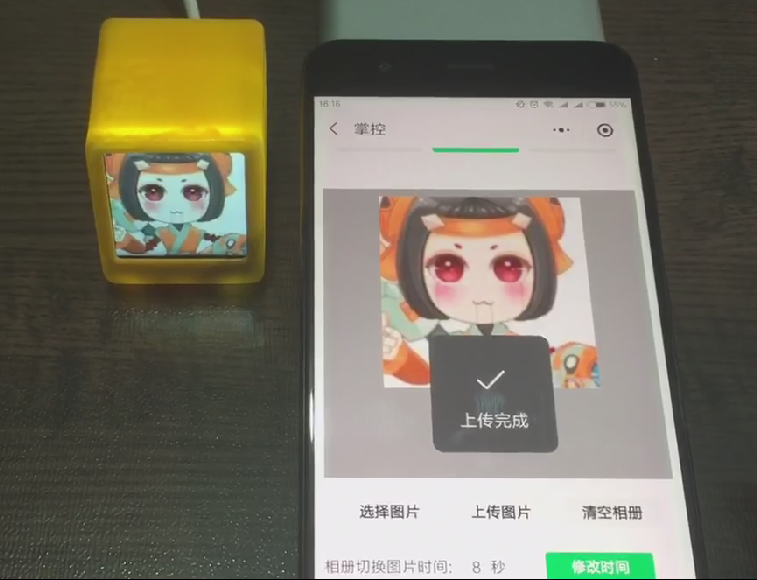
A photo album function allows users to upload or delete images via the mini-program or webpage, and edit uploaded images, including zooming, shrinking, and cropping.
Brightness is adjustable, recognizing different screen brightness needs, so a function to adjust and save brightness within the mini-program or webpage is included. To facilitate nighttime use, a night mode has been added. Once set, the mini TV can automatically adjust its brightness at set intervals, making it more user-friendly.
Ambient lighting effects are also included; the added WS2812 chip allows for fixed color, breathing light, and gradient color effects, eliminating the need to purchase a separate ambient light fixture for a cool look.
An alarm clock function has been added, featuring a buzzer that can be used as an alarm. Don't assume a buzzer only makes a "bi~bi~" sound; the built-in "Ode to Joy" theme song will give you a new perspective
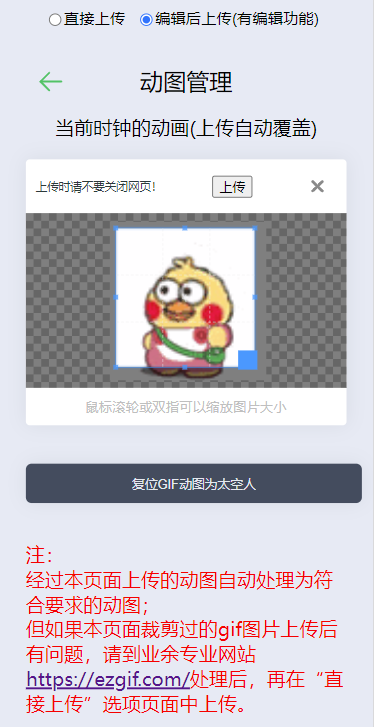
on buzzers. The alarm clock supports several common modes: single ring, weekday ring, and daily ring. The astronaut GIF in the lower right corner can be freely changed. The web version 3.0 firmware adds the ability to replace GIFs, a significant upgrade. This function allows uploading GIFs up to 80*80 pixels and 100KB to the webpage, or using the webpage's built-in editing functions to upload any GIF, which can be scaled, cropped, and automatically adjusted to the appropriate pixels and size. This feature makes the mini TV more than just a monotonous rotating astronaut; various anime and cartoon characters can be freely uploaded.
The firmware also supports certain inverted color screens;
it also supports mirrored display, so you can create a transparent mini-TV with a prism;
some customized firmware versions also support stock quotes, computer performance monitoring, timers, etc.;
an optional lithium battery rechargeable version is available;
related links :
v1.x version -- using the mini-program for interaction allows for many settings: https://www.bilibili.com/video/BV1a3411m7rJ/
v2.1 version -- adding album functionality using the mini-program for interaction: https://www.bilibili.com/video/BV1A54y1g7yU/
v3.0 web version -- using the ESP8266's built-in web interaction, adding GIF upload: https://www.bilibili.com/video/BV1TG411D76i
v3.0 web version user guide: https://www.bilibili.com/video/BV1A54y1g7yU/
"Beginner's Guide to Replicating" https://www.bilibili.com/read/cv22449803/
Project Attributes:
The hardware portion of this project references Misaka's "SD2 Mini TV Open Source Project," xutoubee's "ESP32 Desktop Mini TV Open Source Project," and Zhihui's "HoloCubic Open Source Project."
The software code, v2.x and v3.0, is my original work.
Project Progress :
2022.12 Replicated the SD2 Mini TV and HoloCubic Mini TV.
2023.1 Started writing v1.0 Mini TV firmware (source code referenced from Misaka's source code and some of xutoubee's source code), and simultaneously wrote and released the mini-program code; both the firmware and the mini-program are free.
2023.2 Abandoned the original code, rewrote the program, supporting photo album, OTA upgrades, buttons, color lights, etc., and continued to use it for free.
November 2023: The original code and the mini-program platform were abandoned again. A web-based 3.0 firmware was developed and released. The new firmware added GIF editing and uploading capabilities, a completely new UI, and improved performance while increasing functionality. The mini-program version firmware and mini-program were retained, maintained, and made available to users free of charge.
January 2024: An English version of the web-based firmware was developed and released, supporting global weather information.
April 2024: A lithium battery charging version was added to the hardware, with firmware supporting power display and energy-saving functions.
The hardware design
system block diagram shows
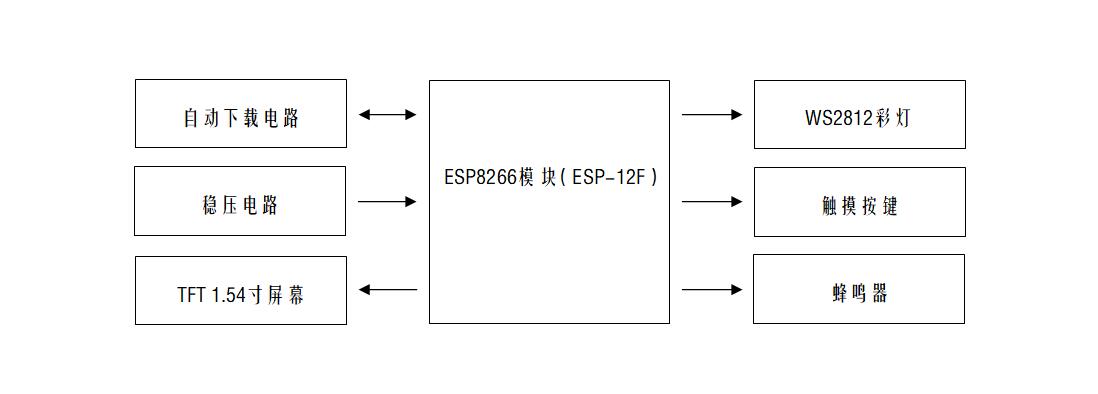
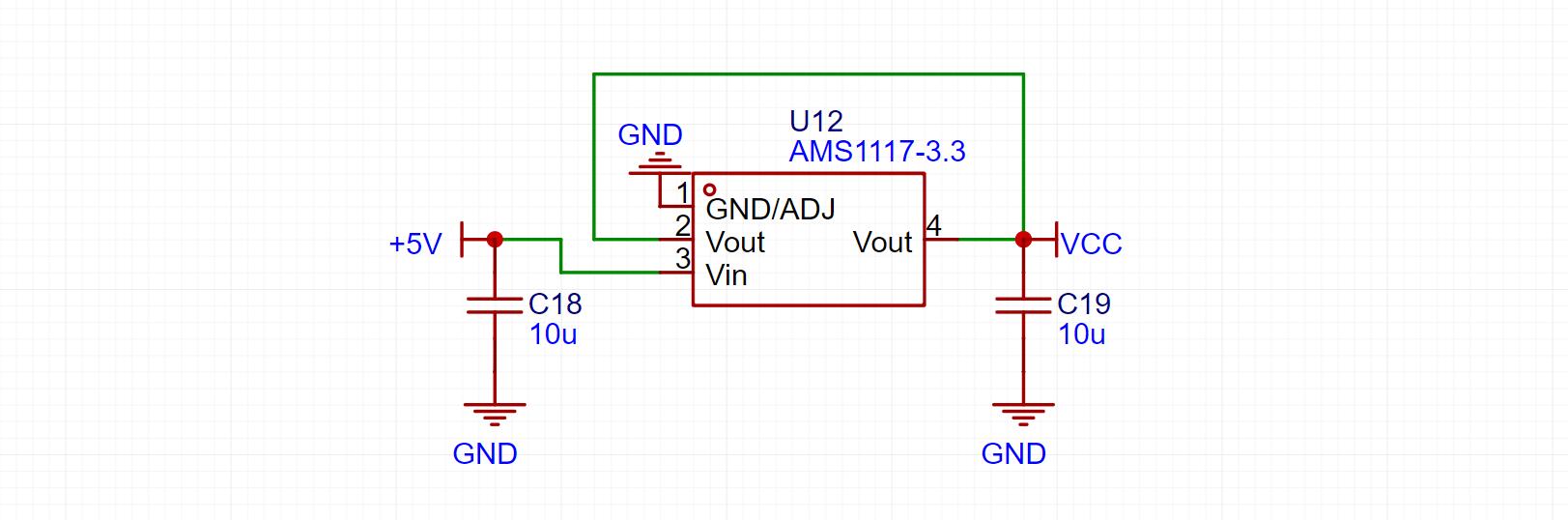
the voltage
regulator circuit using the classic AMS1117-3.3 chip, with 10uf capacitors for decoupling at the input and output.
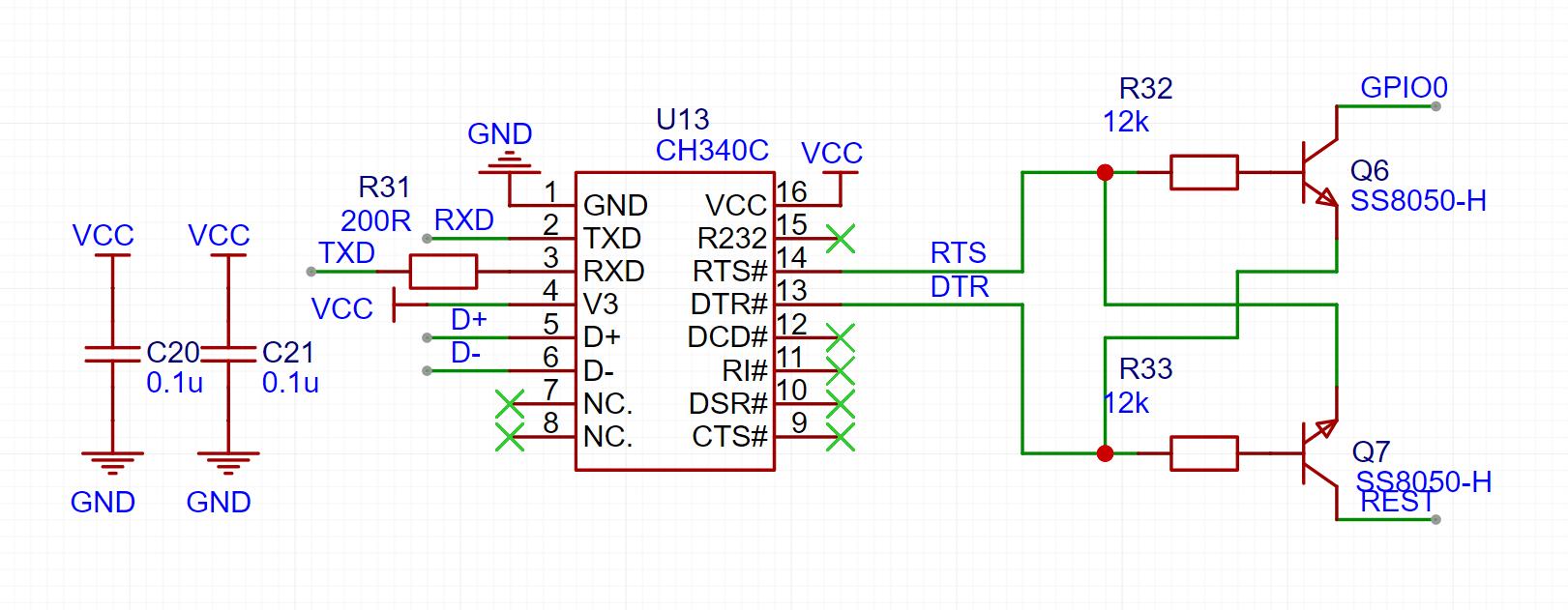
The automatic download circuit
uses the classic CH340C solution, cleverly utilizing two transistors and leveraging the microcontroller's download mode to achieve one-click automatic download. Those interested in the principles can search on CSDN; most explanations are quite good. Actually, you can also use chips like CH340K or CH340X. They don't require transistors or other external components; you only need resistors and capacitors. This project uses CH340C because the SOP-16 package is easy to solder, making it easier for beginners to use.
The TFT screen display circuit
uses a 1.54-inch LCD screen. The 0.7mm ribbon cable is relatively easy to solder, and currently costs around 8 yuan, which is inexpensive and very suitable for replication. An AO3401 MOSFET is used to control the screen backlight.
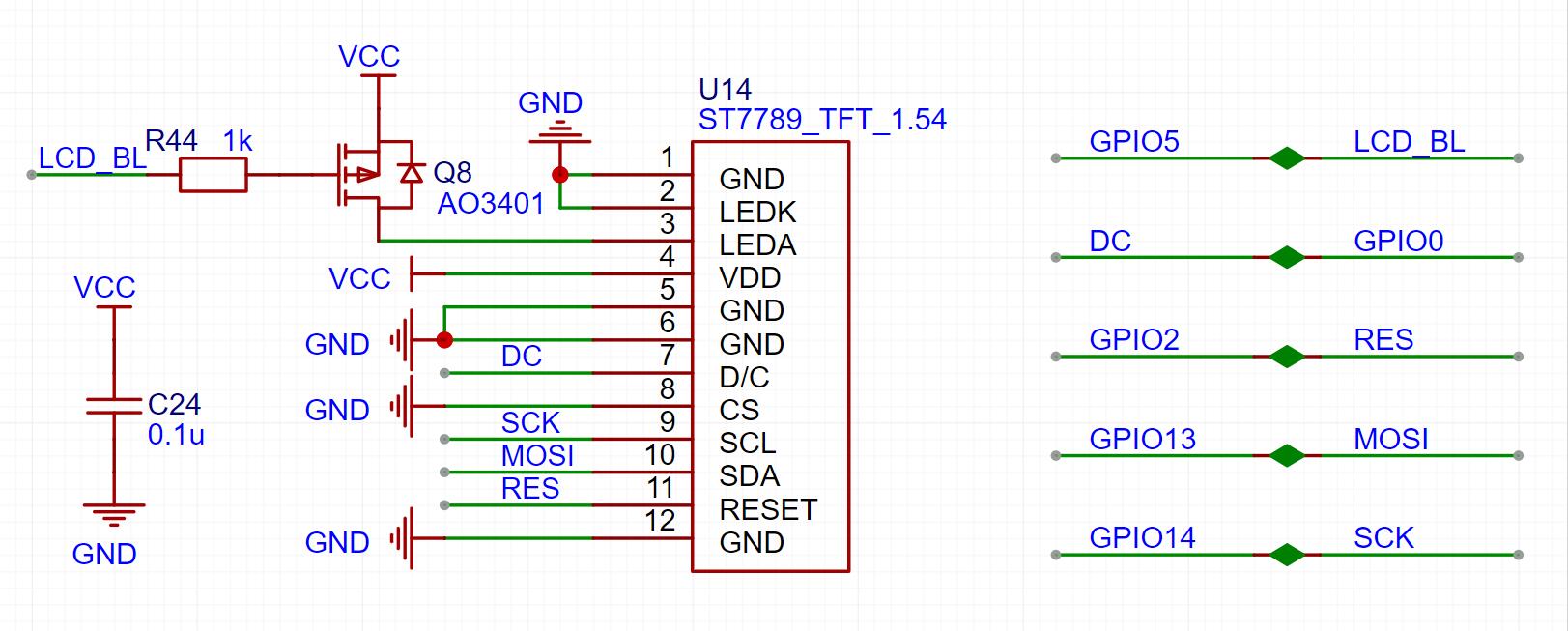
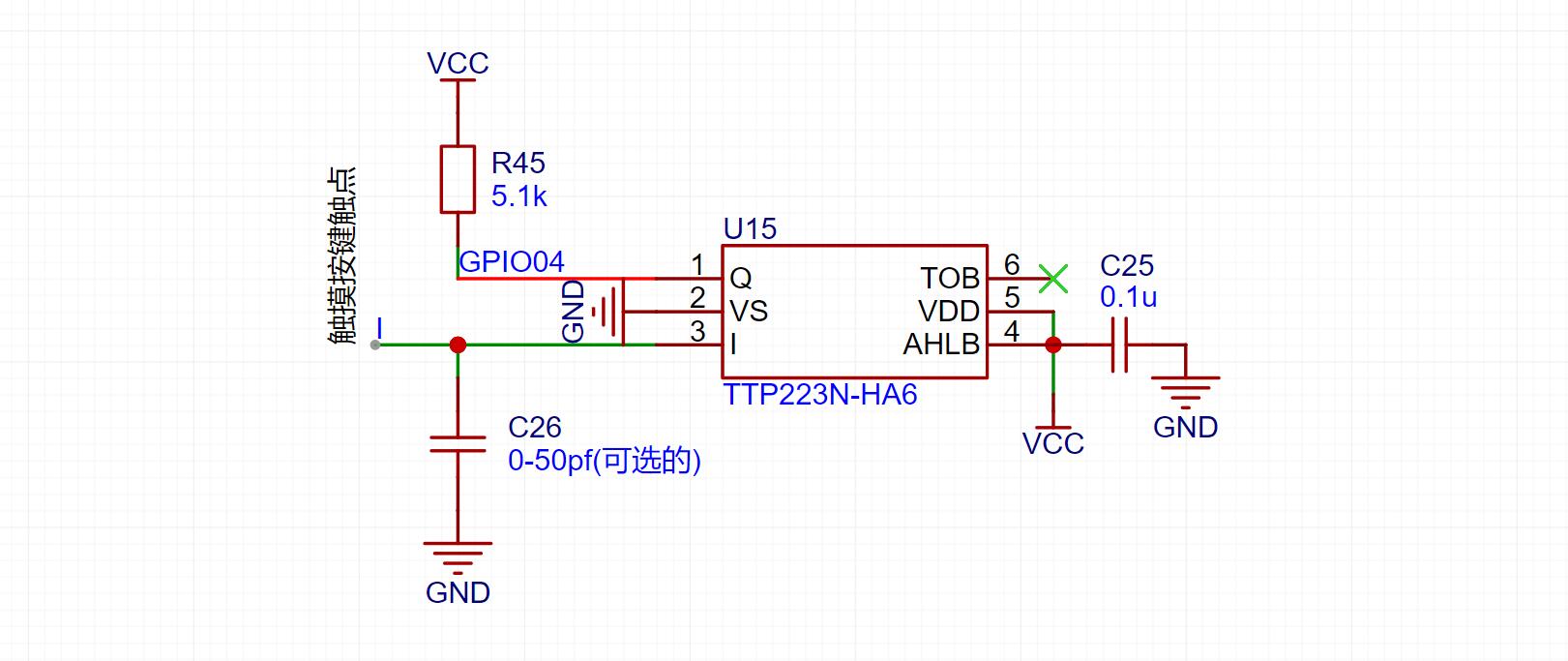
The capacitive touch buttons
use the TTP223 chip to implement the touch button function. This chip only requires one capacitor and one resistor, and the sensitivity is quite ideal. Note that the 0-50fp capacitor is normally not soldered unless the sensitivity is particularly poor, in which case you can add this capacitor to test it. Alternatively, you can directly buy a touch button module for this part; it only costs a few cents. Purchase links are available in the "Replica Components Links" section of the project attachments.
The ambient light uses a WS2812 programmable LED. This LED only requires one data input to control the display of various colors, which is very convenient.

The buzzer uses a 75*75 SMD passive buzzer, and the firmware can drive it to play rhythmic tones (currently with "Ode to Joy" built-in). This part of the circuit uses a transistor to amplify the driving capability, and also uses a diode for current conduction. Those familiar with passive buzzers may have encountered situations where the buzzer gets very hot to the touch. This is because a passive buzzer is essentially an inductor; the voltage can reach several volts or even tens of volts when the power supply is stopped. If this voltage isn't released, it could burn out the buzzer or even other components. It's best not to omit this diode. The
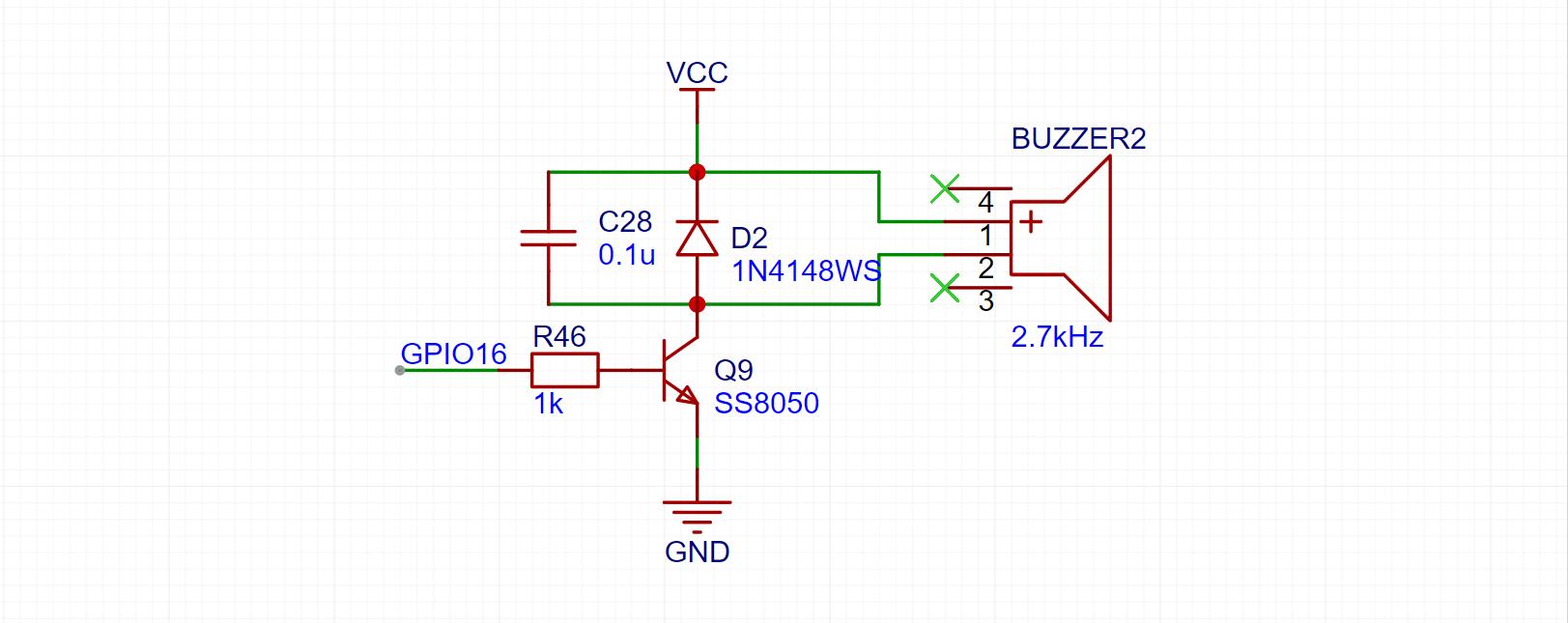
software
program mainly consists of: WiFi connection, time server synchronization, obtaining and parsing weather data, UI display, button control, color light control, buzzer control, image reception and saving, and OTA upgrade. This section will mainly focus on image uploading and OTA upgrades. For other parts, refer to the open-source code of this project and some library examples.
Image reception and saving
involves directly storing data sent from the mini-program or webpage to a file.
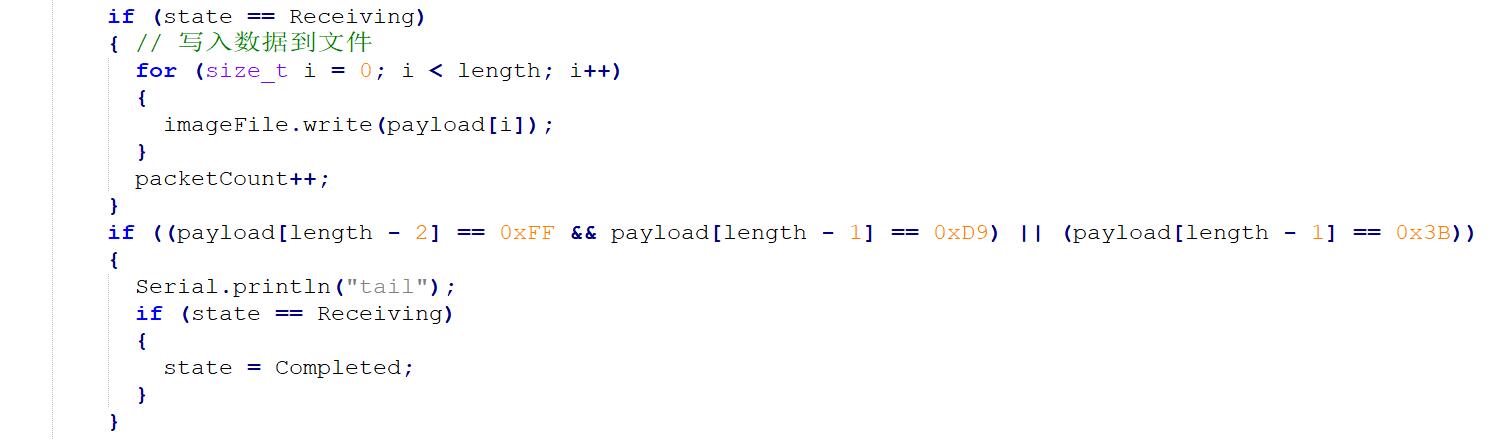
OTA upgrades
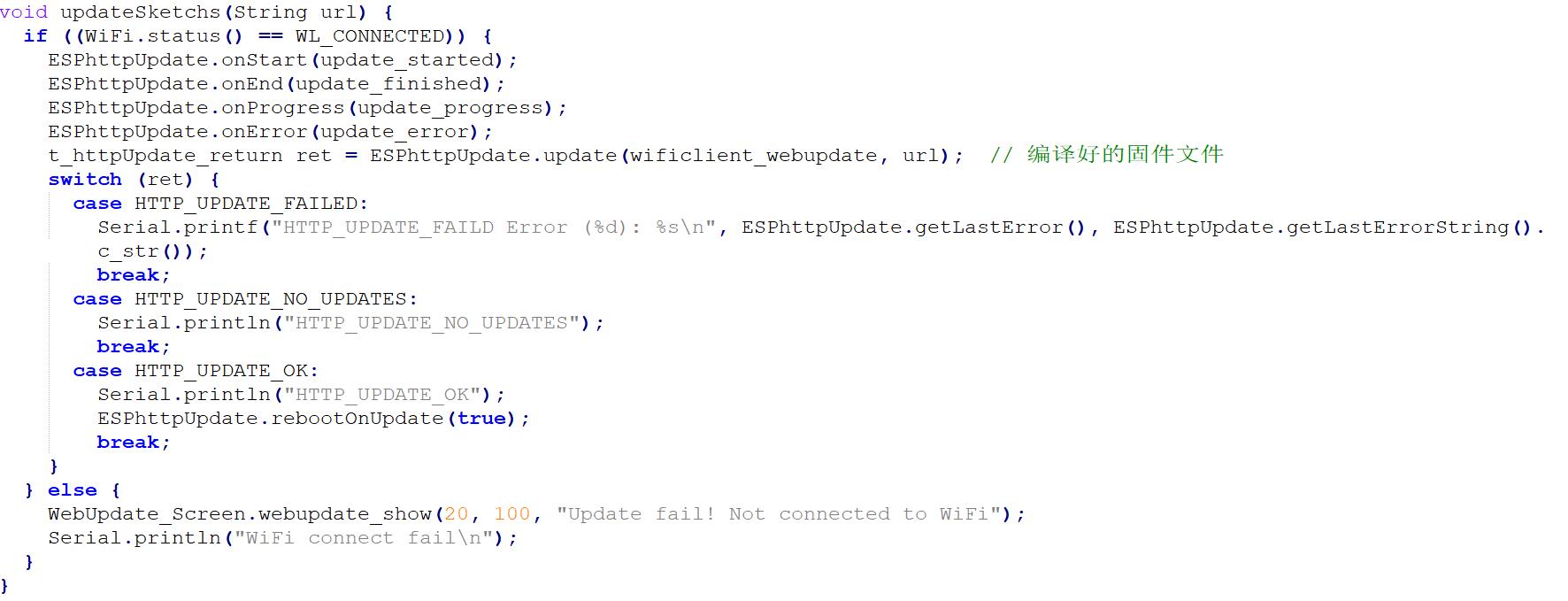
are also very simple; it's just the example code, requiring no modification.
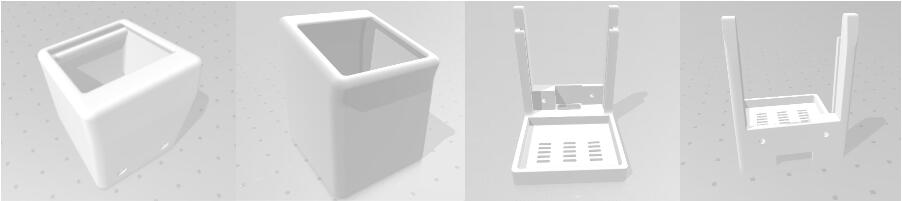
The casing uses a classic open-source mini TV casing, which is simple and beautiful. The 3D printing files are attached. Injection molded casings are also available; you can find the link in "Replica Components Links". The package includes:
casing display
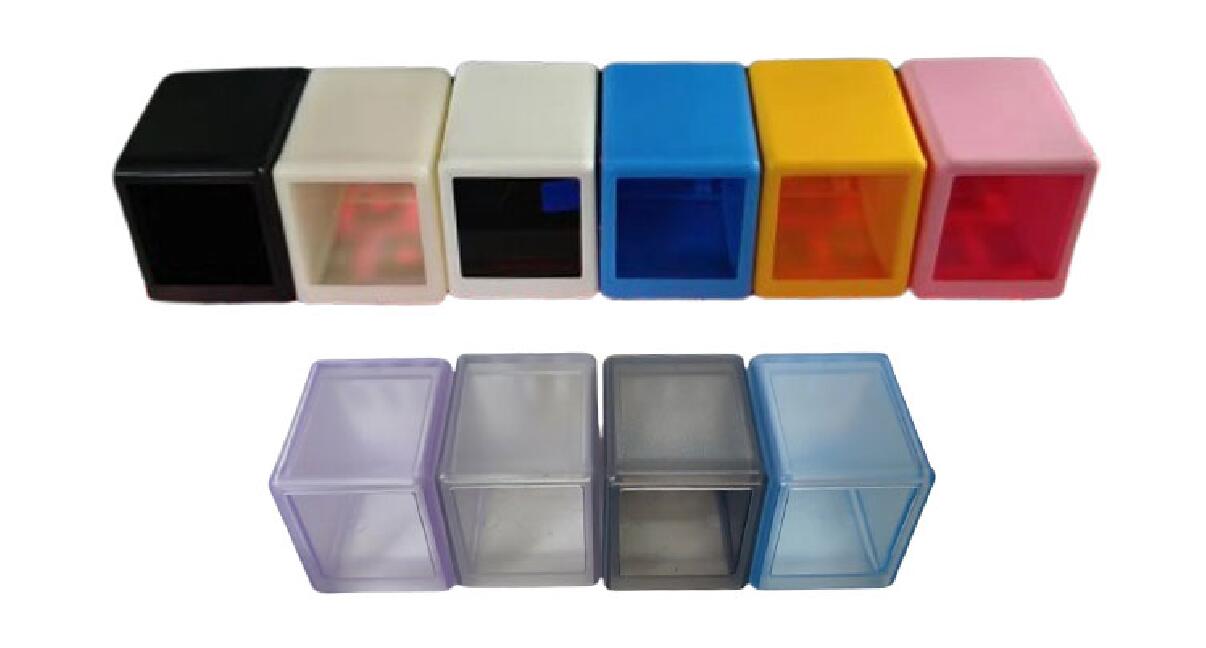
, physical demonstration,
weather clock, UI interface,
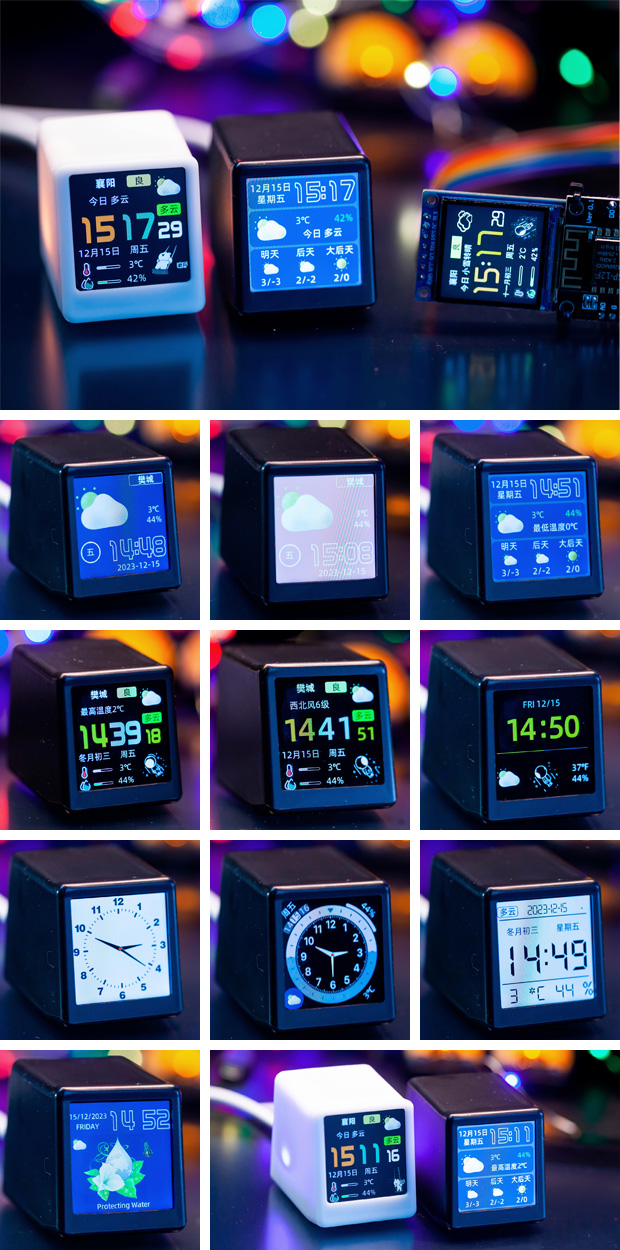
font color settings , photo
upload,
GIF animation upload,
and mutual assistance/communication.
I have created several QQ groups to discuss problems and experiences encountered in replicating and using the mini TV.
Group 1: 744565357, Group 2: 319163806, Group
3 : 3036979;

Thanks
to JLCPCB for letting me get so many PCBs for free, and for letting me continue to get more for free -_-;
Thanks to Misaka for the open-source project "Super Beautiful Personal Clock Weather Station SD²", link: https://oshwhub.com/MisakaBanBan/small_desktop_display;
Thanks to xutoubee for the open-source project "ESP32 Desktop TV", link: https://oshwhub.com/xmz0916/esp32-desktop-tv
; Thanks to Zhihui for the open-source project "HoloCubic--Multifunctional Transparent Display Desktop Station", link: https://github.com/peng-zhihui/HoloCubic;
Thanks to all the friends in my group for their continued support!








 京公网安备 11010802033920号


 WPP1W2P5K-F



