The story behind this project:
I've loved playing games since childhood and have worked in game development for over ten years. Since 2018, I've been involved in Scratch programming for children, initially as a transition from game developer to children's programming educator. Through my work, I came across the open-source hardware microbit and discovered that the microbitV2 with an LCD screen could be used with the Makecode Arcade graphical tool to develop games. This graphical game programming tool allows anyone to develop their own games and download them to a game console. My first encounter with this software was quite astonishing for a traditional game developer like myself, so I immediately bought one from Taobao. After playing for a while, my professional background led me to discover some user experience issues. In Makecode Arcade, all game scenes, backgrounds, and elements are within a single main program, and the controller relies on the game console's hardware, making game programming quite difficult. Even for someone like me with years of game development experience, it felt a bit convoluted, let alone for children or beginners. Makecode Arcade still felt like a programmer doing game development. In comparison, Scratch game programming is much simpler. Common icons and sound elements can be used directly from the built-in library or uploaded from a computer, without needing to be fully programmed. Different characters can be programmed independently and modularly, and users can easily understand both the programming framework and the programming concepts. I have also verified this in actual teaching applications; the teaching difficulty of Scratch is far lower than that of Makecode Arcade.
As my work deepened, I found that most of the teaching software used by children's programming institutions in China, as well as well-known programming platforms such as Mind+, OpenBlock, and mBlock, are mostly secondary developments based on native Scratch. In the early days, almost all domestic institutions conducted children's programming teaching through Scratch, and Scratch has a relatively high penetration rate in China; many people's first lesson in children's programming is with Scratch. Makecode Arcade, on the other hand, has fewer users in China. So, I had an idea: could I develop a programming game console that can run Scratch games?
With this idea in mind, I began to make the following attempts.
My first thought was to find hardware that could directly run the native Scratch format. However, I quickly discovered a problem: native Scratch is very CPU and memory demanding. Even on a device with a configuration like a Raspberry Pi, running native Scratch wasn't very smooth. So, I considered hardware that could run Linux with a UI (such as Allwinner/RK solutions), but the minimum cost was still around 200 RMB. Clearly, this solution was like putting Scratch on a mobile device; while feasible, the hardware cost was too high, and the overall cost and advantages weren't significant. It was simpler to develop a mobile app.
I quickly conceived a second solution: instead of running the native Scratch application on the device, I would write a program similar to the one that could parse and run sb3 format, referencing the Scratch source code. However, this presented another problem. Besides the executable program, native Scratch contains many elements, icons, and other resource files, which are several tens of megabytes in size and must be pre-installed on the hardware. If the host computer adds or modifies these resource files, the slave device must upgrade its firmware to synchronize. Furthermore, it still places relatively high demands on hardware memory, and writing this software is quite difficult.
Based on the previous two rounds of consideration and discussion, I re-summarized the requirements and made some adjustments. The core requirements
are: ideally, the hardware should be the most mainstream open-source hardware currently available; the hardware BOM cost should be controlled within 100 RMB; it should be easy to manufacture and replicate; it should have strong compatibility; and it should be easy to develop firmware and expand functionality.
Additionally, people generally prefer the native Scratch UI and programming style; similar software is easy for everyone to adapt to. Therefore, we only need to maintain the Scratch programming style as much as possible. I can also do secondary development based on Scratch without changing the programming style; it seems easier to implement without insisting on running native Scratch sb3 format files.
With the previous summary, I quickly found inspiration in the microbit motherboard emulator within Makecode software. Could I treat the Scratch stage as an emulator? This way, my hardware's game running could be a hardware emulator within the Scratch software. In this way, the Scratch software would be almost identical to the native one, except for some changes to the stage.
At the time, I had a Pico:ed motherboard (based on the RP2040 controller) on hand. I created a Scratch program to simulate Pico:ed buttons and display functions.
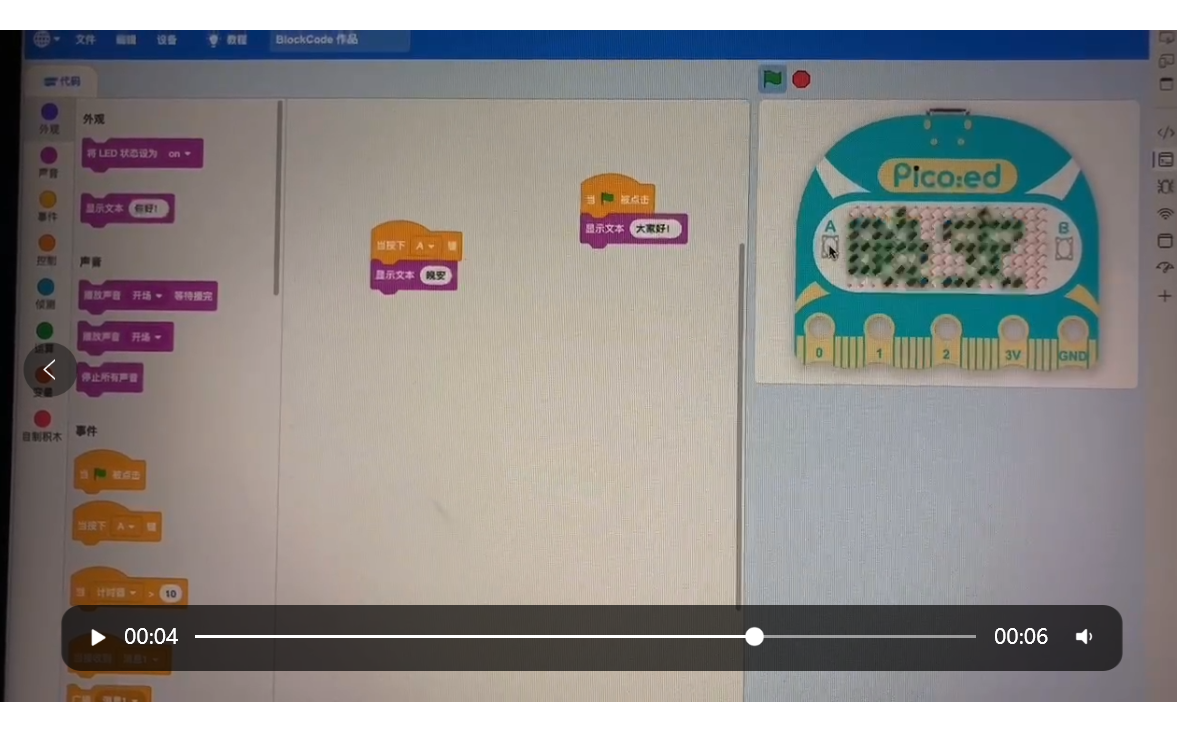
However, since we were making a game, a screen was essential. So, I built a hardware device with an LCD screen based on the RP2040.
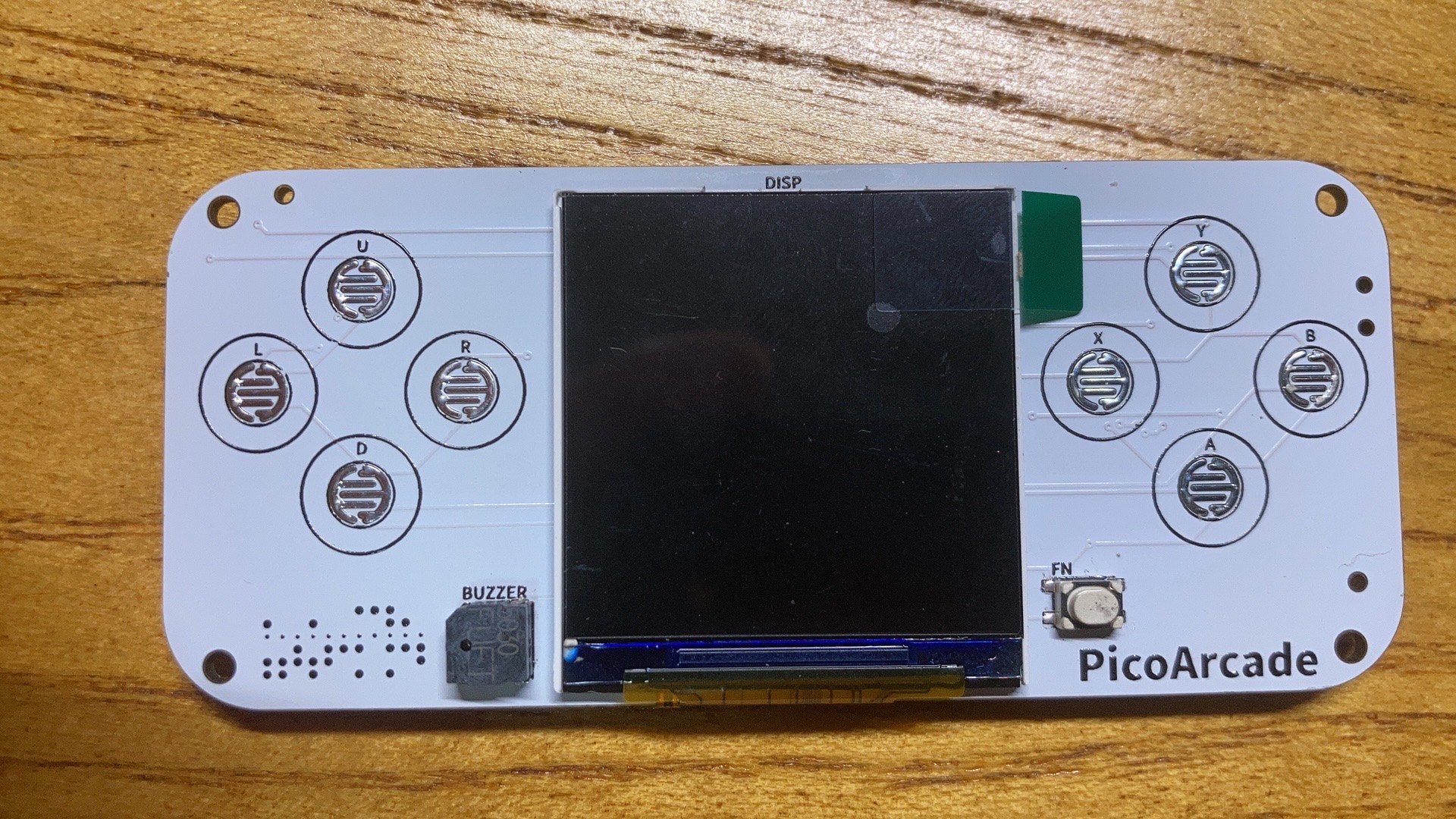
This project was also open-source: https://gon.gyeq.in/#/2023/0617/.
While using the RP2040 as the controller, I quickly encountered new problems. The RP2040's clock speed was only 133MHz, which struggled with image refresh. There wasn't much open-source documentation on peripheral expansion for the RP2040, making further expansion difficult. Therefore, I turned my attention to the ESP32S3, with its 240MHz clock speed, support for Wi-Fi and Bluetooth, and ample expandability.
I then rebuilt the hardware based on the ESP32S3, which
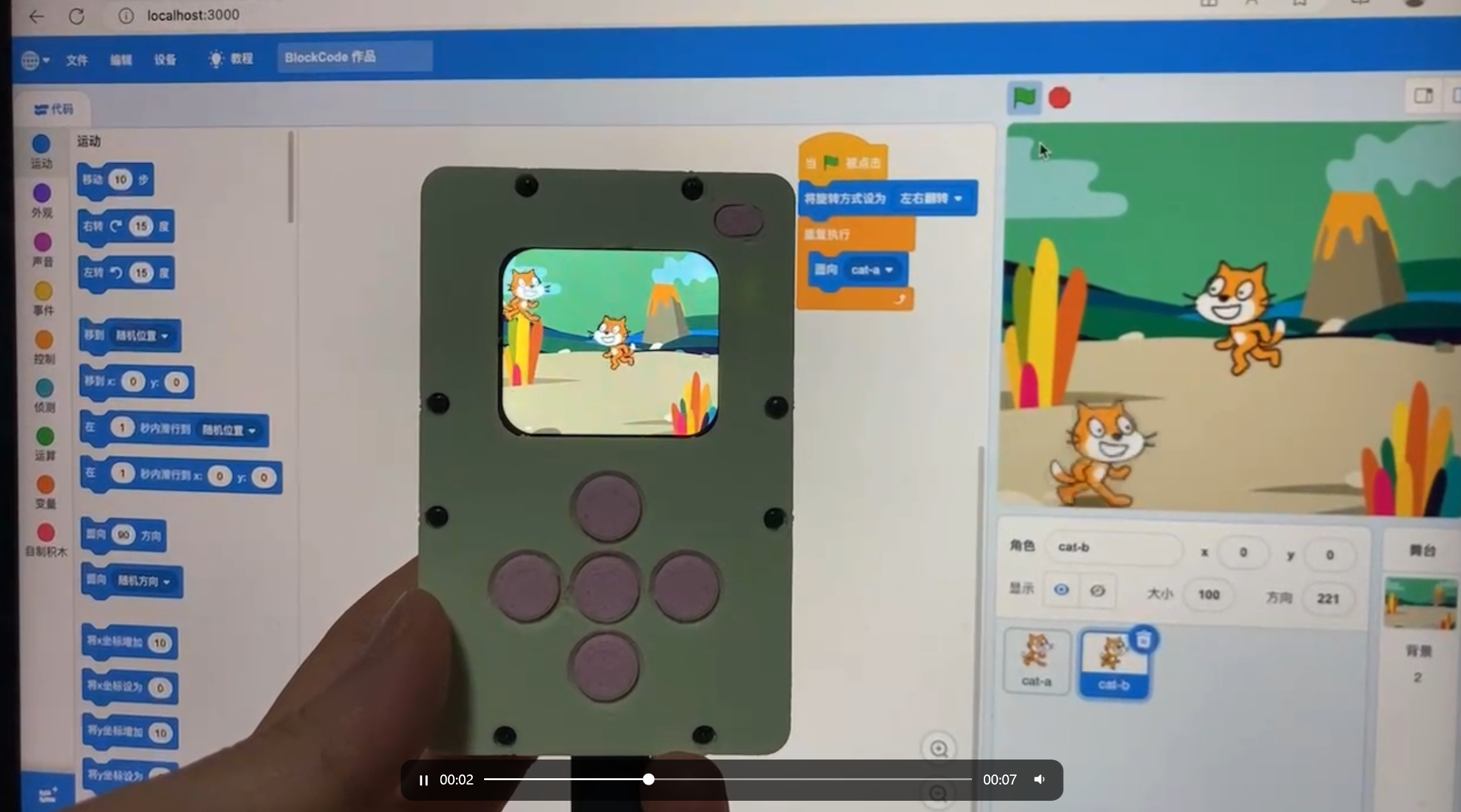
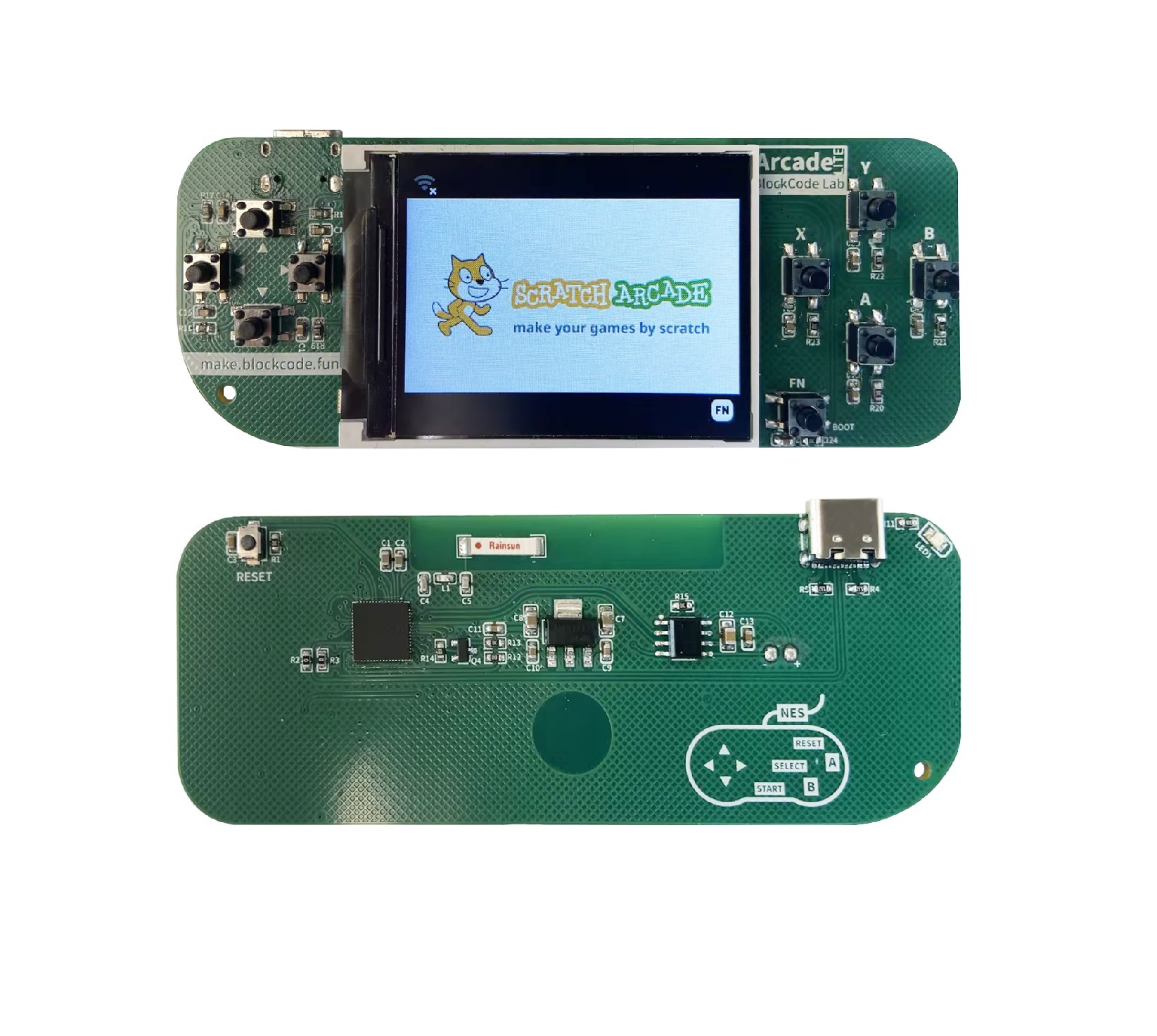
took about six months to implement the core functions. However, it still didn't feel like a game console, so I enlarged the LCD screen, reverting to the original game console design. The final product is the open-source version you see today.
Okay, actually, the entire development and verification process took a year and a half. There were many technical details and challenges involved, and it would take days and nights to write about them all. The main challenges were:
1. Ensuring the programming method remained completely compatible with native Scratch, using an emulator instead of a stage.
2. Determining how to download game resources to the game console and how to maximize the LCD refresh rate within the microcontroller to ensure smooth game execution.
3. Implementing network connectivity, recording, and sound playback on the game console.
4. The ultimate goal was to be able to open and transcode native SB3 formats.
In homage to the classic and powerful platforms Makecode Arcade and Scratch, this game console is named Scratch Arcade.
Next, we'll introduce Scratch Arcade in detail.
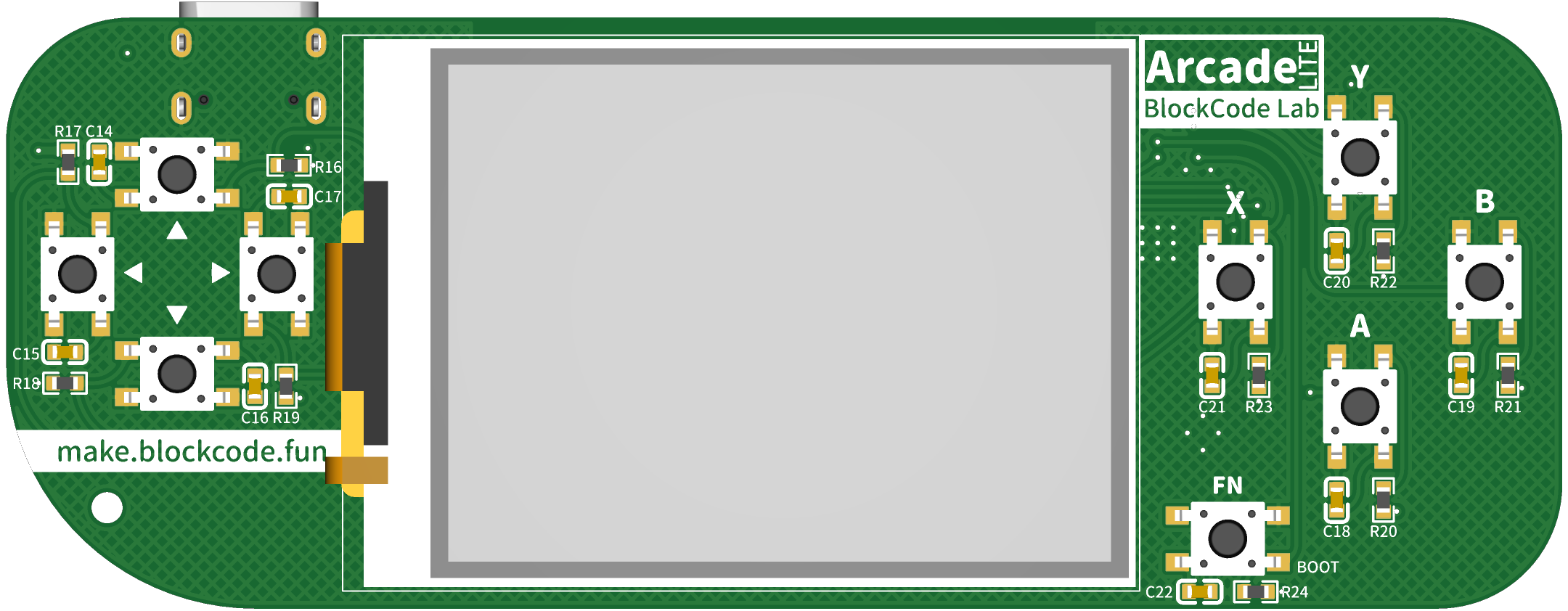
This is a programmable game console hardware product designed for children's programming, addressing the current limitations of Scratch teaching methods, such as monotonous program templates and lack of hardware integration, which leads to decreased student interest. This product will completely overcome these shortcomings, enhancing the richness of teaching content, the diversity and variability of programs, and significantly improving students' sense of accomplishment, all without altering existing teaching content and methods—it's completely ready to use.
Hardware Features
Hardware
Description
Chip:
ESP32-S3 Xtensa© Dual-core 240 MHz 8MB SPI flash 8MB PSRAM
Screen
: 2.0-inch 320×240 HD color screen
Network:
802.11b/g/n Wi-Fi Bluetooth 5 (LE)
Button
Programming Buttons × 9
Sound
Speaker × 1
(
100mm × 38mm
) This is the hardware configuration for the open-source version. For the educational version, click here (arcade.blockcode.fun) to view the hardware introduction.
Screen:
A large 2.0-inch TFT color screen supporting up to 65,536 rich colors (16-bit color) with a resolution of 320×240 pixels, capable of presenting a vast game stage. Combined with TileMap (coming soon), it can realize a huge 2D game world.
Network:
Powered by the powerful networking capabilities of the ESP32-S3, supporting 802.11b/g/n Wi-Fi and Bluetooth 5 (LE). Multiple consoles can also interconnect for maximum online interaction.
Interaction :
Nine buttons—eight standard game buttons (up/down/left/right/A/B/X/Y) and one function (Fn) button. Different functions can be assigned to the buttons through programming to realize various gameplay and enrich the program's interactive capabilities. Programming: Program using
graphical (Scratch) or MicroPython in BlockCode Playgrounds. The graphical (Scratch) interface is identical to Scratch, and most of the programming blocks are also the same, with only a few differences due to hardware features (the missing parts will be gradually added later to more closely resemble the original Scratch blocks and functions), making it easier for teachers familiar with Scratch to teach. The stage aspect ratio remains consistent with the original Scratch, but the resolution is reduced—320×240, with the x-coordinate changing from -160 to 160 and the y-coordinate from -120 to 120. Variables are not displayed; their content will be displayed in the newly added "Data Monitor" (stay tuned). Shapes are only available in bitmap mode; vector mode is not supported. Shapes from Scratch can be used. Backgrounds include bitmap backgrounds from Scratch, as well as TileMap backgrounds and AI backgrounds (stay tuned). TileMap backgrounds use tile maps to create a very large game map; AI backgrounds use generative AI to generate a bitmap background from text. Sound can only use WAV format audio files, with a length not exceeding 10 seconds or a size not exceeding 200kB, and must be mono. The MicroPython firmware is compiled based on MicroPython version 1.2x, adding unique packages for easier game and app development. The MicroPython programming platform is coming soon, and we also recommend using Arduino Lab for MicroPython, a lightweight MicroPython editor, for programming. Project external links : GitHub: https://github.com/BlockCodeLab/arcade-lite Gitee: https://gitee.com/blockcodelab/arcade_lite Firmware download : Download the latest version. Hold down the BOOT key (FN key) while connecting the hardware to the computer, and flash the firmware in the terminal using the following command: esptool.py --chip auto --port "serial port number" write_flash -z 0 arcade_lite.v0.9_mpy_v1.23.0.bin NES emulator: Please wait a moment. Thank you to EasyCreation Space for their production support of the educational version product. Welcome to join our group for discussion. This open-source project has undergone a year and a half of development and optimization. Its biggest achievement is validating the feasibility of the initial idea. Currently, it's just an open-source version. The educational version has many interesting and surprising features, such as voice intercom, AI, FPV image transmission remote control, and a hardware lab. However, there are still many areas that need improvement and optimization. We welcome everyone to join our group to offer suggestions and exchange ideas. Please add me on WeChat first, and I will add you to the group.










 京公网安备 11010802033920号


 11151SV5P00



